
설명
Clean up database by deleting orphaned items such as ‘old revisions’, ‘spam comments’, optimize database and more…
If you have been using WordPress for a while, then you should think absolutely about a database cleanup. Indeed, your database may be full of garbage that makes your site sluggish and bloated such as old revisions, orphaned post meta, spam comments, etc. You should clean-up this unnecessary data to reduce your database size and improve website speed and performance. In addition, you will have quicker database backup since the file of your backup will be smaller.
‘Advanced Database Cleaner’ is a must-have plugin that allows you to clean database, optimize database and more.
Main Features
- Delete old revisions of posts and pages
- Delete old auto drafts
- Delete trash posts
- Delete pending comments
- Delete spam comments
- Delete trash comments
- Delete pingbacks
- Delete trackbacks
- Delete orphan post metadata
- Delete orphan comment metadata
- Delete orphan user metadata
- Delete orphan term metadata
- Delete orphan relationships
- Delete expired transients
- Display and view orphaned information before making a database clean-up so you can be sure about what you are going to clean-up
- Search & filter all items based on their names or values
- Keep last x days’ data from being cleaned: clean only data older than the number of days you have specified
- Schedule database clean up to run automatically
- Create as many scheduled cleanup tasks as you need and specify what items should be cleaned by the scheduled task
- Scheduled tasks can be executed based on several frequencies: Once, hourly, twice a day, daily, weekly or monthly
- Display database tables information such as the number of rows, table size, etc.
- Optimize database tables (The plugin will notify you if any tables require optimization)
- Repair corrupted database tables or damaged ones (The plugin will notify you if any tables are corrupted or damaged)
- Schedule database optimization and/or reparation to run automatically and specify what tables should be optimized and/or repaired
- Empty database tables rows
- Clean and delete database tables
- Display options list
- Display options information such as option name, option value, option size, option autoload
- Clean and delete options
- Set options autoload to no / yes
- Display active cron tasks list (scheduled tasks) with their information such as arguments, next run, etc.
- Clean and delete scheduled tasks
- User-friendly and simple to use
Multisite Support
- The plugin is compatible with Multisite installations
- Only the main site can view, clean and optimize the whole network. Other sites in the network cannot perform these tasks. We have opted for this philosophy because we are sure that your DB is precious and only the super administrator can perform such actions
- You can clean up all sites from one place (the main site). You can also specify specific sites you want to cleanup
By using the ADC plugin, you will
-
Get an overview: The plugin will help you get an overview of what is happening in your database. It will report all unused/orphaned items that should be cleaned, it will give you the number of tables/options/tasks you have, etc. This way, you can control your database if anything goes wrong
-
Save time: You can specify what items should be cleaned/optimized/repaired, what is the number of days’ data to keep and the cleanup/optimization/reparation frequency. The plugin will then automate the process to run automatically based on your settings
-
Save space: By deleting unused/orphaned items, you will save space in your database and make quicker backups since the file of your backup will be smaller
Pro Features (Official website)
Do you know that even after deleting a plugin/theme from your WordPress website, some of its leftovers may remain in your database? Such as orphan options, orphan tables, and orphan cron tasks. As you may know, not all plugins/themes care about the housekeeping of your WordPress database. As long as you are removing plugins/themes, leftovers will be accumulated in your database and will influence your website performance. The Pro version of Advanced Database Cleaner will help you remove all those leftovers and perform a deep database clean up. In the pro version you can:
- Classify options according to their “creator”. They can be either: plugins options, themes options or WP core options
- Detect and delete orphan options. Your ‘wp_options’ table may be full of orphaned options and therefore can impact the performance of loading data from it, which may lead to a slow website. Clean up orphaned options is then important
- Classify tables according to their “creator”. They can be either: plugins tables, themes tables or WP core tables
- Detect and delete orphan tables. As for options, you may also have some orphaned tables that were created by plugins/themes you are not using anymore. Clean up orphaned tables will decrease the size of your database
- Classify all cron tasks (cron jobs) according to their “creator”. They can be either: plugins cron tasks, themes cron tasks or WP core tasks
- Detect and delete orphan cron jobs. After you uninstall a plugin/theme, some of its cron tasks may still be active making WordPress calling unknown functions. using the pro version, you can detect and clean orphaned tasks
- Search & filter options, filter tables and filter cron tasks based on several criteria such as the “name”, “creator”, “value”, etc.
- Get premium support: we will provide quick support as well as any technical answers to help you clean up your database efficiently
Translations
You are welcome to contribute to the plugin translation via the WordPress translation website.
Thanks To
- Fabio Fava for translating the plugin to pt_BR
- Julio Potier for the security remarks
스크린샷
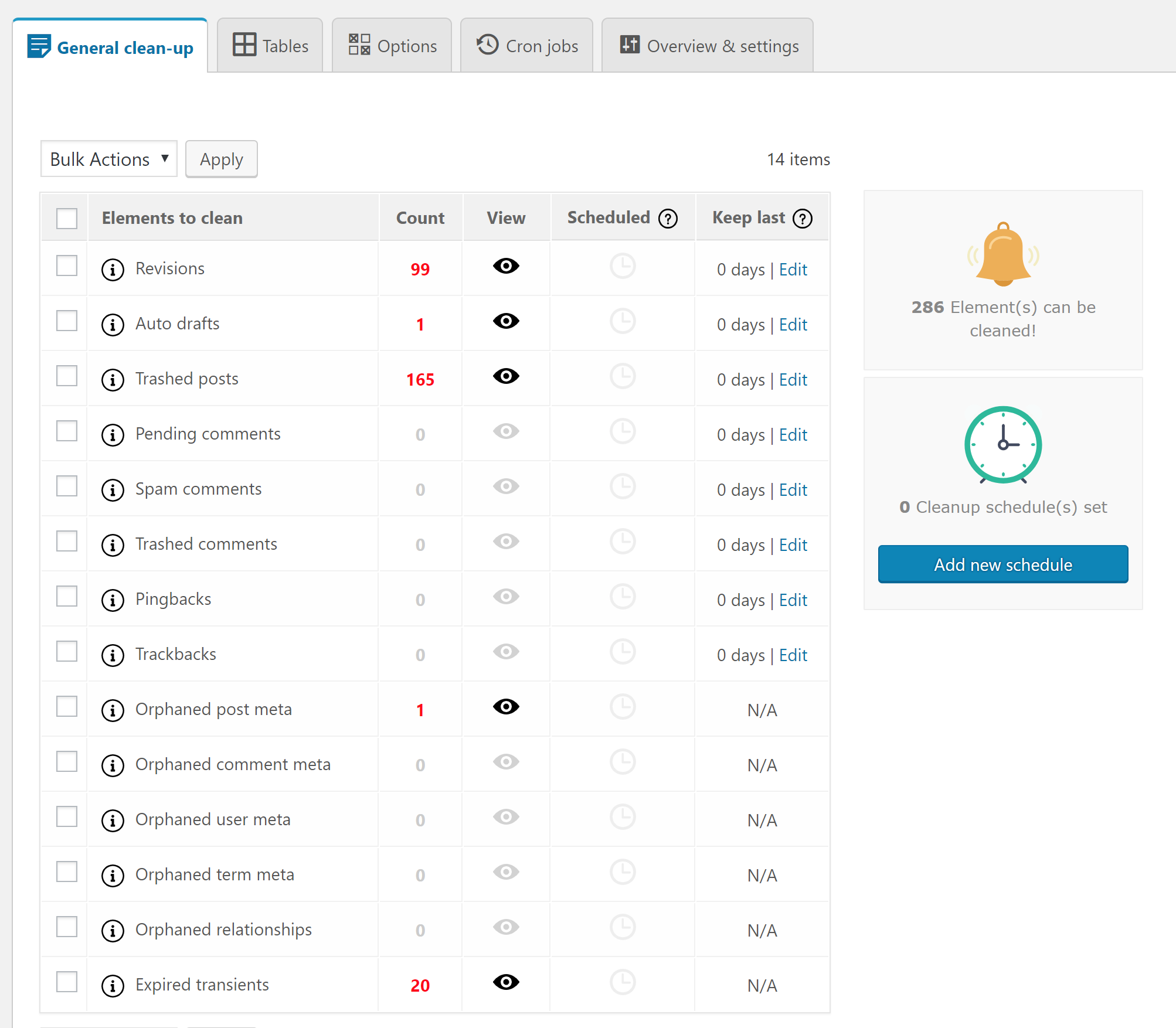
Database with items to clean 
View items before cleaning them (case of revisions) 
Cleanup scheduled task 
Tables overview (scan of tables is available in PRO) 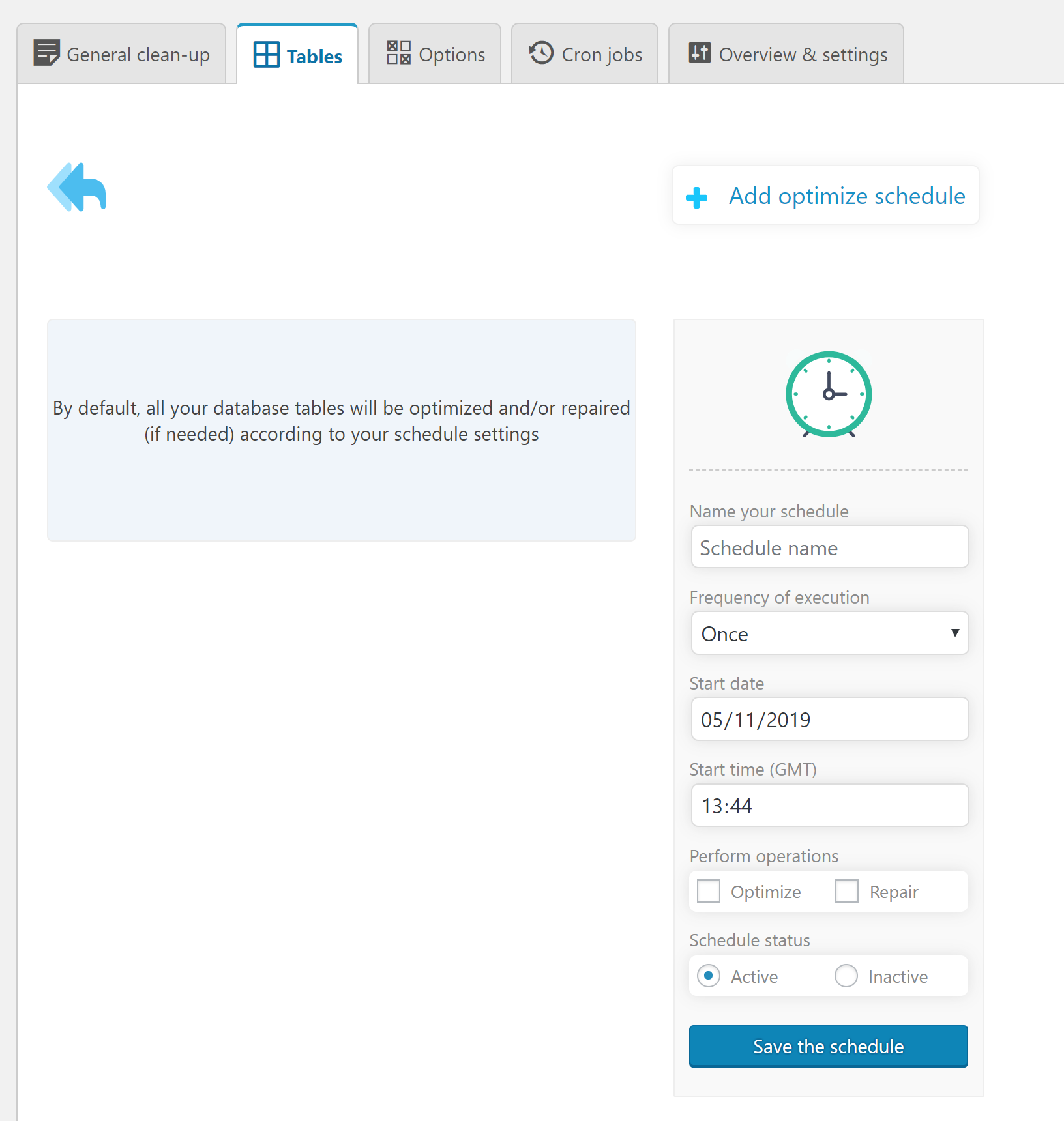
Tables optimization/repair scheduled task 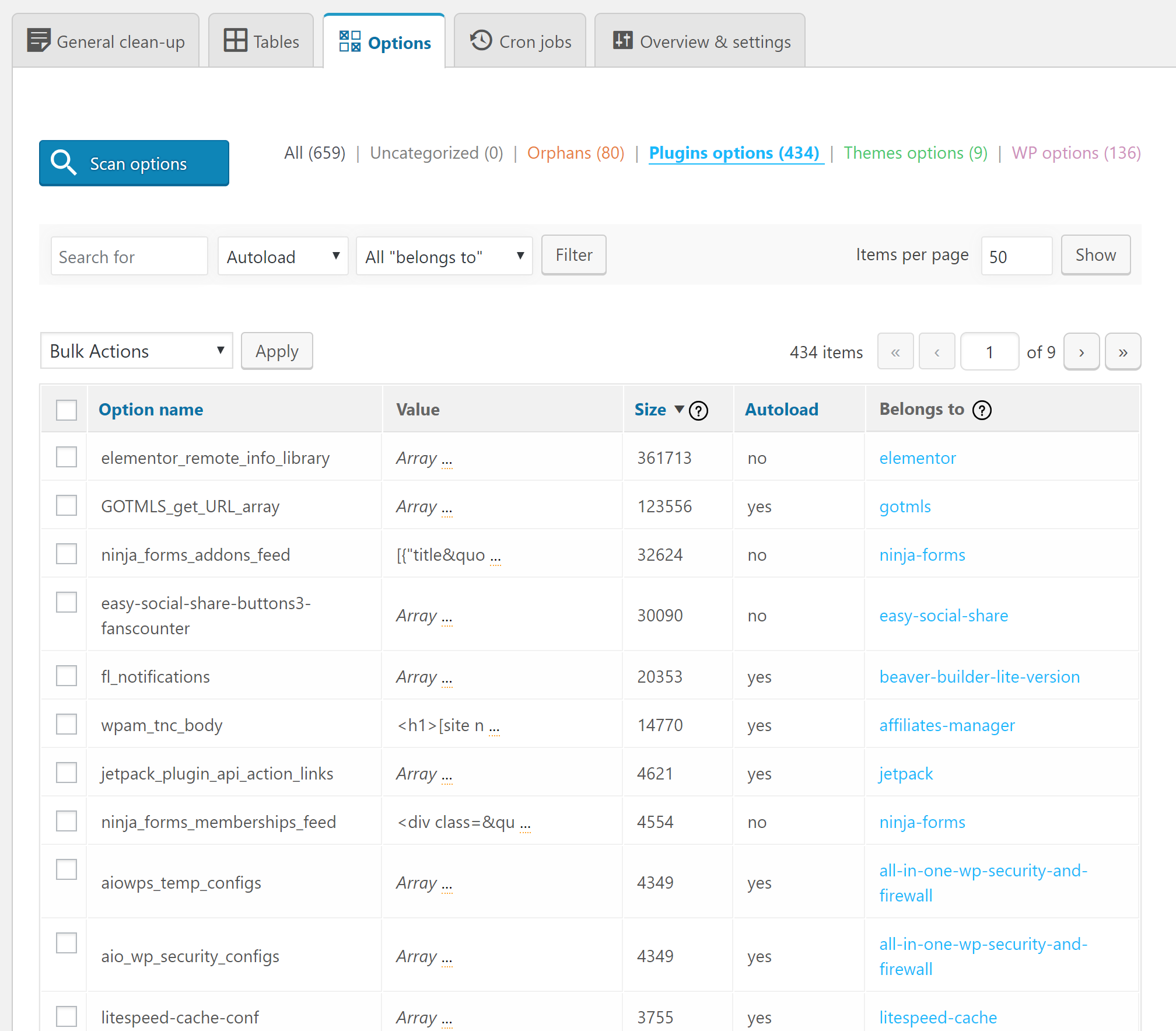
Options overview (scan of options is available in PRO) 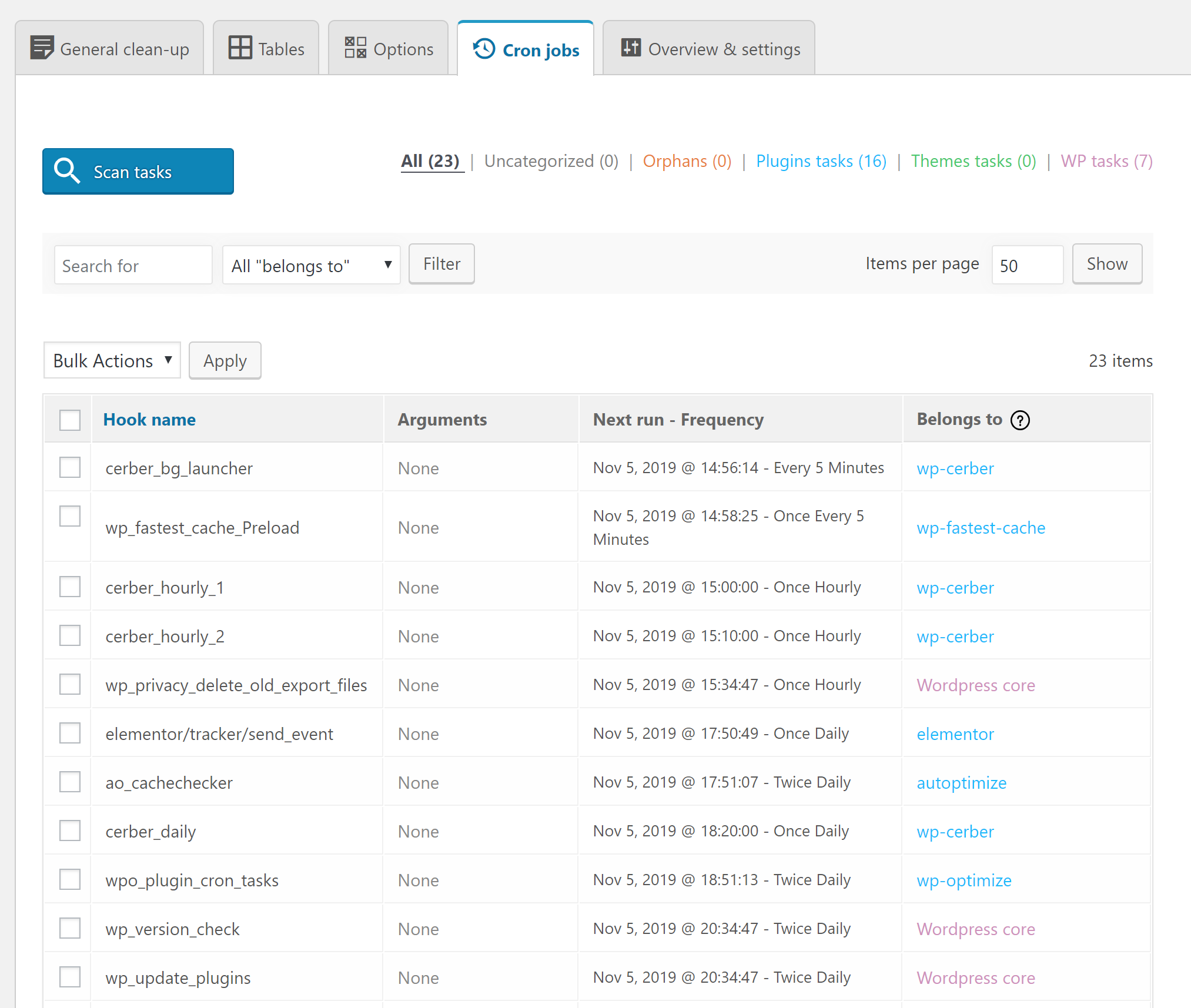
Scheduled tasks overview (scan of tasks is available in PRO) 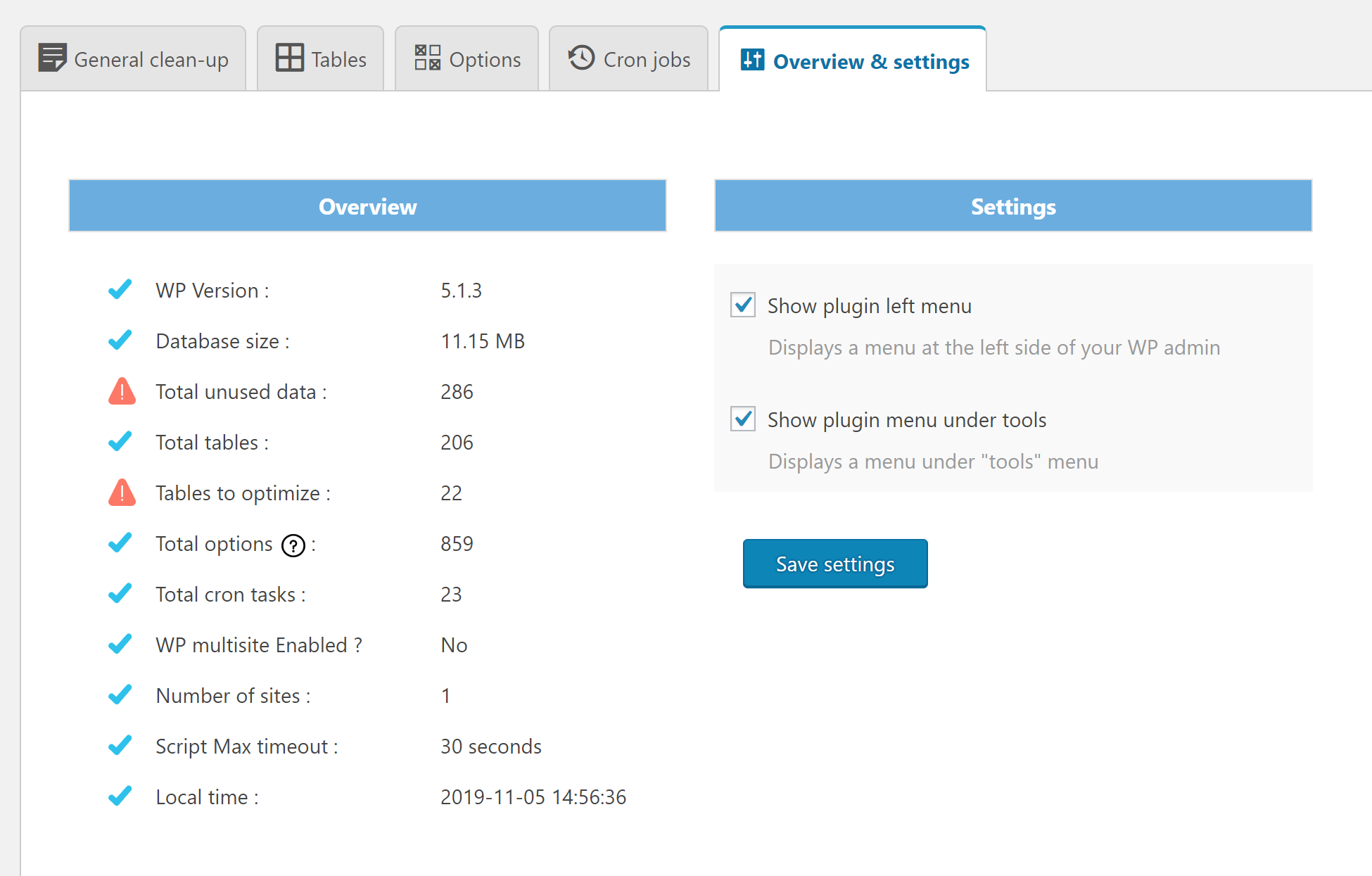
Overview and settings page
설치
This section describes how to install the plugin. In general, there are 3 ways to install this plugin like any other WordPress plugin.
1. Via WordPress dashboard
- Click on ‘Add New’ in the plugins dashboard
- Search for ‘advanced-database-cleaner’
- Click ‘Install Now’ button
- Activate the plugin from the same page or from the Plugins dashboard
2. Via uploading the plugin to WordPress dashboard
- Download the plugin to your computer from (https://wordpress.org/plugins/advanced-database-cleaner/)
- Click on ‘Add New’ in the plugins dashboard
- Click on ‘Upload Plugin’ button
- Select the zip file of the plugin that you have downloaded to your computer before
- Click ‘Install Now’
- Activate the plugin from the Plugins dashboard
3. Via FTP
- Download the plugin to your computer from (https://wordpress.org/plugins/advanced-database-cleaner/)
- Unzip the zip file, which will extract the ‘advanced-database-cleaner-3.0.0’ directory
- Upload the ‘advanced-database-cleaner’ directory (included inside the extracted folder) to the /wp-content/plugins/ directory in your web space
- Activate the plugin from the Plugins dashboard
For Multisite installation
- Log in to your primary site and go to “My Sites” » “Network Admin” » “Plugins”
- Install the plugin following one of the above ways
- Network activate the plugin (Note that only the main site can have access to the plugin)
Where the plugin menu will be displayed?
- The plugin page can be accessed via “Dashboard” » “Tools” » “WP DB Cleaner” or via the left menu “WP DB Cleaner” (You can change this via the plugin settings)
FAQ
-
What does mean “clean my database”?
-
As you use WordPress, your database accumulates a lot of extra data such as revisions, spam comments, trashed comments, etc. Removing this unnecessary data will reduce your database size, speeds up your backup process and speeds up your site also.
-
Is it safe to clean my database?
-
Yes, it is. We do not run any code that can break down your site or delete your posts, pages, comments, etc. However, make sure to always back up your database before any cleanup. This is not optional; it is required! It is always better to be safe than sorry!
-
What does mean “Optimize my database”?
-
Optimizing your database will reclaim unused space in your tables, which will reduce storage space and improve efficiency when accessing tables. Optimizing the database can sometimes significantly improve performance, particularly on sites that receive a lot of traffic or have a large amount of content. Optimizing your database is absolutely safe.
-
Is it safe to clean the cron (scheduled tasks)?
-
A scheduled task enables plugins to execute some actions at specified times, without having to manually execute code at that time. WordPress itself uses some scheduled tasks to perform some regular actions. However, some scheduled tasks may not be removed even if the responsible plugins are deleted from your WordPress installation. As you know, not all plugins care about the housekeeping of your WordPress. Hence, deleting these unnecessary tasks may help in cleaning your site. It should be noted that cleaning scheduled tasks is safe as long as you know what tasks to clean. If you are not sure, it is better to not clean any task.
-
What does mean “Revision”? What sql code is used to clean it?
-
WordPress stores a record (called “revision”) of each saved draft or published update. This system allows you to see what changes were made in each post and page over time. However, this can lead to a lot of unnecessary overhead in your WordPress database, which consumes a lot of space. The sql query used by the plugin to clean all revisions is:
DELETE FROM posts WHERE post_type = ‘revision’ -
What does mean “Auto-draft”? What sql code is used to clean it?
-
WordPress automatically saves your post/page while you are editing it. This is called an auto-draft. If you don’t hit the publish/update button, then the post/page will be saved as auto-draft and any modification to your post/page will not be visible in your public site. Over time, you could have multiple auto-drafts that you will never publish and hence you can clean them. The sql query used by the plugin to clean all auto-drafts is:
DELETE FROM posts WHERE post_status = ‘auto-draft’ -
What does mean “Pending comment”? What sql code is used to clean it?
-
Pending comments are comments published by users and which are waiting for your approval before appearing in your site. In some cases, you will have to clean all these comments. The sql query used by the plugin to clean all pending comments is:
DELETE FROM comments WHERE comment_approved = ‘0’ -
What does mean “Spam comment”? What sql code is used to clean it?
-
It is a comment that you (or a plugin) have marked as spam. The sql query used by the plugin to clean all spam comments is:
DELETE FROM comments WHERE comment_approved = ‘spam’ -
What does mean “Trash comment”? What sql code is used to clean it?
-
A trash comment is a comment that you have deleted from your WordPress and have been moved to the trash. A trash comment is not visible in your site and should be deleted forever. The sql query used by the plugin to clean all trash comments is:
DELETE FROM comments WHERE comment_approved = ‘trash’ -
What does mean “trackback”? What sql code is used to clean it?
-
Trackbacks allows you to notify other websites owners that you have linked to their article on your website. These trackbacks can be used to send huge amounts of spam. Spammers use them to get their links posted on as many sites as possible. That is why they should be deactivated/cleaned if you do not use them. The sql query used by the plugin to clean trackbacks is:
DELETE FROM comments WHERE comment_type = ‘trackback’ -
What does mean “pingback”? What sql code is used to clean it?
-
Pingbacks allow you to notify other websites owners that you have linked to their article on your website. Pingbacks were designed to solve some of the problems that people saw with trackbacks. Although there are some minor technical differences, a trackback is basically the same things as a pingback. These pingbacks can be used to send huge amounts of spam. Spammers use them to get their links posted on as many sites as possible. That is why they should be deactivated/cleaned if you do not use them. The sql query used by the plugin to clean pingbacks is:
DELETE FROM comments WHERE comment_type = ‘pingback’ -
What does mean “Orphan post meta”? What sql code is used to clean it?
-
The post meta data is the information you provide to viewers about each post. This information usually includes the author of the post, when it was written (or posted), and how the author categorized that particular post. In some cases, some post meta data information becomes orphan and does not belong to any post. They are then called “orphan postmeta” and should be cleaned since they are not useful. The sql query used by the plugin to clean all orphan postmeta is:
DELETE pm FROM postmeta pm LEFT JOIN posts wp ON wp.ID = pm.post_id WHERE wp.ID IS NULL -
What does mean “Orphan comment meta”? What sql code is used to clean it?
-
The same as “Orphan post meta” with the exception that “orphan comment meta” concern comments and not posts. The sql query used by the plugin to clean all orphan comment meta is:
DELETE FROM commentmeta WHERE comment_id NOT IN (SELECT comment_id FROM comments) -
What does mean “Orphan user meta”? What sql code is used to clean it?
-
The user meta data is the information you provide to viewers about each user. This information usually includes additional data that is not stored in the users table of WordPress. In some cases, some user meta data information becomes orphaned and does not belong to any user. They are then called “orphaned usermeta” and should be cleaned since they are not useful. The sql query used by the plugin to clean all orphan comment meta is:
DELETE FROM usermeta WHERE user_id NOT IN (SELECT ID FROM users) -
What does mean “Orphan term meta”? What sql code is used to clean it?
-
The term meta data is the information that is provided for each taxonomy term. This information usually includes additional data that is not stored in the terms table of WordPress. In some cases, some term meta data information becomes orphaned and does not belong to any taxonomy term. They are then called “orphaned termmeta” and should be cleaned since they are not useful. The sql query used by the plugin to clean all orphan comment meta is:
DELETE FROM termmeta WHERE term_id NOT IN (SELECT term_id FROM terms) -
What does mean “Orphan relationships”? What sql code is used to clean it?
-
Sometimes the wp_term_relationships table becomes bloated with many orphaned relationships. This happens particularly often if you’re using your site not as a blog but as some other type of content site where posts are deleted periodically. Over time, you could get thousands of term relationships for posts that no longer exist which consumes a lot of database space. The sql query used by the plugin to clean all orphan relationships is:
DELETE FROM term_relationships WHERE term_taxonomy_id=1 AND object_id NOT IN (SELECT id FROM posts) -
What does mean “expired transient”?
-
Transients are a way of storing cached data in the WordPress DB temporarily by giving it a name and a time frame after which it will expire and be deleted. This helps improve WordPress performance and speed up your website while reducing the overall server load. Expired transients are transients that are expired and still exist in the database. These ones can be safely cleaned. Transients housekeeping is now part of WordPress core, as of version 4.9, so no need to clean up them manually unless you have specific needs.
-
Is this plugin compatible with multisite?
-
Yes, it is compatible with multisite. It should be noted that only the main site in the network can clean the database and orphan items of all the network. We prevent other sites to clean your DB since we believe that only the super administrator has the right to perform such operation. Your database is precious!
-
Is this plugin compatible with SharDB, HyperDB or Multi-DB?
-
Actually the plugin is not supposed to be compatible with SharDB, HyperDB or Multi-DB. We will try to make it compatible in the coming releases.
-
Does this plugin cleans itself after the uninstall?
-
We do clean-up of your WordPress site, it will be a shame if the plugin does not clean itself after an uninstall! Of course yes, the plugin cleans itself and removes any data used to store its settings once uninstalled.
후기


기여자 & 개발자

변경이력
3.1.4 – 23/01/2024
- Security: enhancing the security by avoiding deserialization (thanks to Richard Telleng from Wordfence)
- PRO: fix endless scan reloading
- PRO: fix PHP warning: Implicit conversion from float to int
- PRO: some code cleanup
3.1.3 – 12/09/2023
- Security: enhancing the security by sanitizing some parameters
- Fix: fixed ‘Constant FILTER_SANITIZE_STRING is deprecated in PHP 8’
- Fix: fixed ‘Undefined property : stdClass::$data_free’
- Fix: fixed ‘PHP Fatal error: Uncaught TypeError: date(): Argument #2 ($timestamp) must be of type ?int’
- Tweak: better handling of nonces
- Compatibility: tested with the latest version of WordPress 6.3.1
3.1.2 – 22/02/2023
- Security fix: when saving the settings
- Fix: changing the ‘autoload’ of an option may sometimes result in it being created twice
- Fix: activating both the free and pro versions together causes compatibility issues
- Tweak: enhancing some blocks of code to use Ajax
- Tweak: better handling the use of the WP_List_Table class
- Tweak (PRO): enhancing the license page + the update process of the plugin
- Compatibility: Tested with the latest version of WordPress 6.1.1
3.1.1 – 24/06/2022
- Security fix: enhancing the security of the plugin by escaping some URLs before outputting them
3.1.0 – 16/06/2022
- Fix: fixing the error ‘Fatal error: Can’t use function return value in write context’
- Fix: fixing the Warning: count(): Parameter must be an array or an object that implements Countable
- Tweak: correcting of some typos and grammar
- Tweak: deleting some useless data from “overview & settings” tab
- Tweak: enhancing the CSS code, the plugin is responsive now and can be used in small screens
- Tweak: enhancing some blocks of PHP code
- New: adding “delete filter” for custom cleanup elements in “general cleanup” tab
- Info: since we have changed a lot of CSS code, please refresh your browser cache or click “Ctrl + F5”
- Info: great feature will be added to the next version
3.0.4 – 21/01/2022
- Tweak: Enhancing the security of the plugin
- Tweak: Testing the plugin with latest versions of WP
3.0.3 – 06/10/2020
- Tweak: Cleaning the code by deleting unused blocks of code
- Tweak: Enhancing the security of the plugin
3.0.2 – 01/09/2020
- Fix: fixing an issue in the general cleanup tab preventing users from deleting orphaned items
- Tweak: we are now using SweetAlert for all popup boxes
- Tweak: enhancing the JavaScript code
- Tweak: enhancing some blocks of code
- Tweak: enhancing the security of the plugin
3.0.1 – 26/08/2020
- Fix: some calls in the JS file has been corrected
- Fix: the warning “Deprecated: array_key_exists()” is now solved
- Fix: an issue of ‘failed to open stream: No such file or directory’ is now solved
- Tested with WordPress 5.5
- New features very soon!
3.0.0 – 05/12/2019
-
IMPORTANT NOTICE FOR PRO USERS: After you upgrade to 3.0.0 from an old version, you will notice that WordPress has deactivated the plugin due to an error: ‘Plugin file does not exist’. This is because we have renamed the pro plugin folder name from “advanced-db-cleaner” to “advanced-database-cleaner-pro”, causing the WordPress to not being able to find the old one and therefore deactivating the plugin. Just activate it again. It doesn’t break anything. Once you activate the plugin again it will continue working normally without any issues. You will also probably lose the pro version after this upgrade (This is due to a conflict between the free and pro versions which is now solved). If it is the case, please follow these steps to restore your pro version with all new features: (https://sigmaplugin.com/blog/restore-pro-version-after-upgrade-to-3-0-0)
-
COMPATIBILITY: The plugin is tested with WordPress 5.3
- CHANGE: Some changes to readme.txt file
- REMOVE: Drafts are not cleaned anymore in 3.0.0 since many users have reported that drafts are useful for them
- New: You can now clean up new items: pingbacks, trackbacks, orphaned user meta, orphaned term meta, expired transients
- New: The plugin icon in the left side menu has been changed to white color
- New: Change text-domain to ‘advanced-database-cleaner’
- New: Enhancements to the look and feel of the plugin
- New: The sidebar has been changed for the free version and deleted in the pro version
- New: For options, we have added the option size column and two new actions: Set autoload to no / yes
- New: For tables, we have added two actions: Empty tables and repair tables
- New: You can now order and sort all items
- New: You can change the number of items per page
- New: You can keep last x days’ data from being cleaned and clean only data older than the number of days you have specified
- New: You can specify elements to cleanup in a scheduled task. You can also create as many scheduled tasks as you need
- New: Add information to each line of unused data in ‘General clean-up’ tab to let users know more about each item they will clean
- New: Display/view items before cleaning them (in ‘General cleanup’ tab) is now in the free version
- New: Add a new setting to hide the “premium” tab in the free version
- Fix: Repair some strings with correct text domain
- Fix: Some tasks with arguments can’t be cleaned. This is fixed now
- Fix: Some tasks with the same hook name and different arguments were not displayed. This is fixed now
- Fix: In some previous versions, tables were not shown for some users. This has been fixed
- PERFORMANCE: All images used by the plugin are now in SVG format
- PERFORMANCE: Restructuring the whole code for better performance
- SECURITY: add some _wpnonce to forms
- New (PRO): Add “Pro” to the title of the pro version to distinguish between the free and the pro versions
- New (PRO): You can now search and filter all elements: options, tables, tasks, etc. based on several criteria
- New (PRO): Add progress bar when searching for orphan items to show remaining items to process
- New (PRO): Add a category called “uncategorized” to let users see items that have not been categorized yet
- Fix (PRO): The activation issue is now fixed
- Fix (PRO): The scan of orphaned items generated timeout errors for big databases, we use now ajax to solve this
- Fix (PRO): A conflict between the free and the pro versions is now solved
- PERFORMANCE (PRO): We are now using an enhanced new update class provided by EDD plugin
- PERFORMANCE (PRO): Set autoload to no in all options used by the plugin
- PERFORMANCE (PRO): The plugin does not store scan results in DB anymore. We use files instead
- SECURITY (PRO): The license is now hidden after activation for security reasons
- WEBSITE (PRO): You can now view your purchase history, downloads, generate an invoice, upgrade your license, etc. Read more
- WEBSITE (PRO): Enhancements of the plugin premium page
2.0.0
- Some changes to readme.txt file
- Changing the way the plugin can be translated
- Correcting __() to some texts
- Correcting some displaying texts
- Big change in styles
- Restructuring the whole code for better performance
- Creation of the plugin main page: (https://sigmaplugin.com/downloads/wordpress-advanced-database-cleaner)
- Adding language translation support
- Correct the time zone offset for the scheduled tasks
- Skipping InnoDB tables while optimizing
- Change size of lost tables data from ‘o’ to ‘KB’
- Main menu is now under ‘Tools’ not ‘settings’
- Adding separate left menu (can be disabled)
- Adding overview page with some useful information
- Adding settings page
- “Reset database” is now in a separate plugin (please view our plugins page)
- Multisite: now only the main site can clean the network
- New feature: Display/view items before cleaning them (Pro)
- New feature: view and clean options
- New feature: Detect orphan options, plugins options, themes options and WP options (Pro)
- New feature: view and clean cron (scheduled tasks)
- New feature: Detect orphan tasks, plugins tasks, themes tasks and WP tasks (Pro)
- New feature: view and clean database tables
- New feature: Detect orphan tables, plugins tables, themes tables and WP tables (Pro)
1.3.7
- Adding “clean trash-posts”
- Updating FAQ
- Updating readme file
- Tested up to: 4.4
1.3.6
- Fixing a problem in donate button
- Using _e() and __() for all texts in the plugin
1.3.5
- New feature: Adding “Clean Cron”. You can now clean unnecessary scheduled tasks.
- Updating FAQ
1.3.1
- Adding FAQ
1.3.0
- Some code optimizations
- New feature: Support multisite. You can now clean and optimize your database in multisite installation.
1.2.3
- Some optimizations and style modifications
- New feature: Adding the scheduler. You can now schedule the clean-up and optimization of your database.
1.2.2
- Some optimizations and style modifications
1.2.1
- Some optimizations and style modifications
- “Clean database” tab shows now only elements that should be cleaned instead of listing all elements.
- “Clean database” tab shows now an icon that indicates the state of your database.
- “Optimize database” tab shows now only tables that should be optimized instead of listing all tables.
- “Optimize database” tab shows now an icon that indicates the state of your tables.
- “Reset database” shows now a warning before resetting the database.
1.2.0
- Some optimizations and style modifications
- New feature: Adding “Reset database”
1.1.1
- Some optimizations and style modifications
- Adding “Donate link”
1.1.0
- Some optimizations and style modifications
- New feature: Adding “Optimize Database”
1.0.0
- First release: Hello world!