
설명
Using WooCommerce conditional shipping rates
With this WooCommerce Advanced flexible shipping plugin you can setup your own advanced rules to determine when a free shipping rate should be available for the customer.
Using Advanced Flat Rate Shipping for WooCommerce
With our Advanced Flat Rate Shipping Method for WooCommerce you can create your own rule. When this rules are satisfied the Advanced Flat rate shipping method will be available to the buyer
This is highly flexible WooCommerce shipping plugin available, it even allows you to offer table rate shipping through additional charge just like woocommerce table rate shipping plugin does
You can apply specific custom shipping rates based on the below condition or combination of the below conditions:
Free rules
- Country-based shipping rates: Assign a shipping rates for the customer of the specific country
- Product-based shipping rates: Assign different shipping rates if the customer is purchasing a specific product, say if he is purchasing some very large item that needs different shipping rates then you can do that using this rule, this will even work with the variable product
- Category based shipping method: Assign different shipping rates if the customer is purchasing a product from a specific category, say if he is purchasing furniture category product you will need a shipping rates that allows large-item shipping large items, whereas if he is buying from mobile category he can be shipped by normal shipping
- Cart Sub Total based shipping rates: If the Cart total reaches some specific value then you can offer him a different shipping rates, E.g: if the user is buying 1000$ worth of product then you want to offer him fast shipping for free
- Quantity based shipping rates: If you want to offer a different shipping method based on the number of units purchased by the customer then you can do that using this rule
- User-based shipping rates: As the name suggests, you can offer some shipping method to some specific user on your site
- Free shipping coupon support: You can make a shipping method free when user applies a free shipping coupon
- Show a different shipping method when there is a back order product present in the cart
- Give only single shipping method option to customer: If you have several shipping options available at a time based on there conditions but prefer not to display them all, you can utilize this feature to present only one shipping method. This single shipping method can be selected from the available options based on either the maximum or minimum shipping charge.
- If you your site is multi-currency website then you can apply shipping method based on the currency selected by the customer
Package manager (Multiple shipping package for order)
Ability to effortlessly break down your orders into multiple shipping packages!
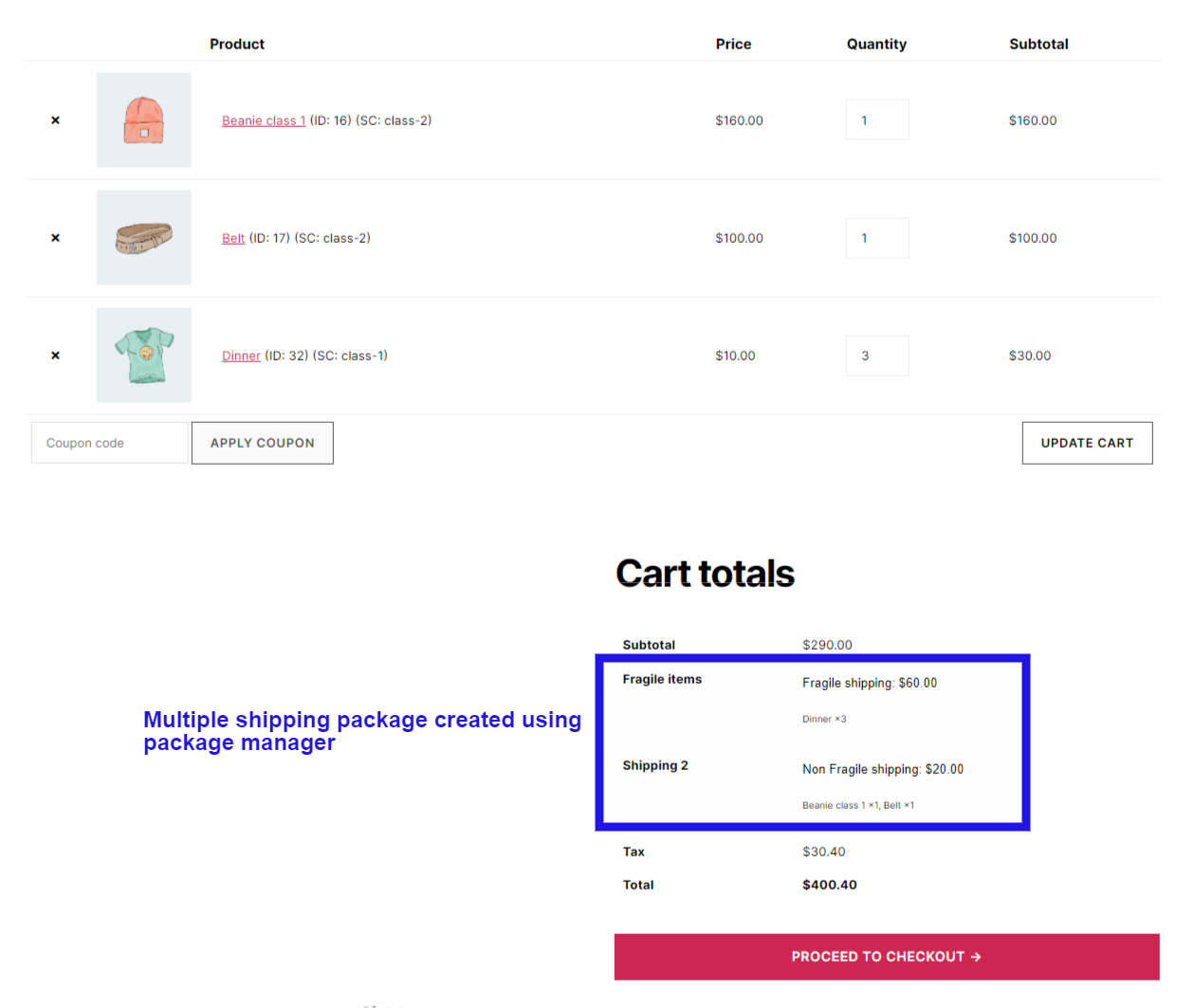
With our plugin you can create rule to group product in one shipping package based on there category or shipping class. This will allow you to easily manage your order and also allow you to offer a different shipping method for different shipping package and charge different shipping cost for each package separately with in same order. In pro version you can create the package based on product, category, shipping class, attribute (WooCommerce registered attribute), product cost, product stock status (if in stock or on back order).
Example Scenario:
You want to charge a flat 20$ for each unit of fragile items and flat 10$ for each unit of non fragile items.
So you will create a Package to group fragile items in a separate shipping package and non fragile items in a separate shipping package.
Then you will create a shipping method for fragile items and set the shipping cost to 20$ * quantity and then create a shipping method for non fragile items and set the shipping cost to 10$ * quantity.
so if a customer adds 2 unit of fragile items
and 3 unit of non fragile items in the cart
then the customer will be shown 2 shipping package on his checkout page
with one package consisting of fragile items and shipping method with cost 203 = 60$
and another shipping package for non fragile items with shipping method with cost 102 = 20$.
Check out this video to know how to automatically split order in multiple shipping packages using package manager:
Pro rules:
- State-based shipping rates: Assign different flat-rate shipping method as per the State/County of your customer
- Postcode/Zip code based shipping rates: If the user comes from a specific postcode, you can even assign rage of postcode like 9011…9090, this will assign the shipping method to all the customer whose postcode falls in 9011 to 9090
- City/town: offer a shipping method based on the city/town selected by the customer. this does a string comparison to do the matching as city is a text field in the WooCommerce checkout process
- Zone-based shipping rates: Assign different shipping method as per the Shipping zone of your customer
- Cart Sub Total (after discount) based shipping rates: Some time the user add discount coupon so their subtotal reduces and if you want to consider those reduced total while deciding the flat rate shipping method you can do that using this rule (you have option to exclude virtual product from this total)
- Weight-based shipping rates: If your want to offer different shipping rate based on the total weight of the product in the order or cart then you can do this using this rule, it calculates the total weight of the product in the cart and then based on the set value in the rule it assigns a shipping rates
- Product Width based shipping rates: It finds the maximum width of the product in the cart and uses that as the width of the cart and compares with width value set by you in the rule and as per the logic set in the rule it assign a shipping method
- Product Height based shipping method: It’s working is same as the Width working
- Product Length based shipping method: It’s working is same as the Width working
- Coupon based shipping method: Using this you can show a shipping method if the customer has applied some specific coupon code
- Shipping class-based shipping method: Show a specific shipping method, if the user buys a product that belongs to some specific category of shipping class
- Payment method based shipping method: Show a specific shipping method, if the user buys select a specific payment gateway, E.g: If you have a shipping method that also collects a payment, then you can show that shipping method when user select cash on the delivery payment method
- User role-based shipping method: Using this you can assign a different shipping method as per the user role. E.g: you can offer a different shipping method to a registered customer and different shipping method to those who are doing a Guest checkout
- User city based method: You can offer method based on user city, it is string comparison or city name
- Shipping class total this rule applies when customer has purchased an x amount of product from specific shipping class
- Shipping class total quantity of product in cart this rule applies when customer has added x unit of product from a specific shipping class in his cart
- Using our this flexible shipping method plugin you can have different Shipping method on specific time of the day: Show a shipping method on specif time of the day,
E.g: Show a shipping method between 10am to 1pm only - Shipping method based on Day of the week: Offer a shipping method based on the day of the week.
E.g: show a shipping method on Saturday and Sunday only - Shipping method based on Selected delivery day: show a different shipping method based on the delivery day selected by the customer in Delivery date selector added by the plugin Delivery date and time plugin
E.g: Show a shipping method when customer is option for sunday as delivery date - Shipping method based on Attribute: Offer a shipping method based on the variation Attribute selected, so you can offer a specific shipping method when user select Large size of the attribute Size in the variable product
- First order free shipping: Offer free shipping to customer when they are placing first order on your website
- Last order total: Offer free shipping to customer if they have purchased more then 100$ worth of product in there last order
- Number of orders total: Offer free shipping to customer if they have placed more then 10 orders on your site in last 1 month
- Total spend on your website: Offer free shipping to customer if they have spend more then 1000$ on your website in last 1 month of time
- Exact set of product or set of category of product Show a shipping method when exact set of product or product belonging to exact set of category are present in the cart.
- Exact set of product or set of category of product not present in the cart Show a shipping method when exact set of product or product belonging to exact set of category are NOT present in the cart.
- Charge $10 for every 100 unit of product in the cart
- Remove all other shipping methods when a particular shipping method is activated (PRO)
- Remove all other shipping methods of this plugin, when a particular shipping method is activated (PRO)
- Remove all other shipping methods of low priority of this plugin, when a particular shipping method is activated (PRO)
Try Pro version Backend | Frontend demo
Custom charge in pro version
The Cost field allows you to charge a flat rate per item, a percentage based cost or a minimum fee.
Available placeholders:
[qty] – Number of products in the cart
[fee] – An additional fee. This fee has two optional arguments.
percent – A percentage based on total order cost.
min_fee – A minimum amount. Useful when using percentages.
max_fee – A maximum amount. Useful when using percentages.
Examples
10 + ( 2 * [qty] ) – A base shipping cost of $10 plus $2 for each item in the cart.
20 + [fee percent=”10″ min_fee=”4″] – A base shipping cost of $20 plus 10% of the order total, which is at least $4.
similar To WooCommerce original flat rate shipping method
Virtual category
Virtual category allows you to create a group of product as per your shipping needs, this virtual category do not affect your site url structure this Virtual category is only used in our plugin shipping method.
You can create a virtual category that is like a group of multiple category, and you can use this virtual category inside the Conditions of shipping method. This gives you fine control over the shipping method.
* You can even add some extra product or variation of product in this virtual group (PRO)
* You can exclude some product or variation of product from this virtual group (PRO)
E.g: You create a virtual category that combines the category T-shirt and Caps, but you want to exclude T-shirt A from this Virtual category so you will add T-shirt A as excluded product, and say your want to make Jeans A as part of this group (although Jeans A do not belong to category T-shirt and cap) so you will add Jeans A as included product to be part of this Virtual category.
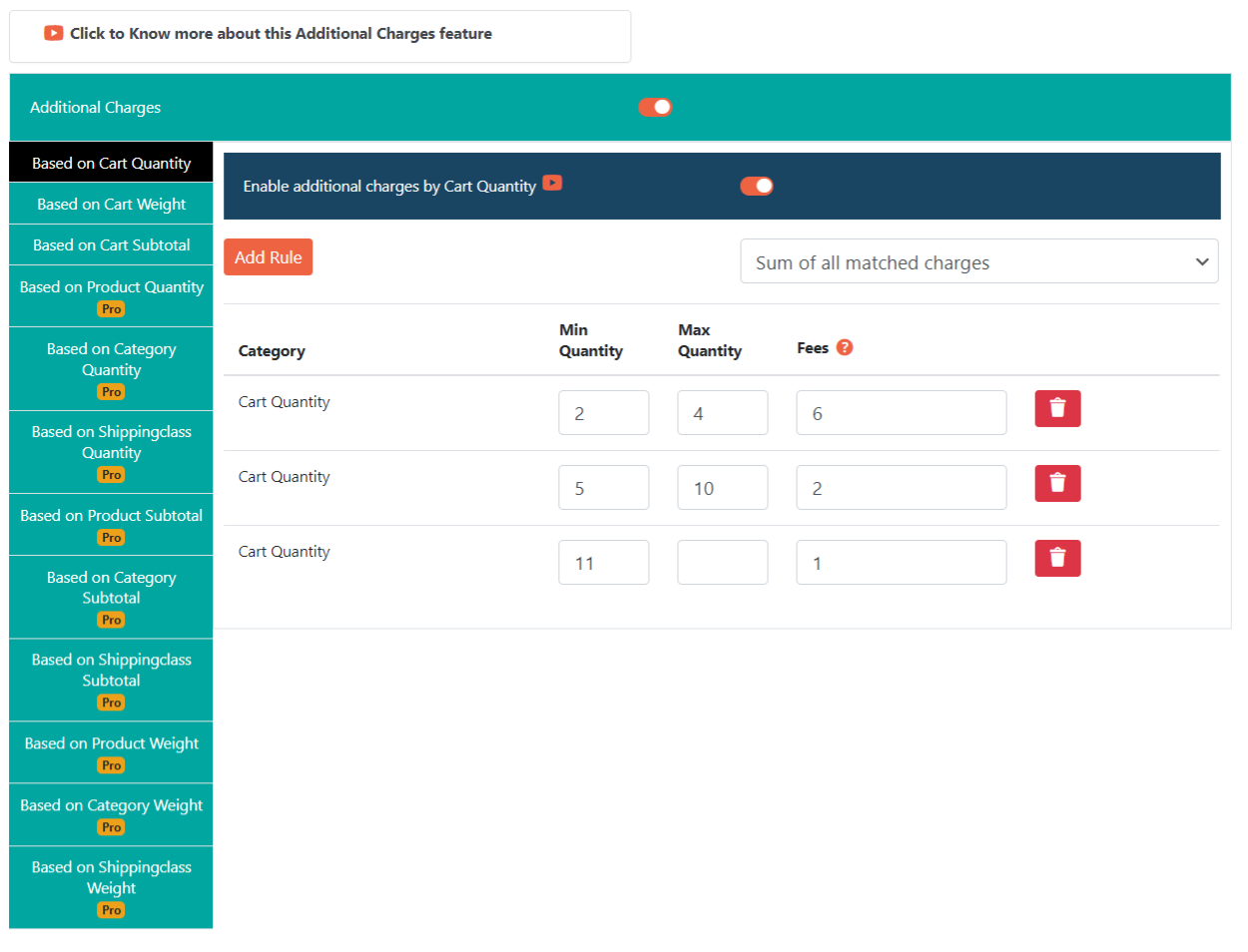
Additional charges (pro)
Using additional charges you can add/subtract charge from the base shipping charge, based on different conditions
This are the different conditions available:
- Cart Quantity: Video
- Cart Weight: Video
- Cart Subtotal: Video
- Product Quantity: Video
- Category Quantity: Video
- Shipping Class Quantity: Video
- Product Weight: Video
- Category Weight: Video
- Shipping Class Weight: Video
- Product Subtotal: Video
- Category Subtotal: Video
- Shipping Class Subtotal: Video
Combine multiple shipping method in to single shipping method (PRO)
Say your have shipping method A and B on the checkout page each shipping method costing 2 and 3 $ respectively and you want to combine them and show them as single shipping method then you can do that using our plugin so it will show combined shipping method as D whose shipping cost will be 5$ and if you want you can hide the method A and B when this combined method is been shown
Compatible with Multi currency plugin
- CURCY – Multi Currency for WooCommerce – The best free currency exchange plugin – Run smoothly on WooCommerce 6.x
- WOOCS – Currency Switcher for WooCommerce. Professional and Free multi currency plugin – Pay in selected currency
- WPML Multi-Currency Support for WooCommerce
Key features:
- improve shipping-related user experience,
- create custom shipping rules,
- offer the free shipping based on the price or products’ in the cart quantity,
- cost based shipping cost
- weight based shipping cost
- total order based shipping cost
- item count based shipping cost
- shipping class based shipping cost
- WooCommerce shipping cost rules
- WooCommerce shipping plugin
- WooCommerce table rate shipping.
- Highly flexible shipping rates
- Per Product Shipping for WooCommerce
- Conditional Payments
- Conditional Country
- Conditional States
- Conditional Shipping
- Variation Product Shipping
- Stand Alone Product Shipping
- WooCommerce Shipping
- Custom Shipping WooCommerce
- Per Product Shipping
- Multiple Product Shipping
- Easy Shipping
- Multi Shipping
- WooCommerce Addon Shipping
- Simple Product Shipping
- Per Product Shipping
- Per Product Shipping WooCommerce
- Table Rate Shipping
- Advanced Shipping
- Flexible Shipping
- Weight Based Shipping
- Free Shipping
- Flat Rate Shipping
- USPS Shipping
- UPS Shipping
- Local Pickup
- Hide Shipping Method
- Custom Shipping
- Bundle Shipping
- Fedex Shipping
- Ship Station Shipping
- Conditional Payment
- Ship by quantity
- Ship by weight
- Ship by order amount
- WooCommerce shipping
- WooCommerce shipping classes
- WooCommerce restrict shipping by postcode
- WooCommerce delivery plugin
- combine shipping method into one shipping method
- automatically split order in multiple shipping packages
스크린샷
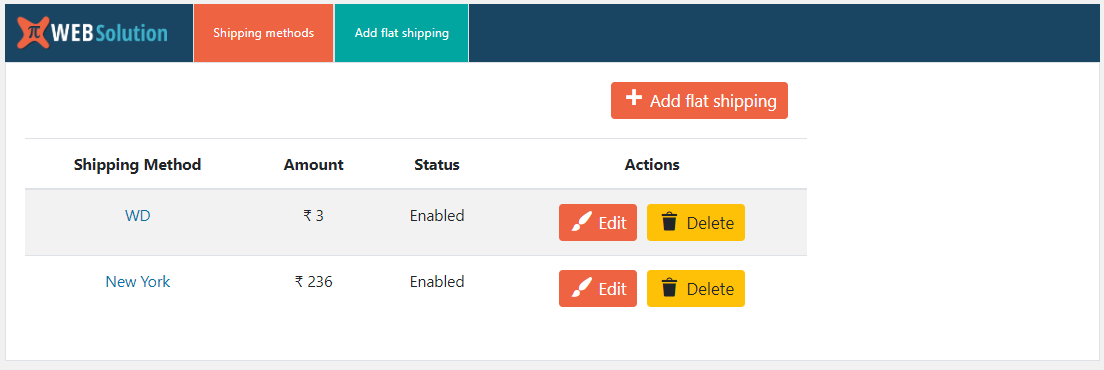
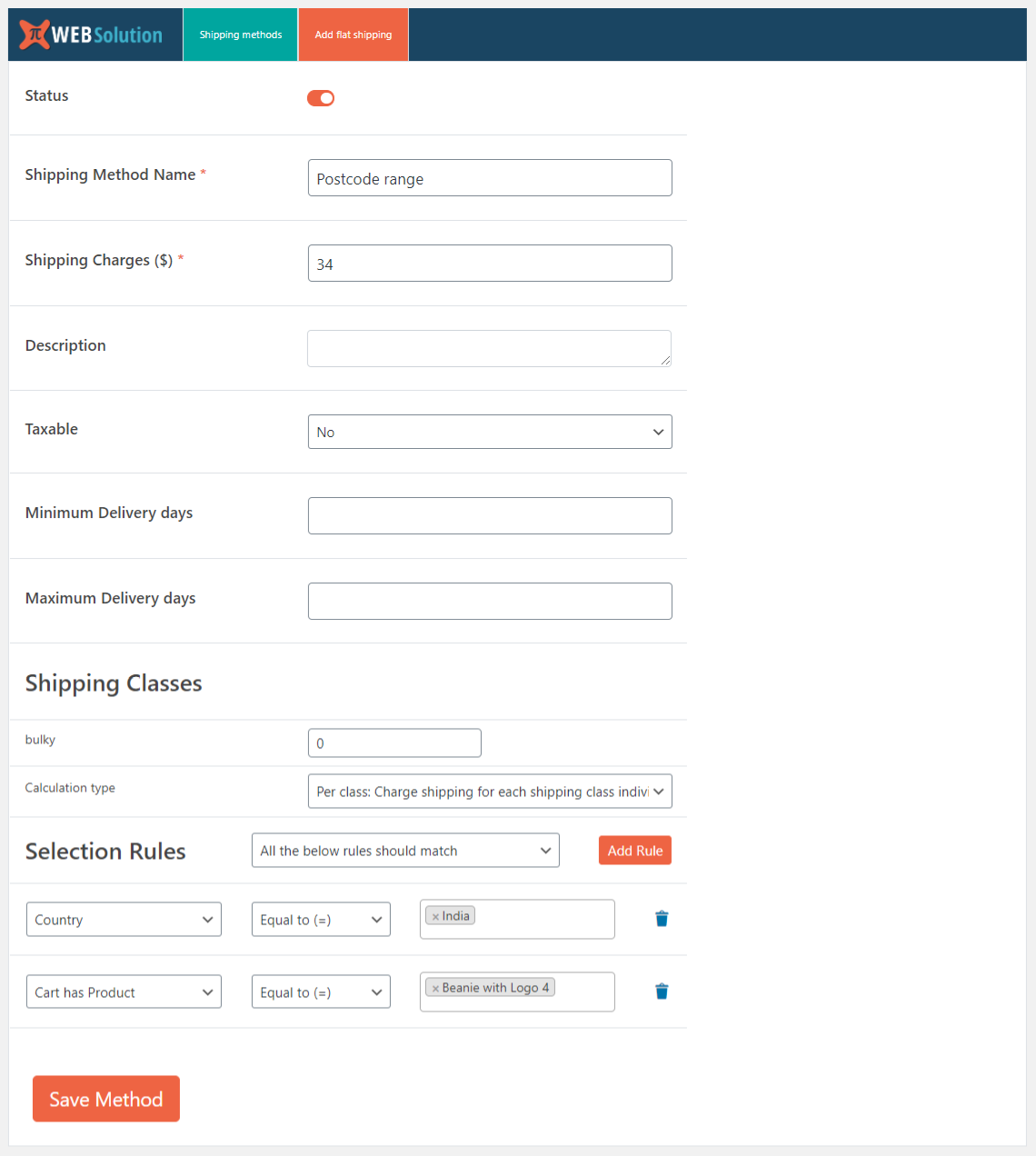
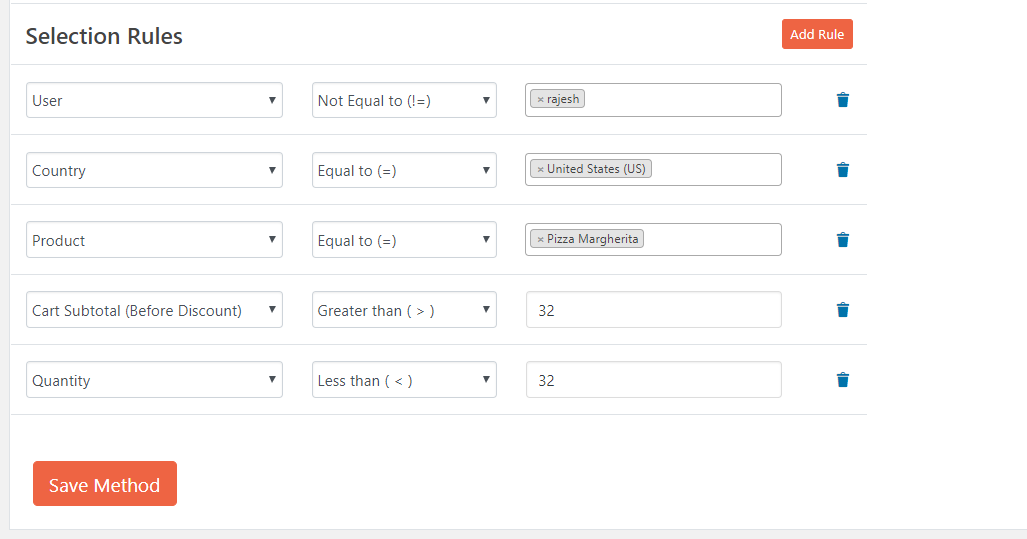
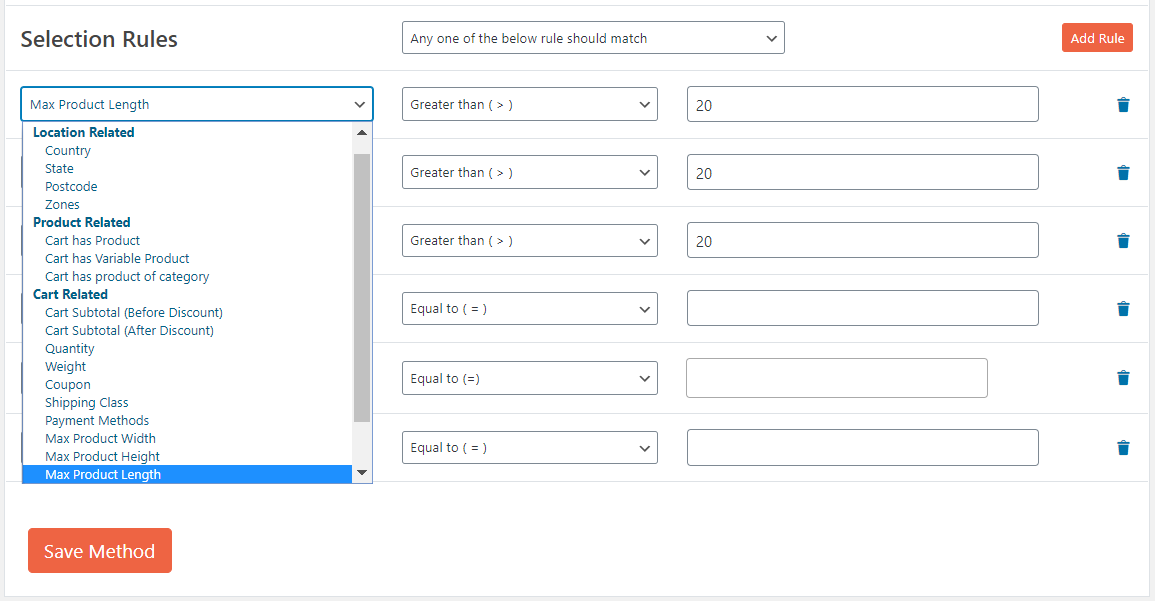
FAQ
-
I want to offer flat rate shipping for specific county
-
Yes you can do that using our country based rule
-
I want to offer flat rate shipping for specific country when there subtotal exceeds certain amount
-
Yes you can do that by creating a shipping method and adding rule of country and subtotal in it, so when the subtotal will be grater then specified amount and the country selected is as per your rule it will apply this flat rate shipping
-
I want to set postal code range in the condition
-
In the pro version you can set range of the postal code in the shipping method rule
-
I want to remove other shipping method when a particular shipping method is applied
-
You can do that in the pro version
-
I want to charge customer a different shipping rate on Weekend then weekdays
-
In the pro version we have a rule that allow you to offer a different shipping method based on the day of the week
-
I want to show a shipping method only on weekend
-
Yes there is rule in the pro version that allows you to show shipping method based on the order placement day of the week
-
I want to show a shipping method during the specific time of the day
-
Yes you can do that in the pro version, there is option to specify the time range and that shipping method will be shown during that time of the day only
-
I want to show a shipping method based on the Custom delivery date selected by the customer
-
Yes for this you will need our extra plugin Delivery date and time plugin that allow customer to select delivery date they want, and then the pro version of this plugin will allow you to create rule based on the day user selected date falls, E.g: if you want to offer free shipping on Sundays, so when the customer will select a delivery date that is on Sunday then that shipping method will be shown to him
-
How do I set product based shipping method? (If I want to apply shipping cost $20 if cart has particular product)
-
You have to set a product rule like a cart contains product equal to Christmas cake then give shipping method of cost $20.
-
How do I set shipping method based on product category and country?
-
You have select rule for cart contains category’s product equal to Halloween toy and select country equal to UK then give shipping method of cost $30.
-
What happen when multiple shipping method rules matches (PRO)
-
Each shipping method gives you option to remove other shipping method of lower priority the options available are as:
* Hide all other methods
* Hide all other methods (excluding WC Local Pickup method)
* Hide all methods except the one added by this plugin
* Hide all methods except the one added by this plugin and WC Local pickup
* Hide all plugin methods with lower priority -
How to charge shipping cost for total product’s quantity of cart in WooCommerce store? (PRO)
-
If you want to charge $10 for total cart’s quantity then you have to set shipping charge like 10*[qty].
-
Is it possible to create shipping methods based on different zones? (PRO)
-
Yes, you can create different shipping zones in WooCommerce as per your requirements (based on countries/states/zip-codes), and then you can assign different shipping method to different zones by using shipping zone condition rule.
-
I want to offer a different shipping method based on the Delivery day selected by the customer
-
You will need to install our Order date and time plugin to take the delivery date from the customer and then based day selected by the customer you can show appropriate shipping method
-
Offer shipping method based on Attribute value
-
In the PRO version you can offer a shipping method based on the attribute selected in the variation product
-
Using WooCommerce shipping classes weight
-
In pro version you can restrict shipping method based on the weight of product from specific shipping class
-
WooCommerce weight based shipping
-
You can create a weight based shipping by using additional charge based on Cart weight
-
Want shipping charge to become Zero when Free shipping coupon is applied
-
There is option inside each shipping method to make that shipping method Free when user applies a free shipping coupon to the cart
-
Do the plugin support Free shipping coupon
-
Yes, plugin do support free shipping coupon. You can enable the option “Make free when free shipping coupon is applied” inside each of the shipping method to make them free when free shipping coupon is applied
-
Combine multiple shipping carrier rates with different shipping methods into one rate
-
Yes you can do that in the PRO version of the plugin
-
Will like show same day shipping method when all the product in the cart are in Stock
-
Yes that can be done we have a rule “Stock status of product in cart” using this rule you can activate the shipping method when all the product in user cart are in stock
-
I want to charge shipping as percent of sub total, but I want the min shipping charge to be 10$ and max shipping charge should not exceed 50$
-
You can do that in the pro version as there you can set the fees to be percent of subtotal and also set a min max range for shipping charge
-
I want to only show only one shipping method so customer don’t have to chose from multiple shipping method and i want to show the most expensive of them
-
Yes you can do that, go to Extra settings tab there you will set “Give only single shipping method option to customer” to be “Maximum: Show the shipping method with highest shipping charge”
-
Is it HPOS compatible
-
Yes the Free version and PRO version both are HPOS compatible
-
create multiple shipping package
-
you can divide the products of an order to be delivered in multiple shipping package and then assign different shipping method to each package
-
How to automatically split order in multiple shipping packages
-
checkout this video https://www.youtube.com/watch?v=MVPPdukqLp0
후기


기여자 & 개발자
“Conditional shipping & Advanced Flat rate shipping rates / Flexible shipping for WooCommerce shipping”(은)는 오픈 소스 소프트웨어입니다. 다음의 사람들이 이 플러그인에 기여하였습니다.
기여자
개발에 관심이 있으십니까?
변경이력
1.6.4.31
- Tested for WC 8.7.0
- Tested for WP 6.5.0
1.6.4.29
- Tested for WC 8.5.2
1.6.4.24
- Package manager added
- Package support added in rule and additional charge
- short code support given in the additional charge
1.6.4.23
- Shipping class cost bug fixed and now support shortcode [qty] in shipping class cost
1.6.4.22
- Delete shipping method count transient on activation and deactivation of the plugin
1.6.4.20
- Continents added in the country rule
1.6.4.19
- Tested for WP 6.4.0
1.6.4.17
- Tested for WP 6.3.1
1.6.4.11
- Multi currency feature added
- Tested for WP 6.3.0
1.6.4
- Tested for WC 7.6
1.6.3.99
- Tested for WC 6.2.0
1.6.3.93
- Compatible with HPOS database structure