
설명
The most popular WooCommerce product search plugin. It gives your users a well-designed advanced AJAX search bar with live search suggestions.
By default, WooCommerce provides a very simple search solution, without live product search or even SKU search. FiboSearch (formerly Ajax Search for WooCommerce) provides advanced search with live suggestions.
Who doesn’t love instant, as-you-type suggestions? In 2023, customers expect smart product search. Baymard Institute’s latest UX research reveals that search autocomplete, auto-suggest, or an instant search feature is now offered on 96% of major e-commerce sites. It’s a must-have feature for every online business that can’t afford to lose customers. Why? FiboSearch helps users save time and makes shopping easier. As a result, Fibo really boosts sales.
Features
✅ Search by product title, long and short description
✅ Search by SKU
✅ Show product image in live search results
✅ Show product price in live search results
✅ Show product description in live search results
✅ Show SKU in live search results
✅ Mobile first – special mobile search mode for better UX
✅ Details panels with extended information – “add to cart” button with a quantity field and extended product data displayed on hovering over the live suggestion
✅ Easy implementation in your theme – embed the plugin using a shortcode, as a menu item or as a widget
✅ Terms search – search for product categories and tags
✅ Search history – the current search history is presented when the user clicked/taped on the search bar, but hasn’t yet typed the query.
✅ Limit displayed suggestions – the number is customizable
✅ The minimum number of characters required to display suggestions – the number is customizable
✅ Better ordering – a smart algorithm ensures that the displayed results are as accurate as possible
✅ Support for WooCommerce search results page – after typing enter, users get the same results as in FiboSearch bar
✅ Grouping instant search results by type – displaying e.g. first matching categories, then matching products
✅ Google Analytics support
✅ Multilingual support including WPML, Polylang and qTranslate-XT
✅ Personalization of search bar and autocomplete suggestions – labels, colors, preloader, image and more
Try the PRO version
FiboSearch also comes in a Pro version, with a modern, inverted index-based search engine. FiboSearch Pro works up to 10× faster than the Free version or other popular search solutions for WooCommerce.
Upgrade to PRO and boost your sales!
PRO features
✅ Ultra-fast search engine based on the inverted index – works very fast, even with 100,000+ products
✅ Fuzzy search – works even with minor typos
✅ Search in custom fields with dedicated support for ACF
✅ Search in attributes
✅ Search in categories. Supports category thumbnails.
✅ Search in tags
✅ Search in brands (We support WooCommerce Brands, Perfect Brands for WooCommerce, Brands for WooCommerce, YITH WooCommerce Brands). Supports brand thumbnails.
✅ Search by variation product SKU – also shows variable products in live search after typing in the exact matching SKU
✅ Search for posts – also shows matching posts in live search
✅ Search for pages – also shows matching posts in live search
✅ Synonyms
✅ Conditional exclusion of products
✅ TranslatePress compatible
✅ Professional and fast help with embedding or replacing the search bar in your theme
✅ and more…
✅ SEE ALL PRO FEATURES!
Showcase
See how it works for others: Showcase.
Feedback
Any suggestions or comments are welcome. Feel free to contact us via the contact form.
스크린샷

Search suggestions with a details panel 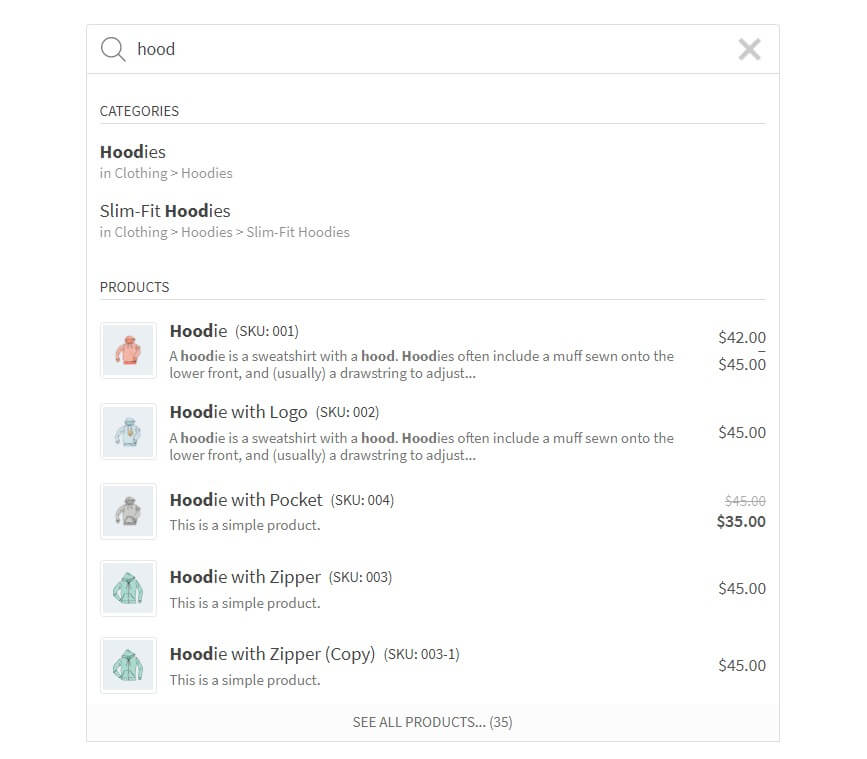
Search suggestions 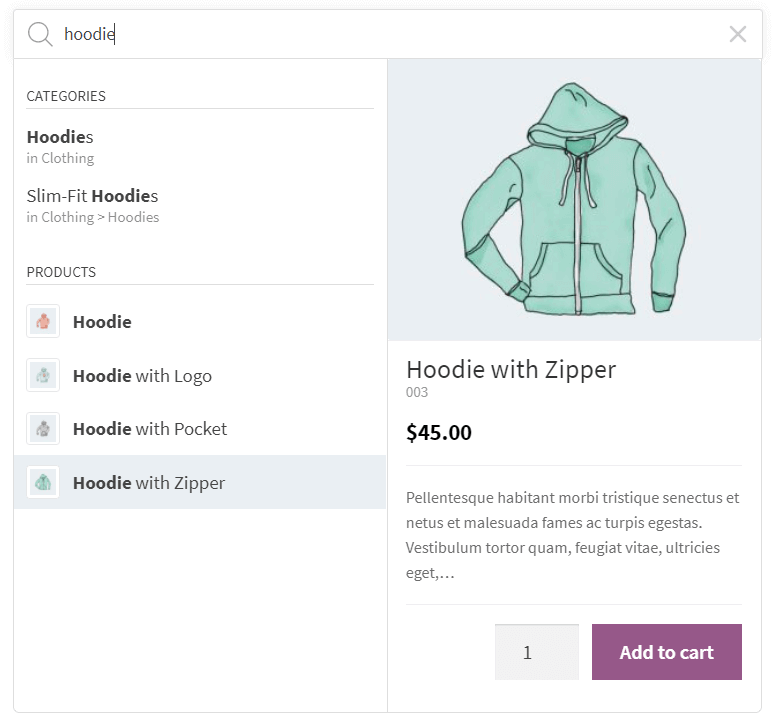
Search suggestions with a details panel 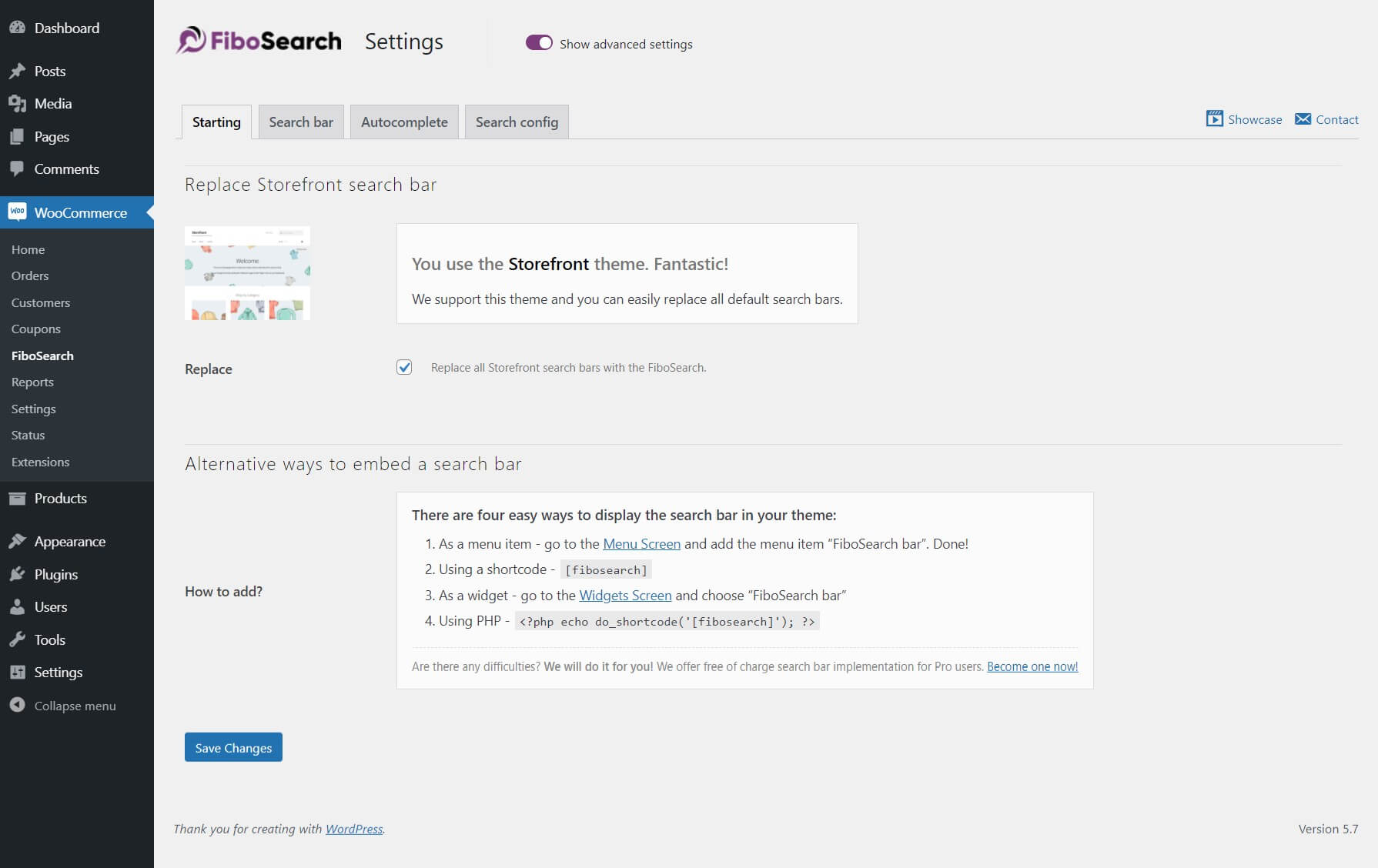
Settings page 
Settings page
블록
이 플러그인은 2(을)를 제공합니다.
- FiboSearch AJAX (live) search form for WooCommerce
- FiboSearch navigation item AJAX (live) search form for WooCommerce
설치
- Install the plugin from within the Dashboard or upload the directory
ajax-search-for-woocommerceand all its contents to the/wp-content/plugins/directory. - Activate the plugin through the ‘Plugins’ menu in WordPress.
- Go to
WooCommerce → FiboSearchand set your preferences. - Embed the search bar in your theme.
FAQ
-
How do I embed the search bar in my theme?
-
There are many easy ways to display the FiboSearch bar in your theme:
– Replacing the existing search bar with one click – it is possible for dozens of popular themes
– As a menu item – in your WordPress admin panel, go toAppearance → Menuand addFiboSearch baras a menu item
– Using a shortcode[fibosearch]– As a widget – in your WordPress admin panel, go to
Appearance → Widgetsand chooseFiboSearch
– As a block – learn how to use blocks and FiboSearch together
– Using PHP<?php echo do_shortcode('[fibosearch]'); ?>– We will do it for you! – we offer free search bar implementation for Pro users. Become one now!
Or insert this function inside a PHP file (often, it is used to insert a form inside page template files):
-
How do I replace the existing search bar in my theme with FiboSearch?
-
We have prepared a one-click replacement of the search bar for the following themes:
- Storefront
- Divi
- Flatsome
- OceanWP
- Astra
- Avada
- Sailent
- and 43 more… See a complete list of integrated themes on our documentation.
If you want to replace your search bar in another theme, please contact our support team.
We will assist with replacing the search bar in your theme for free after you upgrade to the Pro version. -
Yes, you can! Go to
Appearance → Menu. You will see a new menu item called “FiboSearch”. Select it and click “Add to menu”. Done! -
How can I ask a question?
-
You can submit a ticket on the plugin website and the support team will get in touch with you shortly. We also answer questions on the WordPress Support Forum.
-
Do you offer customization support?
-
Depending on the theme you use, sometimes the search bar requires minor improvements in appearance. We guarantee fast CSS corrections for all Pro plugin users, but we also help Free plugin users.
-
Where can I find plugin settings?
-
In your WordPress dashboard, go to
WooCommerce → FiboSearch. The FiboSearch settings page is a submenu of the WooCommerce menu. -
Who is the Pro plugin version for?
-
The Pro plugin version is for all online sellers looking to increase sales by providing an ultra-fast smart search engine to their clients.
The main difference between the Pro and Free versions is search speed and search scope. The Pro version has a new fast smart search engine. For some online stores that offer a lot of products for sale, search speed can be increased up to 10×, providing a whole new experience to end users.
All in all, the Pro version is dedicated to all WooCommerce shops where autocomplete suggestions work too slowly.
You can read more and compare Pro and Free features here: Full comparison – Pro vs Free.
후기


기여자 & 개발자
“FiboSearch – Ajax Search for WooCommerce”(은)는 오픈 소스 소프트웨어입니다. 다음의 사람들이 이 플러그인에 기여하였습니다.
기여자

변경이력
1.27.0, January 31, 2024
- ADDED: Integration with the “Betheme theme”
- ADDED: Highlight words in search results with Greek letters regardless of accent
- ADDED: Support for “Full-width Search” in the “XStore theme”
- FIXED: Multiple search containers on mobile in the “Astra theme” integration
- FIXED: No focus on search input for mobile devices in the “Astra theme” integration
- FIXED: Allow an HTML
<i>tag in suggestion titles and headlines - FIXED: Multilingual support is active even for one language
- FIXED: Overriding the search icon and form in the header was not working properly in the “WoodMart integration”
- FIXED: Missing filters from “Advanced AJAX Product Filters” plugin in the “Divi theme”
- FIXED: Replace
%for more stable format%%in asprintffunction - FIXED: An unwanted modal after closing the search overlay on mobile in the “Flatsome theme”
- FIXED: Missing colors after updating the “Bloksy theme” to 2.x
- FIXED: Incorrect calculation of a product’s position in search results when it contains Greek letters
- FIXED: Incorrect term language detection in the WPML plugin. Replacing
term_idwithterm_taxonomy_id -
FIXED: Unwanted ampersand entity in the product description of search results
-
UPDATED: Requires PHP: 7.4
- UPDATED: The
.potfile - UPDATED: Polish translation
- UPDATED: Freemius SDK v2.6.2
1.26.1, October 19, 2023
- FIXED: Details panel – wrong HTML format of stock status element
1.26.0, October 17, 2023
- ADDED: Integration with “Bricks builder”
-
ADDED: Integration with “Brizy builder”
-
FIXED: Calc score by comparing every word of the search phrase instead of all search phrase
- FIXED: WooCommerce Wholesale Prices plugin – invalid search results e.g. not hidden products and categories in the search results
- FIXED: Flatsome – when there are more search icons, only one is replaced
- FIXED: WPRocket – in some cases search fields/icons are not replaced immediately after the page load
-
FIXED: Highlight matched words instead of the whole search phrase
-
TWEAK: Allowing access to the
Personalizationclass viaDGWT_WCAS()function -
TWEAK: HUSKY – Products Filter Professional for WooCommerce plugin – disable the test in the Troubleshooting module for newer versions of this plugin
-
REFACTOR: Replace
.click()withtrigger('click'),.focus()withtrigger('focus'),.blur()withtrigger('blur') - REFACTOR: Replace
jQuery.fn.mouseup()with$(document).on('mouseup') - REFACTOR: Replace
jQuery.isFunction()withtypeof fn === 'function' - UPDATED: Freemius SDK v2.5.12
1.25.0, July 06, 2023
- ADDED: Possibility to search for taxonomy terms regardless of accents in a phrase or term name
-
ADDED: Added some new filters to change URLs of results in autocomplete and details panel
-
FIXED: Warnings due to
open_basedirrestrictions - FIXED: Integration with the Impreza theme – broken AJAX pagination for Grid element
- FIXED: Integration with the TheGem theme – missing search results when the “Layout Type” option is set to “Products Grid”
- FIXED: Integration with the Divi theme – mobile overlay not showing up
-
FIXED: Stronger sanitization of the details panel output
-
UPDATED: Freemius SDK v2.5.10
- UPDATED: Polish translation
1.24.0, May 25, 2023
- ADDED: Integration with the “Minimog” theme
- ADDED: Posts, pages, and taxonomy terms are included in the FiboSearch Analytics module
- ADDED: Taking into account a new feature of the dark theme in the Nave theme
- ADDED: Possibility to change the color of a search bar underlay. Only for the Pirx style
- ADDED: New search widget and extended search results for Elementor
-
ADDED: TheGem theme – “Header Builder” support
-
FIXED: Wrong position of search icons in the history search module
- FIXED: Broken suggestions layout and detailed panel visibility when the “Minimum characters” option is set to less than 1
- FIXED: Compatibility with PHP 8.1
- FIXED: Hide unnecessary modules when constant
DGWT_WCAS_ANALYTICS_ONLY_CRITICALis set to true in the FiboSearch Analytics module - FIXED: Incorrect display of information about constants on the debug page
- FIXED: Other minor bugs in the FiboSearch Analytics module
- FIXED: Integration with the Astra theme – support for version 4.1.0 of the Astra Addon
- FIXED: Integration with the Minimog theme – wrong position of the search history wrapper
- FIXED: Integration with the Enfold theme – the search engine icon disappears when the page finishes loading
- FIXED: A HTML tag
<br>was unnecessarily stripped in the description in the details panel -
FIXED: The voice search feature – overlapping icons and disabling functionality on Safari
-
UPDATED: French translation
- UPDATED: Freemius SDK v2.5.8
- TESTS: Two integration tests that check saving phrases in a database table
- TESTS: Fix assertion in “Analytics/Critical searches without result”
- REFACTOR: Change order if set settings defaults. Now the defaults are set after calling the
dgwt/wcas/settingsfilter - SECURITY: Added escaping for a “Search input placeholder” option
1.23.0, April 05, 2023
- ADDED: Integration with the “Blocksy” theme
- ADDED: Integration with the “Qwery” theme
- ADDED: Integration with the “StoreBiz” theme
- ADDED: Allows the
Shop managerrole to manage the plugin settings by adding a constant to thewp.config.phpfile -
ADDED: Allows creating HTML templates instead of displaying simple “No results” message
-
IMPROVED: Blocks calculating score if the phrase contains a single character
- FIXED: More accurate calculation of the order of products in search results. The extra score for an exact match of a sequence of words
- FIXED: Storefront theme – not working focus event while using a mobile overlay for iPhone devices
- FIXED: Mobile overlay on iPhone devices – didn’t hide search results on a scroll event or after clicking the “done” button
- FIXED: iPhone devices – annoying auto zoom in search input on focus
- FIXED: Search icon mode and search history – a search bar was needlessly concealed on clicking the “Clear” button
- FIXED: Freemius SDK – added submenu slug
- FIXED: Flatsome theme – detecting incompatible settings and disappearing search form on hover
- FIXED: Layout option – hidden triangle icon when a layout is “icon” and style is “Pirx”
-
FIXED: Unnecessary AJAX query on the settings page
-
TWEAK: Replacing empty href tag with
#in Storefront integration because of SEO -
TWEAK: Trivial CSS changes
-
UPDATED: Freemius SDK to v2.5.6
-
REFACTOR: Forcing mobile overlay breakpoint and in layout breakpoint in theme integrations
- REFACTOR: Variables names in the method
Helpers::calcScore()
1.22.3, January 30, 2023
- FIXED: Some prices were not aligned properly
1.22.0, January 30, 2023
- ADDED: New feature – Search history. The current search history is presented when the user clicked/taped on the search bar, but hasn’t yet typed the query.
- ADDED: FiboSearch Analytics – New widget in WordPress Dashboard with critical searches without result
- ADDED: Integration with Essentials theme
- ADDED: Make UI_FIXER object as global object
- ADDED: Ability to search for vendors by description and city
- ADDED: Ability to exclude critical phrases in the Analytics module
- ADDED: Custom JavaScript events during the search process
- ADDED: Ability to export search analytics data as CSV files
- FIXED: Integration with Flatsome theme – focus event didn’t work with a search bar
- FIXED: Integration with WooCommerce Product Filter by WooBeWoo – “Undefined array key ‘query’” notice
- FIXED: Integration with Jet Smart Menu – repair duplicated search bars IDs
- FIXED: Integration with Astra theme – support for version 4.0.0
- FIXED: Integration with Astra theme – cannot change the number of products on the cart page
- FIXED: Integration with XStore theme – support for search icon in mobile panel
- FIXED: Compatibility with PHP 8.1
- FIXED: RWD for FiboSearch Settings views including Analytics views
- FIXED: Search bar CSS, especially when Pirx style and Voice Search work together
-
FIXED: A user with permission to edit plugin settings cannot see search analytics
-
CHANGE: Updated French translation
- CHANGE: Hide the Voice Search icon when a user starts typing
- CHANGE: Updated Freemius SDK to v2.5.3
- CHANGE: Remove information that Analytics is a beta feature
- CHANGE: Remove information that Darkened Background is a beta feature
- CHANGE: Set “Pirx” as a default search bar style
1.21.0, November 21, 2022
- ADDED: Integration with Product GTIN (EAN, UPC, ISBN) for WooCommerce plugin
- ADDED: Integration with EAN for WooCommerce plugin
-
ADDED: Troubleshooting – checks if products thumbnails need to be regenerated
-
FIXED: Missing translation domain in some texts
- FIXED: Support variants of <br> tag in product names in autocomplete
- FIXED: Unable to embed search bar as a widget
- FIXED: Disable voice search for Chrome on iPhone or iPad
- FIXED: Integration with the Astra theme – unclosed <div> tag
- FIXED: Exclude save phrases to analyze when the phrase is ‘fibotests’ or the user has a specific role.
- FIXED: UI_FIXER: check if event listeners were correctly added to search inputs. If no, reinitiate the search instance
- FIXED: UI_FIXER: rebuild all search bars without correct JS events
-
FIXED: Redundant DB queries related to the existence of plugin tables
-
CHANGE: Updated Freemius SDK to v2.5.2
1.20.0, September 13, 2022
- ADDED: Integration with Woostify theme
- ADDED: Integration with Neve theme
- ADDED: Integration with WP Rocket
- ADDED: Include block sources in the plugin package
- ADDED: Possibility to reset search statistics from the settings page
-
ADDED: Support for <sub> element in autocomplete suggestions
-
FIXED: Incorrect display of styles with personalization of the search
- FIXED: Wrong settings index in Impreza and Enfold theme
- FIXED: Removed of unnecessary language files
- FIXED: Always set cursor at the end of the input
- FIXED: Incorrect verification if the browser supports speech recognition
- FIXED: FiboSearch Analytics – not working “check” buttons of the latest loading list
- FIXED: Unnecessary options and transients after uninstalling plugin
1.19.0, July 27, 2022
- ADDED: New feature – New search layout called “Pirx”
- ADDED: New feature – FiboSearch Analytics
- ADDED: New feature – Layout type: Icon on desktop, search bar on mobile
- ADDED: New feature – Voice search
- ADDED: New feature – FiboSearch blocks in the block editor
- ADDED: Separated option “mobile_overlay_breakpoint” to handle overlay on mobile breakpoint
- ADDED: Add “mobile_overlay_breakpoint” as a shortcode param to add the opportunity to set this value independently from global settings
- ADDED: New search bars fixer: try to regenerate search bars when they were added by AJAX callbacks
- ADDED: Support for header builder in integration with Astra theme
- ADDED: Another question marks for FiboSearch settings that cover our documentation
- ADDED: Settings preview – smooth scrolling
- ADDED: Settings preview – animate typing on a search preview for “Search bar” tab
- ADDED: Support all types of layout in widget and embedding via Menu
- ADDED: Ability to reset plugin settings to default values
-
ADDED: New shortcode params: “submit_btn” and “submit_text”
-
FIXED: WOOF – Products Filter for WooCommerce integration: broken counters on the search results page
- FIXED: Interdependent settings in Settings -> Search bar -> Style -> Design
- FIXED: Improved darkened background positioning (support for sticky elements as well)
- FIXED: Improved search suggestions and the details panel positioning (support for sticky elements as well)
- FIXED: Settings page – wrong position of a questions mark (Safari)
- FIXED: JavaScript errors in the settings page when the GeoTargetingWP plugin is active
- FIXED: Try to add “dgwt-wcas-active” class again if it has not been added by other events
- FIXED: Incorrect elements position after load “iconMode”
- FIXED: Incorrect adding CSS class as shortcode parameter
-
FIXED: English grammar typos
-
CHANGE: Updated Freemius SDK to v2.4.4
- REFACTOR: Indexer – Replacing “PDO” with WPDB”
- REFACTOR: Settings page – rebuild the settings section Search Bar -> Appearance to improve UX
- REFACTOR: Search bars fixer
1.18.1, May 23, 2022
- FIXED: Exceeding the memory limit on the search results page
1.18.0, May 12, 2022
- ADDED: New feature – FiboSearch Analytics. This feature will be available to everyone in FiboSearch v1.19.0. To enable it in v1.18.0 declare constant
define( 'DGWT_WCAS_ANALYTICS_ENABLE', true );inwp-config.php - ADDED: Open selected suggestion in new tab by shortcut Cmd+Enter/Ctrl+Enter
- ADDED: Show score in search results on the Debug page
-
ADDED: Link darkened background and fuzzy search feature to the documentation
-
FIXED: Improving ESC key functionality: If there are suggestions, ESC hides them. If there are not suggestions and mobile icon mode is enabled, ESC disables mobile icon mode. If there are not suggestions and darkened overlay is enabled, ESC disables darkened overlay
- FIXED: Allow recognizing CMD key
- FIXED: Remove interaction on the TAB key
- FIXED: Elementor popups – reinit search bars after loading Elementor’s popup
- FIXED: Cannot open the first result with Ctrl + Enter
- FIXED: Prevent displaying search results, if the search icon mode is closed
- FIXED: Unnecessary closing mobile icon mode and darkened overlay mode after selecting text in the search bar. It used to happen often when users selected text from the search bar to remove it and write something new but clicked outside the search bar (JS mouseup event was outside the bar)
-
FIXED: Better sanitization of the plugin settings
-
FACTOR: Retrieving results on the search page without additional HTTP request
1.17.0, February 28, 2022
- ADDED: New beta feature – “Darkened background”
- ADDED: Integration with Kadence theme
- ADDED: Integration with TheGem (Elementor) and renamed TheGem (WPBakery)
- ADDED: Comments in template files for the Details Panel
- ADDED: Refreshing the content on the checkout page when a product is added to the cart from the search Details Panel
- ADDED: Tooltip with information about overriding when an option is overridden by theme integration
- FIXED: Conflict between Salient theme and Shipmondo plugin
- FIXED: Unexpected hiding from the search bar right after the “focus” event. Bug occurred only on mobiles
- FIXED: Hide the Storefront handheld footer bar when the search results are open. Otherwise, handheld footer bar covers the autocomplete dropdown
- FIXED: Prevent toggle mobile overlay if the search bar doesn’t have this mode
- FIXED: Non-existing table during the database repair process
- FIXED: Minor security issues
- FIXED: Fatal errors in PHP 8 when the dashboard language is set to “ru_RU”
- FIXED: Add artificial overlay to cover the “Close Button” because SVG elements don’t provide information about parents elements in “event.target”
- CHANGE: General tooltip style on the plugin settings page – more padding, bigger font, right position of the tooltip, auto cursor, wider
1.16.0, February 03, 2022
- ADDED: Integration with a XStore theme
- ADDED: Allow customization of the Details Panel with actions and filters
- ADDED: Templating system to override details panel templates via child-theme
- ADDED: Troubleshooting – test if product translations are enabled in the Polylang settings
-
ADDED: Add extra CSS classes when search bar is focused
-
FIXED: Compatibility with PHP 8.1
- FIXED: Integration with Astra theme – the “Save Changes” button disappeared after turning on the integration
- FIXED: JavaScript errors on the plugin activation page
- FIXED: Bug with enabling and disabling “overlay on mobile” feature during window resizing and reaching a breakpoint
- FIXED: Missing “Troubleshooting” tab icon with the number of issues
1.15.0, December 16, 2021
- ADDED: Integration with a Uncode theme
- ADDED: Integration with Uncode theme – support for dark menu skin
- ADDED: Possibility to submit the search event to Google Analytics in your own way
- ADDED: Basic support for AMP
-
ADDED: Allow getting search results programmatically
-
FIXED: Integration with the Goya theme has stopped working
- FIXED: Divi theme integration – overlay on mobile was fixed. Support for new Divi ID #et_top_search_mob
- FIXED: Divi theme integration – search form did not disappear after exiting mobile overlay
- FIXED: Search suggestions were invisible because of a bug in the old version of jQuery UI. The method outerHeight() returned an object instead of a number
-
FIXED: Simplifying integration with Polylang
-
CHANGE: Remove info about rebranding
1.14.0, October 19, 2021
- ADDED: Integration with “GeneratePress” theme
- ADDED: Possibility to set a delay for initialization of mobile overlay
- ADDED: New filter to manipulate the results score
- ADDED: Details Panel – support for responsive images including retina images (2x), sizes, and srcset
- ADDED: Possibility to insert custom HTML in 5 places in the search suggestion
-
ADDED: New filter and action hooks
-
FIXED: Prevent hiding search results on click an Enter key when submit is disabled via a filter
- FIXED: No results on the search page when WPML is active with “Language name added as a parameter” option
- FIXED: Support for version v1.3.1 of Open Shop theme
- FIXED: Integrating with Divi theme – delay in starting JS scripts
- FIXED: Integrating with Divi theme – force search overlay for mobile devices
- FIXED: Unnecessary HTML tags in the search input after selecting a suggestion
- FIXED: Hide mobile overlay after submitting a form or clicking a result. Fixes screen after clicking iPhone back arrow
- FIXED: Troubleshooting module. Fixed false negative in “OutOfStockRelationships test”. An order of arrays was taken into account for the diff function. It was replaced by full diff
- FIXED: Unclosed tag <a/>
- FIXED: Typo on Troubleshooting tab
-
FIXED: Clear “alt” attribute in the product thumbnail
-
REFACTOR: Escape search terms the way WordPress core does
- REFACTOR: Replacing image with thumbnails in DgoraWcas\Post class to keep a consistent style compared with DgoraWcas\Product
1.13.0, July 27, 2021
- ADDED: Integration with “eStore” theme
-
ADDED: Allow to open search result in new tab with Ctrl+left mouse key
-
FIXED: Disappearing suggestions and details panel on click when there were more search bars.
- FIXED: Improved integration with “Avada” theme
- FIXED: Improved mobile search in new version of “Rehub” theme
- FIXED: Unable to use context menu and middle mouse button on search results
-
FIXED: “Eletro” theme – Support cases when the search overlay is disabled
-
REFACTOR: Clean up composer files
1.12.0, June 22, 2021
- ADDED: Integration with Electro theme
- ADDED: New test for the troubleshooting module – test language codes
-
ADDED: New test for the troubleshooting module – check if the Elementor Pro has defined correct template for search results
-
FIXED: “WOOF – Products Filter for WooCommerce” – disappearing filters if “Dynamic recount” and “Hide empty terms” was enabled and other issues
- FIXED: Remove unnecessary AJAX request on select “See all products … (X)”
-
FIXED: The search form is now generated without random ID, to be compatible with the LiteSpeed Cache plugin
-
REFACTOR: Change .dgwt-wcas-suggestion element from <div> to <a> to allow open a suggestion in a new tab
1.11.0, May 24, 2021
- ADDED: Integration with Goya theme
- ADDED: Integration with Top and Top Store Pro theme
- ADDED: Keep the state of a details panel in memory instead of replacing it every time using jQuery.html() method. Doesn’t clear quantity and “add to cart” states.
-
ADDED: Prevent submit empty form
-
FIXED: W3 validator warning: The type attribute for the style element is not needed and should be omitted.
- FIXED: Search terms with apostrophes
- FIXED: Synchronization with the native WooCommerce option “Out of stock visibility”
- FIXED: Hiding an unnecessary line in the product details when there is no description
- FIXED: Adding polyfill for supporting “includes” in Internet Explorer 11
- FIXED: Better elements positioning on the “Starting” tab on the plugin settings page
- FIXED: Support for custom Google Analytics object name
- FIXED: Better handling “plus” and “minus” buttons for a quantity field
- FIXED: Uncaught Error: Call to a member function get_review_count() on null
- FIXED: Displaying the search box off screen on mobile devices
- FIXED: Correct way for rebuilding autocomplete feature on an input by manually recalling dgwtWcasAutocomplete(). Remove more events on dispose method
- FIXED: Highlight single chars in autocomplete results
- FIXED: Add trim on query value
- FIXED: Clear search title and phrase from escape characters
1.10.0, April 22, 2021
- ADDED: Possibility to disable select event on suggestions (click and hit the Enter key)
-
ADDED: Possibility to disable submit a search form via a filter
-
FIXED: Not working click event on suggestions after using “back arrow” on a Safari browser
- FIXED: Allow to recognize Chinese lang codes such as zh-hant and zh-hans
- FIXED: Error on PHP 8. Wrong format for printf function
- FIXED: When searching for something and then clicking “back arrow”, the “✕” for closing remained
- FIXED: Wrong path in restoration theme
- FIXED: Better checking of nonces
1.9.0, March 15, 2021
-
ADDED: Support for WooCommerce Private Store plugin
-
CHANGE: Plugin rebranding – Replace the plugin name AJAX Search for WooCommerce with new name FiboSearch
- CHANGE: Plugin rebranding – Replace the old domain ajaxsearch.pro with new fibosearch.com
- CHANGE: Plugin rebranding – Update visual assets
- CHANGE: Updated Freemius SDK to v2.4.2
- CHANGE: New alternate shortcode [fibosearch] instead of [wcas-search-form]
- CHANGE: Min supported version of PHP is 7.0
- FIXED: Fixed Chrome lighthouse insights
- FIXED: Missing of dgwt-wcas-active class when the search was focused too early
- FIXED: Grammar and spelling errors in texts
-
FIXED: Not firing jQuery onLoad event for some browsers
-
REMOVE: Removed useless dgwt-wcas-search-submit name attribute
- REMOVE: Removed unused search forms from a Avada theme
1.8.2, February 06, 2021
- ADDED: Support for Astra theme
- ADDED: Support for Avada theme – replacing a fusion search form
- ADDED: Support for Open Shop theme
- ADDED: Support for Divi – menu in custom header and hiding search results when opening a search overlay
- ADDED: Support for CiyaShop theme
- ADDED: Support for BigCart theme
- FIXED: Increase the clickable area of the ‘back button’ in the overlay mobile mode
- FIXED: Disappearing search bar especially on Firefox
- FIXED: Hide new aggressive admin notices added by other plugins
- FIXED: Hide shortcodes in the Details Panel
- FIXED: Divi theme integration – Prevent to focus input if it isn’t empty. Fix case with more search bars in #main-header selector
- FIXED: Adaptation to the new class name convention of WooCommerce Product Table plugin
- FIXED: Fixed display of category names and tags in the Details Panel when the name contains an apostrophe
1.8.1, December 04, 2020
- ADDED: Support for Rehub theme
- ADDED: Support for Supro theme
- FIXED: Troubleshooting module improvements
- FIXED: Blinking suggestions
- FIXED: Bug in icon colors
- FIXED: Flatsome theme – quantity buttons issue
- FIXED: Divi theme – hide extra search bar in footer
- FIXED: Mobile overlay improvements for iPhones
- FIXED: Better suggestion order for non latin letters
- FIXED: Action URL in search form when Polylang is active
- REMOVE: Mobile Detect library
1.8.0, October 23, 2020
- ADDED: Support for Sober theme
- ADDED: Support for Divi theme
- ADDED: Support for Block Shop theme
- ADDED: Support for Enfold theme
- ADDED: Support for Restoration theme
- ADDED: Support for Salient theme
- ADDED: Support for Konte theme
- ADDED: New filter and action hooks
- ADDED: <br> to HTML whitelist for search suggestions
- ADDED: Allow to add search icon as menu item
- ADDED: Allow to change colors of search icon
- CHANGE: Updated Freemius SDK to v2.4.1
- CHANGE: Replace old close “x” icon with Material Design icons
- FIXED: Empty search results on search results page
- FIXED: Support Touchpad click for some devices
- FIXED: Mixed Content on the plugin settings page in some cases
- FIXED: Integration with Flatsome theme
- FIXED: Broken translations via WPML String Translation
1.7.2, July 12, 2020
- ADDED: Integration with FacetWP plugin
- ADDED: Support for Shopkeeper theme
- ADDED: Support for The7 theme
- ADDED: Support for Avada theme
- ADDED: Support for Shop Isle theme
- ADDED: Support for Shopical theme
- ADDED: Support for Ekommart theme
- ADDED: Support for Savoy theme
- ADDED: Support for Sober theme
- ADDED: Support for Bridge theme
- ADDED: Possibility to change search icon color
- ADDED: New filter hook for a search form value
- ADDED: Support for Site Search module in Google Analytics
- FIXED: Add CSS border-box for each elements in search bar, suggestions and details panel
- FIXED: Sending events to Google Tag Manager
- FIXED: Remove <b> from product title
- FIXED: Search in categories and tags for Russian terms
- FIXED: Duplicated category in breadcrumb
- FIXED: No results when searching for phrase included apostrophe or double quote
- FIXED: Details panel – Remove HTML from titles attribute
- FIXED: Fixed for integration with Woo Product Filter plugin by WooBeWoo
- FIXED: Fixed for integration with XforWooCommerce plugin
- FIXED: Error: Undefined index: is_taxonomy in some cases
1.7.1, May 17, 2020
- FIXED: Selecting suggestions issue
1.7.0, May 17, 2020
- ADDED: Icon search instead of search bar (beta)
- ADDED: Improvements on search results pages
- ADDED: Integration with native WooCommerce filters
- ADDED: Integration with Advanced AJAX Product Filters plugin by BeRocket
- ADDED: Integration with WOOF – Products Filter for WooCommerce plugin by realmag777
- ADDED: Integration with Product Filters for WooCommerce plugin by Automattic developed by Nexter
- ADDED: Integration with Woo Product Filter plugin by WooBeWoo
- ADDED: Integration with WooCommerce Product Table plugin by Barn2 media
- ADDED: Support for TheGem theme
- ADDED: Support for Impreza theme
- ADDED: Support for Medicor theme
- ADDED: Support for WoodMart theme
- ADDED: Support for Polylang
- ADDED: New filter and action hooks
- ADDED: Dynamically loaded prices for WPML Multi-currency feature
- FIXED: Mobile search – don’t hide suggestions on blur
- FIXED: Bug related to highlight keywords. For some cases it displayed <strong> tag.
- FIXED: Delay on mouse hover effect
- FIXED: Minor CSS improvements
- FIXED: Broken mobile view on cart page in some cases
1.6.3, March 11, 2020
- ADDED: Details panel – display stock quantity
- FIXED: Better support for the Elementor including popups and sticky menu
- FIXED: Better support for page builders. Late initialization.
- FIXED: Disabling automatic regenerate thumbnails. Conditionally images regeneration.
- FIXED: HTTP 500 on getResultDetails for some cases
- FIXED: Too long description in live suggestions
- FIXED: Add non-breaking space for prices
- FIXED: JS errors Failed to execute ‘getComputedStyle’ on ‘Window’ (for some cases)
- CHANGE: Rename jQuery object from Autocomplete to DgwtWcasAutocompleteSearch because of namespaces conflicts
1.6.2, February 18, 2020
- ADDED: Details Panel – new layout for product overview and other UX improvements
-
ADDED: Automatically regenerates images after first plugin activation
-
FIXED: Highlighted no results suggestion
- FIXED: Better security
1.6.1, January 26, 2020
- ADDED: Details Panel – grouped load, faster load
- ADDED: New way to embed search box – embedding by menu
- ADDED: Details panel – show “more products…” link for taxonomy type suggestion
- ADDED: Add <form> to quantity elements in a details panel
-
ADDED: New filters and actions hook
-
FIXED: Issue related to colors in plugin settings
- FIXED: Suggestions groups – improved limits
- FIXED: Pricing for taxonomy term in a details panel
- FIXED: Show a details panel on keys UP and DOWN
- FIXED: Mobile search overlay – block scroll of <html> tag (issue on iPhones)
- FIXED: Better data-wcas-context ID, bypasses opcache
- FIXED: W3C – Accessibility errors
- FIXED: Storefront mobile search – more time for input autofocus
- FIXED: Disable quantity for Astra Pro theme – there were broken buttons
-
FIXED: Minor CSS improvements
-
CHANGE: Decrease debounce time for better speed effect
- CHANGE: Updated Freemius SDK v2.3.2
1.6.0, December 08, 2019
- ADDED: Suggestions groups
- ADDED: Hide advanced settings
- ADDED: Better grouping of settings
- ADDED: Support for Google Analytics events
- ADDED: Search bar preview in settings
- ADDED: New action and filters hooks
- FIXED: Flatsome theme support for [search] shortcode
- FIXED: Images in details panel
- CHANGE: Updated Freemius SDK
- REMOVE: Remove ontouch event from mobile detect
1.5.0, September 16, 2019
- ADDED: Integration with the Flatsome theme. It is possible to replace the Flatsome search form via one checbox in the plugin settings page.
- FIXED: Overload servers. Optimalization for chain AJAX requests. Creates a debounced function that delays invoking func until after wait milliseconds have elapsed since the last time the debounced function was invoked
- FIXED: Better support for HTML entities in products title and description
- FIXED: Issues with mobile search version on Storefront theme for iPhones
- CHANGE: Update/sync fork of devbridge/jQuery-Autocomplete to the latest version
- CHANGE: Settings design
1.4.1, August 05, 2019
- ADDED: French translations
- FIXED: Better support for fixed menu
- FIXED: Add box-sizing to the search input to better implementation for some themes
- FIXED: Duplicated class Mobile_Detect in some cases
- FIXED: Submit button position in some cases
- FIXED: Zoom in iPhones on focused input
- FIXED: Size of images for categories and tags in the Details panel
- CHANGE: Updated Freemius SDK
1.4.0, May 04, 2019
- ADDED: New modern mobile search UX (beta, disabled by default, enabled only for Storefront theme)
- ADDED: Italian translations
- ADDED: Spain translations
- FIXED: Error with WP Search WooCommerce Integration
- FIXED: Conflict with the Divi theme for some cases
- CHANGE: Implementing flexbox grid (CSS)
1.3.3, March 02, 2019
- FIXED: Deactivate browser native “X” icon for search input
- FIXED: Products images for tags and categories in Details panel
- FIXED: Security fix
- ADDED: New logos
- CHANGE: Updated Freemius SDK
1.3.2, February 16, 2019
- ADDED: The text “No results” and “See all results…” can be customized in the plugin settings
- ADDED: New filters and hooks
- FIXED: Hide the “Account” link in the free plugin versions
- FIXED: The error with the appearance of the tags suggestion
- FIXED: Problem with artificially duplicated search forms occurred in the Mega Menu plugin and some themes.
- CHANGE: Enforcing use “box-sizing: border-box” within the search form
- CHANGE: Updated Freemius SDK
1.3.1, January 06, 2019
- FIXED: PHP error with widget
1.3.0, January 06, 2019
- ADDED: If there are more results than limit, the “See all results…” link will appear
- ADDED: Information about the PRO features
- ADDED: Breadcrumbs for nested product categories
- FIXED: Better synchronization between the ajax search results and the search page
- FIXED: Improvements in the scoring system
- FIXED: Image placeholder for products without image
- FIXED: Add SKU label translatable in the suggestions
- CHANGE: Updated Freemius SDK
1.2.1, October 26, 2018
- ADDED: Storefront support as a option. Allows to replace the native Storefront search form
- FIXED: Improving the relevance of search results by adding score system
- FIXED: Problem with too big images is some cases
- FIXED: Support for HTML entities in the search results
- FIXED: Bugs with the blur event on mobile devices
1.2.0, August 24, 2018
- ADDED: Backward compatibility system
- ADDED: Support of image size improvements in Woocommerce 3.3
- ADDED: Dynamic width of the search form
- ADDED: Option to set max width of the search form
- ADDED: DISABLE_NAG_NOTICES support for admin notices
- ADDED: More hooks for developers
- ADDED: Minified version of CSS and JS
- ADDED: Label for taxonomy suggestions
- ADDED: Quantity input for a add to cart button in the Details panel
- FIXED: Problem with covering suggestions by other HTML elements of themes.
- FIXED: Details panel in RTL
- FIXED: Improvements for the IE browser
- CHANGE: Code refactor for better future development. Composer and PSR-4 support (in part).
- CHANGE: Better settings organization
- CHANGE: Updated Freemius SDK
1.1.7, April 22, 2018
- FIXED: Removed duplicate IDs
- CHANGE: PHP requires tag set to PHP 5.5
- CHANGE: Woocommerce requires tags
- CHANGE: Updated Freemius SDK
- REMOVE: Removed uninstall.php
1.1.6, October 01, 2017
- FIXED: Disappearing some categories and tags in suggestions
- FIXED: Hidden products were shown in search
1.1.5, September 05, 2017
- ADDED: Requires PHP tag in readme.txt
- FIXED: PHP Fatal error for PHP < 5.3
1.1.4, September 03, 2017
- ADDED: Admin notice if there is no WooCommerce installed
- ADDED: Admin notice for better feedback from users
- FIXED: Deleting the ‘dgwt-wcas-open’ class after hiding the suggestion
- FIXED: Allows displaying HTML entities in suggestions title and description
- FIXED: Better synchronizing suggestions and resutls on a search page
- CHANGE: Move menu item to WooCommerce submenu
1.1.3, July 12, 2017
- ADDED: New WordPress filters
- FIXED: Repetitive search results
- FIXED: Extra details when there are no results
1.1.2, June 7, 2017
- FIXED: Replace deprecated methods and functions in WC 3.0.x
1.1.1, June 6, 2017
- ADDED: Added Portable Object Template file
- ADDED: Added partial polish translation
- FIXED: WooCommerce 3.0.x compatible
- FIXED: Menu items repeated in a search page
- FIXED: Other minor bugs
1.1.0, October 5, 2016
- NEW: Add WPML compatibility
- FIXED: Repeating search results for products in a admin dashboard
- FIXED: Overwrite default input element rounding for Safari browser
1.0.3.1, July 24, 2016
- FIXED: Disappearing widgets
- FIXED: Trivial things in CSS
1.0.3, July 22, 2016
- FIXED: Synchronization WP Query on a search page and ajax search query
- CHANGE: Disable auto select the first suggestion
- CHANGE: Change textdomain to ajax-search-for-woocommerce
1.0.2, June 30, 2016
- FIXED: PHP syntax error with PHP version < 5.3
1.0.1, June 30, 2016
- FIXED: Excess AJAX requests in a detail mode
- FIXED: Optimization JS mouseover event in a detail mode
- FIXED: Trivial things in CSS
1.0.0, June 24, 2016
- ADDED: [Option] Exclude out of stock products from suggestions
- ADDED: [Option] Overwrite a suggestion container width
- ADDED: [Option] Show/hide SKU in suggestions
- ADDED: Add no results note
- FIXED: Search in products SKU
- FIXED: Trivial things in CSS and JS files
0.9.1, June 5, 2016
- ADDED: Javascript and CSS dynamic compression
- FIXED: Incorrect dimensions of the custom preloader
0.9.0, May 17, 2016
- ADDED: First public release