
설명
Create a fully customized login and registration experience for your WordPress website. Seamlessly integrates with BuddyPress. Ritch Features to enhance your user login and registration processes.
Restrict content on your website. With this plugin, you can turn your website into a private network, accessible only to registered members. Customize the login and registration forms to match your site’s branding. You have full control over the login url, the login redirect and the registartion form.
Key Features
- Custom Login Form: Create a personalized login form that matches your website’s design and branding.
- Restrict Content: Choose which pages, posts, or custom post types should be accessible to the public and make the rest members only.
- Private Network: Transform your WordPress site into a private network by restricting access to non-registered users.
- Members Only: Ensure that your content is exclusive to registered members, providing them with a unique user experience.
Seamless integration with BuddyPress
Seamless integration with BuddyPress Use this plugin to create a custom BuddyPress Login
Create a Intranet with BuddyPress and Buddyforms
Restrict the site access and create a private community
Restrict your site and network and enable acces to individuell pages or complete post types.
Redirect logged off users to a login and create a private site or network
Select public Accessible Pages
Select public Accessible Post Types
Overwrite the default WordPress Login
Select the page you want to use for the global Login and define how to display the Login
a) overwrite the page content
b) Above the content
c) Under the content
Use the Login Block
Its Gutenberg ready and can be used in any Gutenberg Editor as Login Block. Create Custom Logins with a Block
Use the Shortcodes everywhere
[bf_login_form]
Options:
redirect_url –> is optional
After successful login, redirect to the given URL
Label options
title –> is optional | default values: Login
label_username –> is optional | default values: Username or Email Address
label_password –> is optional | default values: Password
label_remember –> is optional | default values: Remember Me
label_log_in –> is optional | default values: Log In
Examples
[bf_login_form redirect_url=”/test-shortcodes”]
Display Registration Link?
Select a registration page to rewrite the registration Link
Redirect after Login
Select a page you like to use for the redirect.
redirect to the user profile or any custom URL
Documentation & Support
Extensive Documentation and Support
- All code is neat, clean and well documented (inline as well as in the documentation).
- The BuddyForms Documentation with many how-to’s will help you on your way.
- Find our Getting Started, How-to and Developer Docs on docs.buddyforms.com
- or watch one of our Video Tutorials
- If you still get stuck somewhere, our support gets you back on the right track. You can find all help buttons in your BuddyForms Settings Panel in your WP Dashboard and the Help Center!
스크린샷
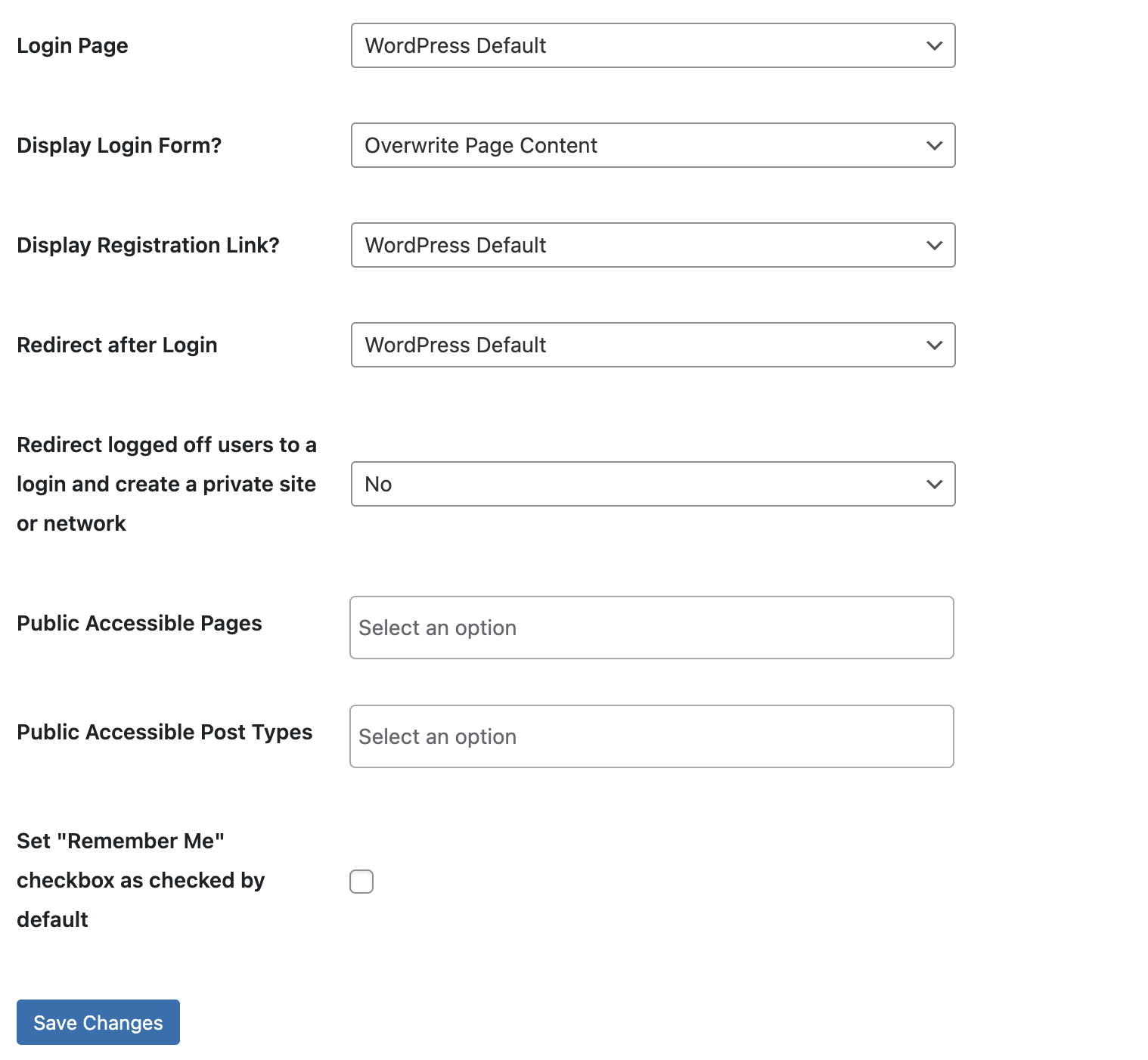
Settings Page - Settings Page in the Admin under BuddyForms/ Settings/ Custom Login 
**Login Form in the Frontend 

설치
Upload the entire plugin folder to the /wp-content/plugins/ directory or install the plugin through the WordPress plugins screen directly.
Activate the plugin through the ‘Plugins’ menu in WordPress.
Head to the ‘BuddyForms’ menu item in your admin sidebar and go to the Settings Page
FAQ
Q: Can I customize the appearance of the login form?
A: Yes, BuddyForms Custom Login allows you to style the login form to match your website’s design and branding.
Q: Can I restrict specific content to registered members only?
A: Absolutely! You have full control over which pages, posts, or custom post types should be restricted to registered users.
Q: Is it possible to create a private network with this plugin?
A: Yes, BuddyForms Custom Login enables you to transform your WordPress site into a private network by limiting access to non-registered users.
후기


기여자 & 개발자
“BuddyForms Custom Login”(은)는 오픈 소스 소프트웨어입니다. 다음의 사람들이 이 플러그인에 기여하였습니다.
기여자


자국어로 “BuddyForms Custom Login”(을)를 번역하세요.
개발에 관심이 있으십니까?
변경이력
1.1.14 – 26 Dec 2023
- Updated Freemius SDK.
- Improved plugin description.
- Tested up to WordPress 6.4.2
1.1.13 – 18 May 2023
- Tested up to WordPress 6.2.1
1.1.12 – 08 Dec 2022
- Fixed issue with login page selector.
- Fixed issue with redirect after login selector.
- Tested up to WordPress 6.1.1
1.1.11 – 28 May 2022
- Fixed vulnerability issue.
- Tested up to WordPress 6.0
1.1.10 – 17 May 2022
- Updated readme.txt
1.1.9 – 24 Mar 2022
- Added new option to use external url as redirection page.
- Tested up to WordPress 5.9
1.1.8 – 23 Sep 2021
- Added new option to set “Remember Me” checkbox as checked by default.
- Fixed validation on Public Accesibles Pages.
- Tested up with WordPress 5.8
1.1.7 – 1 Apr 2021
- Improvements on the custom login page redirection to take into account the WordPress admin email confirmation.
1.1.6 – 8 Mar 2021
- Tested up with WordPress 5.7
1.1.5 – 11 Sep 2020
- Fixed to avoid form login custom page redirection, redirect to custom page only when the user is loggin from a custom login page or wordpress default login page.
1.1.4 – 06 Jan 2020
- Fixed the login redirection for the post and contact form.
- Improved the compatibility with the setting pages of the core plugin.
- Integrated with tk scripts.
1.1.3 06. Oct. 2019
- Added support for the switching user plugin. There was an issue stopping the plugin from switching the user.
1.1.2 04. May. 2019
- Added a filter to override the lost password link
- Added the git templates
- Update the readme.txt to point to the correct plugin url to open issues or features request
- Remove WordPress default from the select. Its not needed and just confuses.
- Update the git templates to submit issues or feature requests.
1.1.1 21. Nov. 2018
- Added one extra check to make sure also pages with child pages or endpoints are recognised
1.1 20. Nov. 2018
- Added 3 new options to enable a private site or network
** Redirect logged off users to a login and create a private site or network
** Select public Accessible Pages
** Select public Accessible Post Types
1.0.1 30. Mar. 2018
- Added freemius integration
- Add banner image and thumbnail to wordpress.org assets
1.0 21. Mar. 2018
first version