
설명
Kiwi Social Share is a standalone plugin built, maintained & operated by the friendly folks over at WPKube
This is by far the best & easiest to use WordPress social media share plugin. A WordPress share plugin with custom icons built-in.
Plugin Options
- Social networks available: Facebook, Twitter, LinkedIN, Pinterest and Flint.
- Turn on/off each of them, individually.
- Great UI with intuitive & simple options.
- Built for the regular user.
- Change the style of the article bar group.
- Display the number of counts next to the social network icon.
- Enable/disable the floating bar.
- Change the shape of the floating bar’s social buttons.
- Add social identities.
- Add a “Click to tweet” button in WordPress editor.
- Google Analytics tracking.
- Four different Skins.
- The default, square style.
- The more futuristic approach, shift style.
- The friendly approach, pill (rounded corners) style.
- The eye-catching approach, leaf style (like a leaf in the wind).
- Display social icons: before content, after content or both.
- Amazing loading speed.
What’s Next?
If you like this plugin, then please consider leaving us a rating / review. This plugin is completely free and maintained by WPKube, a WordPress resource site, where you can learn from our free WordPress tutorials like how to choose the right managed WordPress hosting, how to install WordPress, choose the best shared hosting, and more.
Our other projects:
– MeridianThemes – Beautiful hand-crafted themes for WordPress
– Optin Forms – Simple and easy to use plugin for creating optin forms, works with most well know autoresponder services.
스크린샷
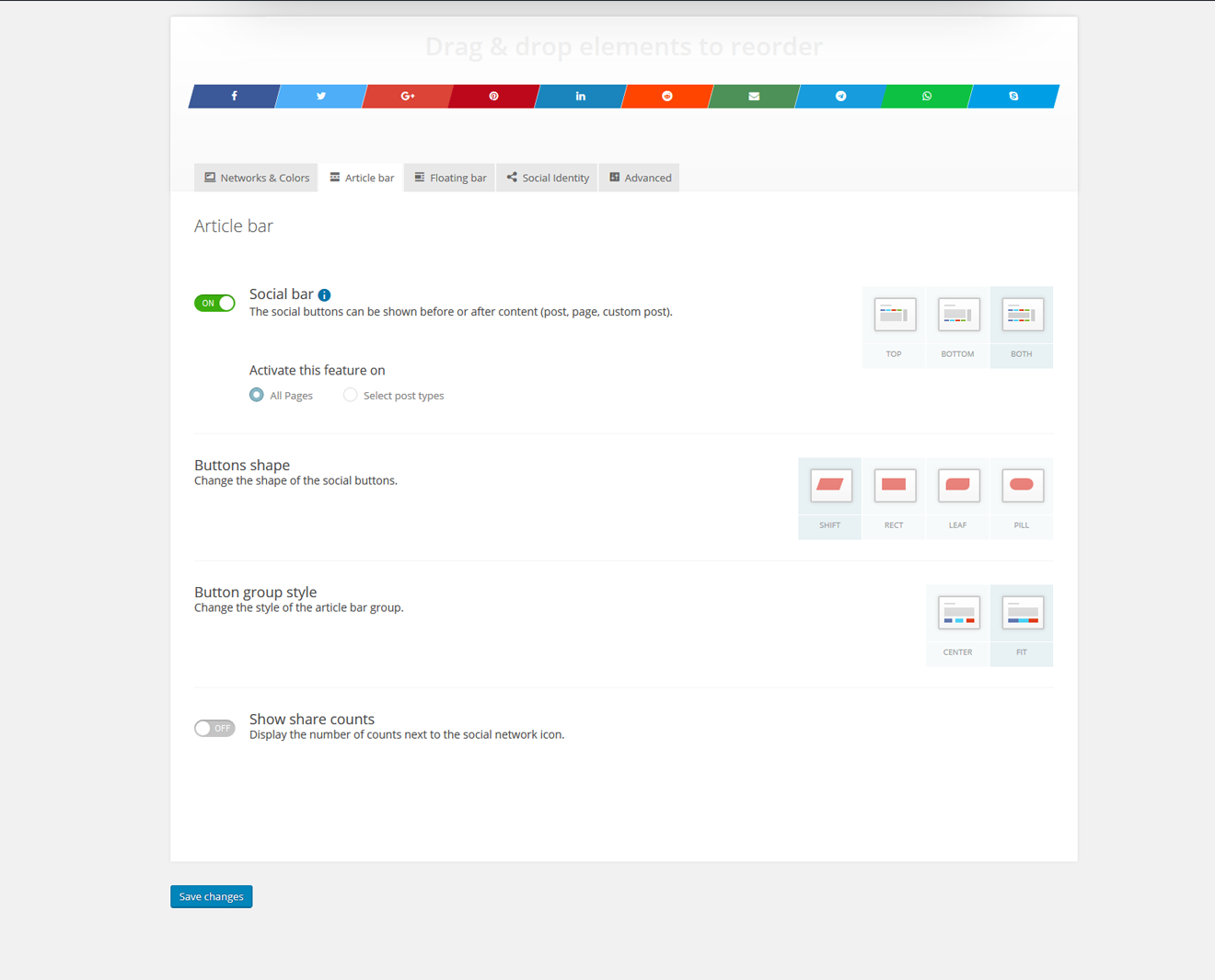
Screenshot of the back-end User Interface. All options are displayed above the fold (no scrolling, no fiddling around). Really easy to use.
설치
This section describes how to install the plugin and get it working.
- Upload the whole contents of the folder
kiwi-social-shareto the/wp-content/plugins/directory - Activate the plugin through the ‘Plugins’ menu in WordPress
- Enjoy using it 🙂
FAQ
Available filters (used for frontend rendering)
Article Bar Filters
kiwi_article_bar_list_custom_class
kiwi_before_article_bar
kiwi_before_first_article_bar_item
kiwi_after_last_article_bar_item
kiwi_after_article_bar
Floating Bar Filters
kiwi_floating_bar_list_custom_class
kiwi_before_floating_bar
kiwi_before_first_floating_bar_item
kiwi_after_last_floating_bar_item
kiwi_after_floating_bar
후기


기여자 & 개발자

변경이력
2.1.7
Fix for icons not showing in some edge cases
2.1.6
Fix for when WordPress returns a post type of NULL
2.1.5
- CMB2 is no longer used for metaboxes. Custom system is implemented
2.1.4
- Fixed issue with twitter share links being broken in some cases
2.1.3
- Fixed security issues
- Code cleanup
2.1.0
- All PRO features are now available in this version
2.0.16
- Fixes issue with “highlight to share” not working ( CSS/JS not loaded ) for some pages
2.0.15
- Facebook share counts no longer work without a Facebook Developer App (https://developers.facebook.com/apps). Options to support connection via Facebook App are added in WP Admin > Kiwi > Social Identity. The options are “Facebook App Id” and “Facebook App Secret”
2.0.14
- Remove uninstall feedback
2.0.13
- Fixed “Trying to get property ‘post_content’ when there is no id, like 404”
2.0.11
- Improve performance
- Fixed security issue
2.0.10
- Update CMB2
- Improved Admin UI
2.0.9
- Minor Fixes
2.0.8
- Added Fintel network
2.0.7
- added uninstall feedback
2.0.6
- WP 4.9 compatibility
- Remove url encode on twitter button
- WhatsApp button didn’t look alright on fit
2.0.4
- Removed box shadow in the admin window
- Changed how URLS are encoded for text
- WhatsApp icon visibility is now handled with CSS ( wp_is_mobile function would not work on websites with cache )
2.0.3
- Saving settings would cause errors on some servers
2.0.2
- Ajax request failed on license activation
2.0.1
- Minor bugs
2.0.0
- Major upgrade
1.0.4
- When checked, the Google+ icon wasn’t showing up. Fix provided via GitHub by @smartinsalmeida
1.0.3
- Increased the weight on the front-end selectors so that margin & padding are harder to get overwritten by themes. Feels like some themes don’t want to play nice
1.0.2
- Fixed a small bug where content wasn’t being returned if kiwi was turned off on posts and pages.
- Added share bar margins top/bottom.
- Fixed a small rendering bug in the back-end for images.
- Fixed a small bug where content wasn’t being returned on !is_singular() pages (archives)
1.0.1
- Replaced Kiwi Logo with Dashicons icon
- Fixed a small bug with the notifications bar overlapping the form badge
- Enhanced the way we control sortables. When you disable a radio within a sortable, that sortable gets it’s opacity lowered.
- Properly formatted JS code with PHPStorm formatting.
- Small assets/back-end/images/ re-organization. Now, social icons have been renamed and moved into their own folder.
- Slightly re-worked the sortable/draggable field to support icons. No more CSS background images
1.0.0
- Initial release