

설명
Mailster Matomo connects the Mailster Newsletter Plugin for WordPress to Matomo so you can attribute newsletter clicks to campaigns in your analytics reports.
When a subscriber clicks a same-site link in a Mailster campaign, the add-on appends Matomo-compatible campaign query arguments (pk_campaign and pk_kwd) to the click redirect URL. Matomo still accepts these legacy pk_* names for campaign reporting (alongside newer mtm_* parameters).
This plugin requires Mailster and a Matomo property (Site ID and tracker domain). It is not affiliated with Matomo or the Piwik PRO brand. For click attribution to appear in reports, your destination pages still need Matomo tracking installed on the website.
What it does
- Appends
pk_campaignandpk_kwdto same-site Mailster click redirects (exact host match with your WordPresssite_urlhost) - Lets you set default campaign name and keyword patterns, including merge tags for campaign, subscriber, and link data
- Optionally overrides those values per campaign via a Matomo Analytics metabox when Campaign based value is enabled
- Stores Site ID, tracker domain, and optional
setDomainsfor the embedded tracker snippet - Outputs the Matomo JavaScript tracker (
piwik.js/piwik.php) in the Mailster campaign web version footer when Site ID and domain are set
What it does not do
- It does not tag external (off-site) links — only redirects whose host matches your site host
- It does not switch to Matomo’s newer
mtm_*parameter names (it always writespk_campaign/pk_kwd) - It does not add an email open-tracking pixel; Mailster and Matomo handle opens separately if you configure them
- The embedded script is not a full-site Matomo install — it only loads on the Mailster campaign web version page
Merge tags you can use
Use these placeholders in the campaign name and keyword fields:
%%CAMP_ID%%, `%%CAMP_TITLE%%`, `%%CAMP_TYPE%%`, `%%CAMP_LINK%%`, `%%SUBSCRIBER_ID%%`, `%%SUBSCRIBER_EMAIL%%`, `%%SUBSCRIBER_HASH%%`, `%%LINK%%`
%%CAMP_TYPE%%resolves toautoresponderorregularbased on the campaign status- Defaults on the settings screen are
%%CAMP_TITLE%%for the campaign name and%%LINK%%for the keyword until you change them
Avoid putting personally identifiable merge tags (such as %%SUBSCRIBER_EMAIL%%) into public URLs unless you intend that data to appear in query strings and analytics.
스크린샷
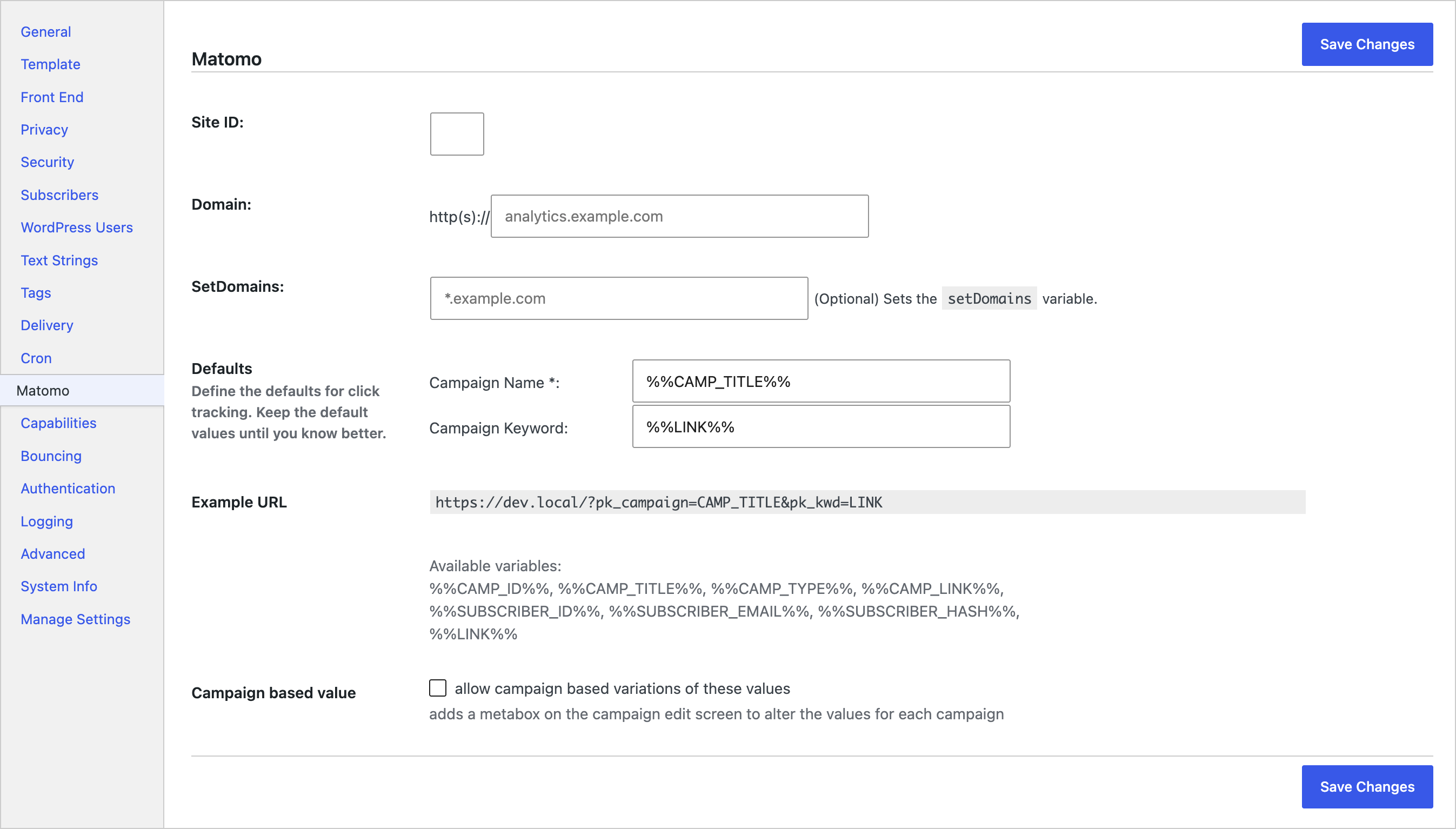
설치
- Install and activate the Mailster Newsletter Plugin for WordPress.
- Upload the entire
mailster-piwikfolder to/wp-content/plugins/, or install Mailster Matomo from Plugins Add New. - Activate Mailster Matomo.
- Open Newsletter Settings Matomo and enter your analytics Site ID and domain (the host that serves the tracker; this add-on loads
piwik.jsand posts topiwik.phpon that host). - Adjust the default campaign name and keyword patterns if needed. Optionally enable Campaign based value to edit them on each campaign screen.
- Ensure Matomo tracking is present on the pages users land on after clicking newsletter links.
- Send a campaign (or click through a tracked link) and confirm same-site destinations include
pk_campaign/pk_kwd, then check campaign reports in Matomo.
FAQ
-
What does the plugin require?
-
An active Mailster install and a Matomo property (Site ID plus the domain where the tracker is hosted). Your site pages need Matomo tracking so campaign parameters on landing URLs are recorded.
-
Does this work with Matomo?
-
Yes. Campaign attribution uses
pk_campaignandpk_kwd, which Matomo still accepts for backwards compatibility. This add-on does not output Matomo’s newermtm_*parameter names. -
Where do I configure it in Mailster?
-
Go to Newsletter Settings and open the Matomo tab. That matches Mailster’s Newsletter menu and Settings submenu.
-
Are external (off-site) links tagged?
-
No. Only click redirects whose host exactly matches your WordPress site URL host receive the campaign parameters. Links to other domains (and hosts that differ, such as a bare domain vs
www) are left unchanged. Unlike some other Mailster analytics add-ons, there is no option to tag external domains. -
Can I set different tracking values per campaign?
-
Yes. Enable Campaign based value on the Matomo settings tab. A Matomo Analytics metabox appears on the campaign edit screen so you can override the campaign name and keyword for that newsletter. Fields are read-only for finished/active campaigns (and autoresponder stats views).
-
What is the optional JavaScript tracker for?
-
When Site ID and domain are set, the add-on prints a classic Matomo
_paqsnippet (including optionalsetDomains) on the Mailster campaign web version page via Mailster’smailster_wpfooterhook. It loadspiwik.jsand usespiwik.phpas the tracker endpoint on the domain you entered. It does not replace installing Matomo on your main website. -
No. This add-on only adds campaign parameters on click redirects. Open tracking is separate (Mailster’s own open tracking, and/or a Matomo email tracking pixel if you add one yourself).
-
Where is subscriber or click data sent?
-
Campaign parameters are added to links on your site. If you configure Site ID and domain, the campaign web version page can send analytics hits to the Matomo hostname you enter. Use only a tracker endpoint you control or trust. Merge-tag values you put in
pk_campaign/pk_kwdmay appear in URLs and thus in analytics logs.
후기
이 플러그인에 대한 평가가 없습니다.
기여자 & 개발자
“Mailster Matomo”(은)는 오픈 소스 소프트웨어입니다. 다음의 사람들이 이 플러그인에 기여하였습니다.
기여자


변경이력
1.1.0
- Rename plugin branding and UI labels from Piwik to Matomo (slugs and option keys unchanged).
1.0.0
- initial release