Mortgage Calculators WP

설명

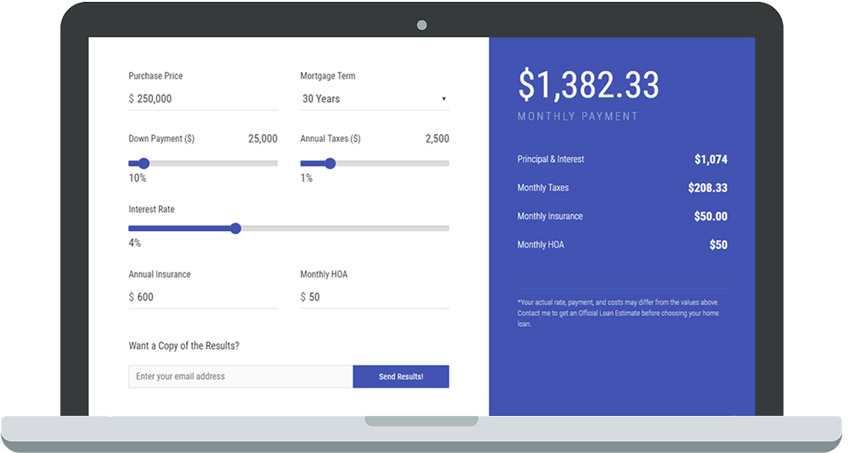
Mortgage Calculators WP is a very easy-to-use wordpress plugin built with the purpose of providing mortgage and other finance professionals with a mortgage calculator that not only delivers accurate home loan estimates, but also the ability for the users to instantly receive a free copy of those estimates via email while also providing the website owner with an email lead everytime a user requests a copy of their estimated values.

You can view a live demo of our mortgage calculators as seen on our loan officer website themes. Simply preview any of the sites provided and scroll down to view the calculator as it would appear on your website.

4 Additional Calculators & Support Available Here

스크린샷

  • Admin Settings View

  • Sample Frontend View of the Calculator

설치

  1. Upload the plugin folder to the /wp-content/plugins/ directory, or install the plugin through the WordPress plugins screen directly.
  2. Activate the plugin through the ‘Plugins’ screen in WordPress.
  3. WordPress MU Network administrators can use the Network Settings > Calculator screen to configure the plugin. Standard WP installations have the settings available under the “Calculator” menu item.
  4. Configure color and outbound email settings here from the General Settings tab.
  5. Next you can configure each of the calculator’s settings individually, save them and make sure to test to ensure everything is coming through as you desire.
  6. Once all the settings are configured you will copy the shortcode from the top of each calculator settings screen and place it on a page of your choice to show the calculator (ex. [mcwp type=”cv”])

FAQ

Is this plugin free forever?

Yes you will get the conventional calculator absolutely free forever and receive our killer support and updates on a regular basis to ensure it stays compatible with the latest version of WP.

Is the plugin available in Spanish?

Yes. As of version 1.50 we have fully translated the plugin into Spanish for all calculators.

Can I edit the look of the calculator?

Yes you can. We have provided a color picker that will change the look/feel of your calculator simply by choosing a color or placing your HEX code in and saving the settings.

How do I get the additional calculators?

  1. Please visit the Mortgage Calculators WP offical site and choose your desired license and upon completion of payment you will receive a key that you can input under the premium tab. Once activated you will receive access to the additional calculators to implement in your website.

후기

2023년 2월 27일
Used on a client website.. a beautiful interface and easy to work with.
2022년 1월 12일 답글 3개
This isn’t a rating, but I updated the plugin and now it is broken (removed the license). I emailed support in November for help on a different issue, and they never replied to me, so I hope that this will get their attention. I’ll change my rating if they support me.
2020년 7월 28일
This plugin does the job! I had a problem when I wanted to integrate the plugin twice on the same site, I reached out to support, and they pointed out the problem to me. I fixed, and it works great! The support was very quick, and very helpful. Definitely recommend this plugin.
2020년 6월 13일
If you are building a real estate website or something related, this is THE mortgage calculator to get. This is only good, modern, looking calculator out there. The setup is extremely easy and if you have any problems, the support is excellent. They will help you diagnose and fix the problem. I had a problem with some of my images going gigantic when this plugin was activated, and so I emailed the support about the issue. They replied within minutes and after diagnosing the issue, they sent two lines of code for me which completely solved my problems. Again, if you are looking for a mortgage calculator, this is it.
모든 10 평가 읽기

기여자 & 개발자

“Mortgage Calculators WP”(은)는 오픈 소스 소프트웨어입니다. 다음의 사람들이 이 플러그인에 기여하였습니다.

기여자

“Mortgage Calculators WP”(이)가 1 개 언어로 번역되었습니다. 기여해 주셔서 번역자님께 감사드립니다.

자국어로 “Mortgage Calculators WP”(을)를 번역하세요.

개발에 관심이 있으십니까?

코드 탐색하기는, SVN 저장소를 확인하시거나, 개발 기록RSS로 구독하세요.

변경이력

1.63 20260324

  • Added CSRF/nonce protection to AJAX email endpoint
  • Fixed VA funding fee logic for 1-4% down payment range
  • Fixed conventional interest rate slider not displaying percent sign
  • Fixed roundOff() ignoring precision parameter; all values round to 2 decimal places
  • Fixed implicit global variables throughout calculator JS
  • Fixed refinance calculator monthly savings truncation
  • Replaced deprecated $new_whitelist_options with $new_allowed_options
  • Fixed “Mortage” typo in admin menu (now “Mortgage”)
  • Prefixed generic function names (checksettings, body_dynamic, email_headers, etc.)
  • Admin scripts now only load on plugin settings page
  • Moved textdomain loading from after_setup_theme to init hook
  • Replaced inline wp_head style with wp_add_inline_style()
  • Changed require_once to require in shortcode views for multiple instance support
  • Added proper version strings to enqueued assets
  • Used wp_safe_redirect() instead of wp_redirect() for network options
  • Sanitized email header values with sanitize_email()
  • Added wp_kses_post() sanitization on email template message/disclaimer output
  • Fixed untranslatable strings in MHA email and RC view
  • Removed jQuery Migrate removal that could break other plugins
  • Added MCWP_VERSION constant for centralized version management

1.62 20260324

  • Updated conventional email to styled card template
  • Removed unused license stub files
  • Removed Dreamweaver _notes folders
  • Tested up to WordPress 6.9.4

1.61 20260324

  • Fixed FHA/VA tax percent slider variable typo bugs (fhva_ and vva_ prefixes)
  • Fixed conventional calculator email recipient logic never using custom email
  • Fixed wp_kses_post called on array in FHA, MHA, and RC email templates
  • Fixed VA funding fee e_rate uninitialized for 1-4% down payment range
  • Fixed refinance calculator monthly savings truncated by parseInt on locale string
  • Fixed copy-paste bug using wrong network settings option key for VA calculator
  • Fixed redirect page slug mismatch in network options update
  • Fixed typo in network options permission error message

1.60 20240402

  • Fixed security related issues

1.56 20230425

  • Split free/premium plugins so all premium users must get the latest version from our site

1.53 20211122

  • Security patch for the color picker

1.50 2020019

  • Added new refi and affordability calculators along with an overall code cleanup and consolidation of functions and Spanish translation

1.45 2020107

  • Fix FHA field interest rate field

1.44 20191210

  • Field tweaks and subsite(WordPress MU) ajax errors.

1.40 20191210

  • Add Accessibility Features

1.39 20191031

  • Fix percentage values

1.38 20190729

  • Bring label changes to results side

1.37 20190729

  • VA calculation fixes

1.36.2 20190312

  • Fix additional numberformatter instance in functions

1.36 20190312

  • Fix NaN value for properties in the millions

1.35 20190227

  • Fixing currency dependency issue with NumberFormatter

1.34 20190202

  • Minor css class fixes for styling consistency

1.33 20190102

  • Added additional currencies and made insurance/hoa fields optional

1.32 20190102

  • Fixed CSS issues with Visual Composer

1.2 20181102

  • Added color picker. Cleaned up settings panel. Added custom disclaimers to be configured per calculator.

1.1 20181025

  • Fixed CSS Issue w/ Bootstrap Tooltips

1.0 20180930

  • First Version of Mortgage Calculators WP