
설명
Just a simple OAuth2 plugin so you can login to your WordPress site from Nextcloud, there is an option to add a login button on the WordPress login page and a shortcode so you can generate your own button. You can set what Nextcloud user groups get mapped to what WordPress user role and what page the users get redirected to on successful login. If you’re using the External sites app in Nextcloud you can set the URL as www.example.com/wp-login.php?nc-sso=redirect and it will auto redirect the user to your Nextcloud install to login without them having to click the login button.
The plugin has been tested with Nextcloud 20.0.14 to 24.0.2.
If you have any problems please reach out on the support forum or directly here.
Note this isn’t an official plugin from Nextcloud, it’s just from someone that uses it with WordPress alot.
스크린샷

Options Page 
Options Page Step 4 User Actions Register 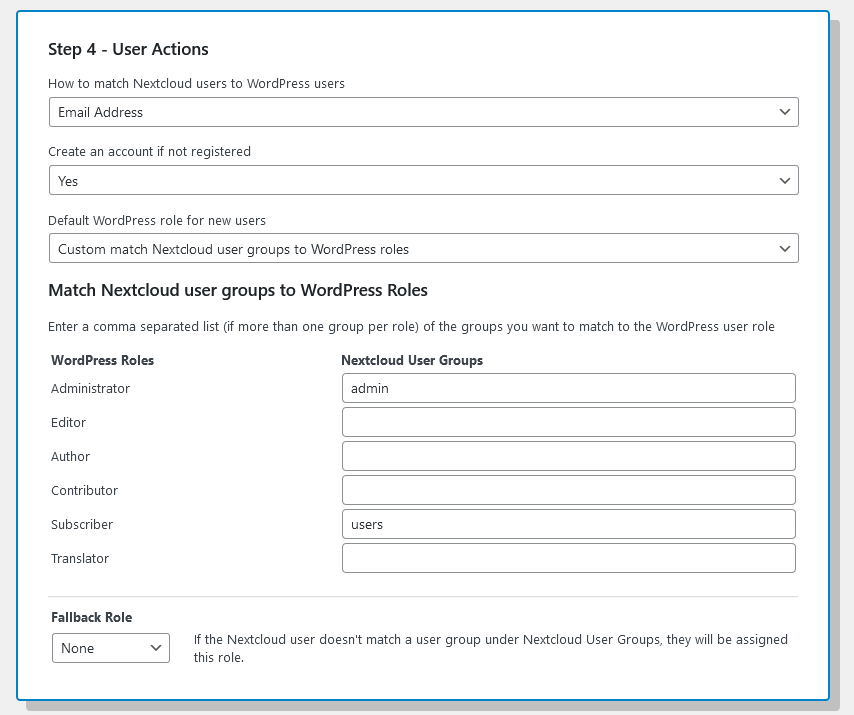
Options Page Step 4 User Actions Custom 
Login Page
설치
Install Tim’s Nextcloud SSO OAuth2 either via the WordPress.org plugin directory, or by uploading the files to your server.
Activate the plugin through the ‘Plugins’ menu in WordPress.
Once Active go to Settings -> Nextcloud OAuth2 in the WordPress admin area and follow the setup instructions.
FAQ
-
How do I set the plugin up?
-
If you go to the settings page (Settings -> Nextcloud OAuth2) it gives you a simple breakdown of what’s needed to setup the OAuth2 connection with your Nextcloud install.
- Login to your Nextcloud install
- Go to Settings -> Security
- Then under “OAuth 2.0 clients” add a new client
- Set the name to anything you like and the redirect URL to your site URL
- Then copy the Client Identifier and Secret keys in the form
-
What’s my Nextcloud URL?
-
This is the URL that you have installed Nextcloud at e.g. https://cloud.example.com/, if you have installed it in a subfolder, please include that e.g. https://example.com/cloud/. If your Nextcloud URLs look like https://example.com/index.php/apps/dashboard/ then please include the /index.php/ in the URL e.g. https://example.com/index.php/.
-
Where is the settings page?
-
It’s under Settings and called “Nextcloud OAuth2”
-
Yes, it’s [nextcloud_login class=”btn”]button text[/nextcloud_login] and there is an option to enable a button on the WordPress login screen, or you can use the URL www.example.com/wp-login.php?nc-sso=redirect
-
Are there any filters available so I can make my own changes?
-
Yes, there is:
tims_nso_authorize_url which is the Nextcloud URL the user gets redirected to, and is also the last hook before they go off to your install of Nextcloud, example:
add_filter('tims_nso_nextcloud_login_button_url', 'custom_function_name_one');
function custom_function_name_one($authorize_url){
    // custom code
    return $authorize_url;
}
tims_nso_successful_login_redirect which is the URL the user goes to after successfully coming back from Nextcloud, example:
add_filter('tims_nso_successful_login_redirect', 'custom_function_name_two');
function custom_function_name_two($redirect_url){
    // custom code
    return $redirect_url;
}
tims_nso_nextcloud_login_button_url which is the URL the login button and shortcode login button uses, example:
add_filter('tims_nso_nextcloud_login_button_url', 'custom_function_name_three');
function custom_function_name_three($url){
    // custom code
    return $url;
}
tims_nso_nextcloud_user_matched which is the WordPress WP_User (Object) and the user data (Object) from Nextcloud for the successful matched user, example:
add_filter('tims_nso_nextcloud_user_matched', 'custom_function_name_four', 10, 2); function custom_function_name_four($user,$nextcloud){ // custom code return $user; } -
I’m getting a “Nextcloud server returned but with an invalid state for this session” error
-
Before you go off to Nextcloud the site needs to store a unique key to verify the response when you come back, if this key is removed before you come back this is when you see this message.
By default, the key is stored in the PHP session but if you’re having trouble you can go into the plugin options and set the “Temp Key Storage Type” to use a Cookie and this should solve the issue.
-
I’m stuck on my Nextcloud install when I click “Grant access”, it doesn’t do anything?
-
If you check the JS console log and see a message like “Refused to send form data to … because it violates the following Content Security Policy directive….” then you need to edit your Nextcloud config file, usually located at nextcloud/config/config.php and add the line: ‘overwriteprotocol’ => ‘https’,
-
Is there a paid version?
-
Nope, just a simple free plugin to enable you to login to your site with Nextcloud.
-
I need help
-
If you have any problems please reach out on the support forum or directly here. I’ll try my best to help.
후기


기여자 & 개발자

자국어로 “Tim's Nextcloud SSO OAuth2”(을)를 번역하세요.
개발에 관심이 있으십니까?
변경이력
2.0.1
Release Date: 1st July 2022
- Added some filter hooks
2.0.0
Release Date: 27th June 2022
- Revamped the options page to be more visually pleasing
- Added the option to redirect the user back to where they were
- The shortcode login button is now hidden if the user is already logged in
- Debug log contains more information
1.9
Release Date: 23rd May 2022
- Organised the options page
- Added a button to test the Nextcloud URL
- Added some filter hooks
1.8
Release Date: 19th May 2022
- Added additional checks when entering the Nextcloud URL
1.7
Release Date: 6th May 2022
- Updated compatibility with WordPress 6.1 and Nextcloud 24.0.0
- Added some more FAQs
- Made an error message more descriptive
1.6
Release Date: 18th March 2022
- Made improvements to the way session data is stored when going between WordPress and Nextcloud
1.5
Release Date: 17th March 2022
- Built in an option to store unique keys that are needed to verify the response back from Nextcloud as a PHP session or Cookie.
1.4
Release Date: 17th March 2022
- Made improvements to the way session data is stored when going between WordPress and Nextcloud
- Tested compatibility with WordPress 5.9.3
1.3
Release Date: 25th February 2022
- Updated to be compatible with older Nextcloud installs
- Logs more useful information to debug file when enabled
1.2
Release Date: 25th February 2022
- Fixed issues with URLs that include /index.php/
1.1
Release Date: 25th February 2022
- Added a new option to log debug information to a file
1.0
Release Date: 11th February 2022
- Initial release.