This plugin adds a custom field in the checkout page to ask your customers where they heard about your store.
This plugin also offers an “Other” field where your customer can provide a specific answer in a separate textbox.
Features:
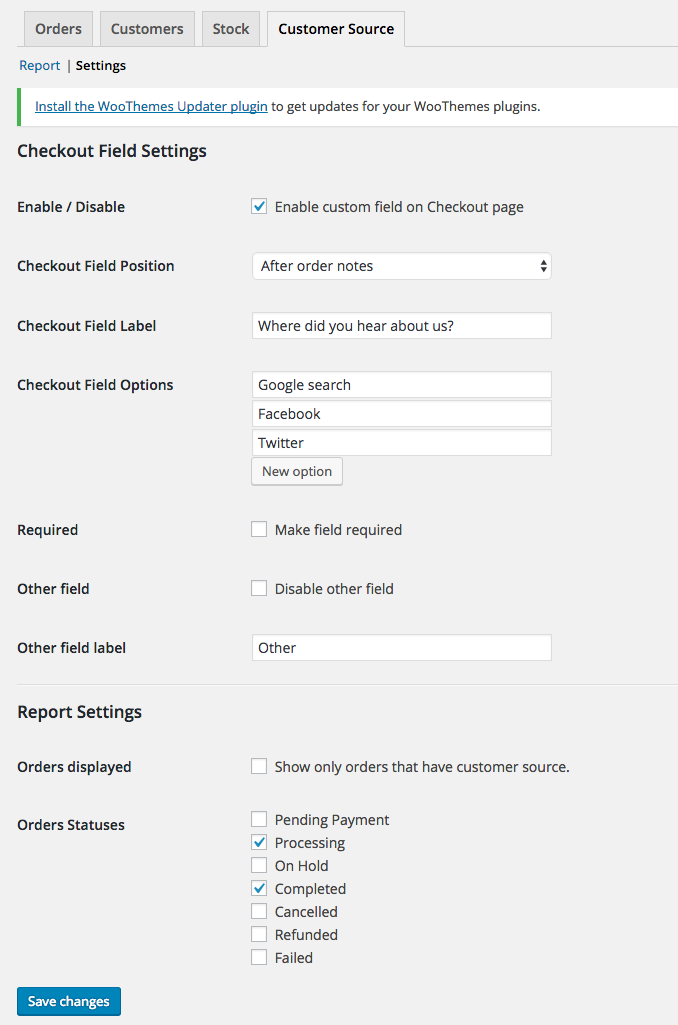
Easily change the labels and choices for the custom field in the checkout page.
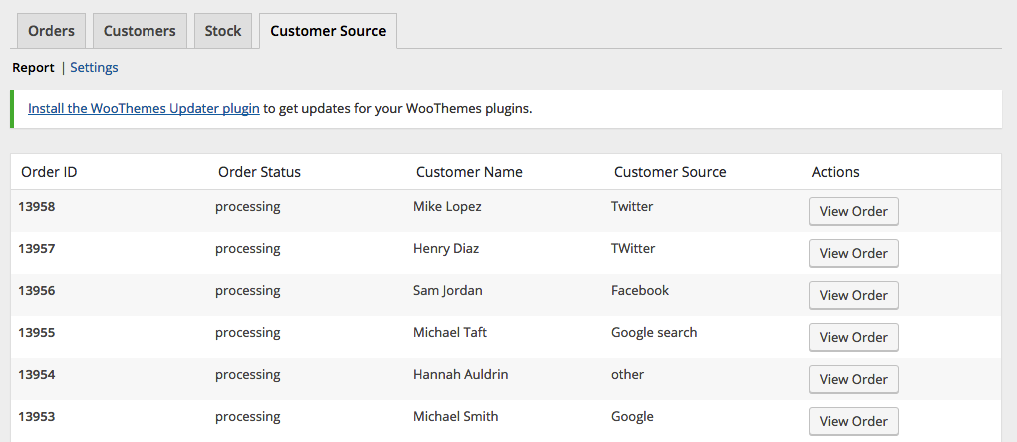
View reports on the “Reports” section in WooCommerce.
Enable/disable the custom field to be required on checkout.
Enable/disable the “Other” field.
Modify order statuses you want to include in the reports.
Export Orders with Customer Source field
스크린샷
The custom field in action on the checkout page.
The custom field value displayed on the order edit page.
Report page.
Settings page.
설치
Install via the WordPress Dashboard:
Login to your WordPress Dashboard.
Navigate to Plugins, and select “Add New” to go to the “Add Plugins” page.
In the right side, enter “Where Did You Hear About Us Checkout Field for WooCommerce” in the search input bar, and press Enter.
Click install, and wait for the plugin to download. Once done, activate the plugin.
Install via FTP:
Extract the zip file, login using your ftp client, and upload the storefront-site-logo folder to your /wp-content/plugins/ directory
Login to your WordPress Dashboard.
Go to “Plugins” and activate “Where Did You Hear About Us Checkout Field for WooCommerce” plugin.
FAQ
Where can I find the report page?
You can find the report page by navigating to WooCommerce > Reports and click on the “Customer Source” tab.
Where can I find the settings?
You can find the settings page by navigating to WooCommerce > Reports and click on the “Customer Source” tab, and then click on the “Settings” link on the sub-navigation.
No mess, no fuss, straight-forward plugin. Was up and running in around 10 minutes. It's great that we can now ascertain how people found our site when going through the checkout process. Awesome stuff! 🙂
Great plugin, works fine. One suggestion:
Currently the line "Other" is not translated in the dropdown-menu (only in the field label).. To fix: on wc-customer-source.php, line 589, please change the text-domain from woocommerce-admin to woocommerce, and it will work flawlessly.
First of all, I would like to thank you for making this plug-in available to the public. I think it is an simple and elegant solution.
There is a few questions that raised for me after giving this a try and reading the source code.
In your report, you are directly accessing WooCommerce properties which is considered bad practice and will actually throw a lot of notices in the admin area ("doing it wrong"). Instead of $order->billing_first_name you should use $order->get_billing_first_name() and so forth. This will ensure the plug-in to continue working if WooCommerce decides to change these properties. Apparently this is also relevant for caching.
You are using woocommerce_form_field( ) to build the select field. Then further down, you are building the field yourself. Is there a reasoning behind it? (I'm not saying it is not legit, just curious if this was done on purpose)
You are defining your class as "final" which means that it can not be extended and methods can not be altered. While I'm sure this has a reasoning, it defeats the purpose of OOP.
Lastly, In terms of transliteration, there's a bunch of strings which are unnecessary to include into your textdomain, such as Report, Setting, Export, Customer Name, Order Status etc. Instead you may use WooCommerce's or WordPress' textdomain:
__( 'Customer Name', 'woocommerce-admin' ),
__( 'Orders', 'woocommerce-admin' ),
__( 'Other', 'woocommerce-admin' )
__( 'Other', 'woocommerce' )
__( 'Select an option…', 'woocommerce' )
__( 'Customer', 'woocommerce' )
I don't fault you for this, in fact I'm seeing this a lot of times in a lot of Plug-Ins but I think with a bit of research in our IDE we can often find strings which already have been included in core or contributed plug-ins. While we can't always depend on other plugins in our translation, it is the case here because we are extending WooCommerce functionality.This way it will be easier to maintain and more languages will be supported in the first place.
I hope you will find this review helpful. Thanks again for sharing your code.