설명
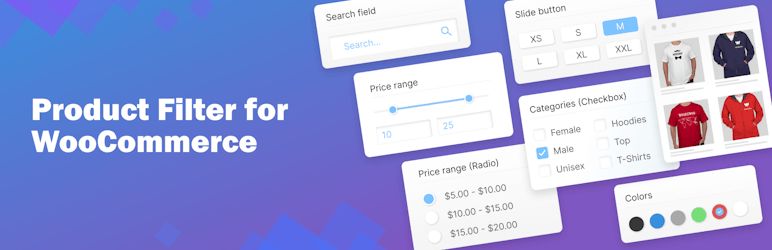
WooCommerce Product Filter 플러그인은 고객이 가격, 카테고리, 태그, 분류, 속성 등으로 검색을 세분화할 수 있도록 하여 여러분의 스토어를 향상시켜 줍니다.
완전히 사용자 지정 가능하며 Elementor와 100% 호환되어 필터링 옵션에 대한 완전한 제어가 가능합니다.
우커머스 제품 필터 주요 기능
Comprehensive Filtering
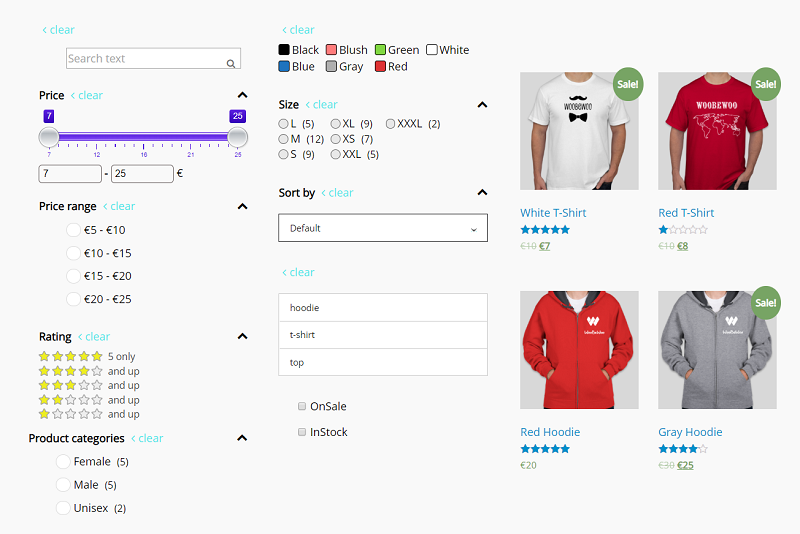
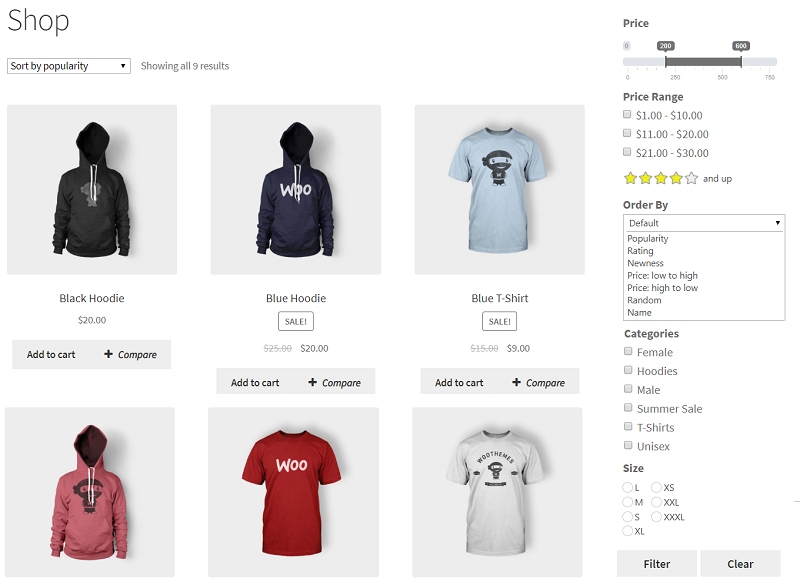
let customers filter products by: Price, Price range, Categories, Tags, Author, Featured, On Sale, In Stock, Rating, Search by text**, Attribute filters.
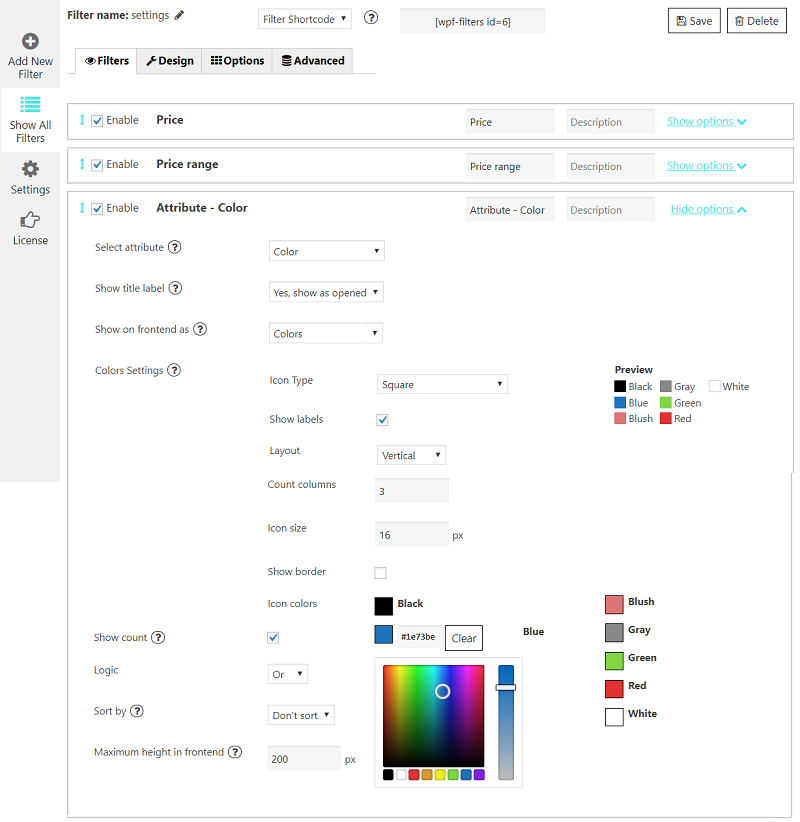
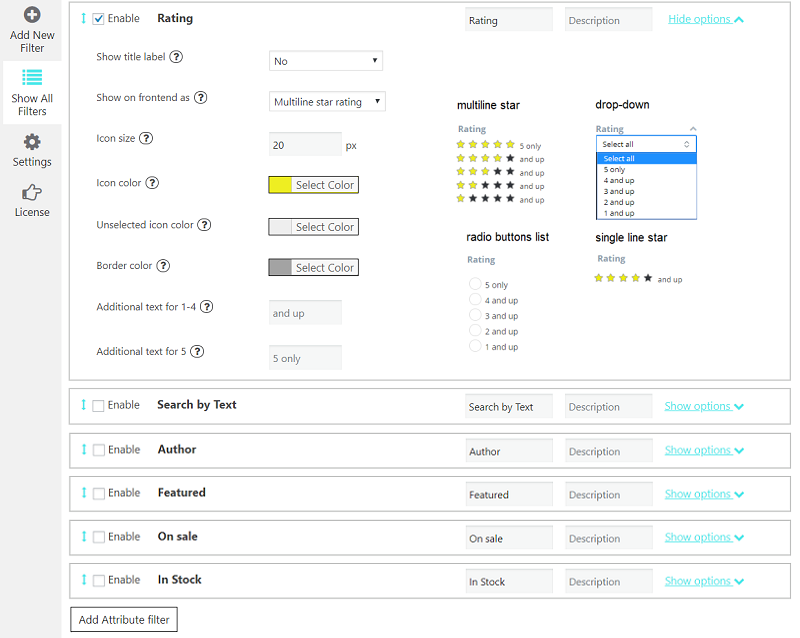
유연한 디스플레이 옵션은 사용자 선호도와 상점의 디자인에 맞춰 다양한 형식으로 필터를 제공합니다. 이러한 옵션에는 라디오 버튼 목록(단일 선택), 드롭다운(단일 선택), 체크박스 목록(다중 선택)** 및 속성 필터(색상, 크기, 평점)**에 대한 아이콘이 포함됩니다.
AJAX live search
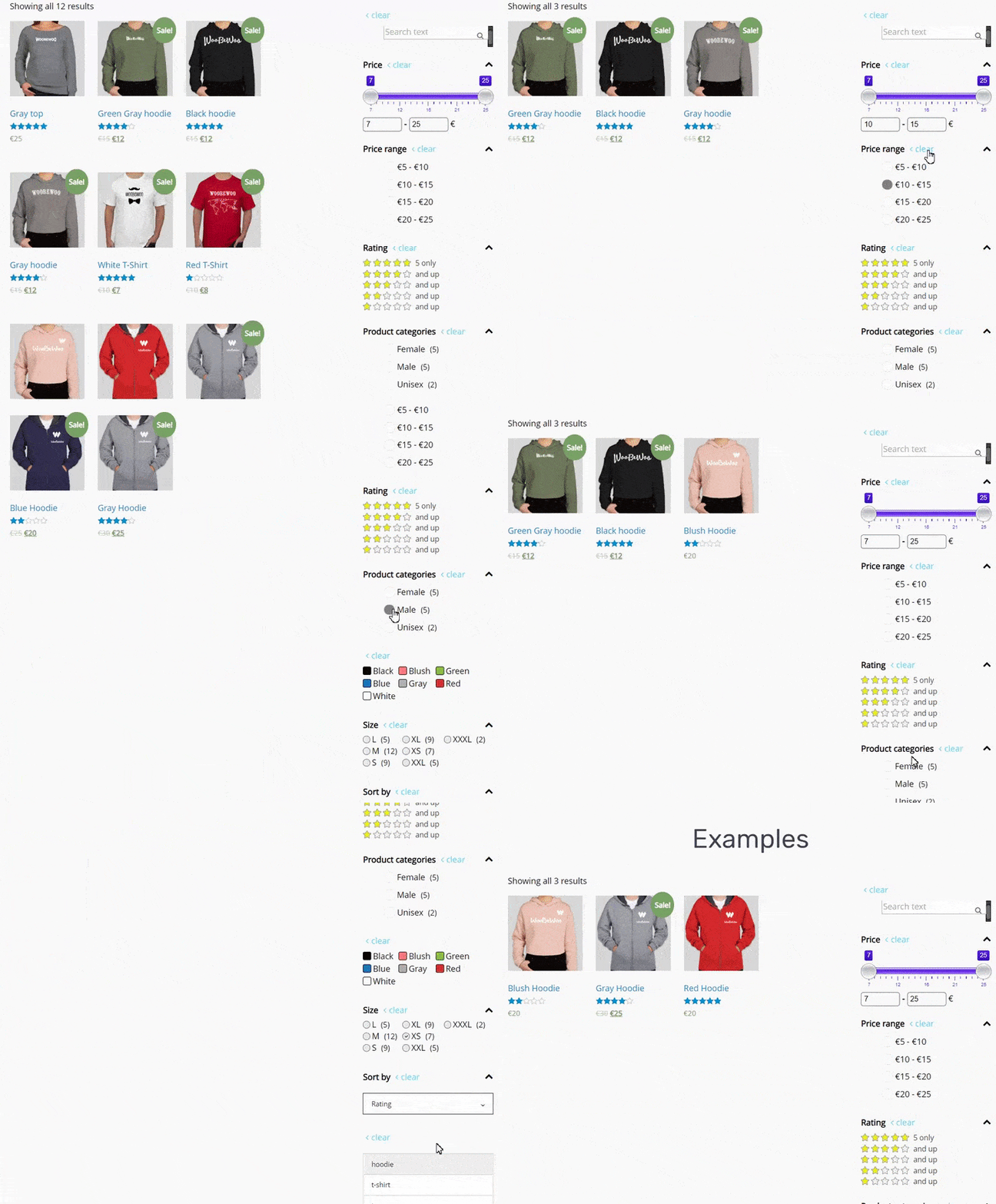
Enable instant results without page reloads for a faster shopping with AJAX live search. AJAX search provides instant filtering results without the need to reload the page. This feature can be configured to activate immediately after a user selects their desired filter options and clicks the filter button, making product searches faster and more intuitive.
Elementor Integration
WooCommerce Product Filter compatible with Elementor. Seamlessly create and customize filters using Elementor’s interface.
All features of the WooCommerce Product Filter by WBW are accessible within the Elementor tab, providing a streamlined workflow for page building.
시작하는 데 도움이 되도록, WBW의 WooCommerce 제품 필터를 설정하는 과정을 안내하는 포괄적인 비디오 튜토리얼이 제공됩니다. 이를 통해 온라인 스토어의 기능성과 사용자 경험을 최대한 향상시킬 수 있습니다.
제품 필터는 고객이 특정 방식으로 제품을 볼 수 있게 하고 필요한 항목을 쉽게 찾을 수 있도록 해주는 핵심 요소입니다.
통계
WBW의 상품 필터는 글로벌 비즈니스 성장을 지원하기 위해 데이터를 수집하고 분석하기 쉽게 해주는 자세한 필터 통계 섹션을 제공합니다. 구매자가 제품을 필터링하고 검색하는 방법에 대한 정보를 수집하여 이를 비즈니스 솔루션으로 전환하십시오.
실시간 미리보기를 사용하면 설정을 변경하는 즉시 결과가 패널에 표시됩니다.
제품 정렬을 위한 다양한 옵션
WooCommerce 용 제품 검색 플러그인은 제품을 인기도, 평점, 가격, 최신순, 알파벳 오름차순 또는 내림차순으로 정렬할 수 있도록 합니다.
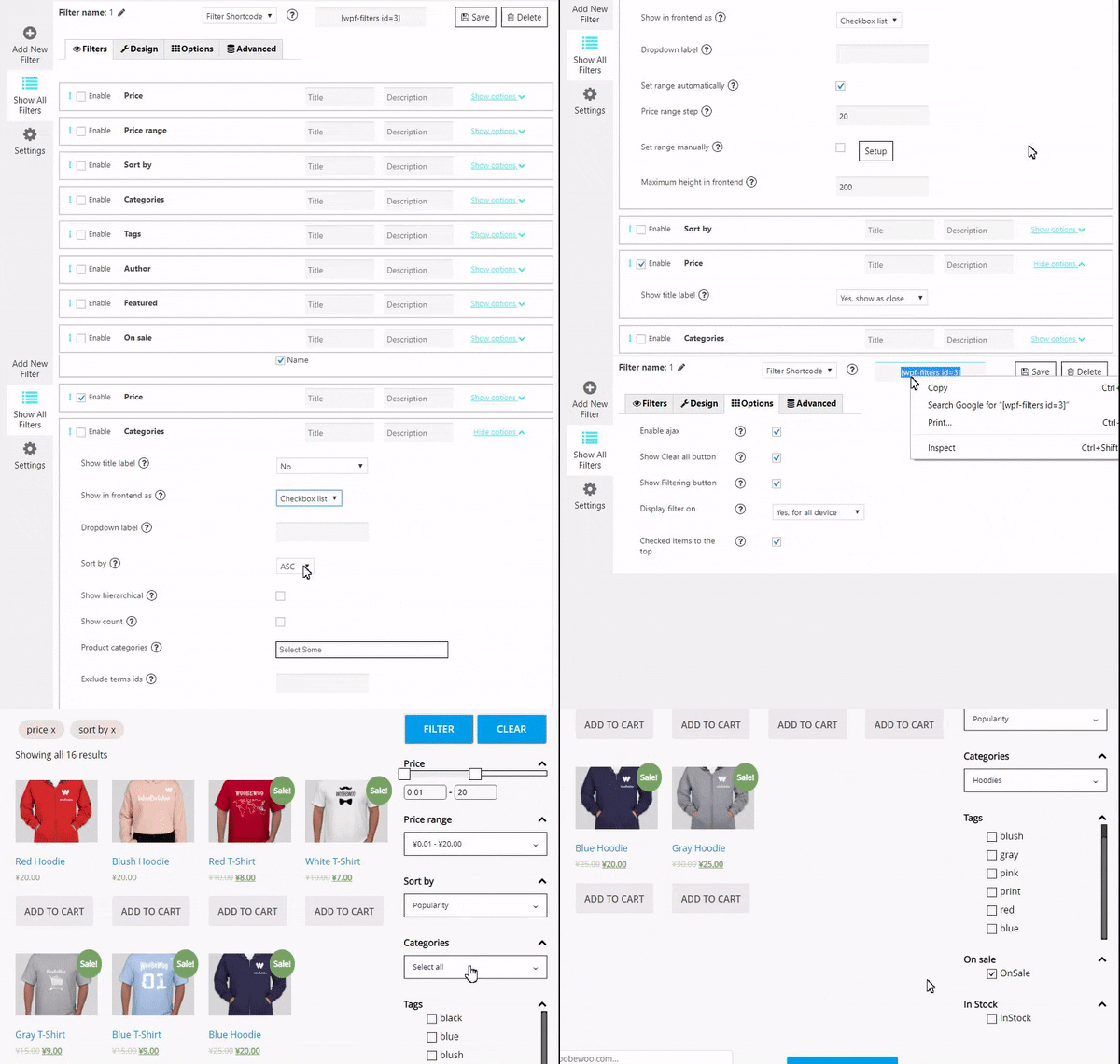
Create new product filters in a few clicks
Easy to customize and set up. Just add a filter to every page using a widget or shortcodes.
가격 필터 디자인
스킨의 변형: 기본, 평면, 크기 큼, 현대적, 날카로움, 원형, 사각형. 디자인을 위한 사용자 지정 설정: 색상, 기호 위치, 통화 코드 또는 기호, 입력 필드.
고정 단계 값으로 자동 가격 범위 설정
값을 수동으로 조정하고 각 단계의 정확한 값을 지정하세요.
개수 표시 및 선택한 필터로 제품 다시 세기
선택한 필터를 기준으로 제품을 다시 세어 필터 결과와 일치하는 정확한 제품 수를 표시합니다.
Fully responsive
The filter looks and works properly on different devices particularly mobile phones and tablets as well as desktops and laptops.
WooCommerce 제품 필터 플러그인에 대한 지원 및 제안
질문이 있으면 지원 포럼에 문의하시거나, 직접 저희에게 연락하십시오.
스크린샷
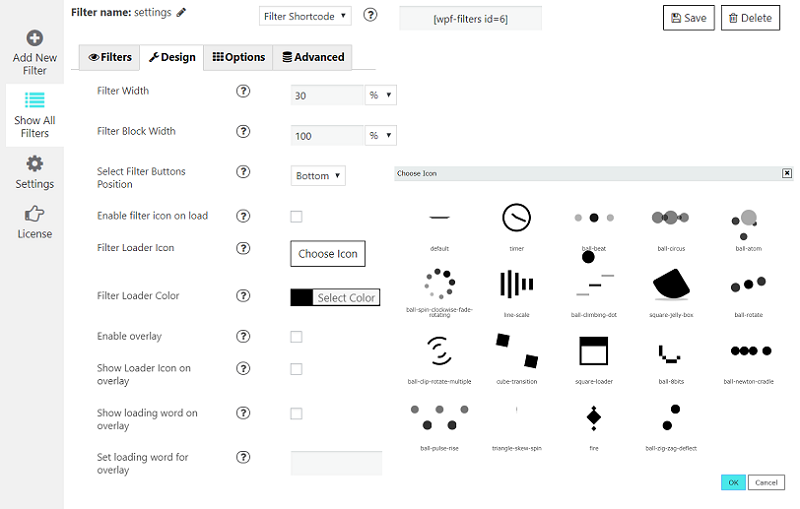
블록
이 플러그인은 1개의 블록을 제공합니다.
- WBW Product Filter
설치
a) FTP를 통해 WooCommerce Product Filter by WBW 플러그인의 다운로드 zip 아카이브 파일 추출 플러그인 폴더 복사 FTP를 통해 \wp-content\plugins\ 폴더 열기 여기에 플러그인 폴더 붙여넣기 관리자 패널로 이동 => 플러그인 => WooCommerce Product Filter by WBW 활성화 클릭
B) 관리자 영역을 통한 직접 업로드 플러그인이 포함된 다운로드 ZIP 아카이브 관리자 패널로 이동 => 플러그인 => 새로 추가 플러그인이 포함된 아카이브를 선택하고 업로드 설치가 성공적으로 완료되었다는 알림을 받을 때까지 기다립니다 활성화 버튼을 누르세요
C) 워드프레스 저장소를 통해 관리자 패널로 이동하여 => 플러그인 => 새로 추가로 이동합니다. 검색 필드에 “WooCommerce Filter Plugin by WBW”를 입력하세요. 목록에서 저희 플러그인을 선택하고 “설치”를 클릭합니다. 설치가 성공적으로 완료되었다는 알림이 나타날 때까지 기다립니다. 활성화 버튼을 누르세요.
FAQ
-
내 웹사이트에 제품 필터를 생성하는 방법은 무엇인가요?
-
모든 필요한 옵션이 하나의 플러그인에 포함되어 있습니다. 이 설명을 따라 지금부터 사용해 보실 수 있습니다. 필요한 설정을 하고 필터 플러그인을 온라인 스토어에 추가하는 것은 매우 쉽습니다. 설치와 플러그인 설정을 관리하려면, 튜토리얼 주요 설정을 확인하세요.
-
어떤 기준으로 정렬할 수 있나요?
-
이제 결과를 인기도, 평점, 최신순, 가격 오름차순 및 내림차순, 무작위, 이름순, 또는 기본 순서로 정렬할 수 있습니다.
-
각 필터에 대해 사용 가능한 설정은 무엇인가요?
-
필터의 유형과 구체성에 따라 구성할 수 있습니다:
- 필터 제목 및 설명.
- Way to display a filter label on the page: no label, show as close/opened.
- 유형: 체크박스 목록/드롭다운, 여러 드롭다운 또는 아이콘.
- 드롭다운 레이블. 드롭다운 첫 번째 옵션 텍스트 설정.
- 검색 및 더보기 표시.
-
스토어에 제품 필터를 추가하는 방법
-
After creating the filter you can add a filer it in 2 ways: with shortcode and PHP code ( you can find them under the settings tab) or add WBW Product Filter widget.
-
쇼트코드 입력
쇼트코드를 복사하여 웹사이트 콘텐츠에 붙여 넣으세요. Product Filter 플러그인은 이 필터에서 조정한 설정을 사용하여 적절한 게시물/페이지에 생성한 필터를 표시합니다. -
PHP 코드 필터링
PHP 코드는 페이지 코드의 어느 위치에나 삽입할 수 있으며, 예를 들어 페이지의 헤더나 푸터에서 정확하게 해당 위치에 표시됩니다. -
디스플레이 위젯
만약 인터넷 스토어 사이드바에서 제품 필터를 사용 중이라면, 제품 필터 위젯도 포함할 수 있습니다.
사이드바에 제품 필터를 표시하려면, WP 관리자 > 테마 디자인 > 위젯으로 이동하세요. 사이드바 드롭다운 옵션을 확장한 후 필터 위젯을 드래그 앤 드롭합니다. 표시할 필터를 선택하고 저장하십시오.
-
-
제품 필터 플러그인은 반응형인가요?
-
WooCommerce 제품 필터는 완벽하게 호환되고 반응형입니다! 플러그인은 태블릿이나 휴대전화에서 완벽하게 작동하고 표시되어, 고객이 모든 기기에서 쇼핑을 즐기고 구매하기에 쉽고 편리합니다.
-
제가 제품 필터가 왜 필요한가요?
-
표준 사이트에서는 고객이 제품을 찾기 위해 많은 페이지와 링크를 스크롤해야 합니다. 이는 지치고 시간이 많이 소요되는 과정이며, 이때 제품 필터링 기능이 필요합니다. 이 기능을 통해 사용자는 다양한 특성을 조정하여 제품으로의 경로를 찾을 수 있습니다.
You can read about How to make the filtering works in the best way
and find the tips Where to place a filter bar, how to display filters, how to present the most relative filters and not overload, customers. -
내 WooCommerce 제품 필터 플러그인이 작동하지 않나요?
-
If you have problems with the work of plugin or something is not working as it should follow these steps:
* Test the plugin with a WordPress default theme, to be sure that the error is not caused by the theme you are currently using.
* Deactivate all plugins you are using and check if the problem is still occurring.
* Ensure that plugin version, theme version, and WordPress are updated and the problem has not already been solved in a later plugin update.
If none of this advice helps you, contact us via support form on our websiteand describe your problem. -
WooCommerce 제품 필터 플러그인이 내 언어로 제공되지 않습니다. 어떻게 해야 하나요?
-
플러그인을 귀하의 언어로 번역하는 데 도움을 주시면 플러그인의 PRO 버전을 출시 즉시 무료로 제공받을 수 있습니다. 이 방법이 너무 복잡하다고 느껴지시면 요청을 보내주시면 WBW Filter 플러그인이 귀하의 로케일에 맞춰 사용 가능해지는 즉시 알려드리겠습니다.
-
Where do I report security bugs found in this plugin?
-
Please report security bugs found in the source code of the plugin through the Patchstack Vulnerability Disclosure Program. The Patchstack team will assist you with verification, CVE assignment, and notify the developers of this plugin.
-
External Services
-
This plugin connects to an external server provided by WooBewoo (woobewoo.com) to handle the following admin-side forms. No data is ever sent automatically — these requests only occur when an administrator explicitly submits one of the forms below from within the WordPress admin panel.
Contact Us form: Sends the administrator’s name, email address, subject, message, site URL, and plugin version to woobewoo.com.
Subscribe form: Sends the administrator’s email address and site URL to woobewoo.com.
Rating form: Sends the administrator’s email address, rating score, feedback message, and site URL to woobewoo.com.Terms of Service | Privacy Policy
This plugin may communicate with the following third-party services:
- Google Fonts (https://fonts.googleapis.com) — Loaded only when a Google Font is explicitly selected in the plugin’s design settings. No data is sent to Google; the request is a standard CSS font-stylesheet fetch. Google Privacy Policy.
후기


기여자 & 개발자
“Product Filter for WooCommerce by WBW”(은)는 오픈 소스 소프트웨어입니다. 다음의 사람들이 이 플러그인에 기여하였습니다.
기여자
변경이력
3.4.8 – 30/10/2026
- Fix – Security – Moved AJAX nonce verification before request processing.
3.4.7 – 20/10/2026
- Fix – Security – Improved output escaping and AJAX response handling in the frontend filter request.
- Fix – Security – Fixed an unauthenticated information disclosure vulnerability in the frontend product query.
- Fix – Security – Fixed an SQL injection vulnerability in product filters.
- Fix – Improved temporary table creation and SQL query handling.
- Fix – Fixed filter parameters not being removed from the URL when clearing filters.
- Fix – Fixed the default multi-select list spacing.
- Dev – Added
JSON_HEX_TAG,JSON_HEX_AMP,JSON_HEX_APOSandJSON_HEX_QUOTflags toWooBeWoo_PF_Response::ajaxExec(). - WC tested up to: 11.2.
3.4.6 – 06/10/2026
- Fix – Fixed PRO “Content” options (selected filters, category slugs in URL, synchronization, scroll, one filter open, view more) being reset on save.
- Fix – Fixed
[wpf-selected-filters]shortcode displaying nothing. - Fix – Fixed AJAX filtering error and lost filter blocks when a filter setting contains a quote or backslash.
- Fix – Fixed empty product grid on filtered categories in “Subcategories” display mode.
- Fix – Fixed filtering not working when the page URL contains “thrive” or “_preview”.
- Fix – Fixed missing PRO styles and Google fonts when the Free and PRO versions differ.
- Fix – Fixed PRO modules staying disabled after an update on licensed sites.
- Fix – Fixed full re-index not recalculating the value counts.
- Fix – Fixed indexing staying locked for 20 minutes after a failed run.
- Fix – WPML/Polylang – Filter strings are no longer registered on every page view.
- Fix – WPML/Polylang – Fixed filter labels showing the translation of another label.
- Fix – Custom CSS/JS – Fixed HTML inside strings being removed.
- Fix – Security – Escaped “No products found” text.
- Fix – Security – Restricted product query arguments sent from the browser.
- Fix – SVG icons not displaying correctly in filter items.
- Fix – Fixed the default multi-select checkbox style.
- Dev – Added notice when the PRO version is not compatible.
3.4.5 – 21/09/2026
- Fix – Fixed checkbox checked state style issue.
- Dev – Removed
!importantfrom button styles.
3.4.4 – 09/09/2026
- Fix – Fixed fatal error when term data is returned as an object.
3.4.3 – 08/09/2026
- Fix – Filter – Appearance – Blocks – Fixed checkbox border issue.
- Fix – Fixed 404 error when paginating filtered results with multiple values.
- Fix – Security – Fixed potential JavaScript injection through the filter ID parameter.
- Fix – Fixed “Filter” and “Clear” text translation.
- Dev – Security – Escaped custom CSS output.
- WC tested up to: 11.1.
3.4.2 – 01/09/2026
- Fix – Fixed fatal error caused by the missing
class-woobewoo-pf-mod-installer.phpfile.
3.4.1 – 01/09/2026
- Dev – Renamed AJAX object.
3.4.0 – 31/08/2026
- Dev – Updated checkbox border color.
- Dev – Fixed “Filter” text translation.
- Dev – Security – Escaped shortcode output.
- Dev – Prefixed PHP class names with
WooBeWoo_PF_. - Dev – Prefixed class file names with
class-woobewoo-pf-. - Dev – Code refactoring.
- Tested up to: 7.1.
3.3.1 – 13/08/2026
- Fix – Fixed WPML translation issues.
- Dev – Fixed Plugin Check OutputNotEscaped warnings.
3.3.0 – 12/08/2026
- Fix – Fixed subcategories filter bug on page load.
- Fix – Fixed Brizy builder pagination reset issue.
- Fix – “Creation of dynamic property is deprecated” notice fixed.
- Fix – Fixed attribute filter selection issue.
- Fix – Fixed admin notice dismiss permissions.
- Dev – Replaced outdated library
chosenwithtom-select. - Dev – Removed Mobile Detect library and replaced it with
wp_is_mobile(). - Dev – Removed promo, pages, mail modules from the plugin.
- Dev – Added plugin prefix to CSS/JavaScript handles, AJAX action/object.
- Dev – Improved coding standards and code cleaned up.
- Dev – Code refactoring.
- WC tested up to: 11.0.
3.1.8 – 01/06/2026
- Fix – Fixed filter not working with Brizy products widget.
- Fix – Fixed Brizy editor shortcode render issue.
- Fix – Security – Fixed SQL injection vulnerability.
- Fix – Fixed collapse toggle icon rendering.
- Fix – Fixed filtered page results issue.
- Fix – Fixed brand attribute filter detection bug.
- Fix – Fixed multi-site permission bug.
- Fix – Fixed “save statistics” permission error.
- Fix – Resolved SQL
IN()clause issue caused by missing quotes in color taxonomy list. - Fix – Fixed Thrive Editor loading issue.
- Fix – Added support for all WooCommerce product shortcodes to resolve AJAX pagination issues.
- Dev – Added keyboard accessibility support for filters.
- Dev – Improved coding standards and code cleaned up.
- WC tested up to: 10.8.
- Tested up to: 7.0.
3.1.7 – 22/04/2026
- Dev – Block component created for page create so that admin can select filtering.
- Dev – Stock status default checkbox selected.
- Dev – Exclude ID option added as a dropdown.
- Dev – Admin dashboard design completely revamped.
- Dev – Category edit option now available from plugin settings.
- Dev – AJAX pagination implemented.
- Dev – Title collapse option made optional.
- Dev – “Pro” text changed to indicate “Pro Feature”.
- Dev – Default theme design option now auto-selected.
- Dev – During filter creation, filter options gray out and display “Added to Filter” text once selected.
- Dev – Slug-wise filtering option now enabled from settings.
- Dev – Radio and checkbox design and icons updated.
- WC tested up to: 10.7.
3.1.6 – 09/04/2026
- Fix – Reverted to v3.1.3 due to stability issues introduced in v3.1.4.
3.1.5 – 09/04/2026
- Dev – Coding standards improved.
3.1.3 – 20/03/2026
- Fix – Security – SQL injection vulnerability fixed.
- Fix – Security – Missing authorization vulnerability fixed.
- Fix – Not working if the AJAX option is disabled.
- Dev – Custom
pluginsdirectory compatibility added. - WC tested up to: 10.6.
3.1.2 – 10/03/2026
- Fix – Searching query filter reset bug.
- Fix – Space replacement with
+sign in search query. - Dev – Admin settings titles updated.
- Readme.txt – “Patchstack Vulnerability Disclosure Program” link added.
3.1.1 – 18/02/2026
- Dev – Corrected price sorting (ASC/DESC) to ensure proper numeric ordering.
3.1.0 – 12/02/2026
- Readme.txt – Changelog – Truncated (full changelog moved to the
changelog.txtfile). - Readme.txt – Rename plugin from “Product Filter by WBW” to “Product Filter for WooCommerce by WBW”.
3.0.9 – 05/02/2026
- Dev – Settings – Change the settings option name from “Browser compatibility” to “Floating mode browser compatibility”.
- Dev – Rename plugin from “Product Filter by WBW” to “Product Filter for WooCommerce by WBW”.
3.0.8 – 23/01/2026
- Dev – Settings – “Browser compatibility” option added (defaults to
no).
3.0.7 – 12/01/2026
- Dev – Coding standards improved.
3.0.6 – 24/12/2025
- Dev – Coding standards improved.
3.0.5 – 23/12/2025
- WC tested up to: 10.4.
- Tested up to: 6.9.
3.0.4 – 28/11/2025
- Fix – Check permissions –
exitfunction fixed. - Fix – Breadcrumbs – “Edit” breadcrumb fixed.
3.0.3 – 26/11/2025
- Dev – Coding standards improved.
3.0.2 – 19/11/2025
- Dev – Settings – “WooCommerce product query action priority” option added.
- WC tested up to: 10.3.
3.0.1 – 22/10/2025
- Fix – Security – “Missing Authorization to Unauthenticated Settings Update” vulnerability fixed.
- Fix – Text typo fixed.
- Dev – Coding standards improved.