콘텐츠로 바로가기
WordPress.org

한국어

  • 테마
  • 플러그인
  • 소식
    • 문서
    • 포럼
  • About
    • WordPress 6.9
    • 워드프레스 6.8
    • 워드프레스와 40% 웹을 위한 여정
    • 워드프레스 번역 핸드북
  • 워드프레스 한국팀
  • 워드프레스 받기
워드프레스 받기
WordPress.org

Plugin Directory

WP Edit Username

  • 플러그인 제출하기
  • 내 즐겨찾기
  • 로그인
  • 플러그인 제출하기
  • 내 즐겨찾기
  • 로그인

WP Edit Username

작성자: Sajjad Hossain Sagor
다운로드
실시간 미리보기
  • 세부사항
  • 평가
  • 설치
  • 개발
지원

설명

This plugin adds feature to edit/change user username.

Features:

  • Edit Username: Allows editing of usernames.
  • Only users with the edit_other_users() capability can change usernames.
  • If the “Send Email” option is enabled, the user will receive a notification email when their username is changed.
  • You can customize the email subject and body text in the admin dashboard or via filter hooks.
  • Modify the email subject using the filter: wpeu_email_subject.
  • Modify the email headers using the filter: wpeu_email_headers.
  • Adjust the email body content using the filter wpeu_email_body. (Note: $new_username and $old_username are automatically prepended to the email content).

Hooks Usage:

<?php

add_filter( 'wp_username_changed_email_subject', 'change_email_subject' );

function change_email_subject( $subject )
{
    $subject = 'Your customized subject';

    return $subject;
}

add_filter( 'wp_username_changed_email_body', 'change_email_body' );

function change_email_body( $old_username, $new_username )
{
    $email_body = "Your custom email text body.";

    return $email_body;
}

?>

스크린샷

Settings panel for WP Edit Username plugin.
Username Edit Button.
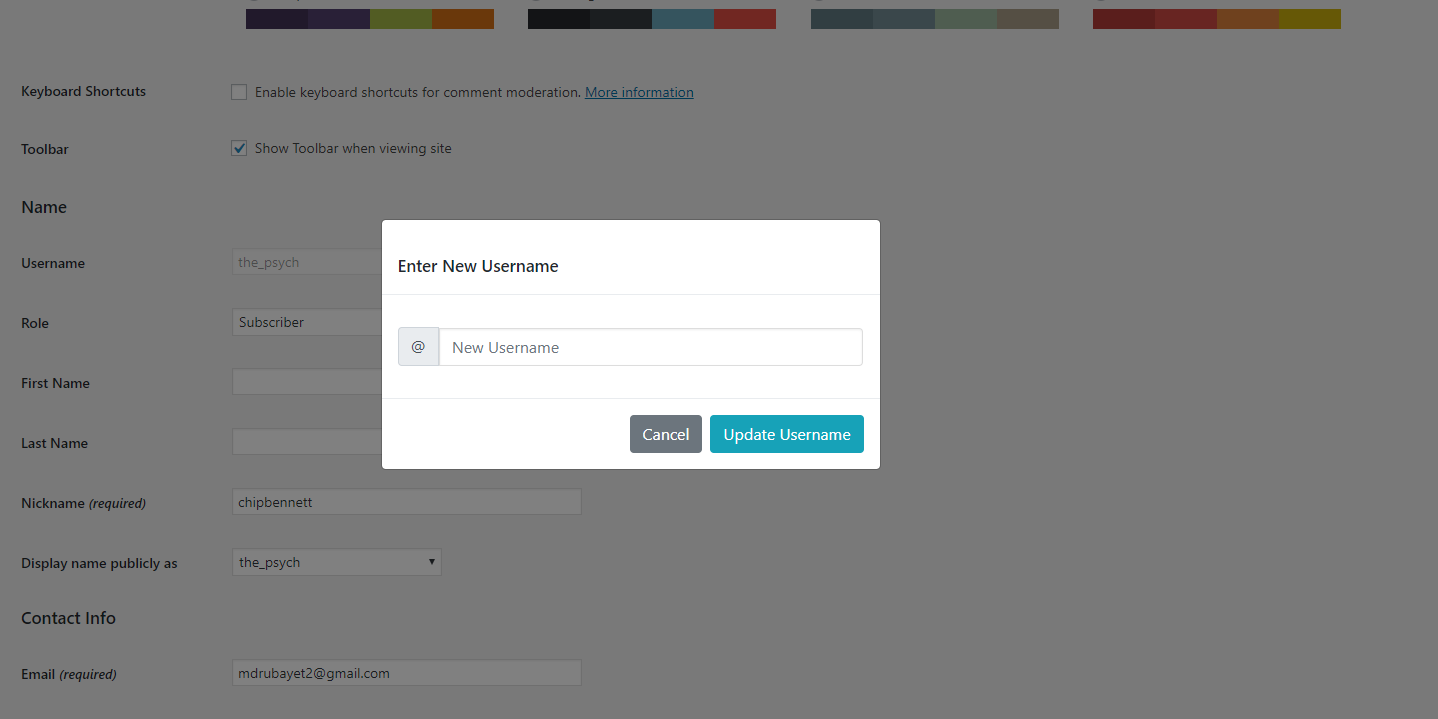
New Username Input Field.
After Username Changed Message.

설치

To add a WordPress Plugin using the built-in plugin installer:

Go to Plugins > Add New.

  1. Type in the name “WP Edit Username” in Search Plugins box
  2. Find the “WP Edit Username” Plugin to install.
  3. Click Install Now to begin the plugin installation.
  4. The resulting installation screen will list the installation as successful or note any problems during the install. If successful, click Activate Plugin to activate it, or Return to Plugin Installer for further actions.

To add a WordPress Plugin from GitHub repo / plugin zip file : 1. Go to WordPress plugin page 2. Click Add New & Upload Plugin 3. Drag / Click upload the plugin zip file 4. The resulting installation screen will list the installation as successful or note any problems during the install. If successful, click Activate Plugin to activate it, or Return to Plugin Installer for further actions.

FAQ

How to use this plugin?

Just after installing WP Edit Username plugin, Go to user profile and edit user username by clicking Edit button.

Update inputs according to your requirement and you are good to go.

후기

gets the job done

ahmedalaa01v 2024년 9월 5일
gets the job done

does its job 😉

default-design 2023년 8월 29일
does its job 😉

Easy, quick! PLEASE UPDATE FOR CURRENT WP VERSION

gpworx 2022년 12월 14일
THANK YOU!!! Using this plugin with ProfileGrid and could not change user names — even from phpMyAdmin. This plugin does the job AND offers to send an email to the user and admin about the change. Awesome! Please update this plugin for security with the latest version of Wordpress. Thank you again!

Good

Tanjimul Islam 2018년 4월 30일
Nice effort…Well done! We want more.

nice WP Edit Username

parvezpreo 2018년 4월 29일
good working .. Awesome plugin. #LOVE it
모든 5 평가 읽기

기여자 & 개발자

“WP Edit Username”(은)는 오픈 소스 소프트웨어입니다. 다음의 사람들이 이 플러그인에 기여하였습니다.

기여자
  • Sajjad Hossain Sagor

“WP Edit Username”(이)가 1 개 언어로 번역되었습니다. 기여해 주셔서 번역자님께 감사드립니다.

자국어로 “WP Edit Username”(을)를 번역하세요.

개발에 관심이 있으십니까?

코드 탐색하기는, SVN 저장소를 확인하시거나, 개발 기록을 RSS로 구독하세요.

변경이력

2.0.6

  • Compatibility checkup for latest wp version 7.0

2.0.5

  • Checked for latest wp version 6.9

2.0.4

  • Fixed issue: typo giving fatal error

2.0.3

  • Applied security patch and added more html tags to the allowed html list

2.0.2

  • Checked for latest wp version 6.8

2.0.1

  • Minor changes in codebase only.

2.0.0

  • Major changes in codebase. Compatibility checkup for latest wp version 6.7, updated bootstrap to latest, removed unused css and added confirmation before submitting username change form.

1.0.8

  • Updated button type from default ‘submit’ to ‘button’

1.0.7

  • Checked for latest wp version 6.6

1.0.6

  • Fixed Plugin settings XSS vulnerability.

1.0.5

  • Added additional email sender : User Only. Added bunch of shortcodes to use in the subject and email body.

1.0.4

  • Checked for latest wp version 6.3

1.0.3

  • Checked for latest wp version & updated coding styles… major changes nothing

1.0.2

  • Checked for latest wp version & updated coding styles… major changes nothing

1.0.1

  • Checked for latest wp version & updated coding styles… major changes nothing

1.0.0

  • Initial release.

기초

  • 버전 2.0.6
  • 최근 업데이트: 2개월 전
  • 활성화된 설치 2,000+
  • 워드프레스 버전 5.6 또는 그 이상
  • 다음까지 시험됨: 7.0.1
  • PHP 버전 8.0 또는 그 이상
  • 언어

    Chinese (Taiwan) 및 English (US).

    자국어로 번역하기

  • 태그:
    ajaxChange Usernameprofile-edituser profileusername
  • 고급 보기

평점

별 5점 만점에 5점.
  • 5/5-별점 후기 별 5개 5
  • 0/4-별점 후기 별 4개 0
  • 0/3-별점 후기 별 3개 0
  • 0/2-별점 후기 별 2개 0
  • 0/1-별점 후기 별 1개 0

Your review

모든 리뷰 보기

기여자

  • Sajjad Hossain Sagor

지원

할 말 있으신가요? 도움이 필요하신가요?

지원 포럼 보기

  • 소개
  • 뉴스
  • 호스팅
  • 개인정보
  • 쇼케이스
  • 테마
  • 플러그인
  • 패턴
  • 배우기
  • 지원
  • 개발자 도구
  • WordPress.tv ↗
  • 참여하기
  • 이벤트
  • 기부하기 ↗
  • 미래를 위한 5가지
  • WordPress.com ↗
  • Matt ↗
  • bbPress ↗
  • BuddyPress ↗
WordPress.org
WordPress.org

한국어

  • X(이전 트위터) 계정 방문하기
  • 블루스카이 계정 방문하기
  • 마스토돈 계정 방문하기
  • 스레드 계정 방문하기
  • 페이스북 페이지 방문하기
  • 인스타그램 계정 방문하기
  • LinkedIn 계정 방문하기
  • 틱톡 계정 방문하기
  • 유튜브 채널 방문하기
  • 텀블러 계정 방문하기
코드는 詩다
The WordPress® trademark is the intellectual property of the WordPress Foundation.