
설명
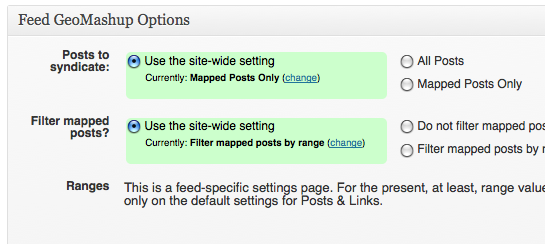
FeedGeoMashup lets FeedWordPress pass GeoRSS data to GeoMashup. Starting with v2.0 you will find plugin options integrated into the FeedWordPress Admin UI. In particlar, you can set site-wide and feed-specific preferences to filter out posts that do not include GeoRSS data. You must have installed, activated and configured both FeedWordPress and GeoMashup.
VERY IMPORTANT: You must additionally configure FeedWordPress to “Expose syndicated posts to formatting filters.” Do this on the admin side at: Syndication > Posts & Links > Formatting > Formatting filters.
Usage
You must have FeedWordPress and GeoMashup installed, activated, and configured
in order for Feed GeoMashup to do anything. Please see the independent
documentation for those plugins.
VERY IMPORTANT: You must additionally configure FeedWordPress to “Expose syndicated posts to formatting filters.” Do this on the admin side at: Syndication > Posts & Links > Formatting > Formatting filters.
Once you have those pieces in place, you can activate the plugin and start
pulling in GeoMashup maps.
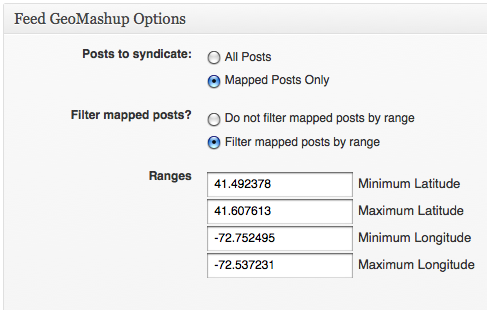
Go to “Syndication > Posts & Links” in the FeedWordPress admin interface to set filtering preferences.
스크린샷
설치
You can search for this plugin from your WordPress plugins administration interface and install it automatically.
Or to install it manually:
- Download the zipped plugin using the link to the right
- Unzip it and put the folder in your wp-contents/plugins folder
VERY IMPORTANT: You must additionally configure FeedWordPress to “Expose syndicated posts to formatting filters.” Do this on the admin side at: Syndication > Posts & Links > Formatting > Formatting filters.
FAQ
- How come I see a shortcode ([geo_mashup_map]) but no map in my syndicated posts?
-
You must configure FeedWordPress to “Expose syndicated posts to formatting filters.” Do this on the admin side at: Syndication > Posts & Links > Formatting > Formatting filters.
- How does it work?
-
Feed GeoMashup scans posts syndicated by FeedWordPress for geodata in the RSS. When your site creates a new syndicated post, GeoMashup can use that data as location information for the post. In addition, Feed GeoMashup scans the incoming posts for maps that GeoMashup created in the original. When it finds such a map, it will replace it with a new [geo_mashup_map] shortcode. The shortcode on your site will probably not have the same settings as on the original. Your map will probably look different, but it will adhere to whatever preferences you have set up in your own GeoMashup options.
- Will this plugin pull in geodata from other sources?
-
It might. It was created to operate on the GeoRSS generated by the GeoMashup
plugin, but it should work on other similarly formatted feeds. - Where are the options settings?
-
Look under “Syndication > Posts & Links” to find a Feed GeoMashup options box. Select an individual feed from the drop-down at the top of the same page to set feed-specific preferences.
- If I set Feed GeoMashup to filter out posts with no GeoRSS data, what will happen to posts that I have already syndicated?
-
Nothing. They will not be deleted, but neither will they be updated. If you set Feed GeoMashup to filter them, FeedWordPress will be affectively unaware of them.
- Can I filter an incoming feed to include mapped posts only from a limited
-
area?
Yes. On the “Syndication > Posts & Links” settings page you can define limits
to a range of longitudes and latitudes. Only posts mapped within the limits
will be syndicated. - Are you offering support for this plugin?
-
No.
후기
이 플러그인에 대한 평가가 없습니다.
기여자 & 개발자

변경이력
2.2.1
- Update the documentation with critical settings information
- Update the WordPress compatibility information
2.2
- GeoMashup single maps had been rendering imperfectly after syndication. The
problem was that the RSS feed included rendered HTML rather than the
shortcode, but the GeoMashup JavaScripts could not be run from the originating
site. FeedGeoMashup now strips the rendered HTML and reasserts the bare shortcode. Any custom attributes set on the
original copy of the post will be lost. On the other hand, default settings on the
syndicating site will apply, a fact that will insure consistency even when
posts come from different sournces.
2.1
- Users can now opt to filter an incoming feed’s mapped posts by longitude and latitude.
2.0
- Adding site-wide and feed-specific options to pull in all posts or only posts with GeoRSS data.
1.0
- This is the initial release