
설명
The HTML editor has not received a lot of love. The type is too small, especially when you see it in the new distraction-free writing mode. This plugin uses the lovely M+ 2m font (the font I use for coding every day) for more beautiful writing.
M+ also has extensive international support. From its site:
All fonts were completed with Basic Latin, Latin-1 Supplement, Latin Extended-A, and IPA Extensions. And most of Greek, Cyrillic, Vietnamese, and extended glyphs and symbols were prepared too. So the fonts are in conformity with ISO-8859-1, 2, 3, 4, 5, 7, 9, 10, 13, 14, 15, 16, Windows-1252, T1, and VISCII encoding.
스크린샷
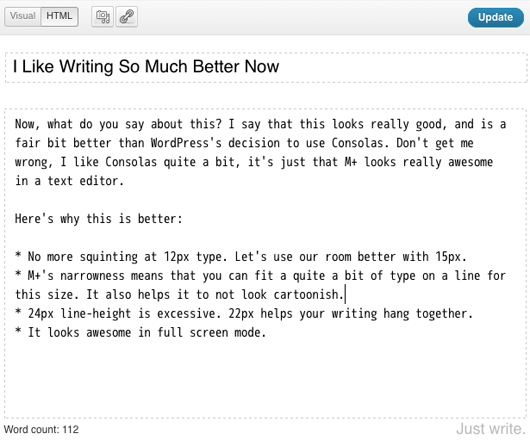
Beautiful HTML fullscreen editing
설치
-
Upload the
html-editor-typefolder to your/wp-content/plugins/directory -
Activate the “HTML Editor Type” plugin in your WordPress administration interface
-
Create or edit a post using the HTML tab (or just disable visual editing altogether in your user settings page). Marvel at the improvement.
후기
이 플러그인에 대한 평가가 없습니다.
기여자 & 개발자

변경이력
1.0.2
- More specific selector for 3.8
1.0.1
- Sloppiness on initial release fixed up.
1.0
- Initial release