

설명
Add a search box to the admin nav that allows you to more easily find that menu item you can’t see at a glance.
Features
- Quickly and easily find what you’re looking for.
- Keyboard navigation friendly (hit
/to focus the search field, use theupanddownkeys to select the menu item you’re after, hit theenterkey to go to the selected menu item) - Customizable border and highlight colours.
스크린샷
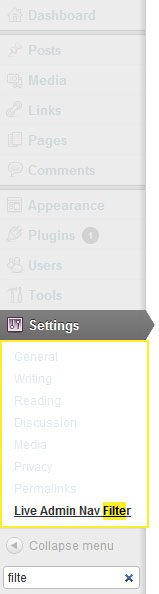
Example results on expanded menu item. 
Multiple results. 
The settings screen.
설치
- Upload the
live-admin-nav-filterfolder to your/wp-content/plugins/directory. - Activate the plugin through the
Pluginsmenu in WordPress. - You should now see a search box below the
collapse menubutton in the admin menu.
후기
이 플러그인에 대한 평가가 없습니다.
기여자 & 개발자

자국어로 “Live Admin Navigation Filter”(을)를 번역하세요.
개발에 관심이 있으십니까?
변경이력
1.0.1
- Bug Fixes
1.0
- Initial Release