

설명
Add outdoor activity resources to your site. For publishers, bloggers, sports and outdoor retail industry specialty stores, travel sites, etc… Add outdoor activity location maps, tag clouds and lists for free. Customize categories from wilderness adventure to urban sports, family – friendly adventure to extreme play, using shortcode and theme widgets.
Add relevant content to your site. Its free and incredibly easy. Just copy and paste.
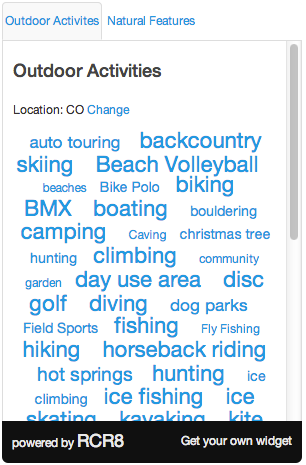
Put the RCR8 widget on your site and immediately give your readers a way to find places for outdoor activities. Increase website traffic and user engagement with interactive outdoor discovery tools. Customize the widget with your colors, for your location, or for a specific activity type. Make it work for you.
Perfect for:
- Bloggers
- Media Companies
- Municipal Sites
- Federal and State Parks
- Niche and Extreme sports
- Community Organizations
- Parenting and Family
- Travel
- Your exclusive special area of expertise
RCR8 content is a perfect compliment to sites with content on specialized sports, entertainment recreation, family friendly tips, geographic interest, and just about anyone who wants to help their users find free and fun ways to spend some time outdoors.
스크린샷


설치
This section describes how to install the plugin and get it working.
e.g.
- Upload
rcr8.phpto the/wp-content/plugins/directory - Activate the plugin through the ‘Plugins’ menu in WordPress
- Add the widget by going to Appearance > Widgets and drag RCR8 Widget into an active position. Set your preferences for default activity, whether to limit activities, your location preferences, etc…
- Use the RCR8 Shortcode Generator under “Tools” to generate shortcodes for pasting in posts and/or pages
FAQ
- I want to limit activities to only certain types
-
Select the activities to limit in the search options by selecting them from the “Limit Activities To:” select options. Shift or Ctrl or Cmd to select multiple options under the widgets control panel.
- I want to default to the user’s location instead of specifying a default location
-
Simply leaft the Default Location field blank and RCR8 will automagically switch to using the location of the browser.
- I’m getting no results when I know there are obviously results
-
The most common problem is that you have selected a default activity but limited activities to exclude the default activity.
- There are no activity listings in my area of interest or geography
-
Feel free to add some. As a community resource, we value your contributions!
- I would like to suggest a category
-
We’re limiting the submission of categories at this time. If you have a suggestion, please contact us here: http://rcr8.com/about/support/
- I’d like to make a correction
-
If you find that a location is off the mark, checkin (requires login with Facebook) and post a note at the spot where you think it should be. Prepend your message with “correction:” to bring it to our attention.
- I still need help
-
Get support here: http://rcr8.com/about/support/
후기
이 플러그인에 대한 평가가 없습니다.
기여자 & 개발자

변경이력
0.3
This version is beta. Feedback greatly appreciated.
0.4
jQuery conflict fixes
0.5
name correction for deprecated input ‘at’ on javascript name
0.5
0.6
Fixes an issue where “Load All Activities” inadvertently filters all but sledding, forcing users to select all activities
0.7
Fix to ip lookup so that location widget parameters are optional for default search
0.8
Adds tagcloud widget