

설명
HD Weather Widget displays current weather conditions and multi-day forecasts with stunning high-definition backgrounds. Perfect for blogs, news sites, and local business websites.
Features:
- HD Quality: 331dpi weather condition backgrounds (48 unique conditions)
- 5-Day Forecast: Configurable forecast display (1-5 days or hide)
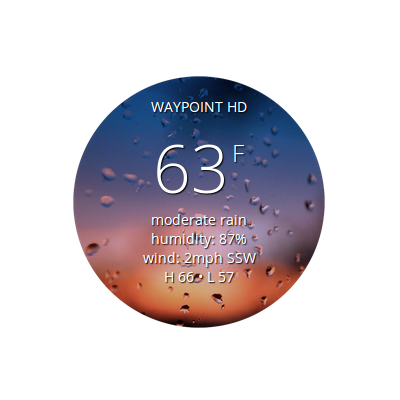
- Current Conditions: Temperature, humidity, wind speed and direction
- Multiple Locations: Unlimited widgets for different cities
- Modern API: OpenWeatherMap v2.5 with HTTPS security
- Responsive Design: Works beautifully on all screen sizes
- WebP Optimized: 92% smaller images with PNG fallback
- Shortcode Support: Easy integration into posts and pages
- Widget Ready: Drag-and-drop sidebar widget included
- Highly Cached: 30-minute cache for optimal performance
Modernized for 2025:
This plugin has been completely modernized with:
* PHP 8.2 compatibility
* WordPress 6.6.1 compatibility
* WebP image optimization (24 MB 1.8 MB)
* Security hardening (output escaping, nonces, HTTPS)
* User-friendly error messages
* Comprehensive admin documentation
Easy Setup:
- Get a free API key from OpenWeatherMap
- Enter your API key in Settings HD Weather Widget
- Use the shortcode generator or widget panel
- Copy and paste the shortcode into any post or page
Credits
- Original Plugin: John Grefe, James Steward – The Waypoint (2013)
- Based On: Awesome Weather Widget by Hal Gatewood
- Modernization: John Grefe & Evaline Grefe
- Weather Data: OpenWeatherMap API
- Weather Icons: HD backgrounds by The Waypoint
스크린샷
설치
Automatic Installation:
- Log into your WordPress admin
- Go to Plugins Add New
- Search for “HD Weather Widget by The Waypoint”
- Click “Install Now” then “Activate”
- Go to Settings HD Weather Widget to configure
Manual Installation:
- Download the plugin ZIP file
- Log into WordPress admin
- Go to Plugins Add New Upload Plugin
- Choose the ZIP file and click “Install Now”
- Click “Activate Plugin”
- Go to Settings HD Weather Widget to configure
Configuration:
- Get your free API key: https://openweathermap.org/appid
- Go to Settings HD Weather Widget
- Enter your API key and save
- Use shortcode examples or widget panel to add weather
FAQ
-
Do I need an API key?
-
Yes. You need a free API key from OpenWeatherMap. Sign up at https://openweathermap.org/appid. The free tier includes 1,000 calls per day, which is more than enough for most sites.
-
How do I add weather to a post or page?
-
Use the shortcode:
[waypoint-weather lat=”48.0624″ lon=”-114.0733″ units=”F” size=”tall” forecast_days=”hide” override_title=”Bigfork, Montana, US”]See Settings HD Weather Widget for complete examples.
-
- Go to Appearance Widgets
- Drag “HD Weather Widget by The Waypoint” to your sidebar
- Configure the settings
- Save
-
Can I show multiple locations?
-
Yes! Add multiple shortcodes or widgets with different locations.
-
Why isn’t the weather showing?
-
Common fixes:
* Make sure you saved your API key in Settings
* Wait 10-15 minutes for new API keys to activate
* Check city spelling (use exact names from OpenWeatherMap.org)
* Clear your cache (weather updates every 30 minutes) -
What units are supported?
-
Both Fahrenheit (F) and Celsius (C) are supported.
-
Can I customize the appearance?
-
Yes, via shortcode parameters:
*units– F or C
*size– tall (default)
*forecast_days– 1-5 or hide
*hide_stats– 0 or 1
*show_link– 0 or 1
*override_title– Custom text
*background– Custom image URL -
Is this plugin responsive?
-
Yes, the widget adapts to all screen sizes.
-
What browsers are supported?
-
All modern browsers. WebP images are used in Chrome, Firefox, Edge, Safari 14+, with PNG fallback for older browsers.
-
Does this work with caching plugins?
-
Yes. Weather data is cached for 30 minutes via WordPress transients, compatible with all caching plugins.
후기
이 플러그인에 대한 평가가 없습니다.
기여자 & 개발자

자국어로 “HD Weather Widget by The Waypoint”(을)를 번역하세요.
개발에 관심이 있으십니까?
변경이력
1.2.0 – October 24, 2025
Geocoding & Shortcode Builder Update
- NEW: Interactive Shortcode Builder: Build custom shortcodes with live preview in admin
- NEW: Geocoding Integration: Automatically convert city names to lat/lon coordinates using OpenWeatherMap Geocoding API
- NEW: Location Search: Find any city in the world with suggestions and selection
- Improved Admin UI: Step-by-step wizard for creating weather widgets
- Enhanced Documentation: Real-time shortcode generation with copy-to-clipboard
- Better UX: No more manual lat/lon lookups – just type a city name!
1.1.0 – October 24, 2025
Major Modernization Update
- PHP Compatibility: Updated for PHP 7.4 through 8.2
- WordPress Compatibility: Tested with WordPress 6.6.1
- Image Optimization: Converted all images to WebP (92.4% size reduction: 24 MB 1.8 MB)
- API Update: Migrated from defunct API v2.1 to current v2.5 with HTTPS
- Security Hardening: Added comprehensive output escaping, nonce verification, secure API calls
- Performance: Implemented 30-minute caching with configurable filters
- User Experience: Added admin settings page with comprehensive documentation
- Code Quality: Removed all deprecated PHP code (create_function, PHP 4 constructors)
- Error Handling: User-friendly error messages instead of fatal errors
- Layout: Standardized to tall mode (size parameter preserved for compatibility)
- Documentation: In-admin shortcode examples and troubleshooting guide
1.0.0 – December 5, 2013
- Initial release by John Grefe (The Waypoint)
- 331dpi HD weather backgrounds
- OpenWeatherMap integration
- Widget and shortcode support