

설명
What is SEO Content Helper?
It’s your assistant when writing awesome content with search engines in mind. Everything should be super easy. We try to make a small, fast plugin, saving space on disc and on screen.
1. Add keywords
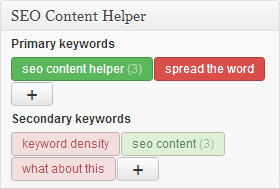
SEO Content Helper needs to know what keywords that are important for the post (or post type).
2. Analyze your SEO content
There are many sections available to analyze your content.
- SEO Analyzer – A SEO checklist (see screenshots)
- Distribution Editor – See how your keywords are distributed in the editor (see screenshots)
- Distribution HTML – See how your keywords are distributed in the HTML (see screenshots)
- Keyword density – Density of your editor words. Keywords are highlighted (see screenshots)
- Images – Highlight keyword matches in alt and filenames (see screenshots)
For full documentation, go to SEO Content Helper.
스크린샷


설치
Installation
- Upload the seo-content-helper folder to the /wp-content/plugins/ directory.
- Activate the SEO Content Helper plugin through the ‘Plugins’ menu in WordPress.
Usage
- Go to a post or page and find the SEO Content Helper box.
- Add primary keywords, the most important keywords on the page.
- Add secondary keywords if you like.
- Save the post or page.
- Analyze your content.
You can add more post types in options if you need to.
FAQ
- Why not use other SEO plugins like “SEO for WordPress”, “SEO Ultimate” or “All in One SEO”?
-
SEO Content Helper is NOT a replacement for these plugins. It’s a complement. We rekommend you to use both.
- I like this plugin. How can I help?
-
- Give us a five star.
More information at SEO Content Helper.
후기

2023년 4월 9일
I hope the developer will update the plugin

2017년 7월 3일
Great to add more focus keywords along with Yoast SEO content analysis.

2017년 2월 7일
A good and necessary plugin! Out of competition.
The author thanks! Not enough of the Russian language.

2017년 2월 7일
немного доработать и будет очень хороший
기여자 & 개발자

변경이력
1.2
- Feature – SEO analyzer – Grouped into sections
- Improved – Changed name on “Distribution” to “Keyword highlighter”
- Bug fix – SEO analyzer – Content – Title keywords now match both lower and uppercase
1.1
- SEO Analyzer – Added blog public warning when blocking search engines
- SEO Analyzer – Added permalink warning when postname is missing
- New Screenshots – More fresh UI
1.0
- Initial release