
설명
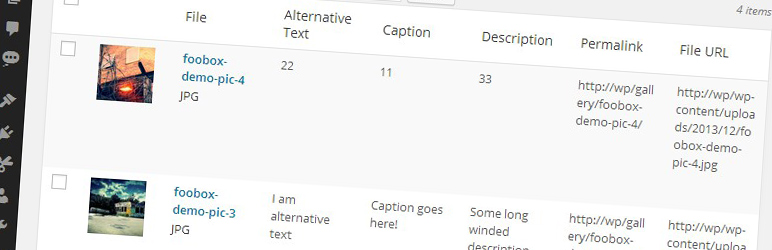
Displays extra columns (Alternative Text, Caption, Description, Permalink and File URL) in the media library view. You can choose to hide or show these new columns using the Screen Options dropdown on the media library page.
There are no settings for this plugin. Simply activate and enjoy!
Read more about why we made this plugin over at fooplugins.com
스크린샷

설치
- Upload the plugin folder to your
/wp-content/plugins/folder - Activate the plugin through the ‘Plugins’ menu in WordPress
- Goto the Media Library page to see the new columns
FAQ
- How do I use this plugin?
-
Simply activate it and enjoy new columns in your media library.
후기

2016년 12월 21일
needs a field for title.
WP uses title for the title of the attachment page. It's automatically set to be the filename minus ".jpg". This makes for ugly attachment pages.
기여자 & 개발자
“Better Media Library Fields”(은)는 오픈 소스 소프트웨어입니다. 다음의 사람들이 이 플러그인에 기여하였습니다.
기여자

자국어로 “Better Media Library Fields”(을)를 번역하세요.
개발에 관심이 있으십니까?
변경이력
1.0.0
- Initial Relase. First version.