
설명
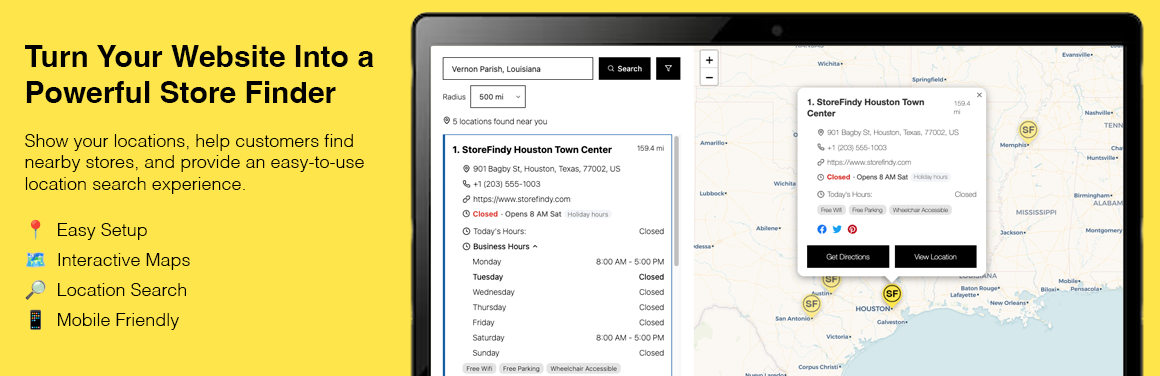
Storefindy Store Locator is a WordPress store locator plugin that helps
businesses create a searchable store finder and display their locations
on an interactive map.
Help customers quickly find nearby stores, branches, dealers, offices,
and other business locations directly from your WordPress website.
Create a customizable store locator with:
- Search by location
- Interactive maps
- Store listings
- Location filters
- Store details
- Business hours
- Get directions
- Bulk CSV location import
- Responsive design
- WCAG-friendly interface
- No Google Maps API key required
Demo Links
스크린샷


블록
이 플러그인은 1개의 블록을 제공합니다.
- Store Locator Embed one of your Storefindy locators. Pick which locator to display in the block settings.
설치
- Upload the
storefindy-store-locatorfolder to/wp-content/plugins/. - Activate the plugin through the Plugins screen.
- Go to https://www.storefindy.com/ and sign up for a Storefindy account.
- In Storefindy, go to Account API Access and generate your API key.
- In your WordPress dashboard, go to Store Locator Settings, paste your API key, and click Save.
- Create a locator under Store Locator Locators.
- Add your locations under Store Locator Locations.
- In the block editor, add the Store Locator block to any page or post using Add Block Store Locator.
- In the Classic Editor, Elementor, or any page-builder text widget, place the
[storefindy_locator id="6a62dc48ea08c051a7cb793e"]shortcode on any page or post to display your interactive Store Locator. Your locator IDs — and a ready-to-copy shortcode for each — are listed under Store Locator How to Use.
FAQ
-
Is this a WordPress store locator plugin?
-
Yes. Storefindy Store Locator lets you add a searchable store locator
and interactive store map to your WordPress website using the Store
Locator block or the[storefindy_locator]shortcode. -
Is there a shortcode?
-
Yes:
[storefindy_locator id="YOUR_LOCATOR_ID"]. It renders the same
store locator as the block, so it works in the Classic Editor,
Elementor, page-builder text widgets, and in theme templates via
do_shortcode(). Copy a ready-made shortcode for each of your locators
from Store Locator How to Use. -
Can I add multiple store locations?
-
Yes. You can create and manage multiple locations and organize them
with Storefindy locators. -
Can visitors search for nearby stores?
-
Yes. Visitors can search by location and find nearby stores using the
interactive map and location listings. -
Does it require a Google Maps API key?
-
No. Storefindy uses OpenStreetMap for its maps and does not require
a Google Maps API key. -
Can I create a store locator without Google Maps?
-
Yes. Storefindy Store Locator uses OpenStreetMap and does not require
a Google Maps API key.
후기
이 플러그인에 대한 평가가 없습니다.
기여자 & 개발자

자국어로 “Storefindy Store Locator”(을)를 번역하세요.
개발에 관심이 있으십니까?
변경이력
1.0.0
- Initial release: settings, locator CRUD, location CRUD, CSV import, help
screen, the Store Locator block and the [storefindy_locator] shortcode.
1.0.1
- Support shortcode for Classic Editor, Elementor, or any page-builder text widget