

설명
CFPro Invoice Sender is a powerful and lightweight WooCommerce extension that automates sending order notifications, invoices, and payment links directly to your customers’ WhatsApp numbers.
Enhance your store’s customer experience by providing instant updates on their order statuses (Processing, On-Hold, Completed, etc.) with beautifully formatted WhatsApp messages.
Features
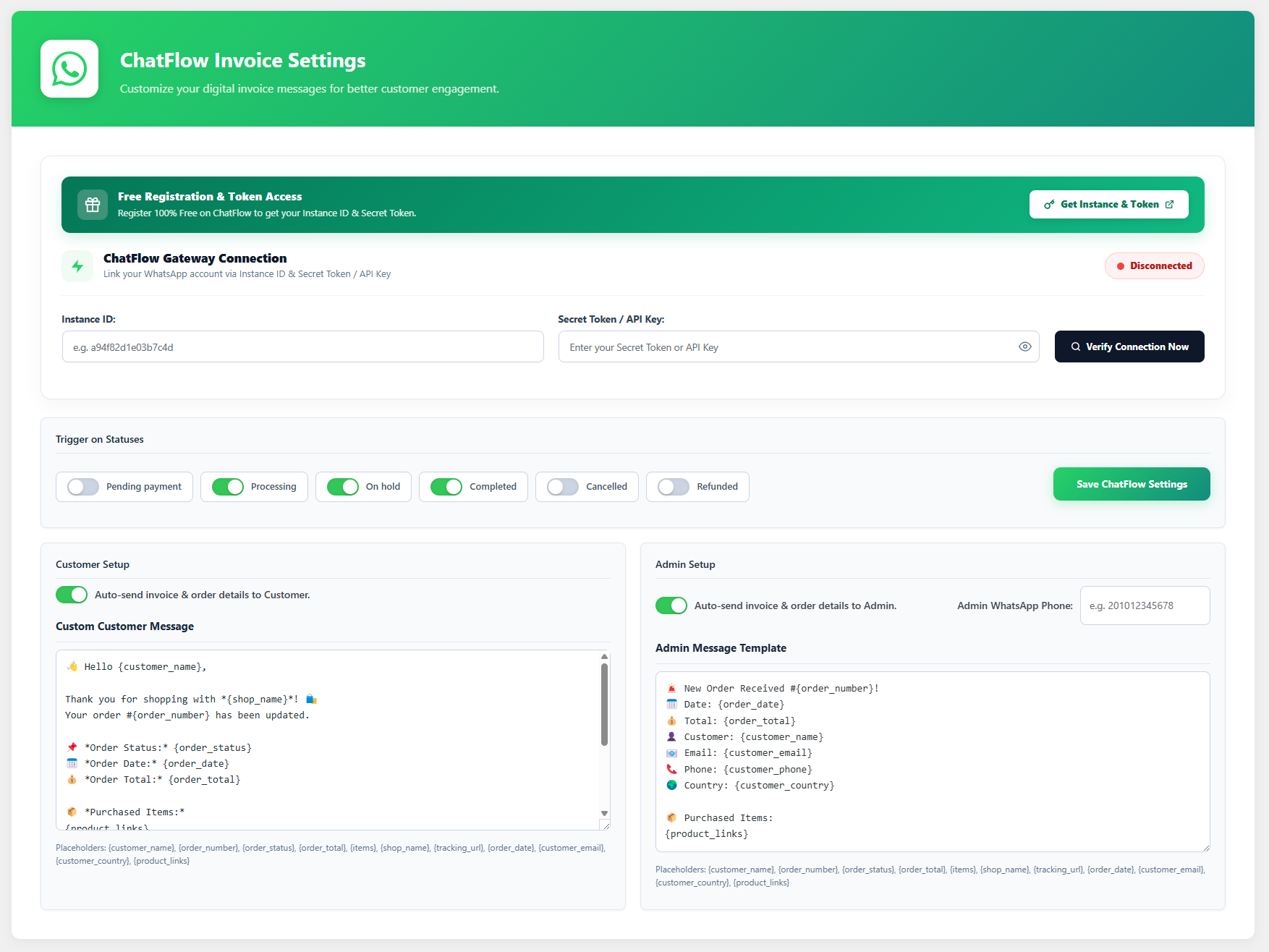
- Automated Customer Notifications: Automatically send WhatsApp messages to customers when their order status changes.
- Admin Order Alerts: Get instant WhatsApp notifications whenever a new order is placed on your WooCommerce store.
- Custom Message Templates: Create beautiful, customized messages with dynamic placeholders like
{customer_name},{order_number},{order_status},{order_total},{product_links}, and more. - One-Click Send Meta Box: Includes a convenient meta box on the Order Edit screen to manually send a WhatsApp message to the customer with one click.
- Fully Secure & Compliant: Uses native WordPress settings APIs with proper sanitization and data handling.
⚠️ Important: Third-Party Service Disclosure
To successfully dispatch messages to WhatsApp without relying on the browser, this plugin relies on an external Software as a Service (SaaS) provider: ChatFlow Pro.
By using this plugin, you acknowledge and agree that:
1. The plugin communicates with the external ChatFlow SaaS API at https://chatflow-pro.site.
2. Order details (including customer phone numbers and message content) are transmitted securely to this API solely for the purpose of dispatching the WhatsApp message.
3. You must register for a free or premium account on ChatFlow to obtain an Instance ID and Secret Token.
Privacy & Terms:
* Please review the ChatFlow Pro Terms of Service: https://chatflow-pro.site/terms/
* Please review the ChatFlow Pro Privacy Policy: https://chatflow-pro.site/privacy/
스크린샷

설치
- Upload the
cfpro-invoice-senderdirectory to the/wp-content/plugins/directory. - Activate the plugin through the ‘Plugins’ menu in WordPress.
- Navigate to WooCommerce > ChatFlow Invoice in your admin dashboard.
- Enter your ChatFlow Instance ID and Secret Token to connect your device.
- Customize your customer and admin message templates and select the trigger statuses.
FAQ
-
Do I need a ChatFlow Pro account?
-
Yes. You need to register on the ChatFlow SaaS platform to get your Instance ID and Secret Token, which links your physical WhatsApp device to your WooCommerce store.
-
Can I use placeholders in the messages?
-
Yes, you can use a variety of placeholders like
{customer_name},{order_status},{order_total}, and{product_links}to dynamically generate rich invoice messages.
후기
이 플러그인에 대한 평가가 없습니다.
기여자 & 개발자

변경이력
1.0.0
- Initial Release.
- Added ChatFlow SaaS Gateway integration.
- Added custom message templates with
{order_status}placeholder. - Added one-click WhatsApp dispatch meta box.
- Full security and code compliance update for WordPress repository.