
설명
This WordPress plugin helps you to add pictures and albums from SlideShowPro Director to your WordPress blog by either choosing them from the media tab or by inserting some shortcode directly into your post. The images are served from Director, so no image is saved or loaded into your Blog.
Features:
- Media tab for comfortable album and image browsing.
- Add one or more images to your post.
- Supports video with included JW Player.
- Show album with one preview image and the others as in lightbox.
- Show album in matrix mode. All images on a page or post.
- Add a photostrip as template tag.
- Widget for displaying thumbnail in your sidebar.
- Uses the Lightview-Plus plugin by Puzich or Lightbox 2 plugin by Rupert Morris for displaying ‘fullsize’ images.
- Admin interface for easy setup.
- Uses WordPresses’ easy and fast shortcode API.
- Official Director API from SlideShowPro included.
Known Issues:
- I should write a decent documentation some day, especially for shortcodes…
- The plugin’s CSS file is not overriden by the theme as it is loaded aferwards. For now you’ll have make appearance changes to the plugin’s css file. Be careful. The file will be overwritten by the next update.
Shortcodes
= Add one image by its director content id =
[sspdc content=(content_id) link=(default:lightbox|post|director|url:) format=(format_name|default:post)]
BETA(be careful): Pass flashvars to mediaplayer
If your content_id is a movie you can pass flashvars by adding the mediaplayer shortcode:
[sspdc content=(content_id) mediaplayer=”autostart=false&backcolor=#000″]
You can get a list of valid flashvars at longtailvideo
Add one album
[sspdc album=(album_id) style=(default:matrix|preview) description=default:false|true]
Photostrip
A photostrip can be added to your theme by using a template tag:
Where’album_id’ is the SlideShowPro Director album number and ‘image_count’ how many images should be shown.
Additional notes
Thanx to Alex Rabe & the NextGEN DEV-Team: their NextGEN Gallery Code helped me understand many aspects of the WordPress API. Checkout the best WordPress gallery plugin.
스크린샷
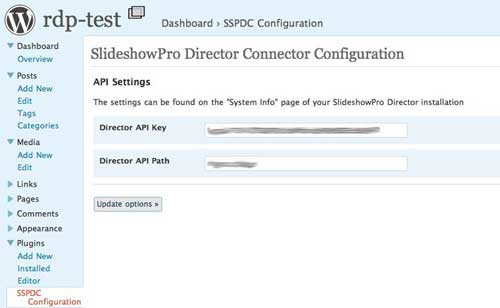
SlideShowPro Director API configuration page. 
SlideShowPro Director API format options page. 
Album matrix view. 
Image on post/page with photostrip below the header. 
Lightbox fullsize view.
설치
- Upload the ‘sspdc_connector’ directory to the
/wp-content/plugins/directory. - Activate the plugin through the ‘Plugins’ menu in WordPress.
- Add the SSP Director API key and API Path to the plugin configuration page.
- Install Lightview-Plus and Lightview
or - Install Lightbox 2
- Change the plugins CSS file (sspdc.css) as you wish and make a backup.
- Add a new post.
- Click the symbol that looks like a sun in WP 2.5/2.6 or the ‘Add Media’ Button in 2.7 and choose the SSPD Connector menu.
- Select an album
- Choose an image
- Save your post
FAQ
- Can I change the look and feel by adapting CSS
-
Yes, you can. Take a look at the ‘sspdc.css’ file. You can override the classes in you themes’ CSS file.
- The plugin seems to work but my Director album dropdown list is empty
-
The DirectorPHP API relies on php_curl for communicating with Director. Connector won’t work without it and checks if php_curl is available and gives instructions. Have a look at your plugin configuration page.
후기
이 플러그인에 대한 평가가 없습니다.
