

설명
A plugin that allows administrator to set Google Calendar embedded link in admin back-end and use a shortcode
to place on a page, post or sidebar.
스크린샷
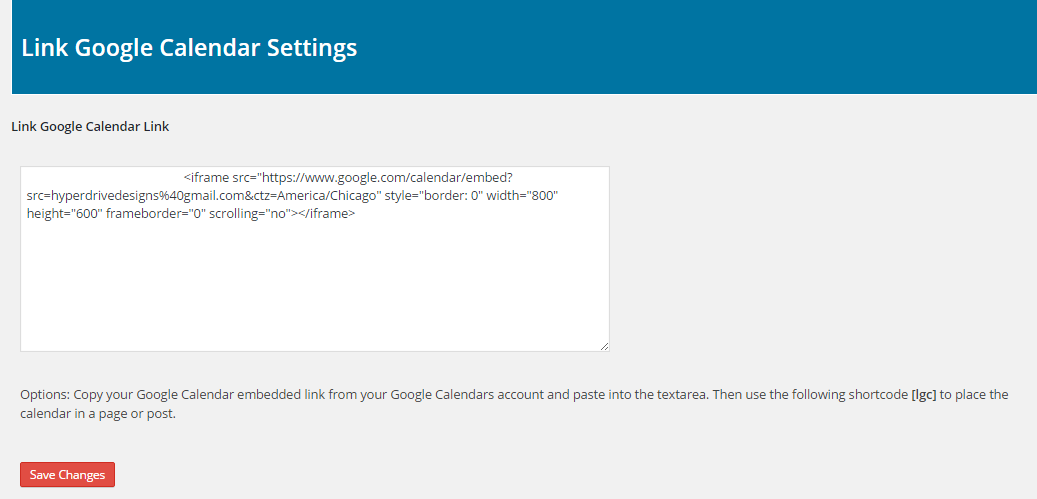
settings page 
calendar page view 
calendar post 
calendar sidebar
설치
This section describes how to install the plugin and get it working.
1. Download and install the plugin from WordPress dashboard. You can also upload the entire “link-google-calendar” folder to the /wp-content/plugins/ directory
2. Activate the plugin through the ‘Plugins’ menu in WordPress
3. You should see a Link Google Calendar Admin Menu Link in the Admin Menu. Click here to go to the Settings Page.
4. Here you would place your Embedded Google Calendar Link in the text area and then click the save button.
5. You would get your Calendar from your Google Account. For information on how to create your Google Calendar and how to get
your Embedded Google Calendar Link, go to https://hyperdrivedesigns.com/free-plugins/google-calendar-link-plugin/ .
6. Use the following shortcode [lgc] to place the calendar in your page, post or a text widget.
7. For using multiple calendars, go to https://hyperdrivedesigns.com/link-google-calendar-update-documentation/ for documentation.
FAQ
Has this plugin been tested
Yes. This plugin has been tested from WordPress version 3.5 – 4.9.5
Can I change the size of my Google Calendar
Yes. You can change the size of the calendar on the settings page. Look at your Embedded Link that you got from Google. There is a width and height settings you can edit.
What about support?
Create a support ticket at Hyperdrive Designs website: https://hyperdrivedesigns.com/contact-us/ and I will take care of any issue. If you have any issues or have any questions, please contact me and give me a chance to help you with your issue.
후기


기여자 & 개발자

변경이력
2.0
Added the ability to use up to 5 different calendars.
1.2
Change in shortcode output code to correct development warnings.
1.1
Change in shortcode output code.
1.0
Initial Commit