
설명
Display an index of all sites on a multisite network with a widget or a shortcode ([site-index]). The site icon, title, and tagline are displayed by default. You can customize the display with CSS, allowing for multiple-column layouts, hiding some of the information, removing list styles, or other changes over how your theme displays them. Some examples are included in the FAQ.
스크린샷
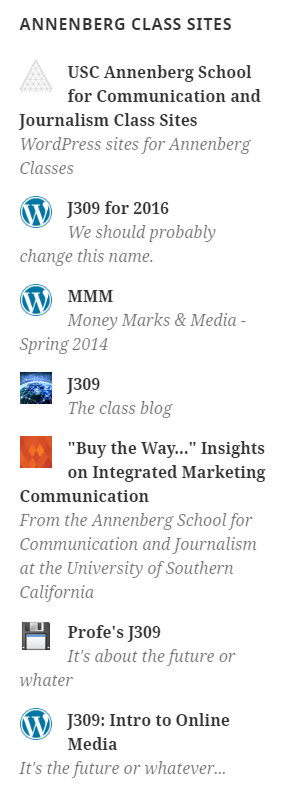
Slightly customized display in a sidebar widget.

Two-column display in a shortcode, with custom CSS available in the FAQ.

Full-width three-column display in a footer widget area.
설치
- Take the easy route and install through the WordPress plugin installer, or,
- Download the .zip file and upload the unzipped folder to the
/wp-content/plugins/directory - Activate the plugin through the ‘Plugins’ menu in WordPress
- Add the
[site-index]shortcode to a post, or add a site list widget to a sidebar
FAQ
-
Exclude sites
-
Sites can be hidden from the list by adding an
excludedargument to the shortcode, or with the option in the widget settings. Use a comma-separated list of site IDs. To find a site’s ID, look at the url for editing a site in the network admin. For example, the shortcode would be[site-index excluded="11,14,15,16"]. -
Showing more that 100 sites
-
On networks with more than 100 sites, a number of sites option is available. Keep in mind that showing more sites may cause issues with server/database resources on very large networks. Shortcode usage:
[site-index number="200"]. -
Layout looks broken
-
This plugin does its best to work with every theme out of the box, but you may need to make tweaks to make it look better. Use the CSS functionality in the customizer (available in WordPress 4.7 and newer) to style the list container
.site-index, the individual site list item containers.site-index .site, or individual elements such as.site-index-site-title,.site-index-site-tagline, orsite-index-site-icon. A few complete examples follow. -
Display sites in columns
-
To display the site index in multiple columns, add this CSS in the customizer (using WordPress 4.7 or newer):
.site-index .site { width: 48%; float: left; margin: 0 2% 1em 0; padding: 0; } ul.site-index { list-style: none; margin: 1em 0; padding: 0; overflow: hidden; } -
Make descriptions smaller
-
.site-index .site-index-site-tagline {
font-size: .8em;
} -
Align icons with site titles
-
There are two ways to make sure the height of the icon matches the height of the site title – changing the icons to match the font size (Requires knowing the line-height used by your theme):
.site-index .site-index-site-icon {
    height:1.5em;
    width: 1.5em;
}
Or, you can set the font size and line height of the titles to match the icons:
.site-index .site-index-site-title { font-size: 24px; line-height: 32px; } -
Hide bullet points from the index list
-
.site-index {
list-style: none;
}.site-index .site { margin: 1em 0 0 0; }
후기


기여자 & 개발자


변경이력
1.2
- Increased the loaded site icon size for greater flexibility.
1.1
- Added the number of sites option for large networks.
- Hid deleted sites from the site index.
1.0
- First publicly available version of the plugin.