
설명
Add support for Google Analytics and Google Tag Manager to your AMP pages
(Accelerated Mobile Pages) on WordPress. The plugin will provide you with an
easy set-up of your accounts on both GA & GTM to make sure you can start
measuring and supporting your AMP pages better.
Features
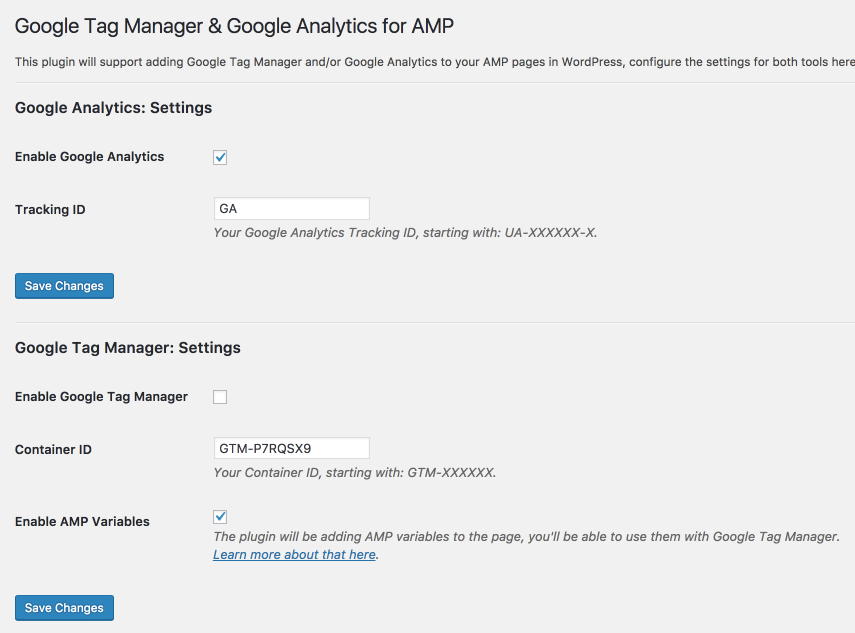
- Enable the tracking codes for Google Tag Manager & Google Analytics.
- Provide custom variables and data for AMP.
- Be able to customize the custom dimensions for Google Analytics.
- Add outbound link tracking for Google Analytics.
스크린샷

설치
From within WordPress 1. Visit ‘Plugins > Add New’. 2. Search for ‘Google Tag Manager & Google Analytics for AMP’. 3. Activate Google Tag Manager & Google Analytics for AMP from your Plugins page. 4. Go to “after activation” below.
Manually
1. Upload the gtm-ga-wordpress-amp folder to the /wp-content/plugins/ directory.
2. Activate the Google Tag Manager & Google Analytics for AMP plugin through the ‘Plugins’ menu in WordPress.
3. Go to “after activation” below.
후기
이 플러그인에 대한 평가가 없습니다.
기여자 & 개발자
“Google Tag Manager & Google Analytics for AMP”(은)는 오픈 소스 소프트웨어입니다. 다음의 사람들이 이 플러그인에 기여하였습니다.
기여자
변경이력
1.0.0
- Enable the tracking codes for Google Tag Manager & Google Analytics.
- Provide custom variables and data for AMP.
- Be able to customize the custom dimensions for Google Analytics.
- Add outbound link tracking for Google Analytics.