
스크린샷
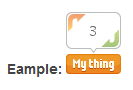
Example of the widget on a page 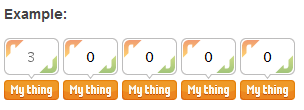
Example of the widget using the Multi-Flattr feature
설치
Installation is easy:
- Download and unzip the plugin.
- Copy the folder to the plugins directory of your blog.
- Enable the plugin in your admin panel.
- Configure the widget (not avaialable yet)
- Include a widget in a post or page by adding the appropriate shortcode to your page or post.
Configuration
Comming in a later version.
Usage
View the Arbitrary section.
FAQ
- The Flattr Shortcode Widget in my Feed is a static image pointing to
-
Flattr need to update the way their API works to allow for a flattr to be submitted without someone flattring and be able to return a value with the flattr page for your submission. If you manually creat the thing on Flattr or the thing has been created on flattr then you can add “rssurl={rssurl}” as a variable and replacing {rssurl} with the url of your thing on flattr.
후기
이 플러그인에 대한 평가가 없습니다.
기여자 & 개발자

자국어로 “Flattr Shortcode Widget”(을)를 번역하세요.
개발에 관심이 있으십니까?
변경이력
0.3.3
*NEW: Screenshots of plugin
*NEW: Ability to flattr developer from settings page
0.3.2
*BUG FIX: Quote marks cause the generated widget to be invalid.
0.3.1
*BUG FIX: A function was used that stopped backward compatability before version 3.0
0.3.0
*NEW: Flattr UID option for induvidual users allowing each user to have their own default Flattr UID
*NEW: Options Page to set the default Flattr UID for the blog
*UPDATE: Flattr Shortcode modified – new uid tag added
0.2.3
*UPDATE: More tags added
0.2.2
*BUG FIX: Feeds would try and render the javascript button.
*NEW: RSS displays a Flattr this image in substitute of the js widget but this links to the flattr home page due to Flattr API restictions
*BUG FIX: Default widget size is not reset to large after creating a compact widget if the Official Flattr Widget is not installed.
*BUG FIX: Name change was not fully migrated
0.2.1
*BUG FIX: Anchor now set when used with multi-flattr feature
*BUG FIX: Anchors tag is now closed properly
*UPDATE: Additional flattrs made by multi-flattr are hidden from listing on flattr.com to stop spamming
*BUG FIX: Further whitespace removal to all variables
0.2.0
*NEW: Anchors added so that multiple flattrs can be used on the same URL
*NEW: Your backlink from flattr can link straight back to the widget rather than just back to the page (uses anchors)
*NEW: You can define how many flattr widgets you want to be generated and each work independantly (allows multiple flattrs)
*NEW: You can use multiple flattrs and anchor features simultaniously
*UPDATE: All true/flase values must now be set to ‘1’ (true) or ‘0’ (flase)
*BUG FIX: Hide not always set to true
*BUG FIX: Default language now works
*UPDATE: Arrays now used instead of lots of independant variables
*BUG FIX: Whitespace in variables that would cause the widget to fail is now removed
0.1.4
*BUG FIX: Decription was not filled in if not manually set
0.1.3
*BUG FIX: Problems with svn sync fixed
*BUG FIX: Version numbers corrected
0.1.2
*UPDATE: Widget name changed from “Flattr Widget” to “Flattr Shortcode Widget”
*BUG FIX: Fixed “Fatal error: Using $this when not in object context”
0.1.1
*UPDATE: Major updates to readme.txt
*NEW: Added to WordPress Plugin Directory
*BUG FIX: Bug that interfered default size of widget for official plugin has been corrected
0.1.0
*NEW: Codebase created
*NEW: readme.txt created