[플러그인 태그:] environment
-

Display Environment Type
Displays WordPress 5.5's environment type setting in the admin bar and the "At a Glance" dashboard widget.
-

Contextual Adminbar Color
Use custom admin bar colors and favicons to differentiate your environments (staging/prod)
-
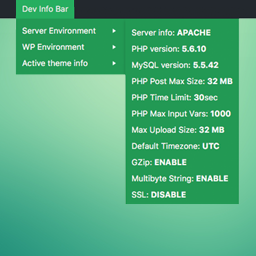
Dev Info Bar
A simple WordPress extension which adds itself to the admin bar, providing system information such as PHP, MySQL version and details of the WordPress …
-
-

PLX Multi-Environments
Manage separate Development, Staging, and Production environments directly from the Wordpress Admin screen.
-
-
365i Environment Indicator
Displays a color-coded DEV, STAGING, or LIVE indicator in the admin bar to prevent accidental changes on production sites.
-

Katze Version Snapshot
View WordPress, PHP, plugin, and theme versions in Markdown or CSV for maintenance checks.
-
-
-
-

MÜLLweg! DE
Mit dem MÜLLweg! DE Plugin kann der MÜLLweg! DE Müll-Mängelmelder direkt in die eigene Homepage eingebunden werden.
-

Online Leaf
Integrates a standby engine to reduce the energy required to view the website when the visitors are inactive, to make your blog a Green Website.
-
-

Abhinavdev Environment Badge
Displays a customizable badge in the WordPress Admin Bar showing your environment (Local, Staging, Production) to avoid errors on live sites.
-

Axle Staging Guard
Stop staging sites from emailing real customers, calling live APIs and showing up in Google. Colours the admin bar so nobody edits the wrong copy.
-

Envwise Environment-Based Control
Automatically controls search engine indexing based on your environment (production vs development/staging).
-

Development Environment
Whoops error handling, no password logins, template hints, no indexing, flush rewrites, everything a developer needs for their local development envir …
-
-

WP Environment Label
WP Environment Label – shows label with current server/environment name defined by config or admin-panel.