

설명
평면 제품 사진을 방문자가 회전하고, 확대/축소할 수 있으며, 증강 현실(AR)을 통해 자신의 방에 배치해 볼 수도 있는 인터랙티브 3D 경험으로 바꿔보세요. 코딩이 필요 없습니다.
왜 3D 뷰어인가요?
정적 이미지는 방문자가 추측하게 만듭니다. 3D 뷰어를 사용하면 방문자가 직접 탐색할 수 있습니다. 게시물, 페이지, 위젯 및 WooCommerce 상품 페이지에 인터랙티브 3D 모델을 삽입하면, 방문자는 마우스나 터치스크린을 통해 제품을 직접 손에 든 것처럼 회전, 확대/축소, 이동하며 모든 각도를 자세히 살펴볼 수 있습니다.
검증된 Three.js 엔진을 기반으로 구축된 3D 뷰어는 모든 주요 3D 형식(GLB, GLTF, OBJ, STL, FBX, DAE, PLY, 3DS)을 지원하며, 모든 기기에서 반응형으로 렌더링합니다. 지연 로딩(Lazy loading) 기능으로 페이지 로딩 속도를 높여주며, 구텐베르크(Gutenberg) 및 엘리멘터(Elementor)와의 원활한 연동 덕분에 이미지를 삽입하는 것과 동일한 방식으로 모델을 배치할 수 있습니다.
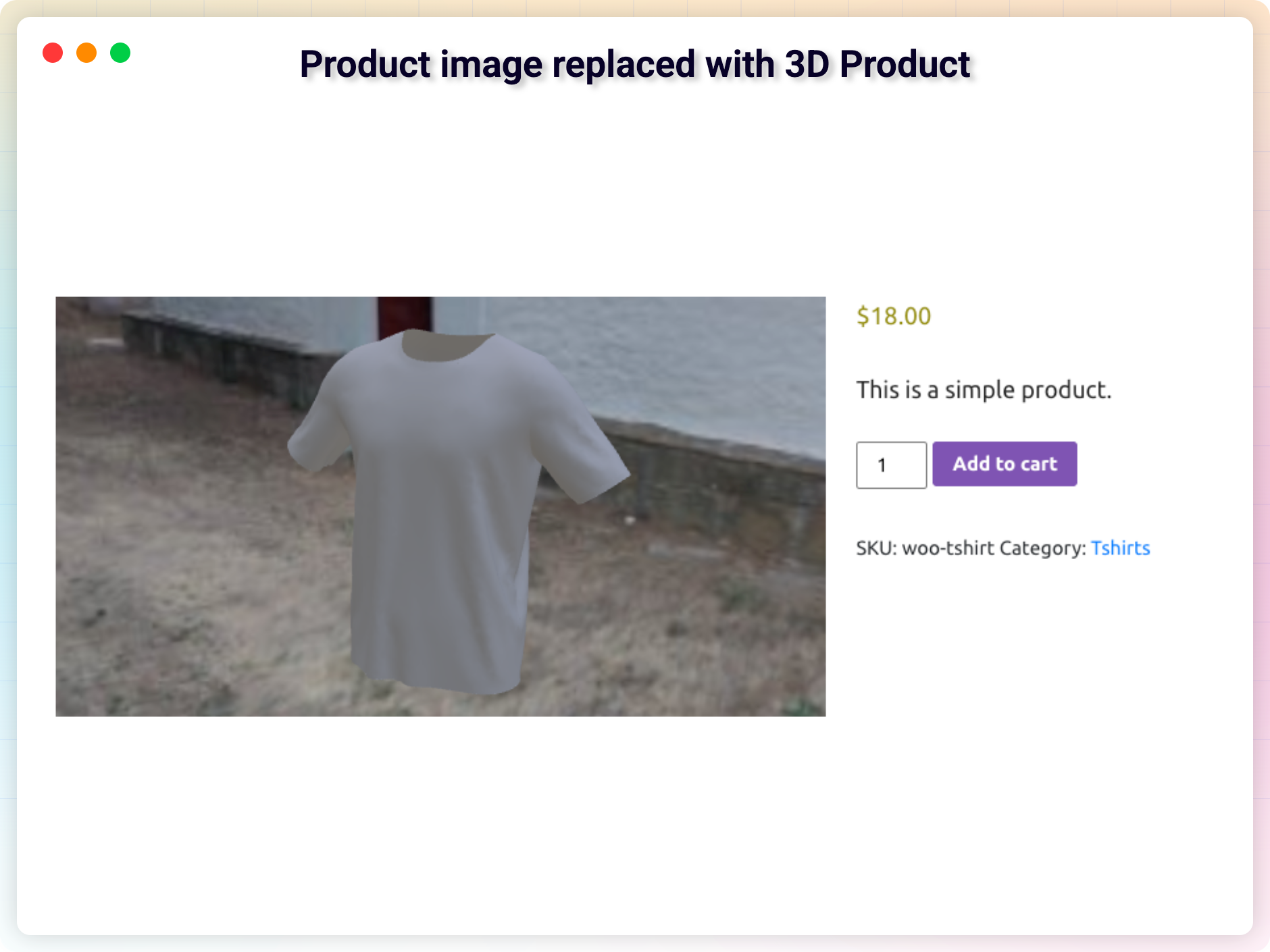
온라인으로 상품을 판매하고 계신가요? WooCommerce 상품을 3D로 보여주고, 고객이 구매하기 전에 직접 체험해 볼 수 있게 해보세요. 상호작용이 가능한 상품 뷰는 방문자를 구매자로 전환시키는 신뢰감을 심어줍니다.
증강 현실(AR)은 무료로 이용 가능합니다. AR 기능은 무료 플러그인의 일부로, 별도의 업그레이드나 추가 기능이 필요하지 않습니다. 어떤 모델이든 이 기능을 활성화하면, 지원되는 휴대폰을 사용하는 방문자는 해당 모델을 자신의 방에 배치할 수 있으며, 데스크톱 방문자는 QR 코드를 스캔하여 휴대폰에서 동일한 모델을 AR로 열 수 있습니다.
무료 기능 – 시작에 필요한 모든 것
- 어디에나 삽입하기: 숏코드나 구텐베르크 블록을 사용하여 게시물, 페이지 및 위젯에 3D 모델을 삽입하세요.
- 증강 현실(AR) – 이제 무료로 이용 가능: 모바일 방문자가 WebXR, Scene Viewer 및 Quick Look을 통해 실제 환경에서 모델을 볼 수 있게 하세요. 데스크톱에서 QR 코드를 통해 접속하는 기능도 포함됩니다. AR 배치 위치(바닥 또는 벽)를 설정하고, 선택 사항으로 iOS용
.usdz소스를 추가할 수 있습니다. - 모든 주요 3D 형식: .GLB, .GLTF, .OBJ, .STL 등의 파일을 업로드하고 표시할 수 있습니다.
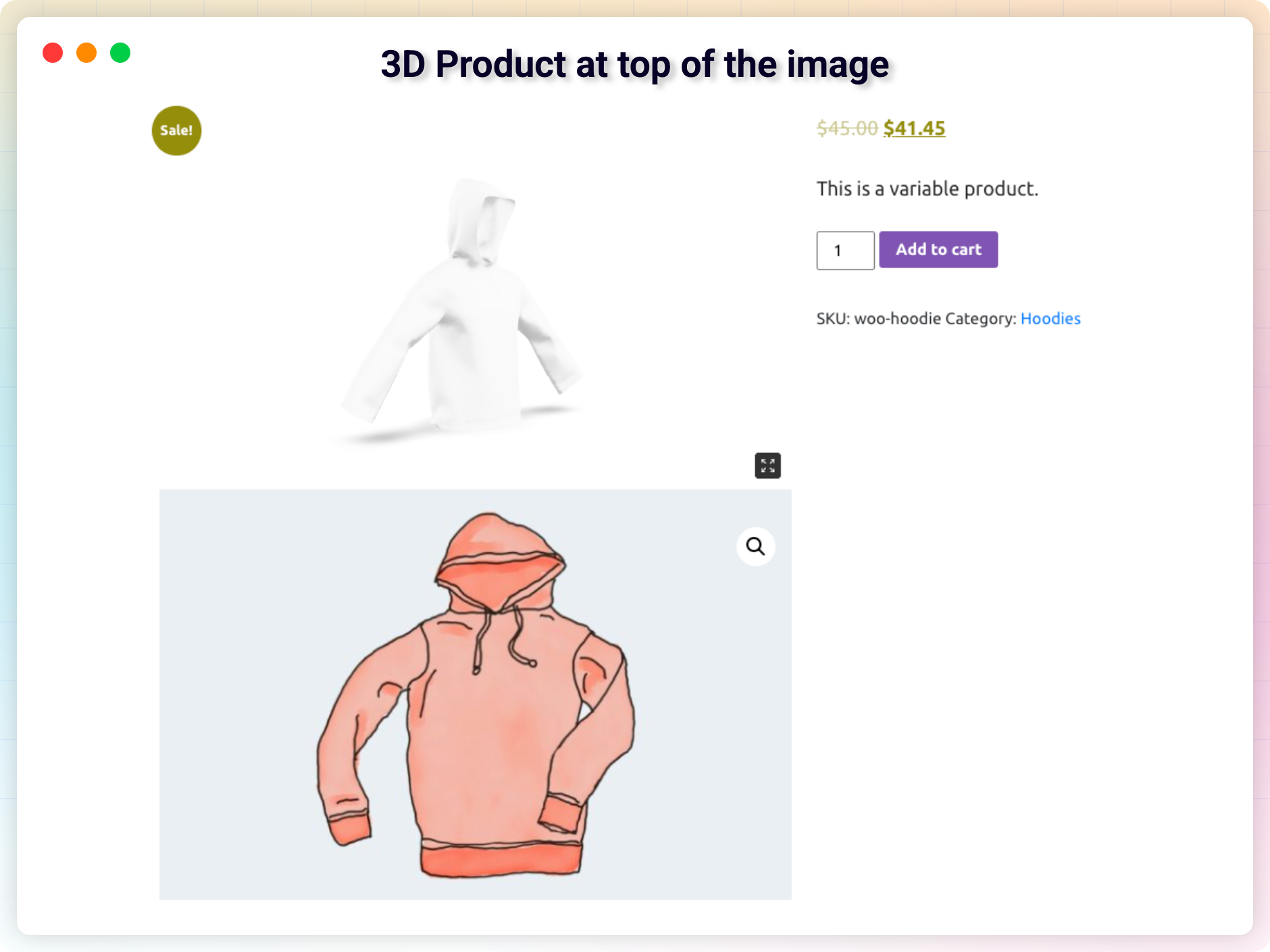
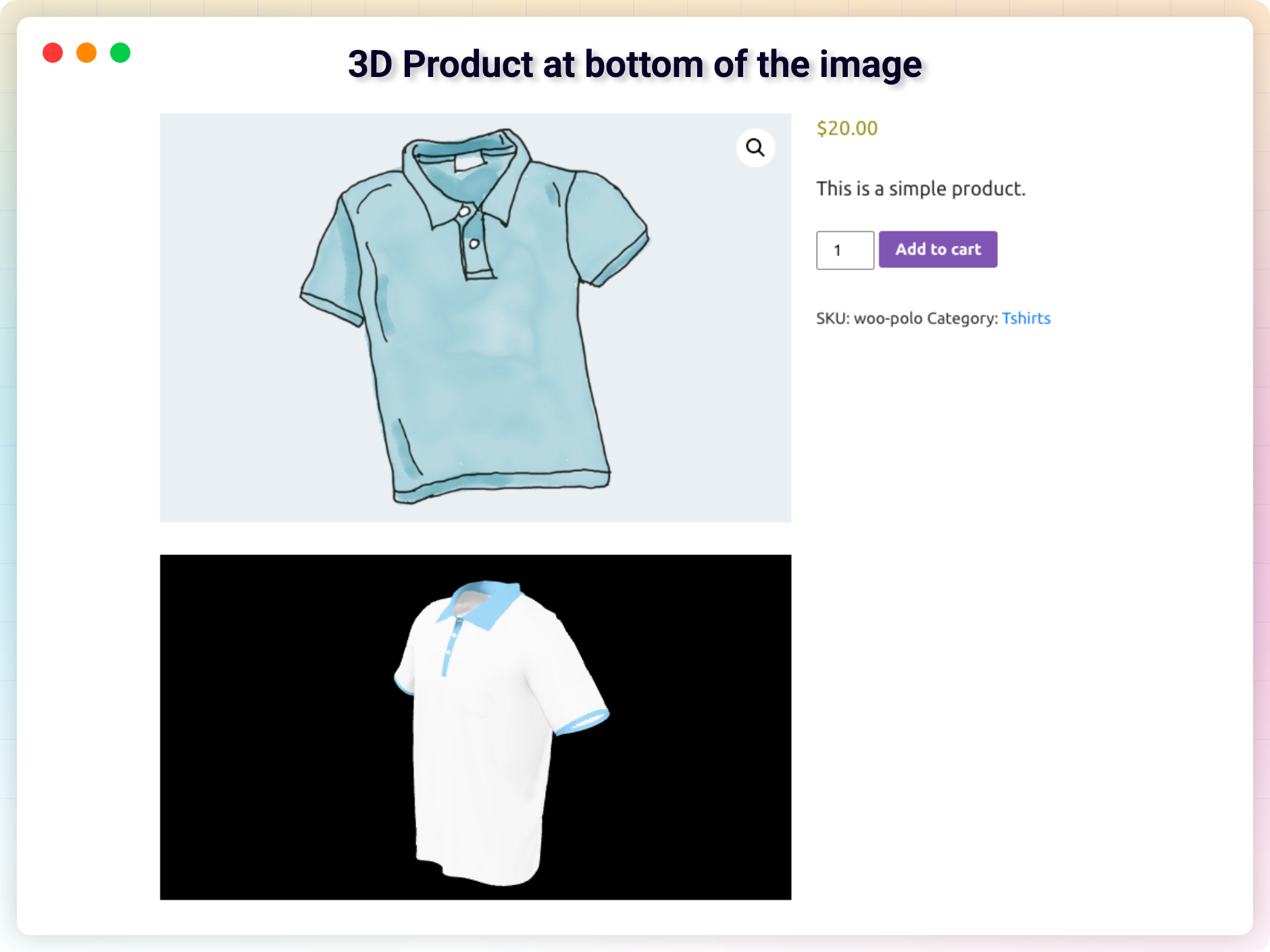
- WooCommerce 연동: 상품 페이지에서 바로 인터랙티브 3D 상품 뷰를 확인하세요.
- 터치, 패닝, 확대/축소 및 회전: 마우스 및 터치스크린 제스처를 기본적으로 완벽하게 지원합니다.
- 환경 및 스카이박스 이미지 – 이제 무료로 이용 가능: 사실적인 조명과 반사 효과를 위해 환경 이미지를 추가하거나, HDR 스카이박스를 모델의 배경으로 설정하세요.
- Elementor 호환: 3D 모델을 Elementor 레이아웃에 손쉽게 드래그 앤 드롭할 수 있습니다.
- 성능 향상을 위한 지연 로딩: 모델은 화면에 표시될 때만 로드되어 페이지 속도를 높이고 SEO에 유리합니다.
- 라이브 에디터 미리 보기: 3D 모델을 구성하는 동안 에디터에서 바로 확인할 수 있습니다.
- 선택적 다운로드 버튼: 방문자가 뷰어에서 바로 3D 파일을 다운로드할 수 있도록 합니다. 기본적으로 비활성화되어 있으며, 토글 버튼을 한 번 클릭하면 활성화됩니다.
- 설정 안내: 첫 활성화 시 페이지에 첫 번째 3D 모델을 표시할 수 있도록 도와주는 간단한 안내입니다.
프로 버전 – 더 많은 제어 및 맞춤 설정 가능
더 많은 유연성을 원하시나요? 3D 뷰어 프로에는 뷰어를 미세 조정하고 성능을 개선하며 워크플로를 간소화할 수 있는 강력한 기능이 추가되었습니다.
프로 버전에는 다음과 같은 기능이 포함되어 있습니다:
- 드래그 앤 드롭 Elementor 위젯과 모든 뷰어 설정이 포함되어 있습니다.
- 외부 모델 URL (Amazon S3, Google Drive, CDN 등).
- 세밀한 조명, 그림자 농도 및 노출 조절 기능.
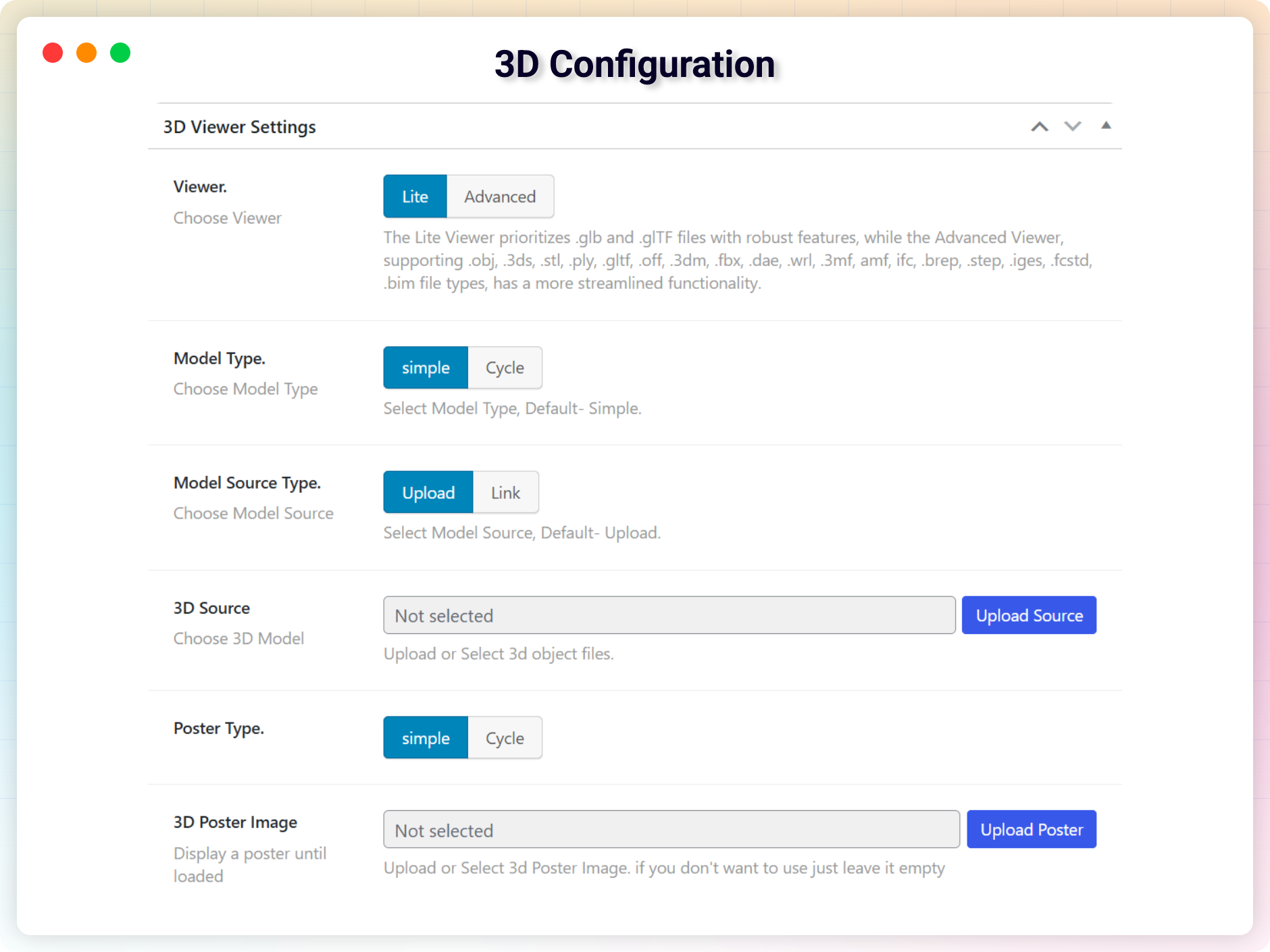
- 모델이 로드되는 동안 표시되는 포스터 이미지와 로딩 진행 바.
- 자동 회전, 전체 화면, 자동 재생 토글 기능.
- 완벽한 첫인상을 위한 맞춤형 카메라 앵글.
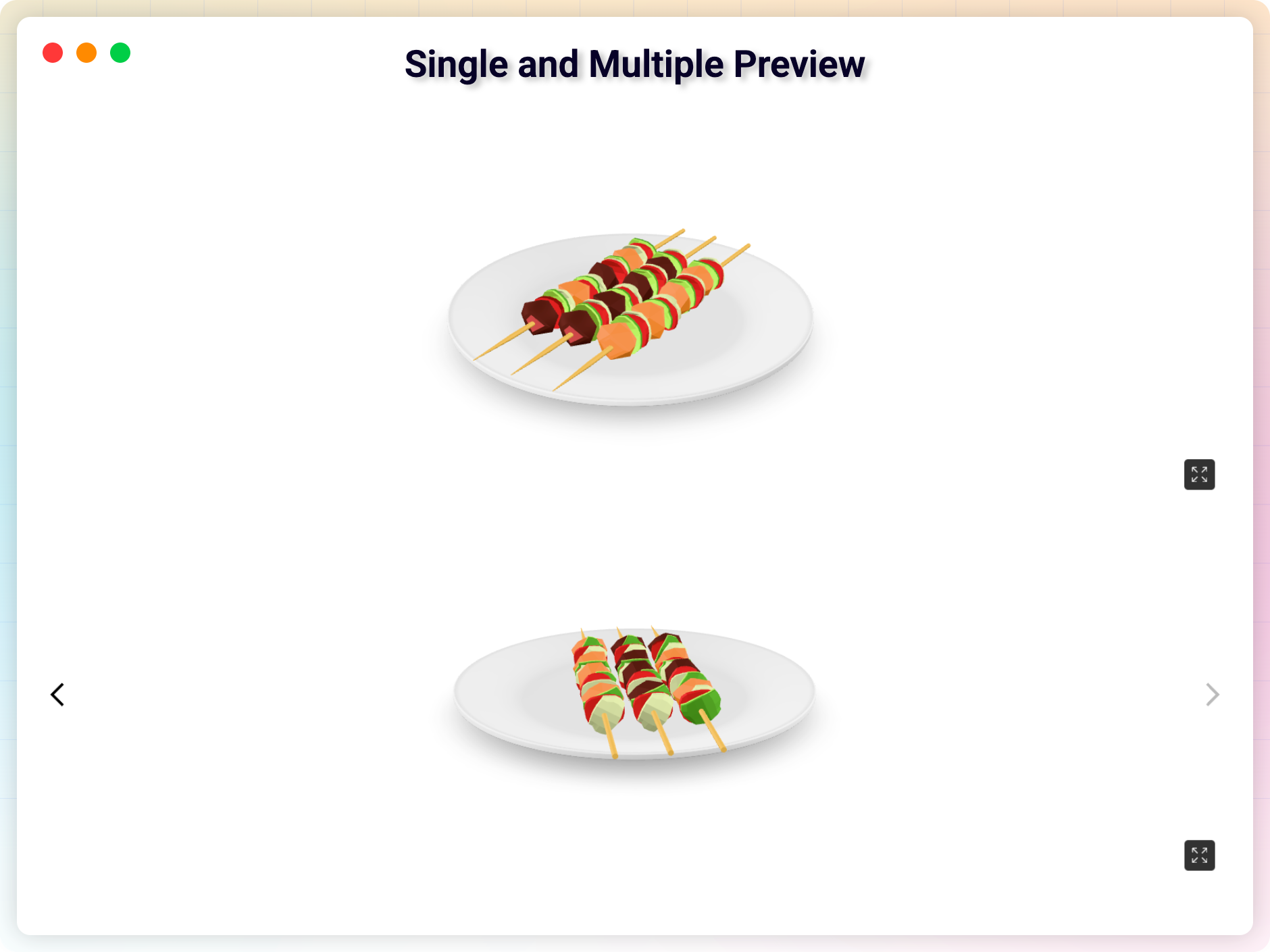
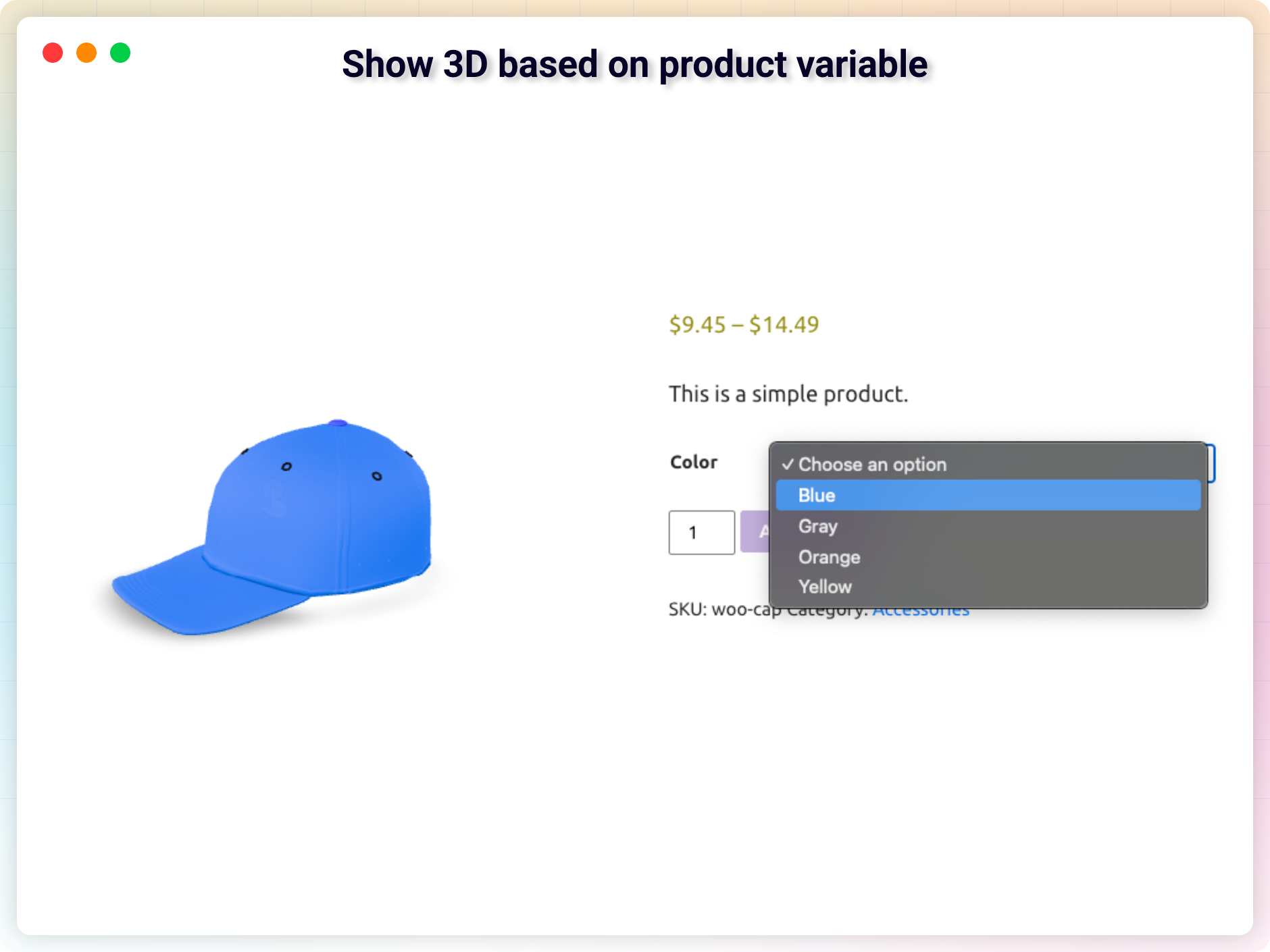
- WooCommerce 3D 갤러리: 상품당 여러 모델을 지원합니다.
- 주요 정보 및 설명을 통해 제품 세부 정보를 강조합니다.
3D 뷰어 사용 방법 – 빠른 시작
1분도 채 걸리지 않는 시간에 첫 번째 모델을 추가하세요:
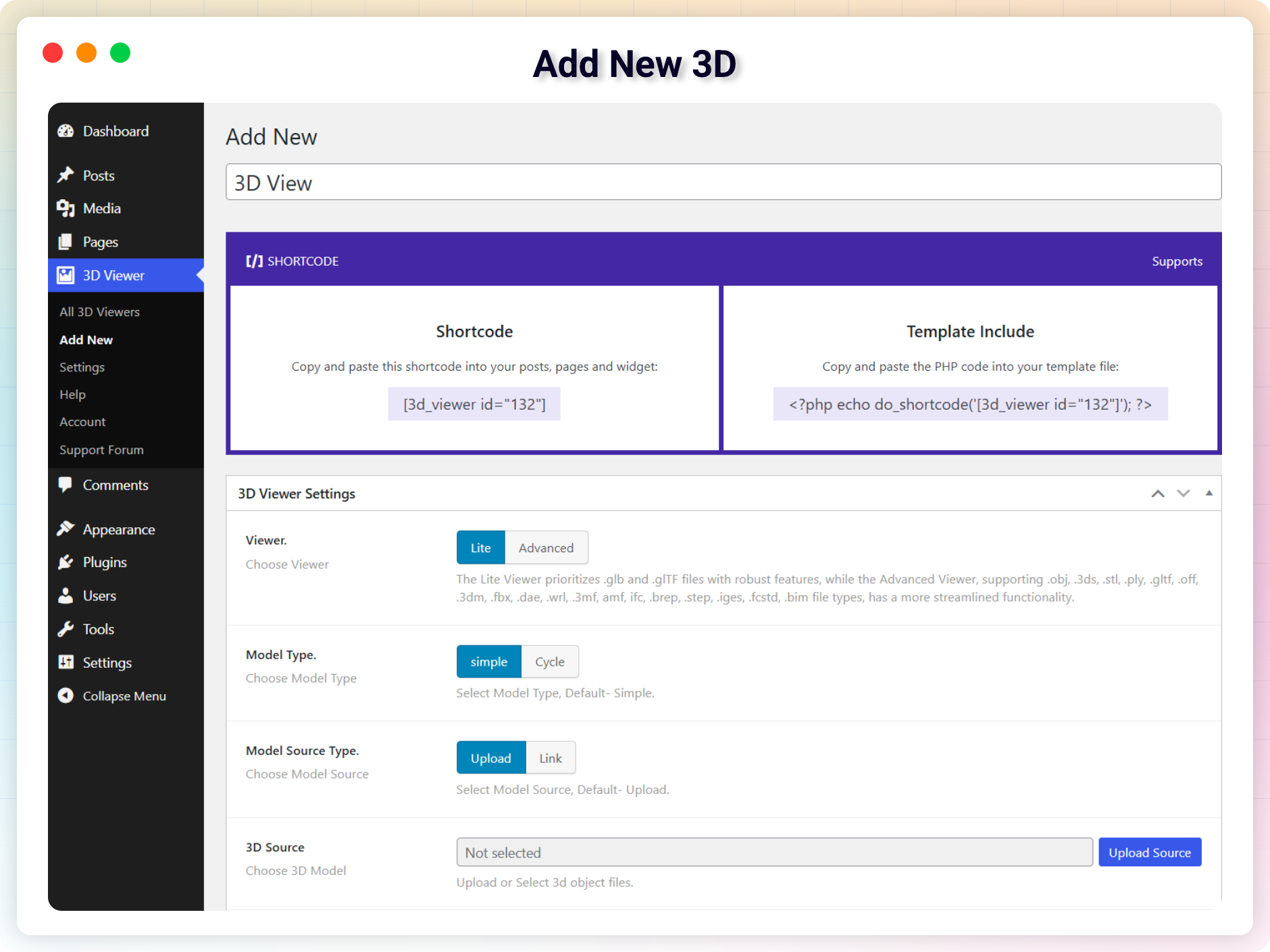
- 워드프레스 대시보드에서 3D 뷰어 새 항목 추가로 이동하세요.
- 3D 모델을 업로드하거나 URL을 붙여넣으세요.
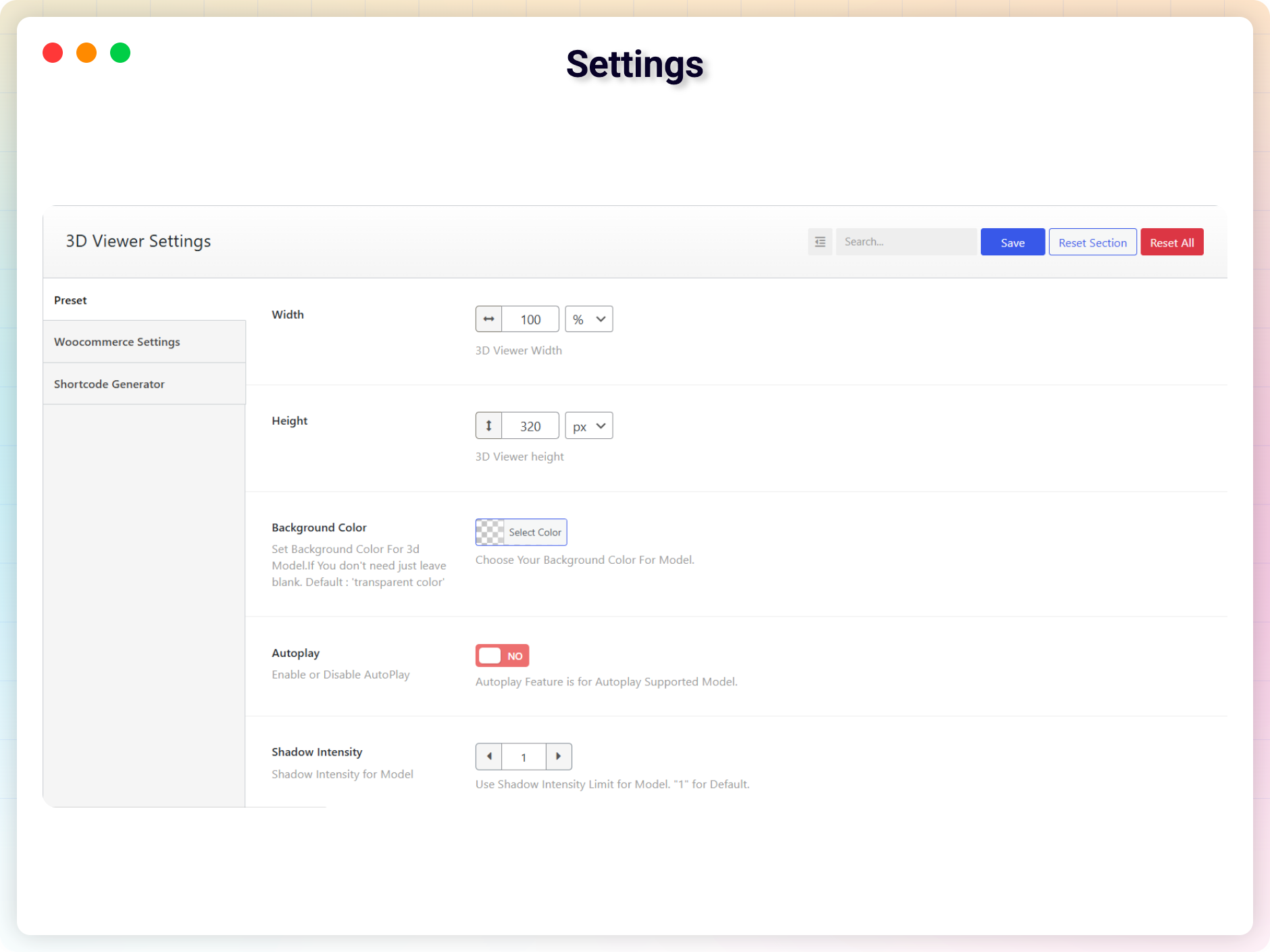
- 뷰어를 사용자 지정하세요(조명, 회전, 배경 등).
- 저장을 클릭하여 숏코드를 생성합니다.
- 이 숏코드를 게시물, 페이지 또는 위젯에 붙여넣으세요.
WooCommerce 상품에 삽입하기:
- WooCommerce 상품 편집 또는 생성
- 3D 뷰어 설정 메타박스로 스크롤하세요.
- 모델 파일을 업로드하거나 외부 링크를 붙여넣으세요.
- 게시 – 3D 모델이 제품 페이지에 표시됩니다.
블록 편집기를 선호하시나요? 게시물이나 페이지에 3D 뷰어 블록을 추가하고, 모델을 선택한 다음 ‘게시’를 누르세요. 그럼 끝입니다. 3D 모델이 바로 표시됩니다!
사용 사례
- WooCommerce 스토어: 고객이 구매 전에 제품을 3D로 회전하며 자세히 살펴볼 수 있게 해주세요.
- 교육 및 훈련: 해부학 모형, 기계 부품 또는 과학 관련 시각 자료를 삽입하세요.
- 건축 및 엔지니어링: 고객에게 3D 건축 도면과 시제품을 제시합니다.
- 게임 및 디지털 자산: 캐릭터, 자산, 환경을 인터랙티브하게 선보입니다.
- 예술 및 디자인 포트폴리오: 조각, 제품 디자인, 창의적인 작품을 소개합니다.
- 연구 및 프로토타이핑: 협업적 피드백을 위해 실험 모델을 공유하세요.
- 포장 및 모형: 이해관계자들이 생산에 들어가기 전에 실시간으로 포장 디자인을 살펴볼 수 있도록 합니다.
지원되는 3D 파일 형식
.GLB, .GLTF, .OBJ, .STL, .FBX, .DAE, .PLY, .3DS
모든 기기 최적화
- 완전 반응형 및 모바일 친화적
- 터치 제스처 지원 (회전, 확대/축소, 이동)
- 레티나 지원 렌더링
- 널리 사용되는 워드프레스 테마와 호환됩니다
사용자 의견
❛❛3D 모델을 보는 데 있어 제가 찾아본 것 중 가장 유용한 플러그인입니다. 지원도 매우 훌륭하고, 제가 보고한 문제도 즉시 수정되었습니다.❜❜
– diegoparoni
❛❛정말 훌륭한 플러그인입니다. 제가 가장 마음에 드는 점은 3D 모델이 완벽하게 로드되고 조명을 조절할 수 있다는 것입니다. 저는 PRO 버전을 사용하고 있습니다.❜❜
– blunoa
플러그인이 마음에 드시나요? 부족한 기능이 있나요? 의견을 보내주세요 – 매월 개선 사항을 출시하고 있습니다.
당사의 다른 워드프레스 플러그인도 확인해 보세요
HTML5 비디오 플레이어 – 다양한 스킨을 통해 동영상을 개별 또는 재생 목록 형태로 재생할 수 있습니다.
HTML5 오디오 플레이어 – 멋진 영상과 함께 오디오를 감상하세요.
PDF 포스터 – 다양한 스타일로 PDF 파일을 표시하고 삽입할 수 있습니다.
StreamCast – 다양한 스킨을 갖춘 사용자 정의 가능한 라디오 플레이어.
Advanced Post Block – 다양한 레이아웃으로 게시물 및 사용자 정의 게시물을 표시합니다.
소스 코드
저희 GitHub 저장소에서 이 플러그인의 소스 코드를 확인하고, 버그를 신고하며, 개발에 기여할 수 있습니다:
GitHub의 3D 뷰어
외부 서비스
이 플러그인은 다음 외부 서비스에 연결됩니다. 연결은 플러그인의 관리자 대시보드 페이지에서만 이루어지며, 사이트 방문자가 프론트엔드에서 이용하는 경우에는 연결이 실행되지 않습니다.
bPlugins API
- 서비스: bPlugins 제품 API –
https://api.bplugins.com - 기능: 플러그인의 대시보드를 열면, 플러그인은 제품 카드, 버전 정보 및 업그레이드 옵션을 표시할 수 있도록 제품 정보(예: 플러그인 자체 정보 및 bPlugins의 다른 플러그인 정보)를 요청합니다.
- 전송되는 데이터: 제품 식별자(예:
https://api.bplugins.com/wp-json/bpl/v1/products/{id})를 포함하여 bPlugins API 엔드포인트로 요청이 전송됩니다. 이 요청의 일환으로 개인 데이터나 사이트 콘텐츠는 전송되지 않습니다. - 시점: 관리자가 wp-admin에서 해당 플러그인의 대시보드를 보고 있는 동안에만.
- 이용 약관: https://bplugins.com/terms-of-service/
- 개인정보 처리방침: https://bplugins.com/privacy-policy/
WordPress.org 플러그인 API
- 서비스: WordPress.org 플러그인 정보 API –
https://api.wordpress.org - 기능: 이 대시보드는 공개된 WordPress.org 플러그인 API를 조회하여 해당 제작자가 공개한 다른 플러그인들(제목, 아이콘, 평점, 활성 설치 수 등)을 나열합니다.
- 전송되는 데이터: 공개된 읽기 전용 쿼리 요청 (예:
https://api.wordpress.org/plugins/info/1.2/?action=query_plugins&request[author]=bplugins). 개인 정보는 전송되지 않습니다. - 시점: 관리자가 wp-admin에서 해당 플러그인의 대시보드를 보고 있는 동안에만.
- 이용 약관: https://wordpress.org/about/privacy/
- 개인정보 처리방침: https://wordpress.org/about/privacy/
서드파티 라이브러리
이 플러그인은 다음과 같은 타사 JavaScript/PHP 라이브러리를 포함하고 있습니다.
Codestar 프레임워크
- 출처: http://codestarframework.com/
- GitHub: https://github.com/Codestar/codestar-framework
- 라이선스: GPLv2 이상 – https://github.com/Codestar/codestar-framework/blob/master/LICENSE.md
- 목적: 플러그인의 설정 및 숏코드 생성기를 위한 옵션 프레임워크를 제공합니다.
Freemius SDK
- 출처: https://freemius.com/
- GitHub: https://github.com/Freemius/wordpress-sdk
- 라이선스: GPLv3 – https://github.com/Freemius/wordpress-sdk/blob/master/LICENSE.txt
- 목적: 플러그인 개선을 돕기 위해 사용자의 동의 하에 사용 현황 추적 및 분석 기능을 제공합니다.
온라인 3D 뷰어 (o3dv)
- 파일:
public/js/o3dv.min.js - 출처: https://github.com/kovacsv/Online3DViewer
- 라이선스: MIT – https://github.com/kovacsv/Online3DViewer/blob/master/LICENSE.md
- 목적: GLB, GLTF, OBJ, STL 및 기타 3D 파일 형식을 지원하는 “고급” 3D 뷰어 엔진을 제공합니다.
이 번들에는 다음과 같은 하위 종속성도 포함되어 있습니다:
- Three.js r163 – MIT – https://github.com/mrdoob/three.js
- fflate 0.8.2 – MIT – https://github.com/101arrowz/fflate
- Chevrotain 9.0.1 – Apache-2.0 – https://github.com/Chevrotain/chevrotain
Google 모델 뷰어
- 파일:
public/js/model-viewer.latest.min.js - 출처: https://github.com/google/model-viewer
- npm:
@google/model-viewer - 라이선스: Apache-2.0 (코드) / BSD-3-Clause (일부 구성 요소) – https://github.com/google/model-viewer/blob/master/LICENSE
- 목적: “Lite” 뷰어 및 WooCommerce 상품 표시에 사용되는
<model-viewer>웹 컴포넌트를 제공합니다.
이 번들에는 다음과 같은 하위 종속성도 포함되어 있습니다:
- Three.js r174 – MIT – https://github.com/mrdoob/three.js
- Lit 3.2.1 / LitElement 4.1.1 – BSD-3-Clause – https://github.com/lit/lit
bpl-tools
- 출처 / GitHub: https://github.com/bPlugins/bpl-tools
- 라이선스: GPL-2.0-or-later – https://www.gnu.org/licenses/gpl-2.0.html
- 목적: 관리자 대시보드 구성 요소와 일반적인 구텐베르크 편집기 제어 기능을 제공하는 공유 유틸리티 라이브러리입니다.
- 외부 서비스: 도서관은 상품 데이터 및 결제 기능을 위해 bPlugins, WordPress.org 및 Freemius 서비스에 연결될 수 있습니다. 자세한 내용은 다음을 참조하십시오: https://github.com/bPlugins/bpl-tools#external-requests–why-they-are-made
bp-extension-manager
- 출처 / GitHub: https://github.com/bPlugins/bp-extension-manager
- 라이선스: GPL-2.0-or-later – https://www.gnu.org/licenses/gpl-2.0.html
- 목적: “확장 기능” 관리자 페이지에서 플러그인의 애드온 확장 기능을 검색, 제한, 라이선스 부여 및 관리하는 공유 라이브러리입니다.
- 외부 서비스: 도서관은 사용 가능한 애드온을 나열하고, 다운로드 URL을 확인하며, 라이선스를 관리하기 위해 bPlugins, WordPress.org 및 Freemius 서비스에 연결할 수 있습니다. 연결은 플러그인의 관리자 대시보드에서만 이루어집니다.
스크린샷
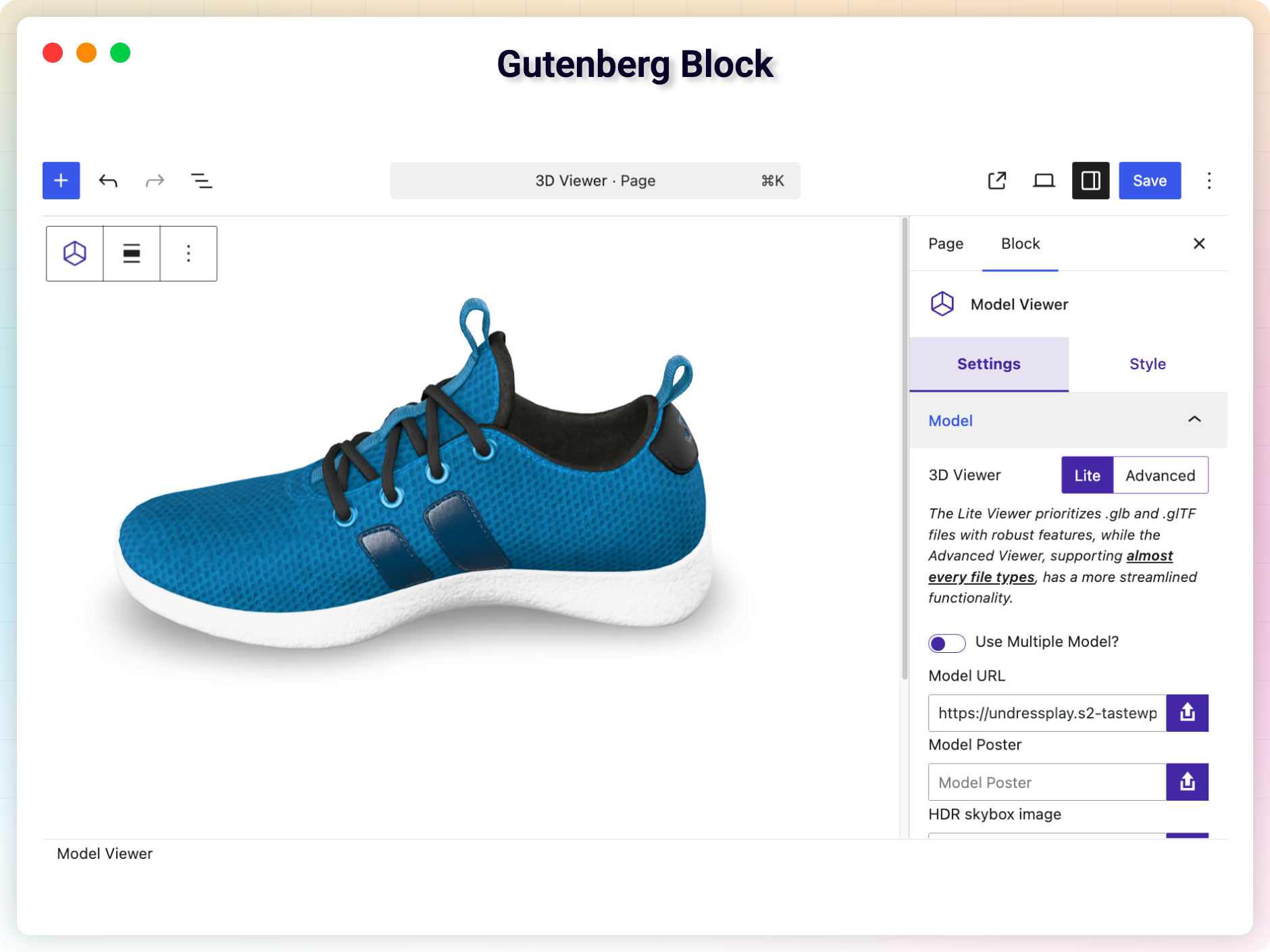
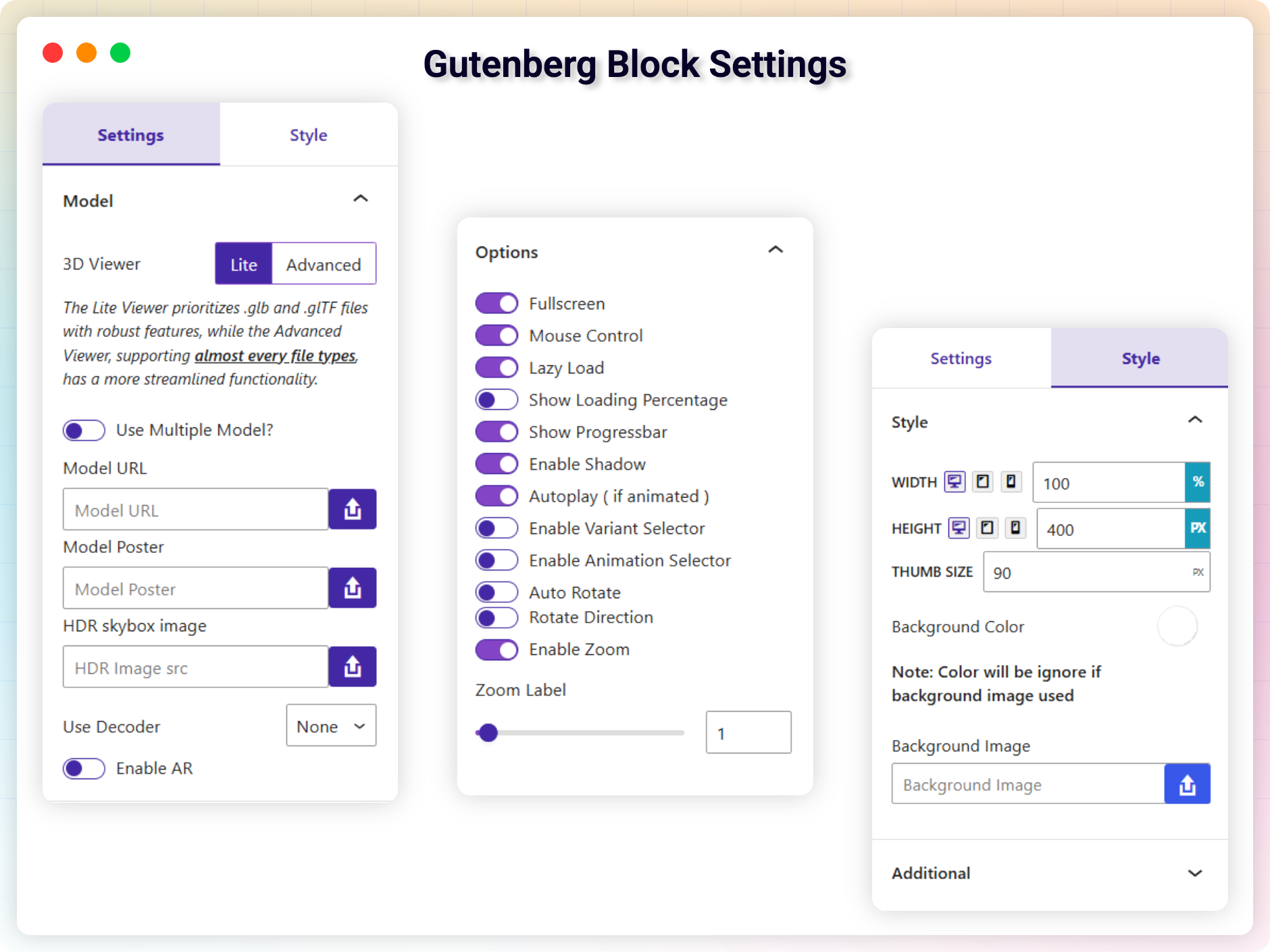
블록
이 플러그인은 2개의 블록을 제공합니다.
- 3D Viewer Display interactive 3D models on the web.
- 3D Model Viewer Easily embed 3D models in your WordPress site with this intuitive block.
설치
워드프레스 대시보드에서 (권장):
- 플러그인 새로 추가로 이동하세요.
- “3D 뷰어”를 검색하세요.
- 지금 설치를 클릭한 다음, 활성화를 클릭하세요.
- 3D 뷰어 새로 추가로 이동하여 첫 번째 모델을 업로드하세요.
수동 설치:
- 플러그인 폴더를
/wp-content/plugins/디렉터리에 업로드하세요. - 워드프레스의 플러그인 메뉴를 통해 플러그인을 활성화하세요.
- 이 숏코드는 어떤 페이지, 게시물 또는 위젯에서나 사용할 수 있습니다.
- 테마 PHP에 삽입하려면 템플릿에
<?php echo do_shortcode('YOUR_SHORTCODE'); ?>를 추가하세요.
FAQ
-
이 플러그인은 어떤 3D 파일 형식을 지원하나요?
-
3D 뷰어는 .GLB, .GLTF, .OBJ, .STL, .FBX, .DAE, .PLY 및 .3DS 파일을 지원합니다.
-
3D 뷰어는 WooCommerce와 호환되나요?
-
네. 어떤 제품에든 3D 모델을 첨부할 수 있으며, 해당 모델은 제품 페이지에 표시됩니다. 프로 버전에서는 제품당 여러 개의 모델과 각 변형별 모델을 포함하는 3D 갤러리 기능이 제공됩니다.
-
증강 현실(AR)을 지원하나요?
-
네, 게다가 무료입니다. AR 기능은 무료 버전에 포함되어 있으므로 별도 업그레이드가 필요하지 않습니다. 지원되는 모바일 기기에서는 WebXR, Scene Viewer(안드로이드), Quick Look(iOS)을 통해 모델을 AR로 볼 수 있습니다. 데스크톱 사용자는 QR 코드를 스캔하여 휴대폰에서 모델을 AR로 열 수 있습니다. 구텐베르크 블록, 엘리멘터 위젯 또는 숏코드 생성기에서 AR 활성화 토글을 켜고, AR 배치 위치와 모드를 선택하세요.
-
이 플러그인을 Elementor와 함께 사용할 수 있나요?
-
네, Elementor 위젯과 숏코드 지원 기능이 모두 기본으로 포함되어 있습니다.
-
방문자들이 제 3D 모델 파일을 다운로드할 수 있나요?
-
사용자가 허용할 때만 가능합니다. 다운로드 버튼은 기본적으로 비활성화되어 있으며, 구텐베르크 블록, 엘리멘터 위젯 또는 숏코드 설정에서 모델별로 활성화해야 합니다.
-
3D 모델이 웹사이트 속도를 느리게 할까요?
-
아니요. 모델은 지연 로드(lazy-load) 방식으로, 화면에 표시될 때만 로드되며, 렌더링은 모바일 및 데스크톱 환경에 최적화되어 있습니다.
-
Amazon S3나 Google Drive와 같은 외부 URL에서 모델을 불러올 수 있나요?
-
네, Pro 버전에서는 외부 URL(S3, Google Drive, CDN 등)에서 모델을 불러올 수 있습니다.
-
수정, 맞춤 설정 또는 도움이 필요할 때 어떻게 연락하면 되나요?
후기


기여자 & 개발자
“3D 뷰어 – 제품 페이지를 인터랙티브한 3D 체험으로 바꾸세요”(은)는 오픈 소스 소프트웨어입니다. 다음의 사람들이 이 플러그인에 기여하였습니다.
기여자


변경이력
1.9.4 – 26 September, 2026
- Changed: Redesigned the guided setup as a three-step onboarding.
- New: Added a Monthly billing cycle to the Pricing page.
- Update: The block editor placeholder now reads “Add Your 3D Model” and keeps the block’s height.
- Update: The old guided setup URL now redirects to the new one.
1.9.3 – 2026년 9월 9일
- New: Environment Image and HDR Skybox Image are now available in the free version, in the Gutenberg block, the Elementor widget, and the shortcode generator.
- Fixed: The viewer no longer spins forever when the 3D model file is missing (404) or fails to load; it now shows a short message instead.
- Update: All supported 3D formats, including .hdr for skybox images, are now enabled for upload by default; any of them can still be turned off in Settings Allowed Mime Types.
- Fixed: The double-extension upload guard (e.g. model.php.glb) passed such files through instead of blocking them; they are now refused.
- Fixed: Guided Setup kept its full-screen layout only if no other plugin appended its admin body class without a space (e.g. Tutor LMS); it now stays full-screen regardless.
1.9.2 – 2026년 8월 12일
- New: Added a 3D file download button that lets visitors download the model file from the viewer. Off by default, and available in the Gutenberg block, the Elementor widget, and the shortcode generator.
- New: Added a guided setup walkthrough for new installs, covering the ways to add a model and ending on your first 3D model. Existing sites can start it from Help & Demos Guided Setup.
- Fixed: Uninstalling the free plugin no longer removes 3D Viewer data while 3D Viewer Pro is active.
- Fixed: The Elementor widget no longer stays blank on sites that reorder, defer, or delay scripts, and the editor preview now always loads the viewer libraries.
- Update: The Elementor widget keeps its configured height while no model is selected, instead of collapsing to the widget icon.
- Update: Rebuilt the Elementor file picker with a file preview, a Replace button and a Remove button. Selected files are unchanged.
- Fixed: The Elementor file picker no longer clashes with other bPlugins plugins (Panorama Lite, HTML5 Video Player) that shipped a control of the same name, which could leave one plugin’s picker unresponsive.
- Update: Augmented Reality (AR) is now available in the free version, including WebXR, Scene Viewer, Quick Look, QR code access, AR placement, and the iOS .usdz source.
1.9.1 – 2026년 7월 19일
- New: Enabled GLB and GLTF uploads by default; other formats can be enabled from Settings Allowed Mime Types.
- New: Added reminder notices in the shortcode generator, Gutenberg block, and Elementor widget prompting to enable other 3D formats from settings.
1.9.0 – 2026년 7월 18일
- New: Added Augmented Reality (AR) support with WebXR, Scene Viewer, and Quick Look modes, including QR code access to view models in AR from mobile devices.
- New: Added an iOS-specific (.usdz) model source for AR Quick Look on Apple devices.
- New: Added Exposure and Shadow Intensity controls for the Model Viewer.
- New: Added a live 3D model preview panel to the editor metabox.
- New: Added an Extensions catalog and manager to the admin dashboard.
- Update: Refactored the admin dashboard with section icons and an improved layout.
1.8.13 – 2026년 6월 1일
- Update: Tested with WordPress 7.0 and Updated Product Meta Field.
- Update: Prefixed isGutenberg meta key and configuration options for standards compliance.
- Fixed: Hardened file extension exception checks against double-extension script uploads.
- New: Added Allowed Mime Types settings checklist to enable/disable 3D file formats on upload.
- New: Integrated dynamic and minimal warning notices in Metaboxes and Gutenberg sidebar.
1.8.12 – 16 May, 2026
- Update: Overall code quality and strengthened security protocols.
- Update: Required WordPress version updated.
1.8.11 – 13 May, 2026
- 업데이트: 설정에서 ‘사용자 정의 CSS’ 필드를 제거했습니다.
1.8.10 – 2026년 5월 9일
- 개선 사항: 전반적인 코드 품질 향상 및 보안 프로토콜 강화.
1.8.9 – 2026년 5월 5일
- Update: Updated Codestar Framework for better stability.
- Update: Removed restricted “Locked Fields” to improve user flexibility
- New: Added Zoom In/Out controls to the Classic Shortcode Generator.
- New: Added Camera controls to the Classic Shortcode Generator.
- 개선 사항: 전반적인 코드 품질 향상 및 보안 프로토콜 강화.
1.8.8 – 2026년 4월 2일
- 수정됨: 우커머스 주문 문제
1.8.7 – 2026년 3월 28일
- Fixed: Move elements fields to ‘Elements’ tab in classic editor
- Fixed: Zoom not working in ‘Advanced’ Viewer
- Update: Freemius SDK
1.8.6 – 15 Mar, 2026
- 수정됨: 알 수 없는 앵커 링크 제거
1.8.5 – 2026년 3월 10일
- Fixed: STL File does not work
- Fixed: Does not work on Elementor Page Builder
1.8.4 – 2026년 2월 28일
- New: 4-step Setup Wizard after installation.
- Fixed: WooCommerce variation not working.
- Fixed: Shadow not working.
- Fixed: Rotation Delay not working.
- Update: Added Info text with all the controls.
- Update: Remove affiliate and contact Submenu.
- Update: Minimize Shortcode area (Classic Shortcode Generator).
1.8.3 – 2025년 12월 17일
- 수정: 새로운 단축코드가 제대로 작동하지 않던 문제 수정.
1.8.2 – 2025년 12월 4일
- 기능: 핫스팟에 링크 추가 옵션 (프리미엄)
- 개선: 일부 자바스크립트 및 CSS 코딩
- 기능: 클래식 단축코드 생성기의 AR 모드
1.8.1 – 2025년 11월 5일
- 업데이트: 라이브러리 업데이트
- 수정: Flatsome 테마 충돌
- 삭제: 모델의 핸드 툴
- 기능: iPhone의 전체 화면 버튼
1.8.0 – 15 Sep, 2025
- 새 페이지: 대시보드
- 추가: 비주얼 에디터
- 기능: 우커머스 갤러리 첫 이미지에서 3D 표시
- 수정: 제품 페이지 레이아웃 오류
- 수정: public.css 파일 미검출
- 개선: 코드
- 기능: 초기 뷰 설정 (프리미엄)
- 기능: 증강 현실 (AR) (프리미엄)
- 기능: 핫스팟/주석 추가 옵션 (프리미엄)
- 기능: X/Y 축 회전 잠금 (프리미엄)
- 기능: 캡처 버튼 (프리미엄)
- 기능: 확대/축소 버튼 (프리미엄)
- 기능: QR 코드를 이용한 AR 뷰 (프리미엄)
- 추가됨: 프리셋 (프리미엄)
- 개선됨: 상점 페이지 및 상품 목록에서 3D 모델 표시 (프리미엄)
1.7.0 – 2025년 7월 9일
- 수정: 아이폰에서 AR 아이콘 표시 오류
- 수정: 제품 페이지에서 치명적/중대한 오류 발생
- 수정: WooCommerce에서 단일 속성 시 제품 변형에 따라 다른 3D 모델 표시
- 수정: iPhone에서 전체 화면 작동 안 함
- 수정: 3d_viewer_product 숏코드 작동 오류
- 기능: 스카이박스 높이 추가 필드
- 기능: 다중 제품 변수에 기반한 모델 표시
- 기능: 로더 추가
1.6.3 – 2025년 5월 7일
- 수정: 로드_텍스트도메인_저스트_인_타임이 잘못 호출되었습니다.
1.6.2 – 2025년 2월 12일 (Pro)
- 기능: 가장자리 표시 및 색상 사용자 지정 옵션(고급 뷰어, 프리미엄)
- 옵션: 줌 활성화/비활성화(고급 뷰어)
- 옵션: 줌 활성화/비활성화(우커머스)
1.6.1 – 2025년 2월 12일 (Pro)
- 수정: 정의되지 않은 percentageWrapper의 프로퍼티를 읽을 수 없음
1.6.0 – 2025년 2월 5일 (Pro)
- 옵션: HDR 스카이박스 이미지 추가(프리미엄)
- 옵션: 톤 매핑(구텐베르크에서만 사용 가능)(프리미엄)
- 기능: 모델에 팩터 및 텍스처 적용(구텐베르크에서만 사용 가능)(프리미엄)
- 기능: 텍스처 옵션을 사용하여 머티리얼 수정(구텐베르크에서만 사용 가능)(프리미엄)
1.5.1 – 1 Feb, 2025
- 업데이트: 워드프레스 SDK
1.5.0 – 2024년 9월 3일
- 기능: 스카이박스 이미지를 모델로 설정
- 기능: AR 기능
- 수정: 회전 지연
1.5.0 – 2024년 9월 3일
- 개선: 코드
- 기능: 모델이 로드될 때까지 포스터/이미지를 표시하는 옵션입니다.
- 기능: 대부분의 테마와 호환
- 수정: 제품 쇼트코드에서 전체 화면으로 작동하지 않음
1.4.2 – 2024년 6월 27일
- 수정: 동적 속성 생성
1.4.0 – 2024년 3월 24일
- 기능: 줌 레벨 설정
- 기능: 환경 이미지 설정
1.3.28 – 2024년 3월 3일
- 수정: 우드마트 단일 상품 이미지 CSS
1.3.27 – 2024년 2월 12일
- 수정: 사용자 정의 각도
1.3.26 – 2024년 2월 7일
- 수정: 모달 너비 문제
1.3.25 – 28 Jan, 2024
- 기능: 우커머스 제품에 라이트/고급 뷰어 추가
1.3.24 – 2024년 1월 17일
- 개선: 사용자 지정 선택기
1.3.23 – 2023년 12월 7일
- 개선: 가격 페이지
1.3.20 – 2023년 11월 23일
- 수정: $product가 정의되지 않음
1.3.19 – 2023년 11월 11일
- SDK 업데이트
1.3.17 – 2023년 10월 12일
- Divi 테마의 단일 제품보기 수정
1.3.16 – 2023년 10월 5일
- 3D용 제품 페이지의 모델/팝업
- 포스터 문제 수정
1.3.15 – 2023년 8월 24일
- OV가 정의되지 않은 문제 수정
1.3.14 – 2023년 8월 17일
- 엘리멘터 문제 수정
- 클래식 쇼트코드 생성기의 뷰어 2
1.3.11 – 2023년 7월 29일
- 퍼센트 문제 수정
1.3.11 – 2023년 7월 19일
- 퍼센트 문제 수정
1.3.10 – 2023년 7월 17일
- 설정 페이지 문제 수정
1.3.9 – 11/07/2023
- 구텐베르크 쇼트코드 생성기
- 우커머스 커스텀 셀렉터
1.3.8 – 30/03/2023
- 수정: 전체 화면 버튼 문제
- 수정: 우커머스의 SSL 문제
1.3.3 – 04/09/2022
- 모델에 속성을 추가하는 apply_filters 후크 추가
1.3.1
- 전체 화면 문제 수정
1.2.9
- 너비 문제 수정
1.2.7
- SDK 업데이트
1.2.6
- 미러 문제 수정
1.2.5
- 제품 메타박스 문제 수정.
- 기타 미러 문제 해결
1.2.4
- 미러 문제 수정.
1.2.3
- 제품 문제 해결
1.2.2
- 성능 향상.
- 미러 문제 수정.
1.2.1
- 새로운 쇼트코드 생성기
- 미러 문제 수정.
1.2.0
- 우커머스 지원
- 모델을 위한 다중 소스 옵션
- 전용 설정 패널.
- 사전 설정 설정
1.1.1
- 전체 화면 기능 추가
- 특정 모델에 대해 맞춤형 각도 지원
- 스크립트 개선
- 기타 문제 해결
1.1.0
- Pro 버전에 새로운 기능 추가
- 옵션 패널 최적화
- 스크립트 개선
- 진행률 표시줄 문제
- 기타 문제 해결
1.0.10
- 이전 버전 쇼트코드 문제 수정.
- 스크립트 개선
- 미러 문제 수정
1.0.9
- 동일한 페이지/글에서 여러 개의 쇼트코드 지원.
- 스크립트 업데이트됨
- 응답성 개선
- 미러 문제 수정
1.0.8
- Https 관련 문제를 해결하세요.
1.0.7
- 자동 회전 속도 및 지연 옵션이 추가되었습니다(프로 전용).
- 미러 문제 수정.
1.0.6
- 새로운 독점 기능 포함.
- 미러 문제 수정.
1.0.5
- 새로운 독점 기능 포함.
- 미러 문제 수정.
- 업데이트된 스크립트
1.0.4
- 새로운 기능 포함.
- 미러 문제를 수정합니다.
- 업데이트된 스크립트
1.0.2
- 미러 문제를 수정합니다.
- 업데이트된 스크립트
1.0.1
- JSON 관련 문제를 수정합니다.
1.0.0
- 초기 릴리스