

설명
AphoniX is a lightweight, high-performance WordPress security plugin that protects your WordPress login page from brute force attacks, bot attempts, and unauthorized credential stuffing.
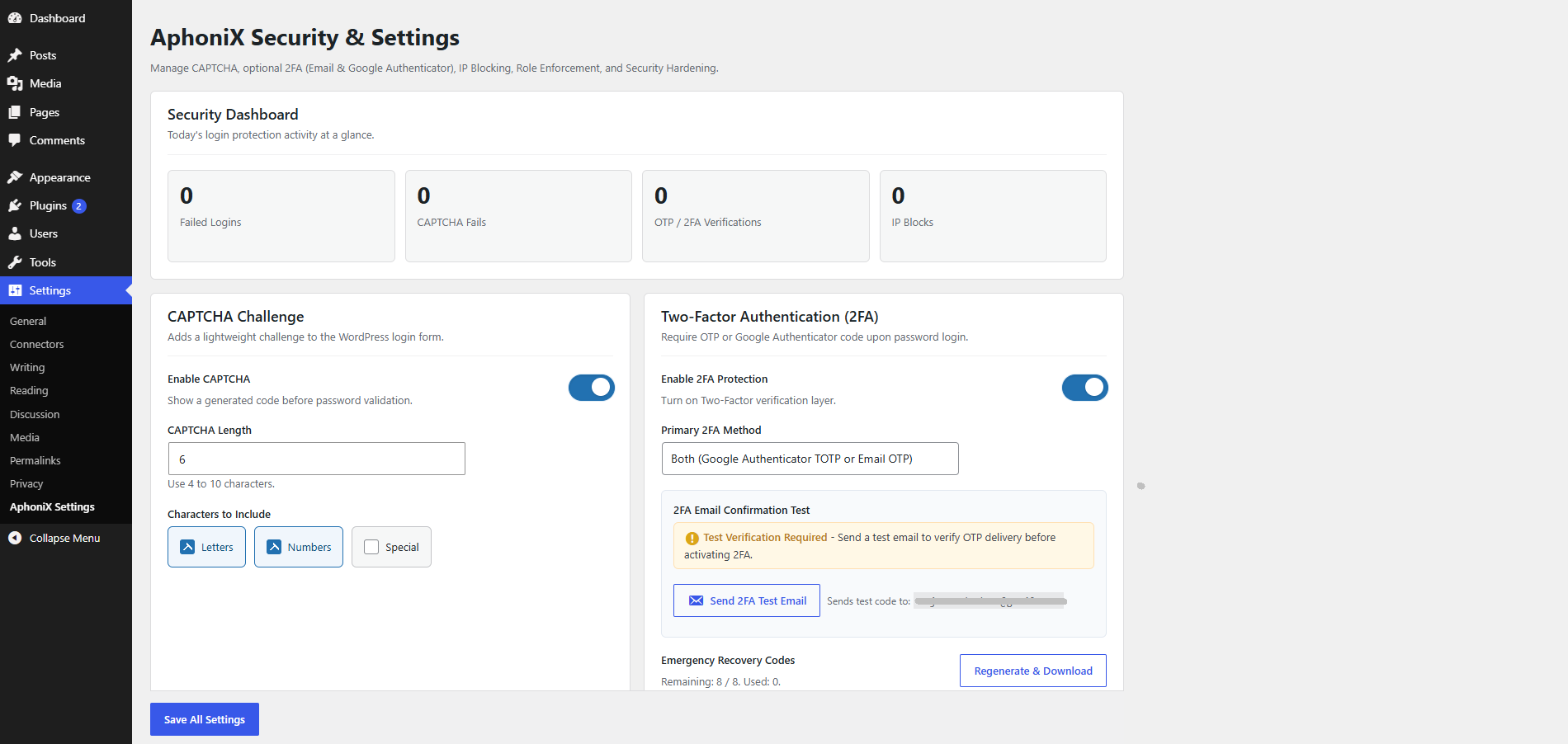
AphoniX includes a generated CAPTCHA that runs locally, plus optional Google reCAPTCHA v3. Authenticator QR codes are generated locally. Google verification contacts Google only when that provider is selected and CAPTCHA is enabled.
Main Features
- Optional Google reCAPTCHA v3: Choose background verification with your Google Site Key, Secret Key and score threshold. Generated CAPTCHA remains the default.
- Inline Authenticator Setup: Scan and confirm the offline QR code directly in Login Protection or the setup wizard. Existing profile setup remains available.
- Custom SVG CAPTCHA on Login: Adds an interference-resistant, bot-blocking SVG CAPTCHA challenge directly onto the login form.
- Two-Factor Authentication (2FA): Adds a secure second verification factor after successful password verification.
- Google Authenticator & Authy Support: Supports standard TOTP authentication apps (Google Authenticator, Authy, Microsoft Authenticator) with local QR code generation in your browser.
- Email One-Time Password (OTP): Delivers 6-digit verification codes straight to verified user emails.
- Emergency Recovery Codes: Generates 8 one-time backup recovery codes to prevent administrator lockouts.
- Email Delivery Verification Test: Ensures your WordPress email/SMTP configuration delivers 2FA OTP codes properly before enforcing 2FA.
- Role-Based 2FA Enforcement: Selectively require 2FA only for sensitive user roles like Administrators and Editors.
- Login Attempt IP Blocking: Automatically blocks IP addresses after too many failed login, CAPTCHA, or 2FA attempts.
- Rapid Attempt Detection: Detects and throttles automated bot attacks submitting bursts of login requests.
- REST API User Enumeration Hardening: Stops unauthenticated hackers and bots from discovering author usernames via
/wp-json/wp/v2/users. - Hide Login URL: Customize your
wp-login.phpURL slug (e.g./my-login/) and redirect direct attempts to a 404 or custom page. - Security Activity Log: Records security events with timestamps, event types, IP addresses, and user IDs with one-click CSV export.
- Generic Login Error Messages: Prevents username enumeration by hiding detailed login failure notices.
- Local CAPTCHA & QR Codes: Generated CAPTCHA and authenticator QR codes work locally. Optional Google reCAPTCHA v3 loads Google scripts and sends tokens to Google. Email OTP messages use your configured WordPress mail provider.
Third-party source and license
QRCode.js by davidshimjs, including QR Code for JavaScript by Kazuhiko Arase, is distributed under the MIT license.
Source: https://github.com/davidshimjs/qrcodejs
The readable source and MIT license are included in assets/js/qrcode.js and assets/js/qrcode-LICENSE.txt. No build step is required.
External services
Google reCAPTCHA v3 is optional and off by default. When selected and CAPTCHA is enabled, protected WordPress login forms load Google’s reCAPTCHA script. The server sends a token and your Google CAPTCHA secret to Google’s SiteVerify API to verify the score, action, hostname and age. Google can receive visitor browser/network data. Generated AphoniX CAPTCHA does not contact Google.
Service: https://www.google.com/recaptcha/about/
Privacy: https://policies.google.com/privacy
Terms: https://policies.google.com/terms
Privacy
Generated CAPTCHA and authenticator checks run locally. Authenticator QR codes are generated in the browser using the bundled library. Optional Google reCAPTCHA v3 loads https://www.google.com/recaptcha/api.js and sends verification tokens to https://www.google.com/recaptcha/api/siteverify. Google Site Key, Secret Key and threshold are saved in WordPress options. The saved Secret Key is not echoed into settings HTML. Google Privacy Policy: https://policies.google.com/privacy and Terms: https://policies.google.com/terms . Email OTP messages are sent using wp_mail() and your configured mail provider, which processes recipient addresses and message contents.
Security logs store IP addresses, user IDs, timestamps and event details locally, with a maximum of 500 entries. Authenticator secrets and hashed recovery codes are stored in WordPress user metadata. Uninstall removes plugin settings and authentication metadata.
스크린샷

설치
- Upload the
aphonixfolder to the/wp-content/plugins/directory, or install the plugin directly through the WordPress Plugins dashboard. - Activate AphoniX through the Plugins screen in WordPress.
- Navigate to AphoniX -> Login Protection to configure your security rules.
- If you enable the Hide Login URL feature, make sure to bookmark your new login URL before logging out.
FAQ
-
Does AphoniX transmit any user secrets to third-party services?
-
Authenticator secrets and QR codes are generated locally; QR generation does not use an external service. Generated CAPTCHA runs locally. If you select Google reCAPTCHA v3, protected login forms load Google scripts and the server sends tokens and the Google CAPTCHA secret to the Google verification API. Google can receive visitor browser/network data. Email OTP uses your configured WordPress mail provider.
-
What happens if my email server fails and I cannot receive the 2FA OTP?
-
AphoniX allows administrators to generate and download 8 Emergency One-Time Recovery Codes from the settings screen. Any of these codes can be entered on the 2FA prompt to gain access.
-
Can I enforce 2FA only for Administrators?
-
Yes. Under AphoniX -> Login Protection -> Role-Based 2FA Enforcement, you can select which roles require two-factor verification.
-
What should I do if I forget my custom Login URL slug?
-
If you lose access, connect to your server using SFTP, FTP, or your hosting file manager, and temporarily rename the
/wp-content/plugins/aphonix/folder. This deactivates the plugin so you can log in at/wp-login.php. Once logged in, rename the folder back toaphonixand update your settings. -
Is IP blocking permanent?
-
No. AphoniX blocks IPs temporarily to mitigate active brute force and credential-stuffing attacks while preventing legitimate users from being locked out indefinitely.
후기
이 플러그인에 대한 평가가 없습니다.
기여자 & 개발자

변경이력
1.0.1
- Fixed recursive login URL filtering when redirect validation requests an admin or login URL, including Google Site Kit compatibility.
- Fixed successful 2FA logins remaining on the verification URL when the session’s redirect target was empty or missing. These now open the dashboard.
- Fixed private login detection when a query value contains wp-login.php, and preserved nested redirect parameters and fragments when rewriting login URLs.
- Preserved the requested destination and Remember Me selection through 2FA. Enforced challenge age independently of cache expiry.
- Showed delivery failures truthfully when an OTP email or resend could not be sent.
- Added compatibility for current Wordfence AJAX login preflight: retained the CAPTCHA challenge and JSON response until the final login form POST.
- Added optional Google reCAPTCHA v3 with server-side score, action, hostname and expiry checks.
- Added inline authenticator QR confirmation in settings and setup, preserving existing profile setup and legacy Both configurations.
- Added a first-activation setup wizard for existing login protections, with per-step saving and skip controls. The wizard has no permanent menu entry.
- Added a dedicated AphoniX admin menu while preserving the original Settings page URL.
- Matched the development version’s violet branding, tabbed settings and responsive setup wizard design, retaining the existing dashboard and activity log.
- Existing CAPTCHA, 2FA, recovery codes, role enforcement, IP blocking, REST protection, and activity logging remain available.
1.0.0
- Initial release of AphoniX.