
설명
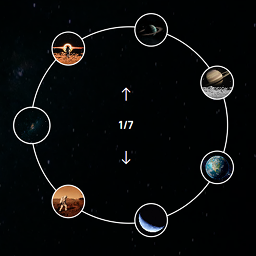
Artisan Slider Elementor Widget is a simple yet powerful circular thumbnail slider built for Elementor.
It features smooth transitions, autoplay options, and custom styling to match your site perfectly.
Features:
- Circular thumbnail navigation
- Fully responsive and lightweight
- Easy to customize via Elementor settings
- Autoplay and manual navigation support
- Control the visible arc of thumbnails
- Choose the active thumbnail position
스크린샷

Slider widget in action 
Elementor controls panel for customization 
Artisan Slider displayed in a different design view 
Circular thumbnail slider in half-arc layout
설치
- Upload the plugin files to the
/wp-content/plugins/artisan-sliderdirectory, or install the plugin through the WordPress plugins screen directly. - Activate the plugin through the ‘Plugins’ screen in WordPress.
- Use the new Artisan Slider widget inside Elementor to create beautiful sliders.
FAQ
-
Does it work only with Elementor?
-
Yes, this plugin requires Elementor to work.
-
Can I control the number of thumbnails?
-
Yes, you can adjust thumbnails and settings easily from the widget controls.
-
Can I control the thumbnail to show only in half part of circle?
-
Yes, and you can show thumbnails in any particular part of the circle using the “Starting Angle” and “Arc Length” options.
-
Can I control the active thumbnail?
-
Yes, there are three options for the active thumbnail — First, Middle, and Last. You can select one using the “Active Index Position in Arc” dropdown.
후기
이 플러그인에 대한 평가가 없습니다.
기여자 & 개발자

자국어로 “Artisan Slider for Elementor”(을)를 번역하세요.
개발에 관심이 있으십니까?
변경이력
1.0.1
- Updated plugin name to “Artisan Slider for Elementor”
- Enhanced FAQ section
1.0.0
- Initial release.