

설명
워드프레스 플러그인인 “Broken Link Notifier”는 웹사이트의 링크를 철저히 관리하는 수호자 역할을 하며, 사용자가 사이트를 방문할 때 끊어진 링크나 작동하지 않는 링크를 모니터링하고 알려줍니다. 이를 통해 원활한 사용자 경험을 보장하고 검색 엔진 순위 하락을 방지하는 데 도움을 줍니다. 전체 사이트 스캔으로 인해 성능 저하 및 타임아웃 문제를 일으킬 수 있는 다른 깨진 링크 검사 플러그인과는 달리, 이 플러그인은 알림 기능에 중점을 두어 전체 사이트 스캔을 처리하는 외부 서비스를 훌륭하게 보완해 줍니다.
This plugin:
- 페이지가 완전히 로드된 후 사용자가 해당 페이지를 방문하면 콘텐츠를 스캔하여 성능 저하를 방지합니다
- 404 오류, 시간 초과, 이미지, 삽입된 YouTube 동영상 등을 포함한 깨진 링크를 식별합니다
- 대시보드 알림, 이메일, Discord, Slack 및/또는 Microsoft Teams를 통해 알려드립니다
- Provides a list of broken links for easy review and correction
- 검색 결과 페이지에서 바로 링크를 간편하게 교체할 수 있습니다 (버전 1.2.0 신규 기능)
- 설정된 시간 동안(버전 1.2.5에서 새로 추가됨) 정상 작동하는 링크를 캐시하여 재확인 과정을 생략합니다.
With “Broken Link Notifier”, you can:
- Ensure accurate and functional links for your users
- Prevent search engines from indexing broken links
- Maintain a professional and trustworthy website image
- Save time and effort in manual link checking
- Scan multiple pages at a time on the back-end from your WP List Tables
- Improve performance by caching successful link checks (optional)
이 플러그인은 방문자들에게 원활하고 오류 없는 브라우징 경험을 보장하고자 하는 웹사이트 운영자, 개발자, 그리고 SEO 애호가들에게 꼭 필요한 도구입니다!
이 플러그인이 정상적인 링크를 깨진 링크로 표시하는 경우, 아래 FAQ를 읽어보시기 바랍니다
Demo
스크린샷
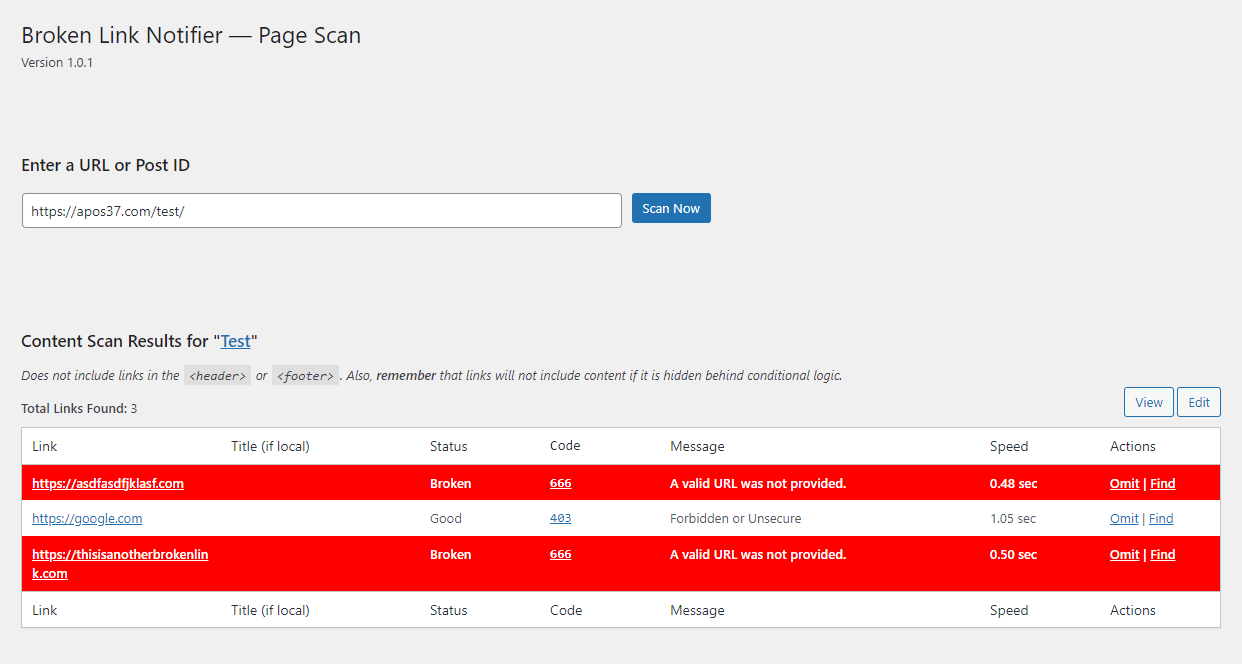
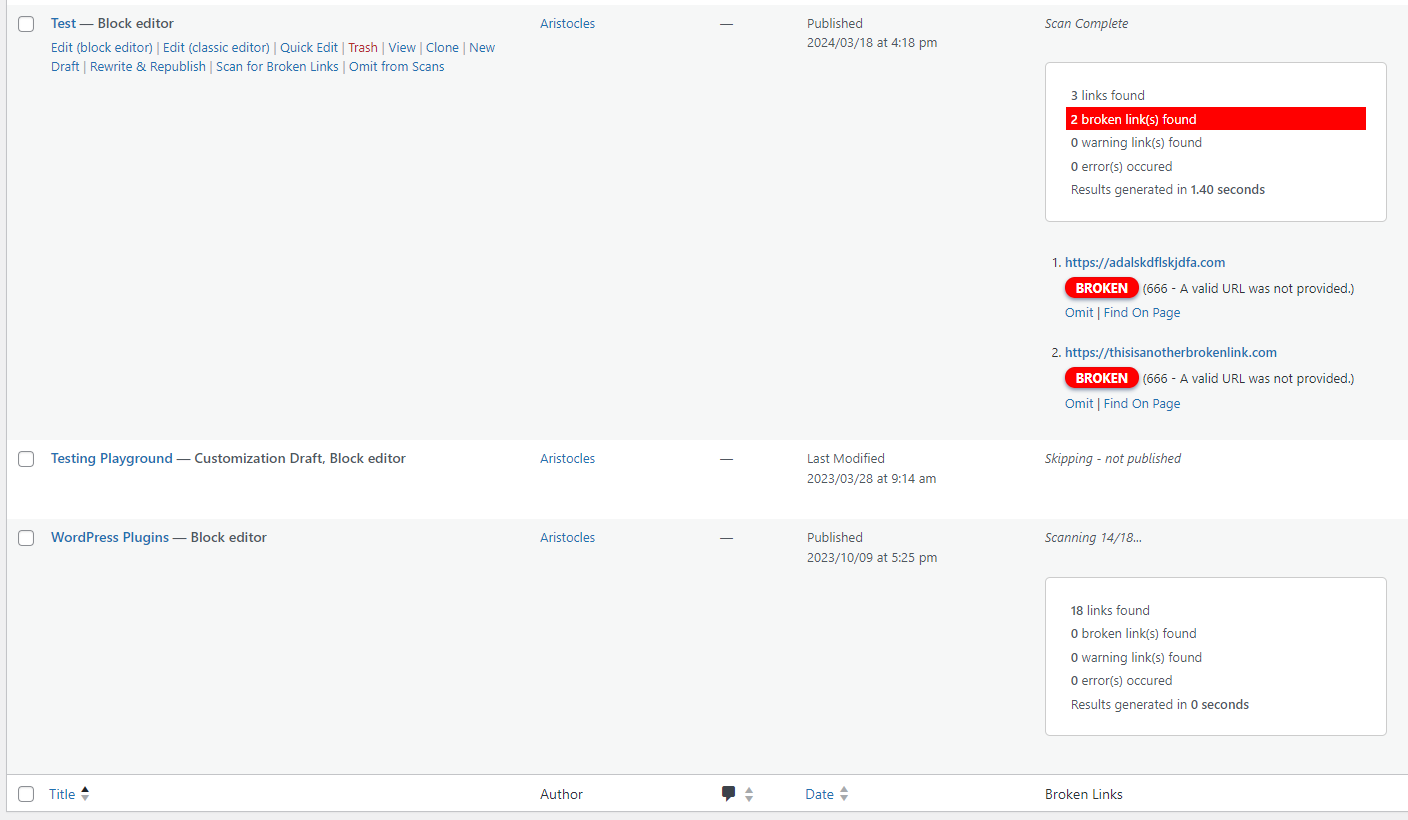
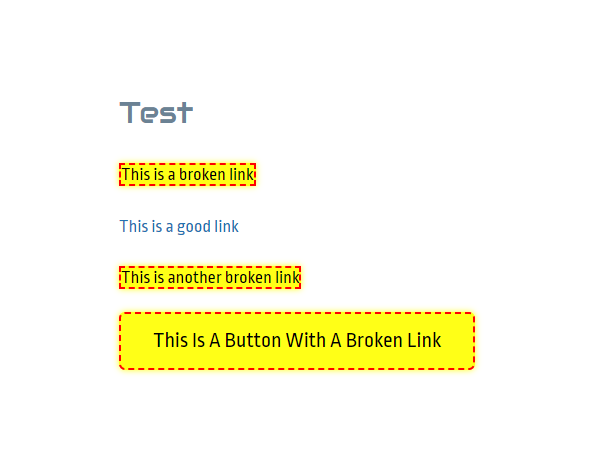
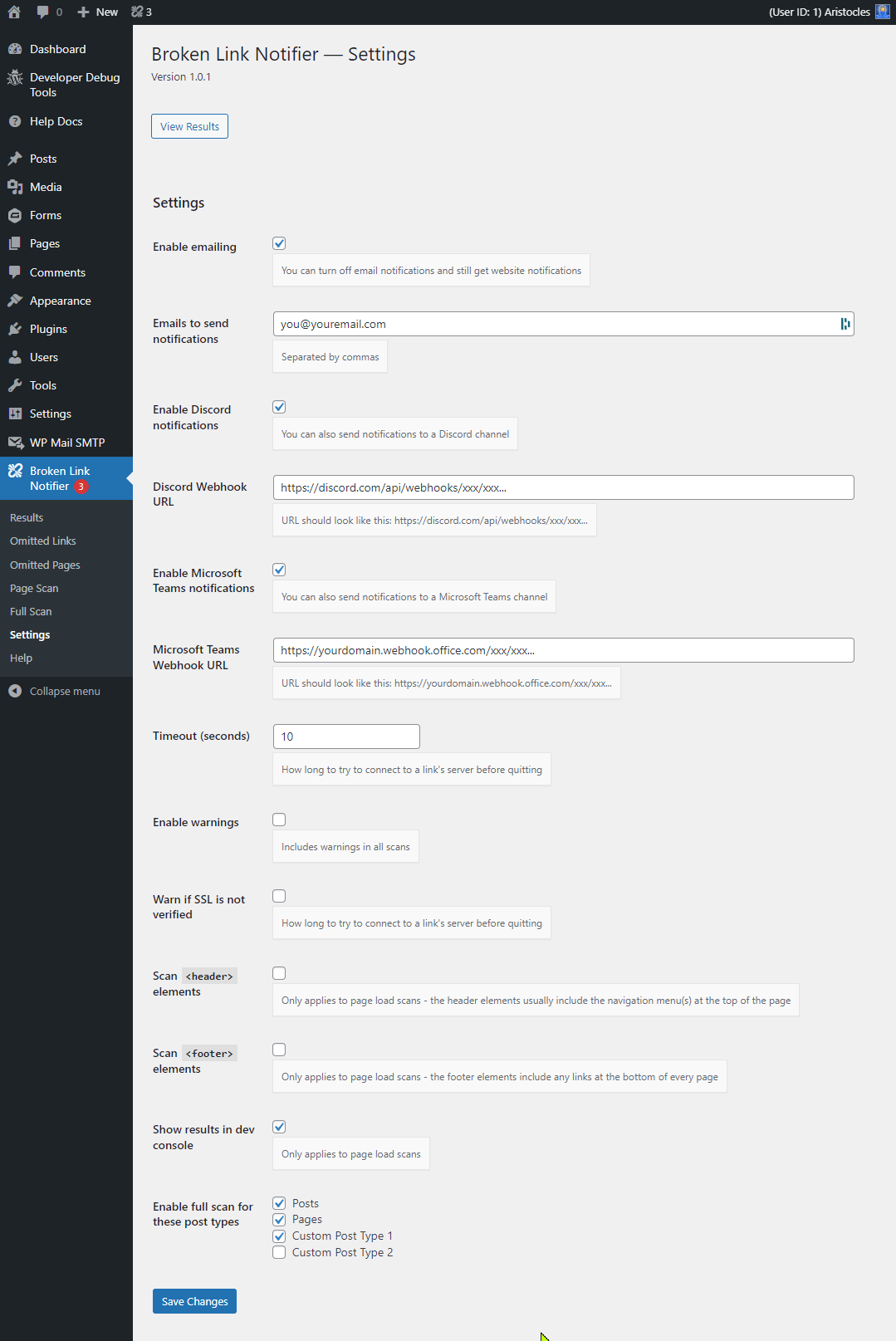
설치
- 웹사이트의 플러그인 디렉터리에서 플러그인을 설치하거나, 플러그인 폴더에 플러그인을 업로드하세요.
- Activate it.
- Go to
Broken Link Notifier > Settingsin your admin menu. - Update your notification method(s) and post types.
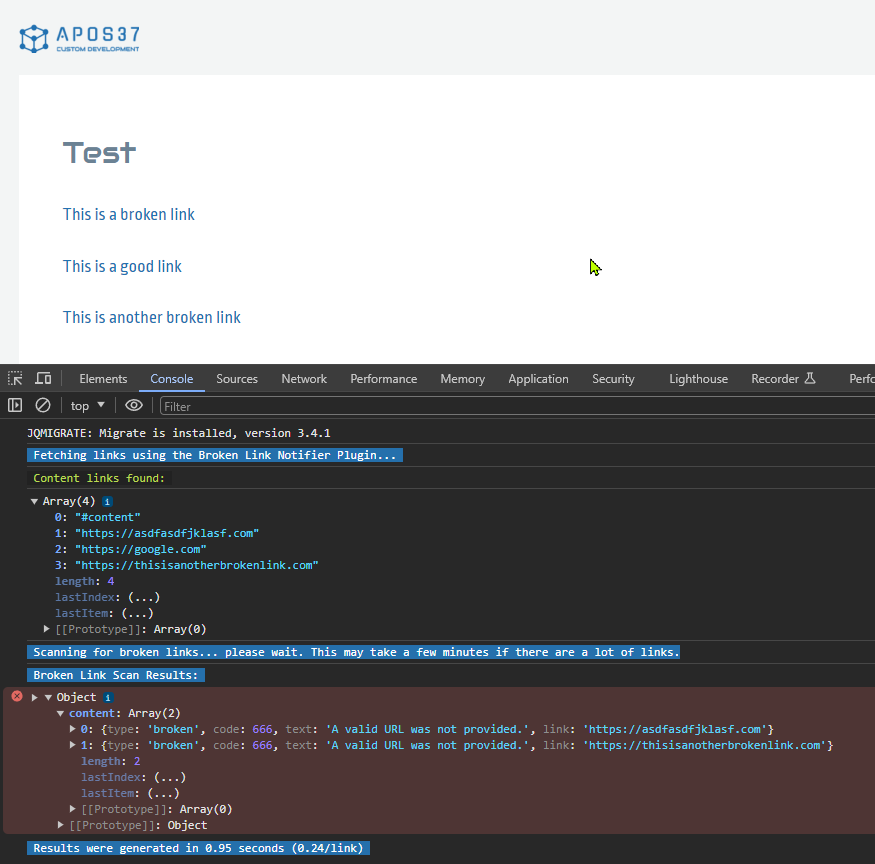
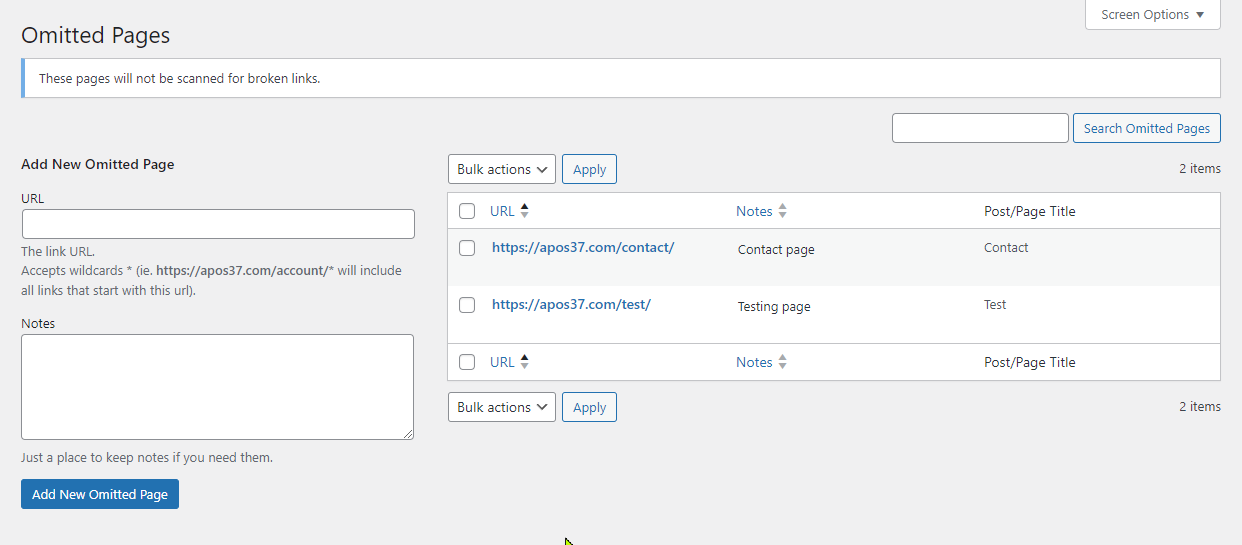
Broken Link Notifier > Omitted Pages로 이동하여, 링크가 전혀 없을 것으로 예상되는 페이지 등 스캔하지 않으려는 페이지를 추가하세요. 이렇게 하면 다중 스캔 옵션의 속도가 빨라집니다.- 페이지 로드 스캔은 자동으로 활성화되므로, 테스트 페이지에 일부 고의로 깨진 링크를 생성한 후 해당 페이지를 방문하여 기능을 확인해 보시는 것을 권장합니다. 결과는
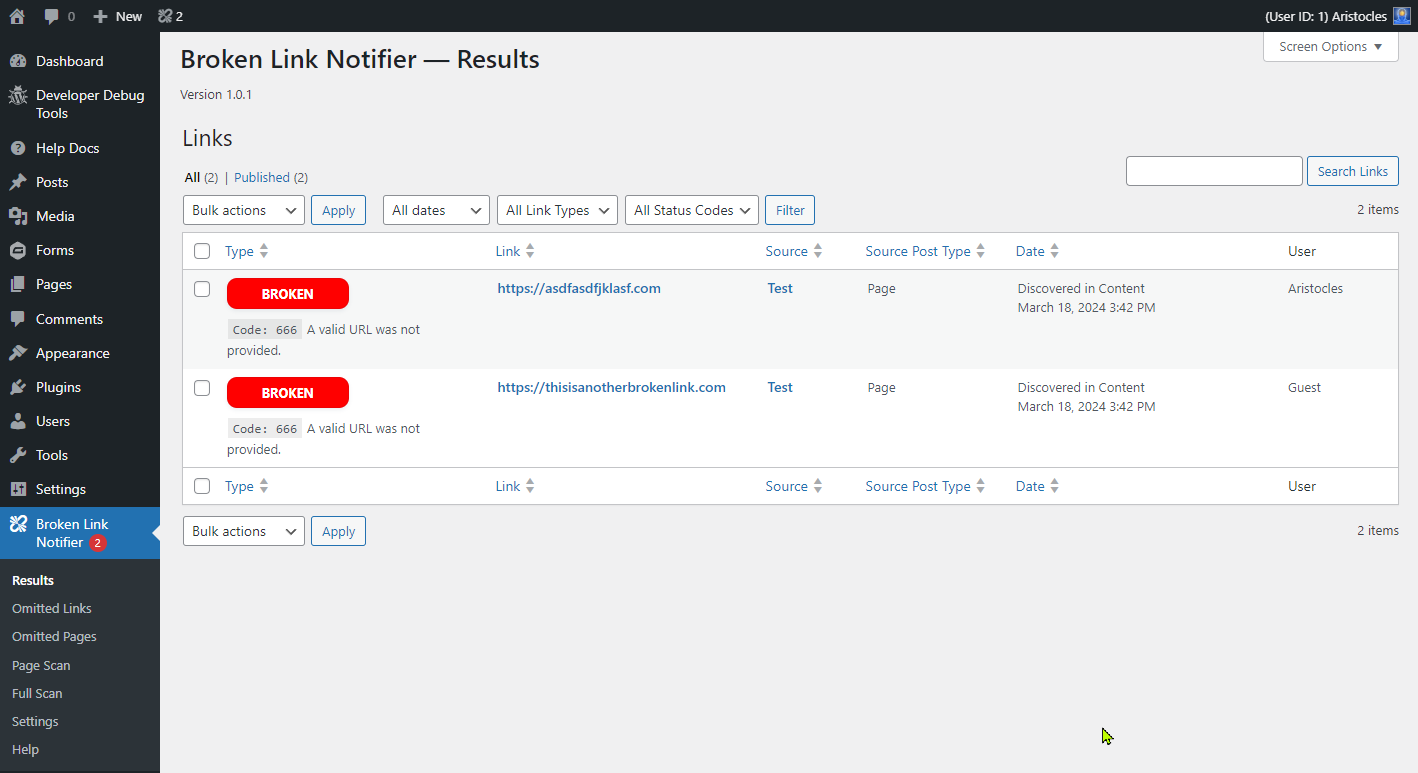
Broken Link Notifier > Results페이지에 표시되며, 이메일, Discord, Slack 또는 Microsoft Teams 알림을 활성화한 경우 해당 채널로 알림이 전송됩니다. 페이지를 새로 고침해도 알림이 중복으로 전송되지는 않습니다. 테스트를 위해 결과 목록에서 해당 항목을 삭제하면 다시 보고됩니다. - 다른 사용자가 발견하기 전에 깨진 링크가 있는지 신속하게 확인하려면, 대외적으로 공개되는 각 게시물 유형에 대해 다중 스캔(Multi-Scan)을 실행하는 것이 좋습니다. 또한 오탐으로 보고될 수 있는 일부 링크를 제외하기 위해서도 필요합니다. 검색 결과에서 개별 링크를 빠르게 제외할 수 있으며,
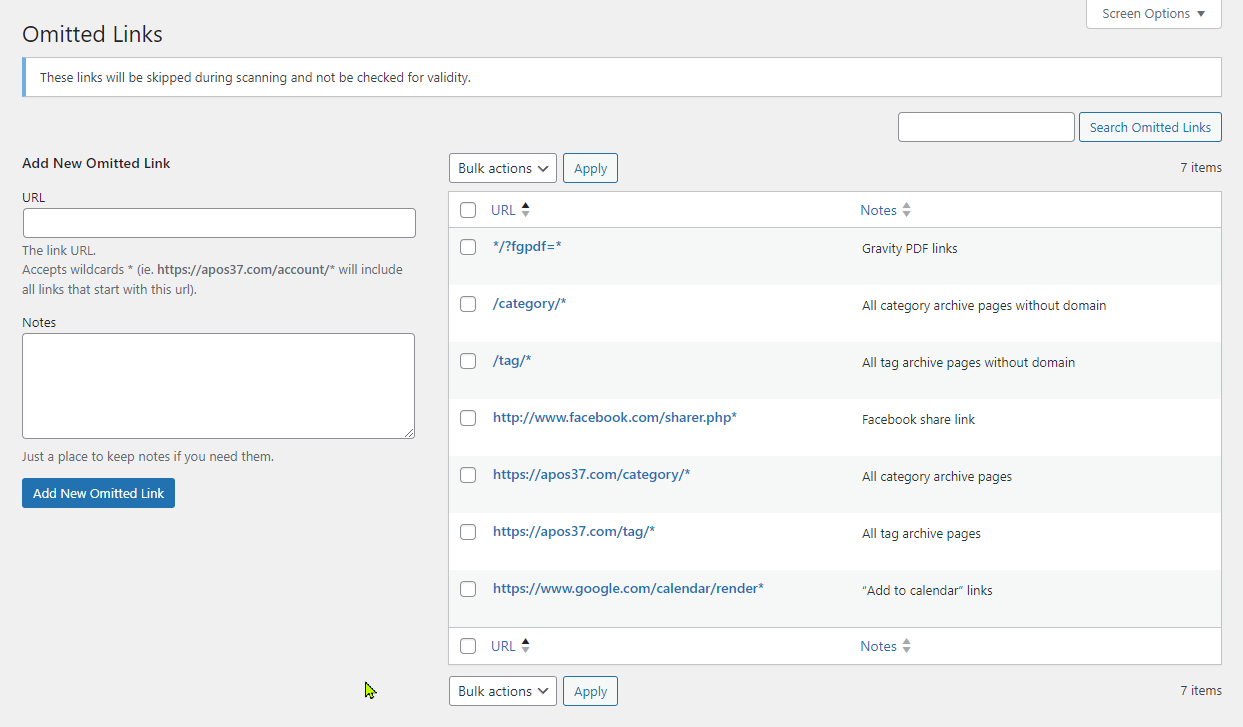
Broken Link Notifier > Omitted Links로 이동하여 와일드카드(*)를 포함한 도메인을 추가하면 해당 도메인으로 시작하는 모든 링크가 제외됩니다. 예시는 스크린샷을 참조하십시오.
FAQ
-
Will this plugin slow down my site?
-
아니요 — 이 플러그인은 방문자의 페이지가 완전히 로드된 후에만 콘텐츠를 스캔하도록 설계되어 성능에 미치는 영향을 최소화합니다. 즉, 페이지 렌더링이나 사용자 경험에 지장을 주지 않습니다. 또한, 버전 1.2.5에서는 성능을 더욱 향상시킬 수 있는 링크 캐싱 기능을 도입했습니다.
(설정 페이지에서) 이 기능을 활성화하면, 정상 작동하는 링크를 캐싱하여 일정 기간 동안 동일한 링크가 반복적으로 재확인되는 것을 방지할 수 있습니다. 이를 통해 불필요한 HTTP 요청을 줄이고 트래픽이 많은 사이트에서 스캔 효율을 높일 수 있습니다.
캐시 유효 기간은 초 단위로 설정할 수 있으며, 일반적으로 다음과 같은 값을 사용합니다.
– 28800: 8시간
– 43200: 12시간
– 86400: 24시간사이트의 트래픽과 링크가 변경되는 빈도에 따라 이 설정을 조정하세요.
-
Why do some links show as broken when they are not?
-
링크가 정상적으로 작동하는데도 여전히 깨진 링크로 표시된다면, 다른 페이지로 리디렉션되고 있거나 페이지의 응답 헤더에 문제가 있는 것으로 보이며, 이 경우 저희가 해결해 드릴 수 있는 방법은 없습니다. 퍼머링크 변경으로 인해 자체 사이트 내에서 리디렉션되는 경우라면, 불필요하게 리디렉션하는 대신 링크를 수정하는 것이 좋습니다. 또한 ‘생략(Omit)’ 옵션을 사용하여 향후 스캔에서 오탐을 제외할 수도 있습니다. 동일한 도메인의 여러 링크에서 비슷한 패턴이 발견된다면,
Broken Link Notifier > Omitted Links로 이동하여 와일드카드(*)를 포함한 도메인을 추가하면, 해당 도메인으로 시작하는 모든 링크가 제외됩니다.만약 다른 문제가 있다고 생각되신다면, 기꺼이 함께 자세히 살펴보겠습니다.
-
What causes a link to give a warning?
-
‘경고’는 해당 링크가 발견되었음을 의미하지만, 보안이 취약하거나 응답 속도가 느릴 수 있음을 나타냅니다. 시간 초과로 인해 경고가 너무 많이 표시된다면, 설정에서 시간 초과 시간을 늘려보세요. 이렇게 하면 대기 시간이 길어지지만, 검색 정확도는 높아집니다. 경고가 너무 많이 표시된다면 경고를 비활성화할 수도 있습니다.
-
상태 코드 666이란 무엇인가요?
-
666상태 코드는 경고 기능이 비활성화된 경우, 유효하지 않은 URL코드 0을 깨진 링크로 처리하기 위해 사용하는 코드입니다. 이는 공식적인 상태 코드가 아닙니다. -
Can I omit links and pages from scans?
-
네, 스캔 결과에서 “제외” 링크를 사용하거나 “제외된 링크” 항목에 수동으로 입력하여 링크의 유효성 검사를 건너뛸 수 있습니다. 마찬가지로, 결과 페이지나 “제외된 페이지”에서 페이지를 스캔 대상에서 제외할 수 있습니다. 와일드카드(*)도 사용할 수 있습니다.
-
When I click on “Find On Page,” I cannot find the link. Where is it?
-
때로는 링크가 CSS로 숨겨져 있거나 모달/팝업 창 안에 있는 경우가 있습니다. 숨겨진 링크를 찾으려면 해당 페이지로 이동한 후 개발자 콘솔을 열거나 페이지 소스를 확인하여 링크를 검색해 보세요. 그러면 링크가 있는 위치와 확인해야 할 요소를 알 수 있습니다. 그런 다음 해당 내용을 반영하여 페이지를 수정할 수 있습니다. 이 작업은 다소 전문적인 기술이 필요하며 도움이 필요할 수 있으니, 언제든지 저희에게 문의해 주시기 바랍니다.
-
개발자 콘솔에는 멀티 스캔에서 스캔된 것보다 더 많은 링크가 표시되는 이유는 무엇인가요?
-
멀티 스캔 링크 수에는 사전 검사에서 제외된 링크는 포함되지 않습니다.
-
What pre-checks are used to filter out broken links?
-
#(앵커 태그 및 자바스크립트) 또는?(쿼리 문자열), 비-HTTP URL 스키마(예:mailto:,tel:,data:등) 및 사용자가 생략한 모든 링크를 건너뜁니다. -
What can I do if I have the same broken link on a lot of pages?
-
WP Engine의 Better Search Replace와 같은 다른 플러그인을 사용하면 사이트 전체의 URL을 한 번에 빠르게 교체할 수 있습니다.
-
Why does my multi-scan page stop loading halfway down?
-
해당 페이지의 콘텐츠에 문제가 있어 리디렉션이 발생하는 것으로 보입니다. 안타깝게도 리디렉션된 모든 콘텐츠를 차단할 수는 없습니다. 만약 그런 경우라면, 해당 페이지를 스캔 대상에서 제외하여 다음에 다시 시도할 때 전체 페이지를 계속 스캔할 수 있도록 하세요.
-
Are there hooks available for Developers?
-
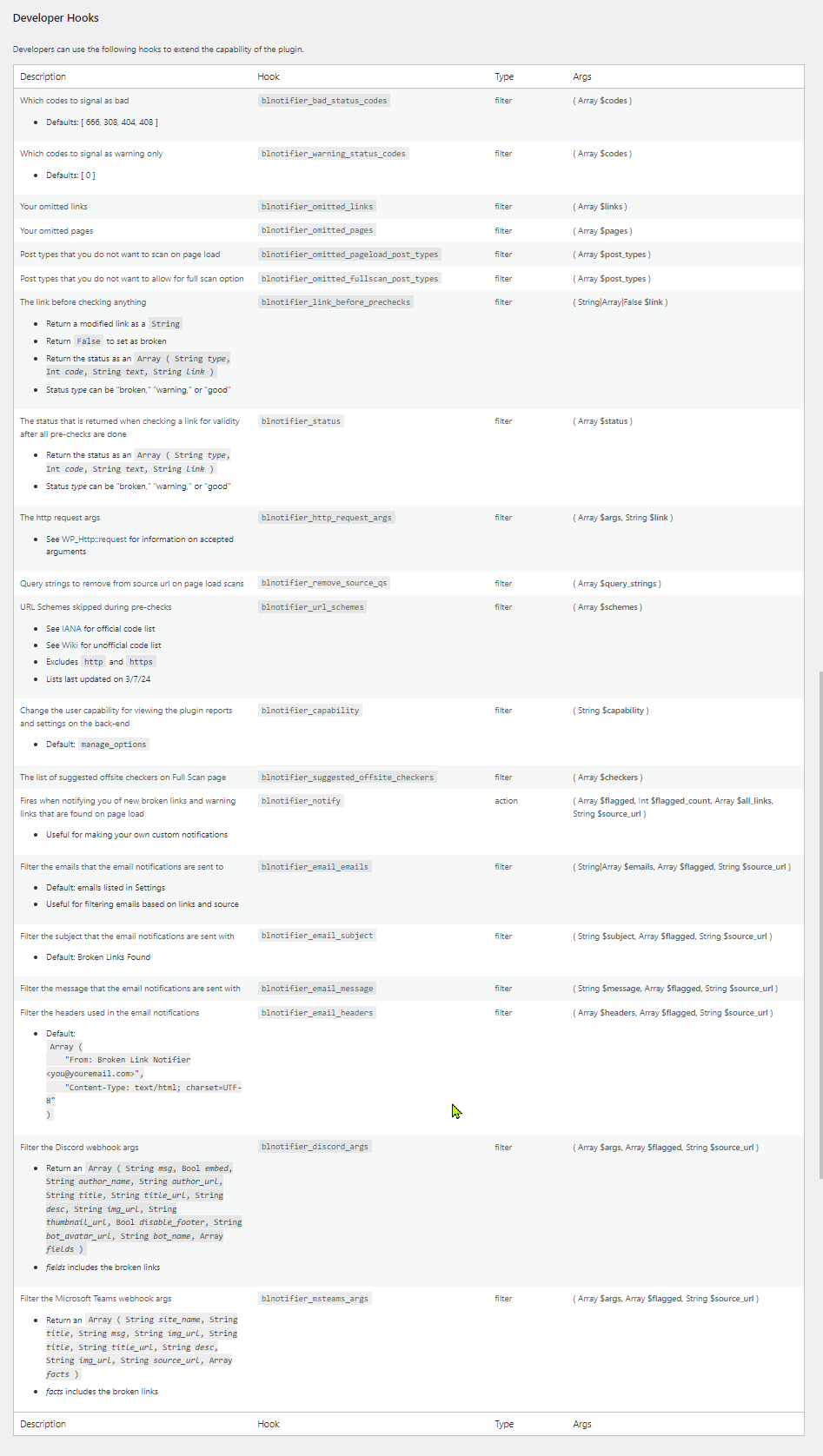
네, 많이 있습니다. 다음 후크들을 사용할 수 있습니다:
*blnotifier_html_link_sources( Array $sources ) — 콘텐츠 HTML 내에서 링크가 발견되는 위치를 필터링합니다
*blnotifier_omitted_pageload_post_types( Array $post_types ) — 페이지 로드 시 스캔하지 않으려는 게시물 유형을 필터링합니다
*blnotifier_omitted_multiscan_post_types( Array $post_types ) — 멀티 스캔(Multi-Scan) 옵션을 허용하지 않으려는 게시물 유형을 필터링합니다
*blnotifier_link_before_prechecks( String|Array|False $link ) — 사전 검사 전에 링크를 필터링합니다
*blnotifier_status( Array $status ) — 모든 사전 검사가 완료된 후 링크 유효성을 확인할 때 반환되는 상태를 필터링합니다
*blnotifier_http_request_args( Array $args, String $link ) — HTTP 요청 인수를 필터링합니다
*blnotifier_remove_source_qs( Array $query_strings ) — 페이지 로드 스캔 시 소스 URL에서 제거할 쿼리 문자열을 필터링합니다
*blnotifier_url_schemes( Array $schemes ) — 사전 검사 중 건너뛸 URL 스키마를 필터링합니다
*blnotifier_suggested_offsite_checkers( Array $checkers ) — 다중 스캔 페이지에서 제안되는 외부 검사기 목록을 필터링합니다
*blnotifier_notify( Array $flagged, Int $flagged_count, Array $all_links, String $source_url ) — 페이지 로드 시 발견된 새로운 깨진 링크 및 경고 링크를 알릴 때 호출되는 액션 훅
*blnotifier_email_emails( String|Array $emails, Array $flagged, String $source_url ) — 이메일 알림이 전송될 수신자 목록을 필터링합니다
*blnotifier_email_subject( String $subject, Array $flagged, String $source_url ) — 이메일 알림의 제목을 필터링합니다
*blnotifier_email_message( String $message, Array $flagged, String $source_url ) — 이메일 알림에 포함될 메시지를 필터링합니다
*blnotifier_email_headers( Array $headers, Array $flagged, String $source_url ) — 이메일 알림에 사용되는 헤더를 필터링합니다
*blnotifier_discord_args( Array $args, Array $flagged, String $source_url ) — Discord 웹훅 인수를 필터링합니다
*blnotifier_slack_args( Array $args, Array $flagged, String $source_url ) — Slack 웹훅 인수를 필터링합니다
*blnotifier_msteams_args( Array $args, Array $flagged, String $source_url ) — Microsoft Teams 웹훅 인수를 필터링합니다
*blnotifier_strings_to_replace( Array $strings_to_replace ) — 링크에서 대체할 문자열 필터링
*blnotifier_force_head_file_types(Array $file_types, Boolean $docs_use_head) — HEAD 요청을 강제해야 하는 파일 유형 목록을 필터링하며, $docs_use_head 변수는 문서 유형을 포함할지 여부를 결정합니다 -
Where can I request features and get further support?
-
기능 요청이나 도움이 필요하실 때는 웹사이트 지원 포럼을 주로 이용해 주시기를 권장합니다. Discord 지원 서버나 WordPress.org 지원 포럼을 통해서도 문의하실 수 있지만, WordPress.org에서는 새로운 게시물이 올라와도 항상 저희에게 알림을 보내주지는 않으므로, 시급한 문제의 경우 적합하지 않을 수 있습니다.
후기


기여자 & 개발자

변경이력
1.3.8
- Tweak: Added “Broken for X days” note under the date on the Results page
- 업데이트: 결과 조회 및 삭제를 위한 엔드포인트가 포함된 REST API가 추가되었습니다. 설정에서 이 기능을 활성화하고 인증을 위해 API 키를 생성하세요.
- Update: Added Slack webhook notifications for broken links
- 업데이트: 이메일, Discord, Slack 및 Microsoft Teams용 테스트 알림 버튼을 추가했습니다.
1.3.7.6
- Compatibility: Increased minimum required WordPress version to 6.0
- Compatibility: Tested with WordPress 7.0
1.3.7.5
- 수정: 다음 링크를 자동으로 생략합니다: /category/, /tag/, /wp-login.php, /wp-admin/
- Fix: Added support for Cornerstone when replacing links from results page
1.3.7.4
- 수정: 결과 페이지에서 링크를 교체할 때 Elementor 지원이 추가되었습니다 (@nazrinn 님께 감사드립니다)
- Update: Added good links and status on console results
1.3.7.3
- 수정: 정의되지 않은 속성
- Fix: Blog pages that are skipped are showing as an invalid source error
1.3.7.2
- Tweak: Remove links on rescan by ID instead of link hash lookup
- 수정 사항: 오류가 발생할 경우 프런트엔드 스캔에 실제 오류 메시지를 표시하여 문제의 원인을 파악할 수 있도록 했습니다.
1.3.7.1
- Tweak: Skipping internal pagination and reply links
- Tweak: Performance update to not call get_current_user_id() on every link
- 수정: 봇이 존재하지 않는 위치로 이동하려다 리디렉션 없이 404 오류 페이지를 반환하는 경우, 존재하지 않는 소스를 보고하는 문제
1.3.7
- 업데이트: 깨진 링크의 저장 방식을 사용자 정의 게시물 유형에서 사용자 정의 데이터베이스 테이블로 변경했습니다.
- Update: Add option to cleanup on uninstall
- 수정:
blnotifier_link_before_prechecks훅이 상태를 반환할 때 발생하는 오류
1.3.6
- 업데이트: 공격 및 타임아웃을 방지하기 위해 ‘페이지당 최대 링크 수’ 옵션을 추가했습니다.
- Fix: Unauthorized access vulnerability (props Nabil Irawan/Patchstack)
1.3.5
- 수정 사항: 이메일 알림에 결과 페이지 링크를 추가했습니다(제안을 해주신 @nazrinn 님께 감사드립니다).
- 수정: 해당 역할에 액세스 권한이 없는 경우 관리자 바에서 깨진 링크 표시기를 제거했습니다.
1.3.4
- 수정 사항: 생략된 링크/페이지의 “삭제” 작업 링크를 “생략 항목 제거”로 변경 (제안해 주신 Diane 님께 감사드립니다)
- Tweak: Highlighted the admin bar count red
1.3.3
- 수정: 필드 및 제출 버튼이 표시되지 않는 설정 오류 (제보: @DLLHell)
1.3.2
- 업데이트: 끊어진 링크를 관리할 수 있는 기능을 추가된 역할에 지원하도록 수정했으며, blnotifier_capability 후크를 제거했습니다.
1.3.1.1
- Fix: preg_replace() deprecation error (props @venutius)
1.3.1
- 수정 사항: CSV 파일 내 수식 요소의 부적절한 중화 처리 (제보: @jfriedli/Wordfence)
- 수정 사항: is_url_safe()를 사용하여 원격 요청 전에 모든 URL을 검증함으로써 SSRF 취약점을 해결했습니다 (@jfriedli/Wordfence 님에게 감사드립니다).
1.3.0
- 업데이트: 새로운 지원 링크
1.2.6.1
- 수정: 결과 페이지에 정상 링크를 표시하는 설정 옵션이 기본적으로 ‘true’로 설정되어 있었으나, 이를 비활성화했습니다.
1.2.6
- 업데이트: 설정 메뉴에 결과 페이지에 정상 작동하는 링크를 표시하는 옵션을 추가했습니다(제안을 해주신 @colnago1 님께 감사드립니다).
- Update: Added an export page (props to @colnago1 for suggestion)
1.2.5.3
- Fix: Link search not finding some URLS
- 수정: 정의되지 않은 배열 키 “min”
1.2.5.2
- 수정: wpdb::prepare 함수가 올바르게 호출되지 않았습니다. 지원되지 않는 값 유형(배열)입니다.
1.2.5.1
- Fixes: Sanitizing and unslashing some variables
1.2.5
- Update: Added option for caching good links (enable in settings)
1.2.4.2
- Fix: If no link is found, omit it
1.2.4.1
- 수정: “사전 검사 필터 통과 실패” 오류 메시지에 더 자세한 정보를 추가했습니다.
1.2.4
- Tweak: Added minified versions of results-front.js and results-front.css
- 수정 사항: 누락된 링크와 누락된 페이지 훅이 별도의 페이지로 이동되었으므로 readme.txt에서 이를 삭제했습니다.
1.2.3
- 업데이트: 사용자 지정 사용자 에이전트가 제공되지 않을 경우, X/트위터 링크의 사용자 에이전트를 자동으로 전환합니다.
- 업데이트: 워드프레스 상표 정책에 따라 작성자 이름과 웹사이트를 다시 업데이트했습니다.
1.2.2
- 업데이트: 작성자 이름을 Apos37에서 WordPress Enhanced로 변경하고, 새로운 작성자 URI를 적용했습니다.
- Tweak: Optimization of main file
- Fix: Undefined variable $redirect_detected
1.2.1
- Update: Added a method column to the results page
- Fix: Links being added from invalid sources
- Tweak: Links without a source will be automatically removed
- Fix: Some links are being added to results without a source
- Update: Added option to pause auto-verification on results page
- Update: Admin bar count is reduced in real time if results are removed
- 수정 사항: 결과 페이지의 알림 문구를 “휴지통”에서 “삭제”로 변경함 (이 점을 지적해 주신 @cantabber 님께 감사드립니다)
1.2.0
- 업데이트: 경고 항목에 코드 413을 추가하고,
GET요청을 사용할 때(리디렉션 허용 옵션 포함) 10MB를 초과하는 파일에는 자동으로 코드 413을 할당하도록 했습니다. - 업데이트: 문서가
HEAD요청을 사용하도록 강제하는 옵션을 추가했습니다. - Fix: Gifs, videos, and other large files timing out (props @mrphunin)
- 업데이트: 결과 페이지의 ‘링크’ 열에 ‘링크 교체’ 기능을 추가했습니다 (제안을 해주신 a4jp-com 님께 감사드립니다).
- 업데이트: 결과 페이지의 소스 보기 기능에 ‘휴지통으로 이동’ 동작이 추가되었습니다. 이 기능을 사용하려면 설정에서 활성화해야 합니다 (제안해 주신 @mrphunin 님께 감사드립니다).
- 수정 사항: 가끔 ‘휴지통 권한 없음’ 오류가 발생하는 문제를 해결하기 위해, ‘결과 지우기’ 동작을 AJAX 방식으로 변경했습니다.
- 수정 사항: 결과 페이지의 ‘링크’ 및 ‘출처’ 열에 있는 다른 모든 작업 링크의 이름을 변경했습니다.
- Tweak: Changed Edit link to “Edit Page” (props a4jp-com)
1.1.4.2
- Tweak: Added support for translations on some other info boxes
- 업데이트: 결과 페이지 상단에 결과 삭제 관련 설명을 담은 정보 상자를 추가했습니다.
- Fix: Undefined array key “HTTP_REFERER”
1.1.4.1
- Update: Added an option to pause front-end scanning (props @ravanh)
- 업데이트: 설정에 상태 코드가 추가되어 유형을 변경할 수 있게 되었습니다. 더 이상 사용되지 않는 훅은 설정에 코드가 저장되지 않은 경우에만 작동합니다: blnotifier_bad_status_codes, blnotifier_warning_status_codes
1.1.4
- 업데이트: 사용자 에이전트 필드를 추가하고, 상태 코드 0을 경고 대신 오류로 표시하는 옵션을 추가했습니다 (@ravanh 님께 감사드립니다).
1.1.3.8
- 업데이트: 최종 상태 코드 대신 리디렉션 상태 코드를 표시하도록 최대 리디렉션 횟수를 0으로 설정할 수 있게 되었습니다.
1.1.3.7
- 수정 사항: 콘텐츠가 없거나 페이지에 리디렉션 단축코드가 포함된 경우 Multi-Scan이 리디렉션되는 문제
1.1.3.6
- 업데이트: 리디렉션을 허용하고 최대 리디렉션 횟수를 설정할 수 있는 기능이 추가되었습니다 (@ravanh 님께 감사드립니다).
1.1.3.5
- Fix: Fatal error on helpers.php at line 1001
1.1.3.4
- 수정: 설정에서 모든 게시물 유형의 선택을 해제하려고 할 때 발생하는 치명적인 오류 (제보: @ravanh)
1.1.3.3
- Fix: Added support for links starting with // (props pauleipper)
1.1.3.2
- 수정: 멀티사이트 지원을 위해 다중 스캔 링크에 전체 경로를 추가했습니다 (oddmoster 님 감사합니다).
1.1.3.1
- 수정: 멀티사이트 지원을 위해 “편집” 링크에 전체 경로를 추가했습니다 (제안자: oddmoster).
1.1.3
- Update: Added a link search page
1.1.2
- Fix: Warnings from Plugin Checker
1.1.1
- Update: Auto-delete omitted links on Results page
- Fix: Some links not being deleted due to special characters
1.1.0
- Fix: YouTube links showing broken
1.0.9
- Fix: Umlauts in links showing broken (props ralf d)
- 수정 사항: 기부 링크를 삭제했습니다. 어차피 기부하는 사람도 없으니, 대신 프리미엄 버전을 개발 중입니다.
1.0.8
- Update: Added demo to readme.txt
1.0.7
- Fix: Results page rescan not working on some links
- Fix: Offsite checker links broken XD
1.0.6
- Fix: wp_mail_failed logging error
- 업데이트:
"×" => "x"에 대한 문자열 치환 기능을 추가했습니다. 이 변환은 이미지 파일명(예: _100x66.png)에 적용됩니다. - 업데이트: 간단한 문자를 대체하기 위한 새로운 필터
blnotifier_strings_to_replace를 추가했습니다.
1.0.5
- 업데이트: 연결 상태가 좋지 않을 때 오탐이 발생하는 경우가 있어, 결과 페이지를 불러올 때 재스캔 확인 절차를 추가했습니다.
- 조정: 플러그인 태그 업데이트
- Update: Added other plugins to bottom of help page
- Update: Added an option in settings to include/exclude image src links
- Tweak: Changed default timeout to 5 seconds
1.0.4.2
- 수정 사항: 검색 결과에 이미 포함된 경우 빈 내용의 이메일이 발송되던 문제를 해결하고, 중복 이메일 발송을 방지했습니다.
1.0.4.1
- Fix: MS Teams integration error with logging
1.0.4
- Fix: Undefined variable on help page
- Update: Added support for checking YouTube video links (props shirtguy72)
- Update: Added support for iframe links (props shirtguy72)
- Update: Added support for image source links
1.0.3.1
- Tweak: Fix minor issues found by WP repo plugin reviewer
1.0.3
- Tweak: Updates recommended by WP repo plugin reviewer
- Fix: Settings saved notification not echoing
- Tweak: Removed links post type and help docs post types if installed
1.0.2
- Tweak: Added nonce to Page Scan JS
- Update: Added Multi-Scan and Page Scan results to results page
- Tweak: Changed “Full Scan” references to “Multi-Scan”
1.0.1
- Deployment