

설명
미디어 라이브러리를 Cloudflare Images로 이전하고 모든 작업을 맡기세요. 이미지를 저장하고, 크기를 조정하고, 최적화하며, 사용자에게 최적의 형식으로 전달해 드립니다.
왜 CDN 플러그인에 과다 지불해야 할까요?
비싼 플러그인이 쏟아지는 지금, 더 현명한 선택으로 전환할 때입니다. 무료여야 마땅한 것에 왜 더 많은 돈을 지불해야 합니까?
이미지 관리를 간소화하세요.
미디어 라이브러리를 Cloudflare Images로 옮겨보세요! 저희 플러그인이 관리해 드립니다:
- 이미지를 안전하게 저장하세요;
- 수동 작업 없이 완벽하게 이미지 크기를 조정하세요;
- 이미지를 최적화하여 초고속으로 로드되도록 하십시오;
- 가장 사용자 친화적인 형식으로 제공하여 모든 사용자의 만족을 보장합니다.
하지만 잠깐만요, 더 있어요!
이미지 CDN – 글로벌 서버 네트워크를 통해 이미지를 제공합니다.
이미지 AI – AI를 활용해 태그 지정, 캡션 생성 및 새로운 이미지 생성 기능을 제공합니다.
압축 – 시각적 품질 저하 없이 파일 크기를 줄이기 위해 JPEG/PNG 이미지를 최적화합니다.
개발자의 약속
개인적인 필요에서 탄생한 이 플러그인은 개발자의 커뮤니티에 대한 헌신을 보여줍니다. 아직 개발 중인 단계이지만, 기억하세요 – 이 플러그인은 수익이 아닌 실제 사용자의 요구를 염두에 두고 제작되었습니다.
여러분의 피드백이 저희를 더 나은 곳으로 만듭니다.
문제가 발생했나요? 원하는 기능이 있나요? 지원 요청을 보내주세요. 저희는 여러분을 더 잘 섬기기 위해 끊임없이 발전하겠다는 약속을 드립니다. 여러분의 바람이 저희의 지시입니다!
면책 조항
Cloudflare, Cloudflare 로고 및 Cloudflare Workers는 미국 및 기타 관할권에서 Cloudflare, Inc.의 상표 및/또는 등록 상표입니다.
스크린샷
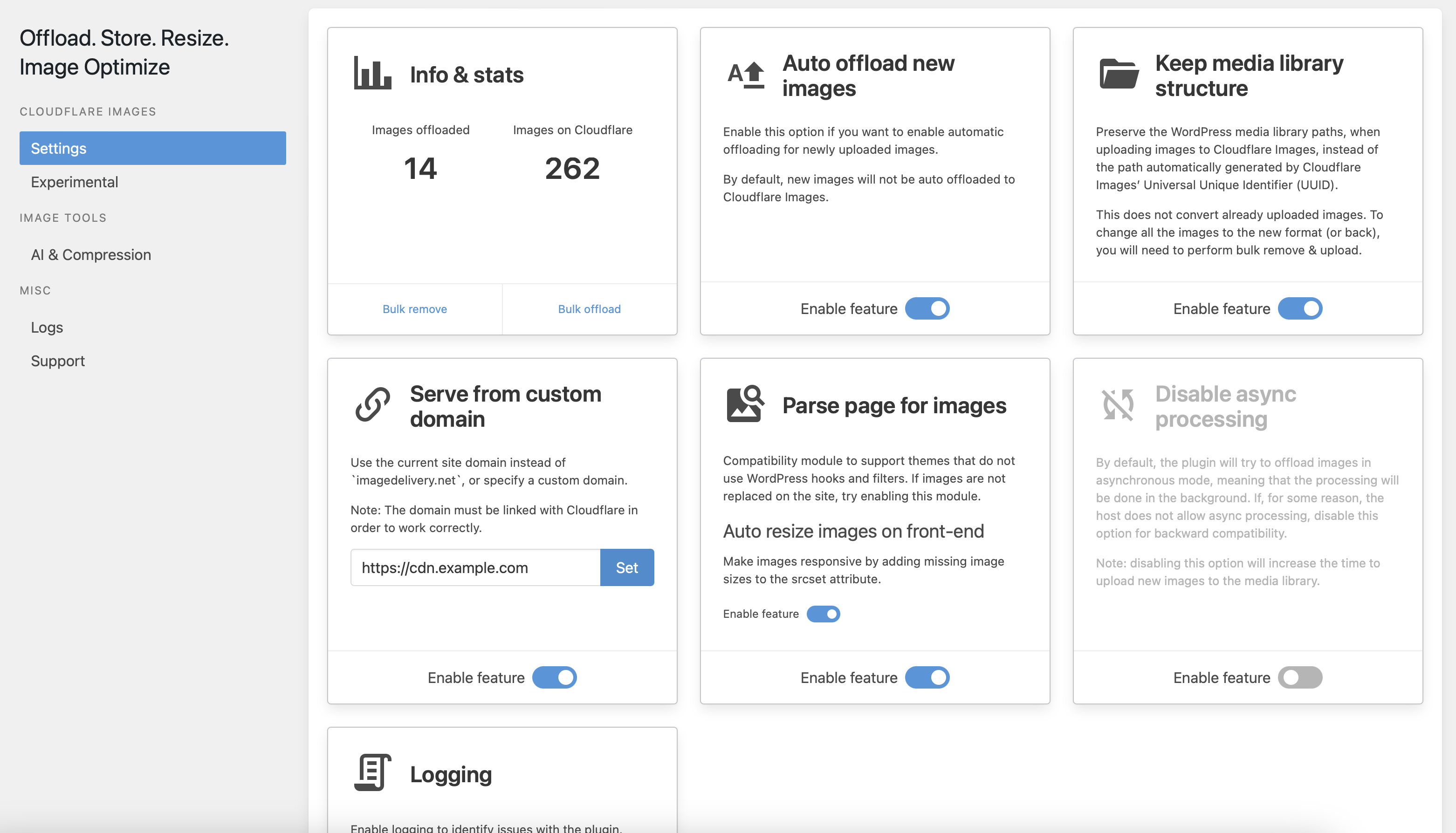
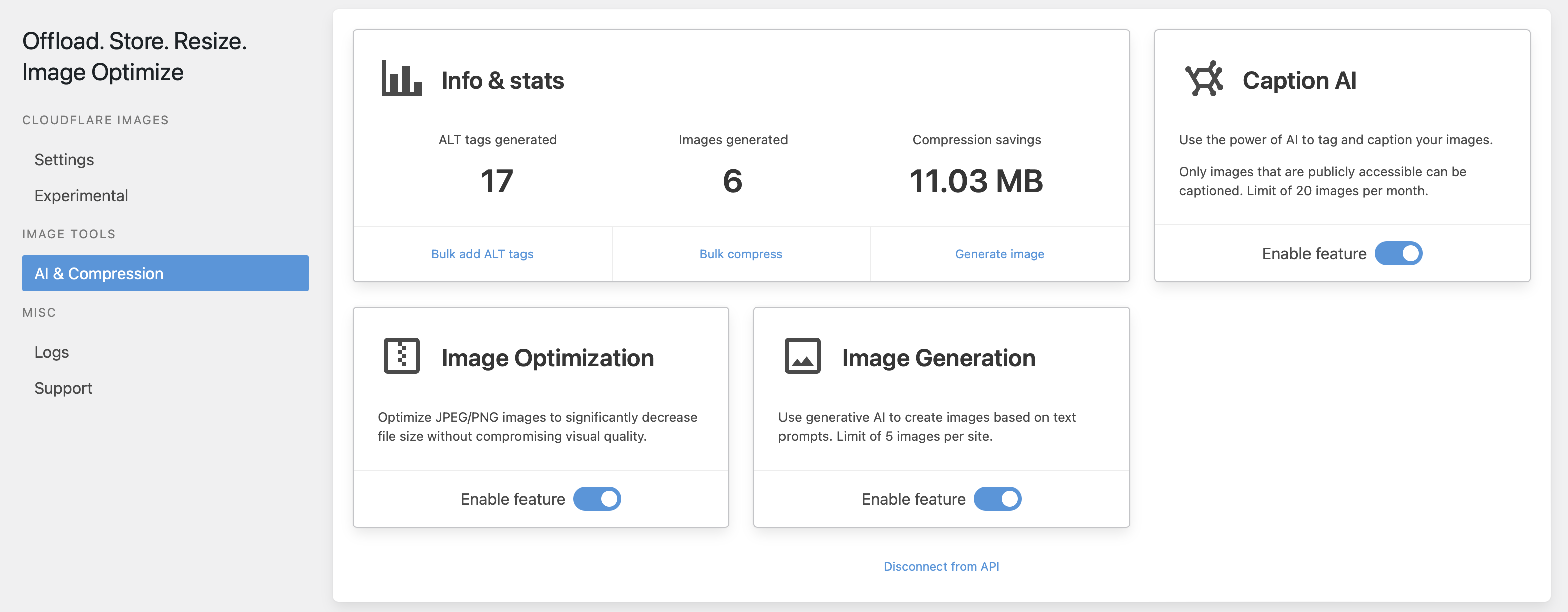
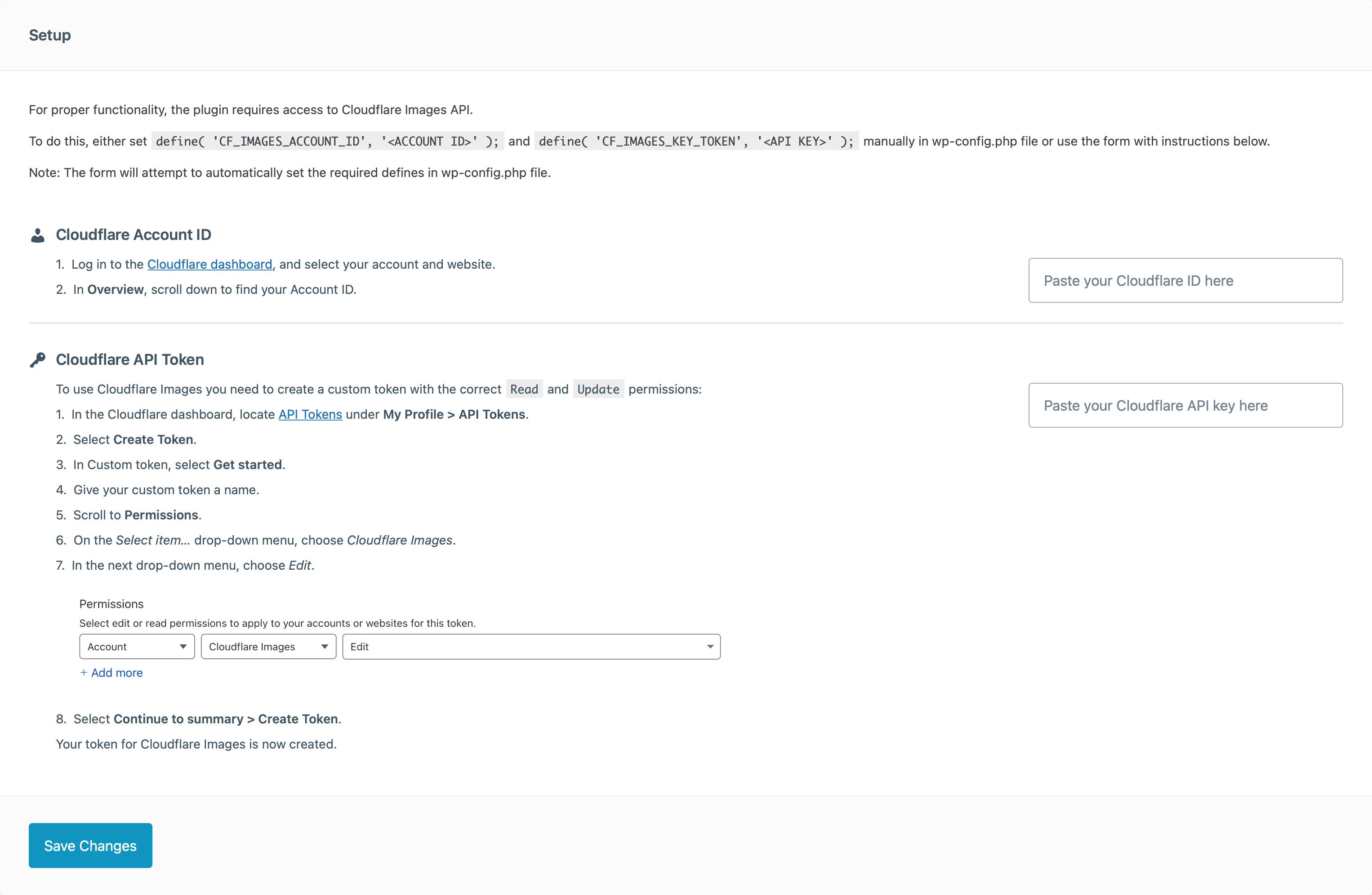
설치
- 플러그인을
/wp-content/plugins/디렉토리에 업로드하세요. - 워드프레스의 ‘플러그인’ 메뉴를 통해 플러그인을 활성화하세요.
- 워드프레스의 ‘미디어 – 오프로드 설정’ 메뉴에서 설정 마법사의 지침을 따르세요.
- 즐기세요
FAQ
-
이건 어떻게 작동하나요?
-
이 플러그인은 Cloudflare Images 서비스를 사용하여 지원되는 모든 이미지를 호스팅하고, 사용자에게 최적의 설정으로 제공할 것입니다.
-
무료입니까?
-
네, 플러그인은 100% 무료입니다. Cloudflare Images 옵션이 활성화된 Cloudflare 계정이 필요합니다.
Cloudflare는 사용 중인 플랜에 따라 이 기능 사용에 대해 요금을 부과할 수 있습니다. -
지원되는 이미지 형식은 무엇입니까?
-
Cloudflare Images에는 다음 이미지 형식을 업로드할 수 있습니다:
* PNG
* GIF
* JPEG
* WebP -
다른 제한 사항이 있나요?
-
Cloudflare Images에서 지원하는 최대 허용 크기 및 치수는 다음과 같습니다:
- 이미지의 높이와 너비는 10,000픽셀로 제한됩니다.
- 이미지 메타데이터는 1024바이트로 제한됩니다.
- 이미지는 10메가바이트(MB) 크기로 제한됩니다.
- 모든 프레임을 포함한 애니메이션 GIF는 100메가픽셀(MP)로 제한됩니다.
-
콘텐츠 내 모든 이미지가 교체되지 않는 이유는 무엇인가요?
-
기본적으로 플러그인은 이미지 처리를 위해 WordPress 핵심 기능을 사용합니다.
일부 테마나 플러그인은 자체 이미지 처리 기능을 구현할 수 있으며, 이로 인해 플러그인이 콘텐츠 내 이미지 URL을 대체하지 못할 수 있습니다. 이러한 현상이 발생한다면 플러그인 설정에서이미지용 페이지 파싱모듈을 활성화해 보세요.
여전히 문제가 해결되지 않는다면 플러그인 지원 포럼에 지원 티켓을 생성하여 알려주시기 바랍니다.
후기


기여자 & 개발자

변경이력
1.10.3 – 08.06.2026
Fixed:
* Improve account ID and API key validation
1.10.2 – 29.05.2026
Fixed:
* Security issue (CVE-2026-9860)
* Bulk delete (full offload) stops on error
1.10.1 – 18.03.2026
Fixed:
* Malformed links in image srcset
1.10.0 – 17.03.2026
Added:
* Integration with Geodirectory plugin
* Compatibility with WordPress 7.0
Enhance:
* Network settings management
* Code quality improvements
Fixed:
* Fix HTML links on dropdowns in media library
* Page parser not properly detecting images sizes for WebP and AVIF formats
* PHP warning: Implicitly marking parameter $value as nullable is deprecated
* PHP notice: Function _load_textdomain_just_in_time was called incorrectly
* Broken srcset parsing caused by unencoded commas in Cloudflare Image URLs
* Memory leak from setTimeout without cleanup in progress bar component
1.9.8 – 31.12.2025
Fixed:
* Version conflict
1.9.7 – 31.12.2025
Fixed:
* Fatal error with latest RankMath update
1.9.6 – 11.11.2025
Added:
* Track image changes and update images on Cloudflare
Fixed:
* Performance issues with network installs
* Network installs
* Prevent unauthenticated users from changing the settings
1.9.5 – 06.07.2025
추가된 기능:
* Elementor 갤러리 위젯 지원
* Voxel 테마 갤러리 위젯 지원
* SVG 이미지 지원
* REST API 요청 제어용 cf_images_is_rest_request 필터
수정 사항:
* 이제 upload_files 권한을 가진 모든 사용자가 이미지를 오프로드할 수 있습니다
* GreenShift – Animation and Page Builder Blocks 플러그인의 전체 오프로드 문제
* 이미지가 완전히 오프로드되었을 때 RankMath가 이미지를 재정의하는 문제
* “웹 서버가 이 이미지에 대한 반응형 이미지 크기를 생성할 수 없습니다. 업로드 전에 JPEG 또는 PNG로 변환하세요” 오류 수정
1.9.4 – 14.12.2024
Added:
* Bulk offload actions to the media library list view
* Global option to disable processing in the page head section
* Additional TTL options (3, 6 and 9 months)
Changed:
* Improved UI/UX
* Improved logging to better catch offload errors
Fixed:
* Fix logs layout spanning off-screen
* Undefined array key PHP warning (props @ablears)
1.9.3 – 07.10.2024
Added:
* Integration with Smart Slider 3
* Integration with All in One SEO: allow controlling application/ld+json schema image URLs
* Integration with Rank Math: allow controlling application/ld+json schema image URLs
* Filter cf_images_disable_crop to disable auto cropping for registered crop images
* Background image support in Spectra plugin when styles are inlined (props @josephdsouza86)
Changed:
* Improve performance processing external images
* Rename ‘cf_images_can_run’ filter to ‘cf_images_skip_image’ so it’s more clear what it does
Fixed:
* Images being replaced in RSS feeds, regardless of the settings
* Fatal error when a registered image size does not have height or width defined
1.9.2 – 17.07.2024
Added:
* Integration with WPBakery page builder image galleries
* Integration with Elementor Pro Gallery
* Integration with Flatsome theme gallery
* cf_images_upload_host filter to adjust the image host ID
Changed:
* Improve image AI modules
* Improve performance when Rank Math image SEO is active
Fixed:
* Only allow generating image alt text for supported formats (JPEG, PNG, GIF, BMP)
* Duplicate queries for images that are not part of the media library
* Rank Math image SEO module not working with custom domains
1.9.1 – 23.04.2024
Added:
* Integration with Elementor lightbox
Fixed:
* NaN undefined error in compression savings stats
* AI image captioning when custom image paths are set
* WPML compatibility
* “Disable WordPress image sizes” option causing issues with image URLs
1.9.0 – 22.03.2024
Added:
* Set browser TTL for images
* Option to serve originals for logged-in users
* Option to apply settings network wide in multisite
Changed:
* Disable logging in wp-admin
* Improve detection of cropped images
* Fallback to scaled images if original image is larger than 20 Mb
Fixed:
* Image size can now be changed in the Gutenberg image block for fully offloaded images
* Full size images not replaced in the gallery block on expand
* Multiple fixes and improvements with the WPML integration
1.8.0 – 16.02.2024
Added:
* Support for RSS feeds
* Auto crop option. If an image width matches the image height – auto crop the image.
* Use img width size. New option that allows using the img width attribute value for the image size, if the value is smaller than the requested image.
* Bulk remove files from the media library.
* Bulk restore files to the media library.
Fixed:
* Page parser will now add the wp-image-* class to images that do not have it
* Page parser not detecting images that have a custom title set in the media library