

설명
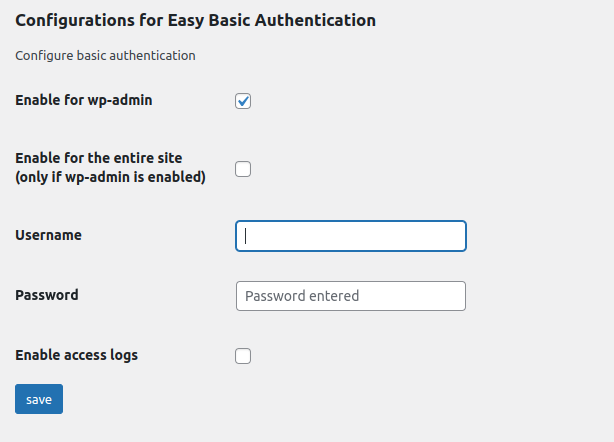
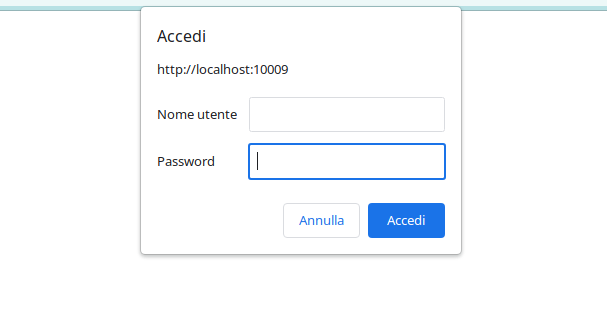
The Easy Basic Authentication plugin provides a simple method to add basic authentication to your WordPress site. You can enable basic authentication for the entire site or only for the admin area by setting a custom username and password. Secure your site by restricting access only to authorized users.
Try it on a free mock site: click here
Key Features
-
Simple Configuration: With Easy Basic Authentication, you can easily set up basic authentication for your entire website or specifically for the admin area. Set a custom username and password to ensure secure access.
-
Admin Area Protection: If you wish to restrict access to your WordPress admin area, Easy Basic Authentication allows you to do so quickly and effectively. Only users with the correct credentials will be able to access this critical part of your site.
-
Entire site protection: If you wish, there is an option to extend the access limitation to the entire site and not just for your WordPress admin area, Easy Basic authentication allows you to do this quickly and effectively. Only users with the correct credentials will be able to access this critical part of your site.
-
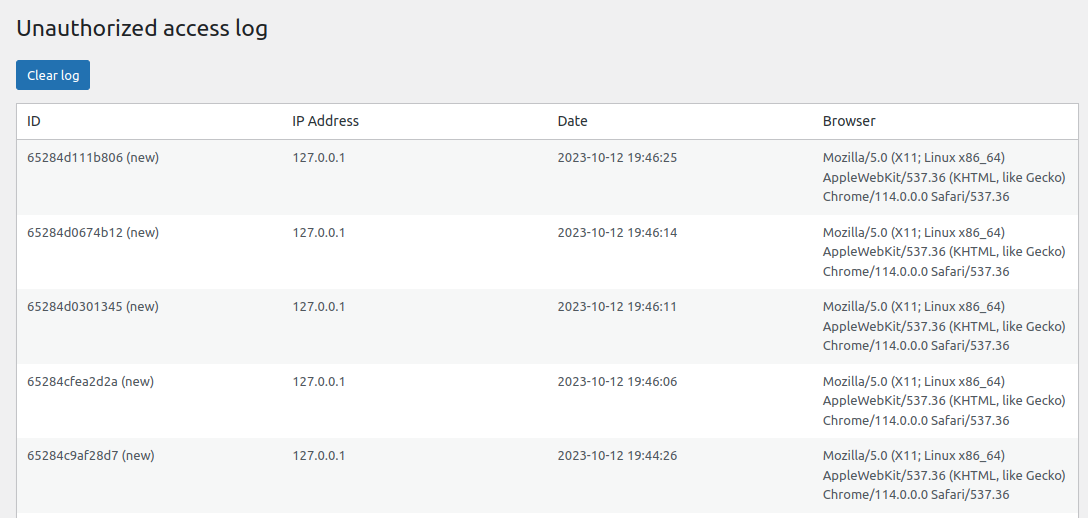
Failed Access Logging: The plugin keeps track of failed login attempts, helping you identify unauthorized access attempts. This is particularly useful for monitoring your site’s security.
-
Access Log: If you choose to enable this feature, Easy Basic Authentication allows you to log successful logins, providing a comprehensive overview of login activities on your site.
-
Easy Management: The plugin’s intuitive interface makes it simple to manage basic authentication settings. You can easily enable or disable basic authentication and adjust credentials to suit your needs.
-
Email Alert Functionality: Easy Basic Authentication includes an email alert feature to notify you of unauthorized access attempts. You can receive email alerts when someone tries to access your site without proper credentials.
-
White List Functionality: Easy Basic Authentication now includes a White List feature, allowing you to specify trusted IP addresses exempt from basic authentication. Configure this list to grant immediate access to known users or systems without requiring credentials, enhancing convenience while maintaining security.
-
Access Token for Crawlers: Some visitors cannot type a username and password: a search engine crawler, an uptime check, a headless front end. Generate an access token in the settings and let them through with an
X-Basic-Auth-Tokenheader, or anAuthorization: Bearerone. The token opens the site only, never the admin area or the login page, and it exists only if you generate it.
Protect your WordPress site with basic authentication quickly and reliably. Easy Basic Authentication gives you control to ensure that only authorized users can access your online resources. Maintain your site’s security and prevent unwanted access today with Easy Basic Authentication.
Usage
- Visit the plugin settings page to configure your desired basic authentication options.
- Choose whether to enable basic authentication for the entire site or just the admin area.
- Set a custom username and password for secure access.
- Monitor failed access attempts and access logs for added security.
Letting a crawler in with a token
Go to the plugin settings, tick Generate a token when saving next to Access token for crawlers, and save. The token appears in the field; copy it and give it to the service that needs to reach the site.
That service must send it as a header, one of these two:
X-Basic-Auth-Token: your-token-here
Authorization: Bearer your-token-here
A request carrying the right token is served normally. The admin area and the login page stay behind the username and password, so the token cannot be used to reach the dashboard. A wrong token is refused like wrong credentials, and it is recorded among the failed attempts.
The token is a password: anyone holding it can read the whole site. Send it over HTTPS, and tick Delete the token and close this door when it is no longer needed. Tick Replace this token with a new one when saving to rotate it; the old one stops working immediately.
The basic_auth_token_access_granted action fires whenever a request comes in on the token, if you want to log or count those separately.
Troubleshooting: Resetting Basic Authentication
If you’re having trouble logging in due to the basic authentication, you can reset it and regain access by following these steps:
1 Connect to your website via FTP.
2 Navigate to the plugin directory:
wp-content/plugins/easy-basic-authentication/class/
3 Locate the file:
easy-basic-authentication-class.php
4 Find the following line:
add_action( 'init', array($this,'basic_auth_admin') );
5 Comment out that line by adding a # at the beginning:
#add_action( 'init', array($this,'basic_auth_admin') );
6 Save the file and re-upload it to your server.
This will disable the basic authentication temporarily, allowing you to log in. Once logged in, you can adjust the plugin settings as needed.
If you need further assistance, feel free to reach out.
GitHub Repository
You can find the source code and contribute to the project on GitHub: Easy Basic Authentication on GitHub
스크린샷
설치
- Upload the Easy Basic Authentication plugin to your WordPress site.
- Activate the plugin.
- Configure the basic authentication settings from the WordPress admin panel.
후기


기여자 & 개발자
“Easy Basic Authentication – Add basic auth to site or admin area”(은)는 오픈 소스 소프트웨어입니다. 다음의 사람들이 이 플러그인에 기여하였습니다.
기여자

변경이력
4.2.0
- New: an access token that lets a crawler or an external service reach the site without a username and password. Generate it in the settings and send it as an
X-Basic-Auth-Tokenheader, or asAuthorization: Bearer. It opens the site only: the admin area and the login page stay protected. No token is generated until you ask for one, so nothing changes for sites that do not need it. - Fixed: on a site protected in full, scheduled tasks stopped running. WordPress closes the response of
wp-cron.phpbefore loading the plugins, so the 401 challenge reached nobody, left a “headers already sent” warning in the error log on every run, and the exit that followed cancelled every scheduled task of the site. Cron requests are no longer challenged. - Fixed: on WordPress 6.7 and later the plugin triggered the “Translation loading was triggered too early” notice. The settings fields are now built on
admin_initinstead ofplugins_loaded.
4.1.0
- Fixed: an access attempt was logged, and an alert email sent, for every visitor. Basic Authentication always makes a first request without credentials, and that request was being counted as a failed attempt. Only requests that send wrong credentials are recorded now.
- Fixed: the access log was stored in an autoloaded option, so up to 500 entries (around 144 KB) were loaded on every request to the site. It is now loaded only where it is used, and existing logs are migrated on update.
- Fixed: on a site protected in full, WP-CLI and any command line script stopped silently. HTTP authentication is no longer applied outside HTTP requests.
- The 401 status is now sent through WordPress instead of a hardcoded HTTP/1.0 header.
- The authentication realm can be changed with the new
basic_auth_realmfilter. - Tested up to WordPress 7.1.