

설명
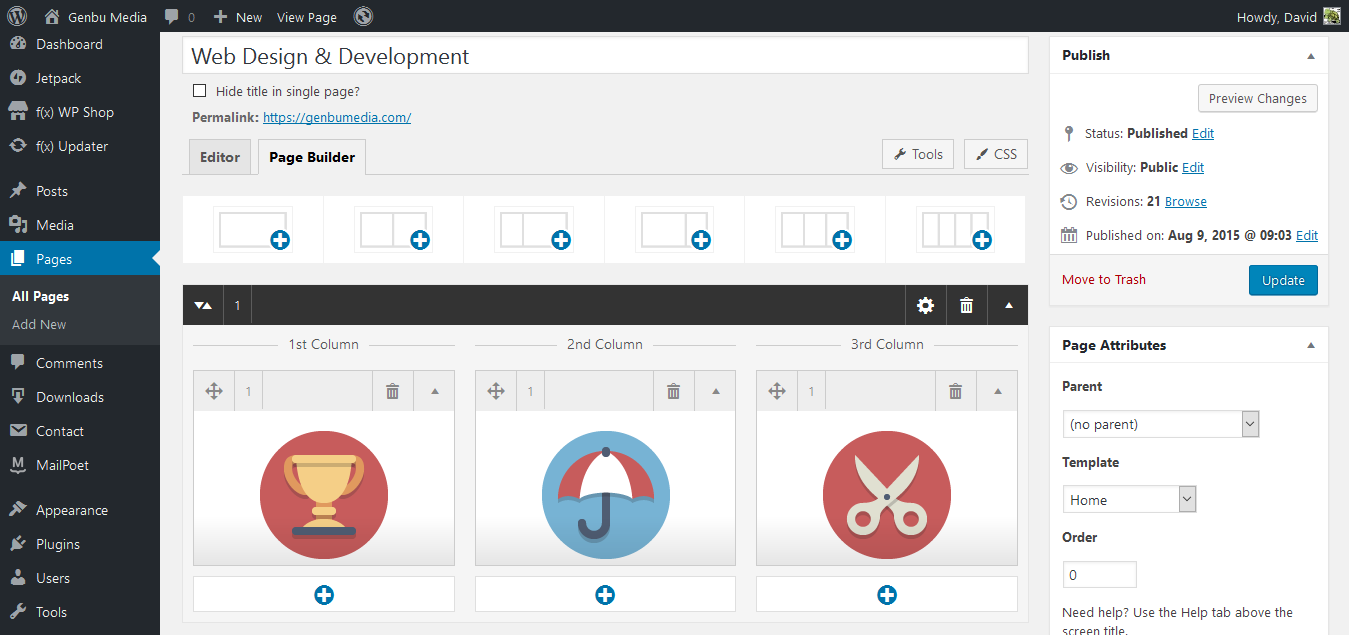
f(x) Builder is a new page builder plugin that provides visual columns in the post editor without using shortcodes. From the setting page, you can enable it for posts, pages, and custom post types. There is no vendor lock-in. If you decide you no longer wish to use the plugin, you can disable it without losing your content (though you would loose the column formatting).
GITHUB
You can contribute to development at GitHub https://github.com/turtlepod/fx-builder
Features:
- Super simple to use.
- Visual columns in the post editor.
- If you disable the plugin, you content is not lost.
- Settings to enable/disable for each post type.
- 1 – 4 columns supported.
- Free, Open Source, GPL v2.0 or later license. 🙂 Use it to make something cool.
- Support available at Genbu Media.
Notes for developer:
GitHub
Development of this plugin is hosted at GitHub. Pull request and bug reports are welcome.
스크린샷



설치
- Navigate to “Plugins > Add New” Page from your Admin.
- To install directly from WordPress.org repository, search the plugin name in the search box and click “Install Now” button to install the plugin.
- To install from plugin .zip file, click “Upload Plugin” button in “Plugins > Add New” Screen. Browse the plugin .zip file, and click “Install Now” button.
- Activate the plugin.
- Navigate to “Settings > Page Builder” to configure.
- Edit your content.
FAQ
- Installation Instructions
-
- Navigate to “Plugins > Add New” Page from your Admin.
- To install directly from WordPress.org repository, search the plugin name in the search box and click “Install Now” button to install the plugin.
- To install from plugin .zip file, click “Upload Plugin” button in “Plugins > Add New” Screen. Browse the plugin .zip file, and click “Install Now” button.
- Activate the plugin.
- Navigate to “Settings > Page Builder” to configure.
- Edit your content.
후기

2017년 7월 6일
Exactly what I was looking for. Thanks a lot. Works great.

2017년 5월 12일
I love it!

2017년 5월 2일
I’ve used several Page Builders, but none integrates as perfectly as the f (x) Builder plugin.
Clean design, very lightweight and easy to use make this plugin essential for any WordPress site.
Please continue with this beautiful development, I sincerely do not know if it needs any improvement, it is perfect for me.
Many thanks to the developer!

2016년 10월 12일
I mean it works without me thinking how to use it), which is unbelievable for a builder. Simple and efficient. I tried it yesterday when it was alpha, today is beta, I liked UI improvement. Great potential!

2016년 9월 24일
No bells and whistles, just a plain and simple page builder, with a FULL editor at our disposal. Perfect for those who create their own themes or shortcodes or use some quality shortcodes plugins.
What’s really amazing is that it add 0 (ZERO) strain on the server – the page loads are exactly the same with this page builder active or not. If you are using a shared hosting, and especially if you are using a “heavy” plugin like Woocommerce, and if you want to have a page builder without effecting the speed of the site, then besides a good theme and agood cache plugin, this is the page builder to use.
I cannot specify how excited I’m with this, I hope they don’t add too many things to it. There are a million other page builders that have plenty of features, at the expense of speed and memory (RAM). We needed at least one that is extremely lightweight, and this is it. Besides, there is no way any builder plugin can compete with Visual composer, so dominating a different niche is very clever.
If anything that needs to be added, the ability to have full width content when the theme is fixed width, ala Visual Composer, or SiteOrigin. The Divi builder plugin and the Beaver builder plugin fail miserably with this.
기여자 & 개발자

변경이력
1.0.2 – 13 Ags 2017
- Fix bug: WP 4.8 compat https://github.com/turtlepod/fx-builder/issues/48
- Credit for reporting WP 4.8 bug: nick6352683 https://wordpress.org/support/users/nick6352683/
1.0.1 – 06 Jan 2017
- Fix bug: wp preview remove page builder data https://github.com/turtlepod/fx-builder/issues/45
- Fix CSS Bug: Tools & CSS button position.
- Store _fxb_active in revisions.
- Hide “Preview Changes” button in “Publish” meta box when page builder active.
- Fix “save_post” hook to fix fatal error bug.
1.0.0 – 09 Dec 2016
- First Stable Release.
1.0.0.beta – 12 Oct 2016
- Browser compatibility (Tested with: Firefox, Chrome, IE11, Edge, Android Phone, Tablet)
- Use Admin Color
- UI and UX Improvement.
- RTL Support
- Use HTML Class for Front End Output + Update Front CSS.
1.0.0.alpha3 – 29 Sep 2016
- Revision: Revert to Revision now also revert to page builder data.
- Remove disable editor feature. Simpler Settings.
- Change settings option name. You need to re-configure settings.
- Page is enabled by default.
- Introduce Tools: Export / Import page builder data.
- Auto focus to editor when open editor modal.
- Fix Custom CSS textarea line break.
- Fix several small-screen accessibility issue in modal box.
1.0.0.alpha2 – 23 Sep 2016
- Add row with thumbnail for each layoout.
- Welcome notice with link to admin page/
- Improve overall builder design.
- Fix overflow in editor modal.
- add post class “fx-builder-entry” when active.
- Reset undo in editor modal.
- Custom CSS for each posts.
- Other small fixes and improvements.
1.0.0.alpha – 21 Sep 2016
- Initial alpha release.