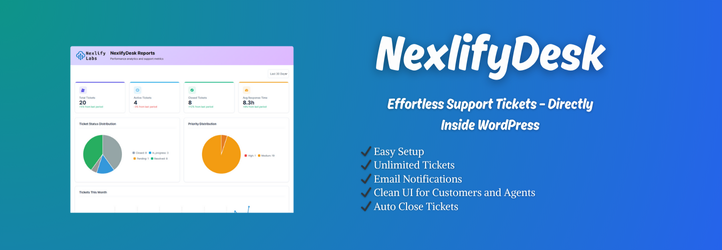

설명
NexlifyDesk transforms your WordPress site into a comprehensive customer support platform. Featuring advanced ticket management, intelligent duplicate detection, multi-channel email integration, and seamless WooCommerce connectivity, it delivers enterprise-level support capabilities while maintaining complete data control and security.
Documentation: Check out the Full Documentation & Setup Guide
NexlifyDesk is a comprehensive, enterprise-grade helpdesk solution designed specifically for WordPress. Built with scalability, security, and efficiency at its core, it provides everything you need to deliver exceptional customer support while maintaining complete control over your data and workflows.
Why Choose NexlifyDesk?
Transform your customer support with a professional ticketing system that grows with your business. Whether you’re a small business handling dozens of tickets or an enterprise managing thousands, NexlifyDesk provides the tools, automation, and insights you need to deliver outstanding customer experiences.
Core Capabilities:
– Advanced Ticket Management – Complete lifecycle management with intelligent routing and automation
– Multi-Channel Email Integration – Convert emails to tickets with IMAP/POP3, AWS WorkMail, and Google Workspace support
– Intelligent Duplicate Detection – AI-powered semantic analysis prevents ticket fragmentation
– WooCommerce Integration – Deep integration with order history and customer context
– Enterprise Security – Built-in spam protection, rate limiting, and secure file handling
Key Features
Frontend Customer Experience
– Ticket Submission & Management – Clean, user-friendly interface for ticket submission, history tracking, and progress monitoring
– Real-time Updates – AJAX-powered interface with live status updates and instant reply notifications
– File Attachments – Multiple file type support with configurable size limits and security validation
– Responsive Design – Optimized experience across desktop, tablet, and mobile devices
Advanced Admin Dashboard
– Centralized Ticket Management – Comprehensive admin interface with filtering, search, and bulk operations
– Real-time Statistics – Live dashboard with ticket counts, response times, and performance metrics
– Agent Assignment – Intelligent auto-assignment with manual override and load balancing capabilities
– Status Management – Five ticket statuses (Open, In Progress, Pending, Resolved, Closed) with automated workflows
Agent Roles & Permissions System
– Custom Agent Positions – Unlimited agent roles with granular permission control and capability management
– Performance Tracking – Monitor response times, resolution rates, and workload distribution analytics
– Capability Management – Fine-grained control over agent permissions (view tickets, assignments, categories, reports)
– Orphaned Ticket Management – Automatic ticket reassignment when agents are deactivated or removed
Professional Communication Tools
– Internal Notes – Private agent-to-agent communication within tickets (invisible to customers)
– Email Notifications – Fully customizable templates with dynamic placeholders and conditional delivery
– Notification Control – Granular settings for notification timing, recipients, and trigger conditions
– Professional Templates – Pre-designed email templates for all ticket lifecycle events and SLA notifications
Intelligent Automation
– Enhanced Duplicate Detection – Advanced multi-layer algorithms with semantic text analysis and automatic merging
– Smart Auto-Assignment – Intelligent ticket distribution based on agent availability and workload balancing
– SLA Monitoring – Automated tracking and breach notifications to maintain service level agreements
– Auto-Closure – Automatic ticket closure after 48 hours of inactivity with system notifications
Email Piping & Integration
– Multi-Provider Support – Convert emails to tickets with Custom IMAP/POP3, AWS WorkMail, and Google Workspace/Gmail integration
– Flexible Email Management – Configurable options to retain or delete emails after ticket creation
– Advanced Spam Protection – Built-in filtering, blocking, and rate limiting to prevent abuse and maintain security
– Intelligent Email Processing – Automatic sender detection, thread management, and duplicate prevention algorithms
Enhanced Admin Experience
– Real-time Ticket Management – Live-updating interface with read/unread status indicators and priority sorting
– Smart Prioritization – Unread tickets automatically surface first for immediate attention
– Instant Notifications – Real-time updates without page refresh for seamless workflow management
– Bulk Operations – Enhanced bulk actions for efficient ticket management and workflow optimization
Categories & Organization
– Unlimited Categories – Organize tickets with custom categories, descriptions, and hierarchical structures
– Priority Management – Four priority levels (Low, Medium, High, Urgent) with visual indicators and automated workflows
– Advanced Search & Filtering – Comprehensive search across all fields with multiple filter combinations
– Bulk Operations – Manage multiple tickets simultaneously for improved efficiency
WooCommerce Integration
– Order History Access – Built-in order lookup functionality for WooCommerce stores with comprehensive order details
– Customer Context – Direct access to order information from within tickets for enhanced customer support
– Order-based Duplicate Detection – Intelligent linking of tickets to existing order conversations for context preservation
Reporting & Analytics
– Performance Metrics – Comprehensive reports on ticket volume, response times, and agent performance analytics
– Visual Analytics – Interactive charts for ticket trends, priority distribution, and monthly statistical analysis
– Activity Monitoring – Real-time feed of all support activities across your team for operational transparency
Developer & Advanced Features
– Template Override System – Customize frontend templates by copying to your theme for complete design control
– Shortcode System – Flexible shortcodes like [nexlifydesk_ticket_form] and [nexlifydesk_ticket_list] with customizable attributes
– Data Management – Configurable retention policies with optional purge functionality for compliance requirements
– Rate Limiting – Built-in protection against spam and abuse with configurable thresholds
– Caching System – Optimized performance with intelligent cache management for enhanced responsiveness
Duplicate Ticket Detection
NexlifyDesk features an advanced three-layer duplicate detection system designed to maintain organized support queues and prevent ticket fragmentation:
Detection Layers:
– Exact Subject Matching – Identifies identical subjects from the same user within the last 30 days and automatically adds new messages as replies to existing tickets
– Order Number Pattern Recognition – Recognizes order/invoice number patterns (such as “Order #12345” or “#ABC123”) and intelligently links related communications to unified conversation threads
– Semantic Content Analysis – Employs advanced cosine similarity algorithms to compare keywords between new and recent tickets from the same user, with configurable 80% similarity threshold and intelligent stopword filtering
User Experience
When duplicate tickets are detected, users receive clear notifications that their message has been added to an existing conversation, maintaining contextual continuity and communication history.
Administrative Control
– Enable or disable duplicate detection in NexlifyDesk > Settings
– Adjust sensitivity thresholds to match your workflow requirements
– Monitor duplicate detection statistics and effectiveness in the reports dashboard
– Configure semantic analysis parameters for optimal accuracy
Usage
Shortcode Reference
[nexlifydesk_ticket_form] – Display the ticket submission form
– show_title="no" – Hide the page title
– category="5" – Pre-select a specific category by ID
– priority="high" – Set default priority level (low, medium, high, urgent)
[nexlifydesk_ticket_list] – Display ticket history and management
– show_title="no" – Hide the page title
– status="open" – Filter tickets by status (open, in-progress, pending, resolved, closed)
– limit="10" – Limit the number of tickets displayed per page
Administrative Menu Structure
NexlifyDesk (Main Menu)
– All Tickets – Comprehensive ticket management with advanced filtering and bulk operations
– Categories – Create and manage custom ticket categories and hierarchies
– Settings – Complete configuration panel for all plugin features and integrations
– Reports – Analytics dashboard with charts, metrics, and performance insights
– Agent Positions – Role and capability management for team members
– Order History – WooCommerce order lookup and integration features
– Email Templates – Customize all notification templates with dynamic content
– Support – Direct access to plugin support and documentation resources
Ticket Status Workflow
Five distinct statuses provide complete ticket lifecycle management:
– Open – Newly submitted tickets awaiting initial agent response
– In Progress – Tickets actively being worked on by assigned agents
– Pending – Tickets waiting for customer response or additional information
– Resolved – Tickets marked as solved, awaiting customer confirmation
– Closed – Completed tickets (closed manually or automatically after 48 hours)
Agent Capability System
Custom agent roles support granular permission control:
– View All Tickets – Organization-wide ticket access across all agents and departments
– Assign Tickets – Ability to delegate tickets to other agents or departments
– Manage Categories – Create, edit, and organize ticket categories and hierarchies
– View Reports – Access to analytics, performance metrics, and statistical dashboards
Customization
Settings Panel Configuration
– Email Notifications – Control delivery timing, recipients, and notification triggers
– Default Values – Configure default priority levels, categories, and agent assignments
– File Upload Controls – Manage allowed file types, size limits, and security validation
– SLA Management – Set response time targets, breach notifications, and escalation rules
– Automation Rules – Configure auto-assignment, duplicate detection, and closure policies
Email Template Customization
– Dynamic Placeholders – Use variables like {ticket_id}, {user_name}, {subject}, {ticket_content} for personalized communications
– HTML Support – Rich text formatting with live preview functionality
– Multiple Templates – Separate customization for each notification type and event
– Multi-language Ready – Support for internationalization and localization
Visual Customization
– CSS Override – Add custom styles through your theme’s stylesheet
– Template System – Override plugin templates for complete structural control
– Responsive Design – Mobile-first approach with tablet and desktop optimization
– Color Schemes – Customize visual elements to match your brand identity
Advanced Integration
– WooCommerce Support – Deep integration with order management and customer history
– Multisite Compatibility – Full support for WordPress multisite networks
– Developer Hooks – Extensive action and filter hooks for custom functionality
– REST API Ready – Prepared for future API integrations and third-party connections
Performance & Security
Optimized Performance
– Smart Caching – Intelligent cache management for database queries and duplicate detection
– AJAX Interface – Seamless user experience with real-time updates and no page reloads
– Optimized Database – Efficient query structure and indexing for large ticket volumes
– Background Processing – Email handling and notifications processed asynchronously
Security Features
– Nonce Verification – WordPress security tokens for all form submissions and AJAX requests
– Data Sanitization – Comprehensive input validation and output escaping
– File Upload Security – MIME type validation, file extension verification, and size limits
– Rate Limiting – Built-in protection against spam, abuse, and automated attacks
– Capability-based Access – Role-based permissions with granular access control
Data Management
– Configurable Retention – Flexible data retention policies for compliance requirements
– Optional Purging – Safe data removal options with confirmation safeguards
– Database Tools – Maintenance utilities for optimization and cleanup
– Full Export Options – Complete data portability for migrations and backups
Support & Documentation
Getting Help and Support
– Email Support: support@nexlifylabs.com for technical assistance and general inquiries
– Official Website: https://nexlifylabs.com for documentation, tutorials, and updates
– Comprehensive Documentation: Complete setup guides and feature documentation available on our website
– Community Support: WordPress.org plugin forums for community assistance and discussions
Premium Support Services
Upgrade to premium support for priority assistance, advanced features, and dedicated technical support with faster response times.
Feature Requests and Feedback
We value your input! Send feature suggestions and feedback through our support channels to help shape future development.
Privacy & Data Protection
Data Storage and Security
– Local Storage: All ticket data is stored in your WordPress database with no external servers
– Complete Control: Maintain full control over your support data and customer information
– No Third-party Dependencies: Core functionality operates independently without external service requirements
Email Handling and Privacy
– Your Mail System: Uses your existing email infrastructure and SMTP settings
– No External Services: Email processing occurs on your server without third-party involvement
– Privacy Compliant: Designed to meet GDPR, CCPA, and other privacy regulation requirements
Data Portability and Export
– Complete Export: Export all ticket data, attachments, and configurations in standard formats
– WordPress Compatibility: Data exports use WordPress-standard formats for easy migration
– GDPR Ready: Built-in tools for data export, modification, and deletion to support privacy rights
Security Measures and Compliance
– Data Encryption: Sensitive data encryption for secure storage and transmission
– Regular Security Audits: Ongoing security reviews and updates for vulnerability protection
– Best Practices: Implementation follows WordPress security best practices and guidelines
For complete privacy policy details, visit: Privacy Policy
Uninstall Process
Data Retention (Default Behavior)
– Safe Preservation: All plugin data (tickets, attachments, categories, settings) is preserved during uninstallation
– Data Safety: Your support history and customer data remain intact for future plugin reinstallation
– WordPress Standard: Follows WordPress plugin standards for data preservation
Complete Data Removal (Optional)
1. Navigate to NexlifyDesk > Settings before uninstalling
2. Uncheck “Preserve all tickets and plugin data during uninstallation”
3. Save settings and proceed with plugin uninstallation
4. All plugin data will be permanently removed from your database
Important Warning: Complete data removal is irreversible. Always create a full backup before enabling data removal or uninstalling the plugin. This ensures you can restore your support data if needed.
스크린샷
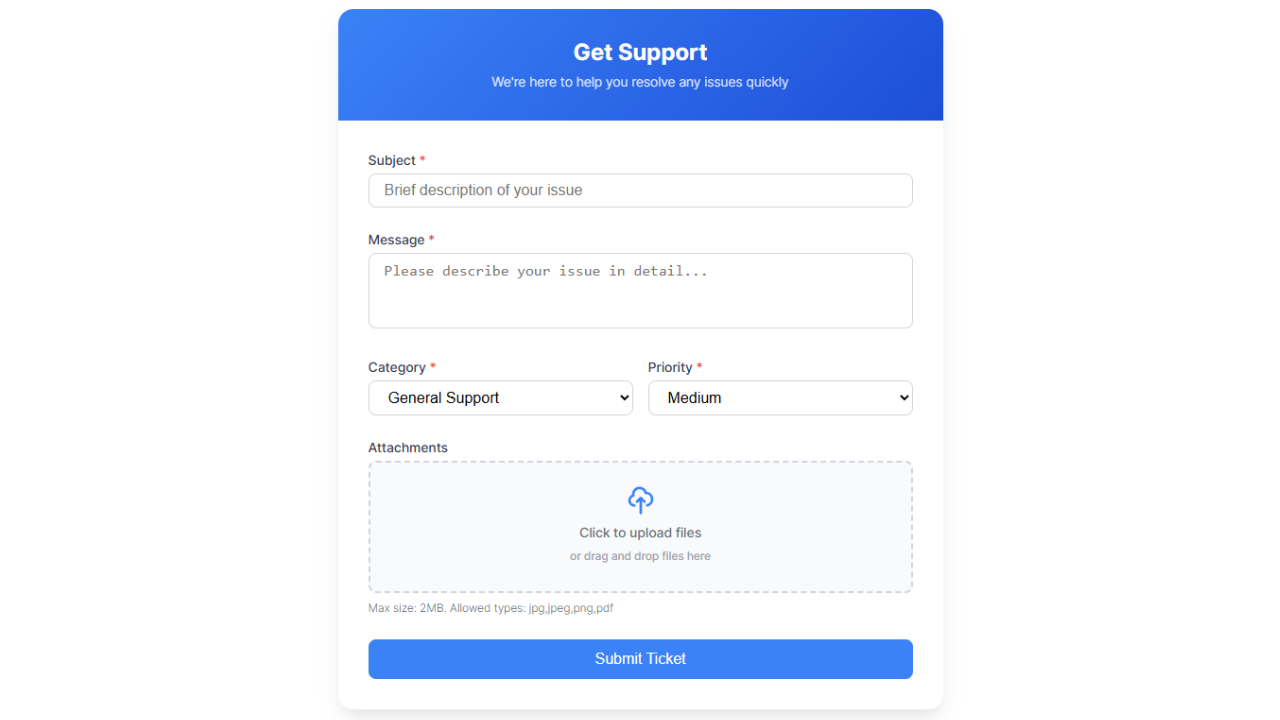
Frontend Ticket Submission Form – Clean, user-friendly form interface with file attachments and priority selection 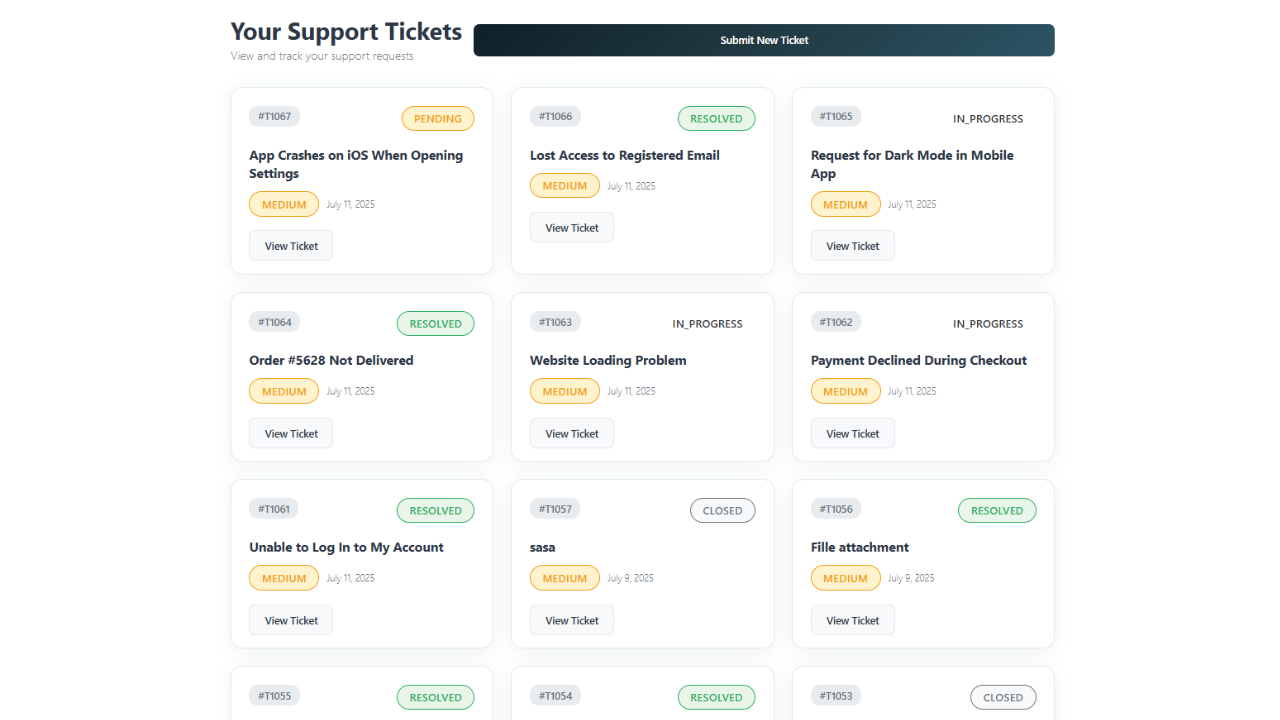
Customer Ticket Dashboard – Intuitive interface for customers to view and manage their ticket history 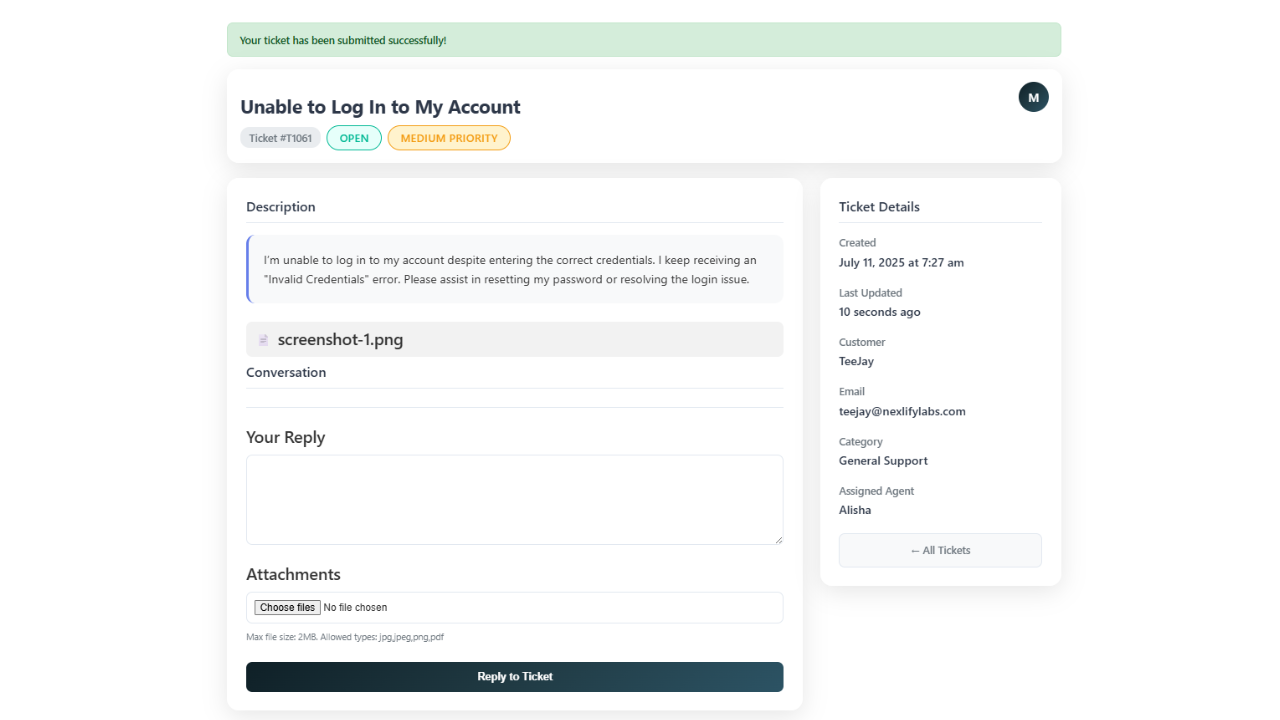
Frontend Ticket Conversation – Threaded conversation view with file attachments and status updates 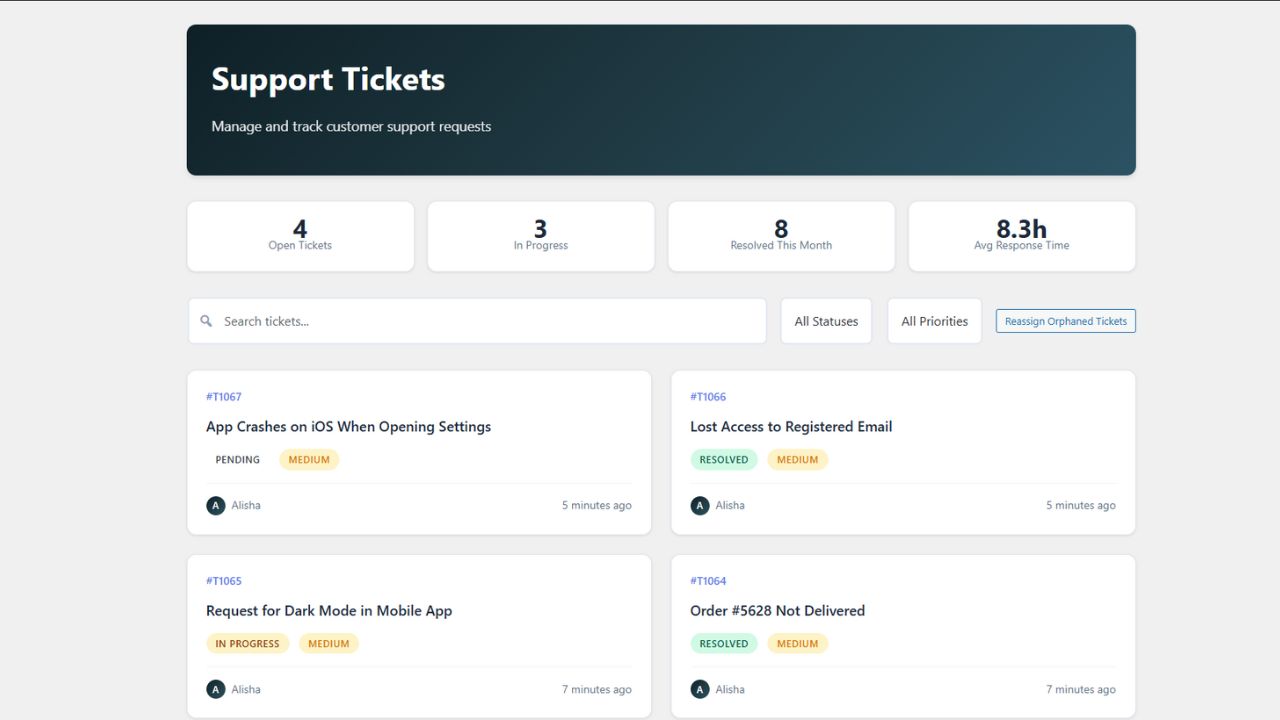
Admin Dashboard Overview – Comprehensive ticket management interface with real-time statistics 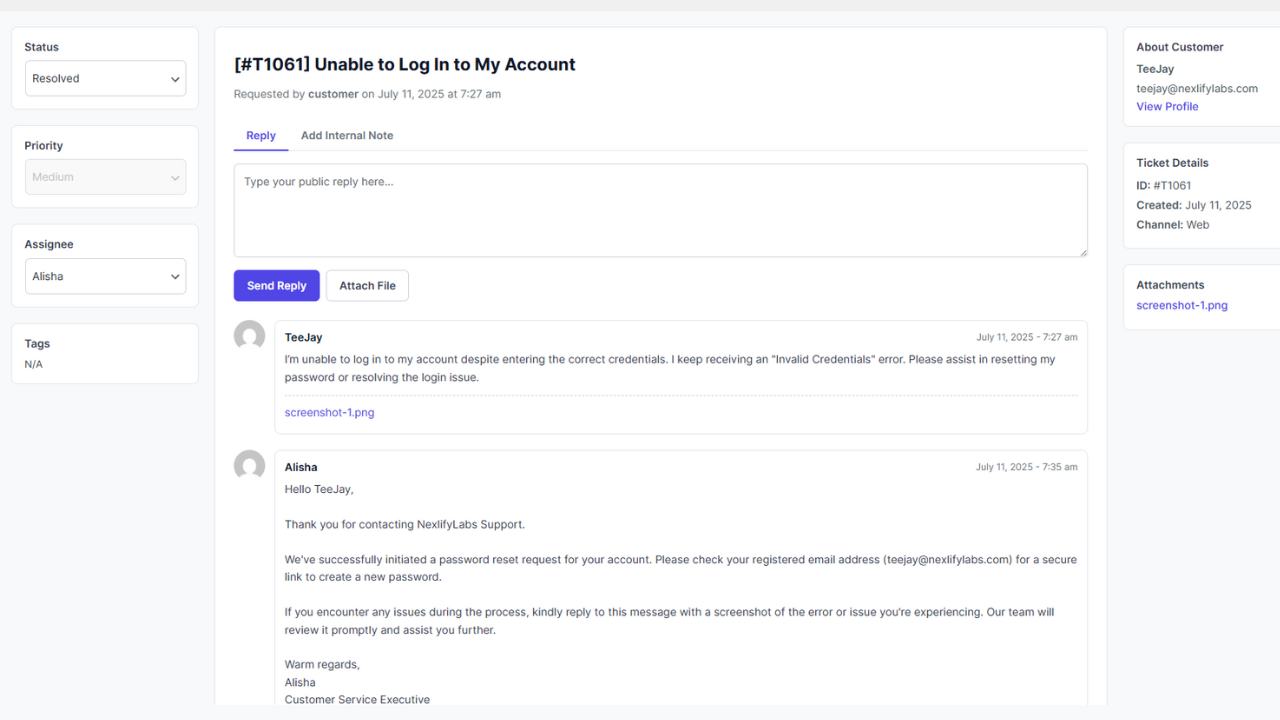
Admin Ticket Details – Single-ticket management view with internal notes and agent actions 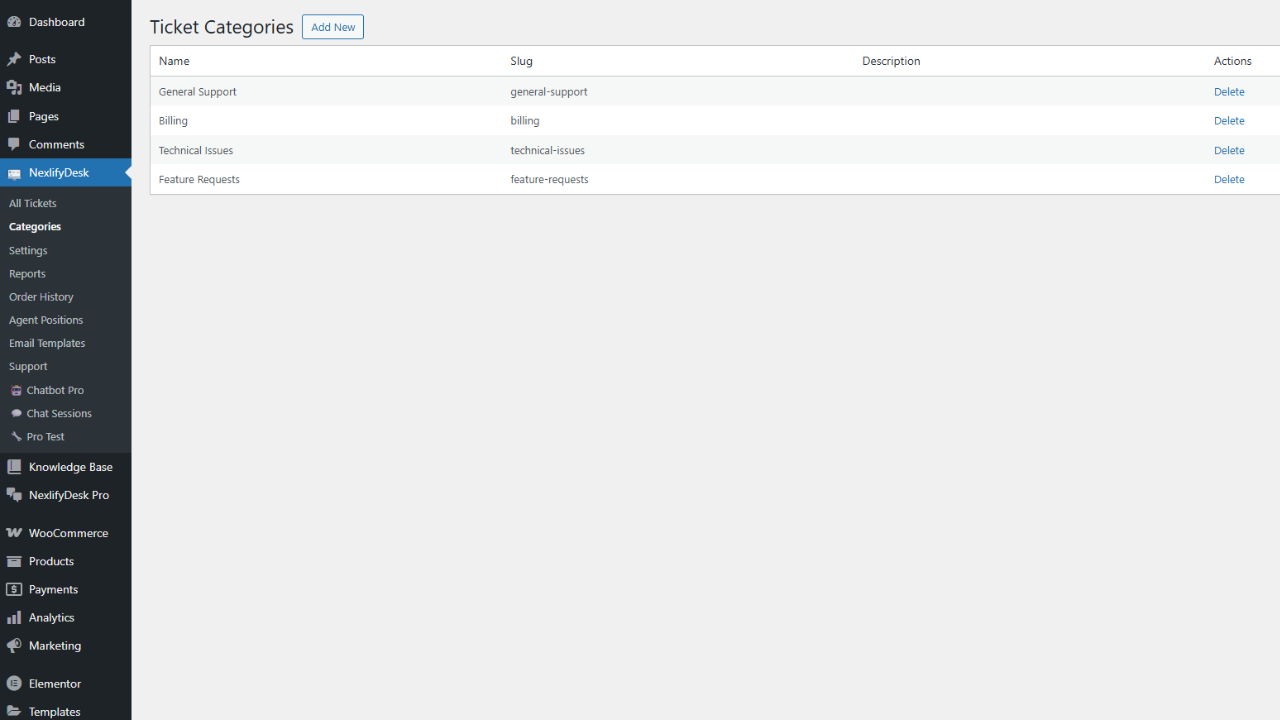
Category Management – Organize and manage custom ticket categories with descriptions 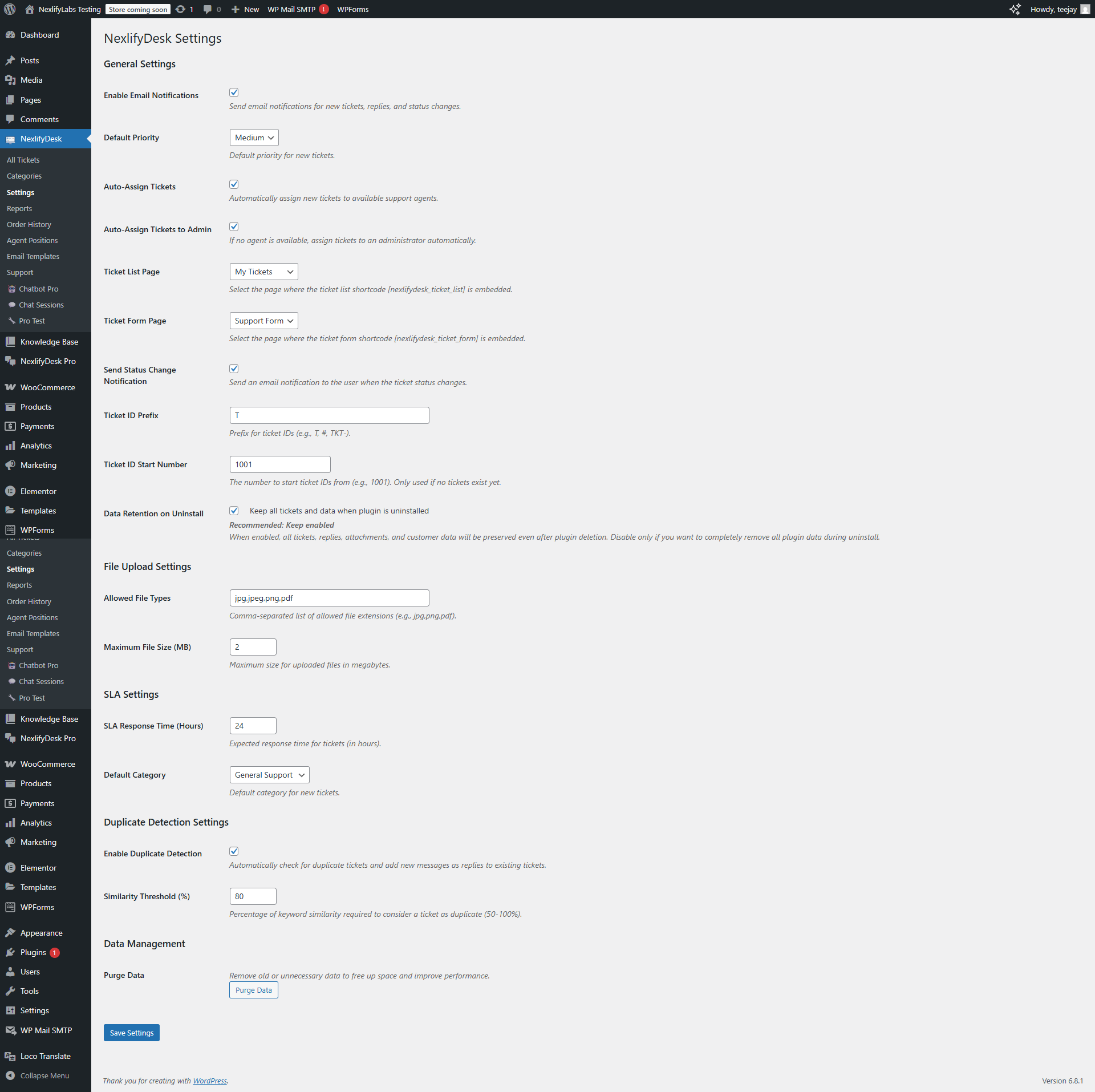
Comprehensive Settings Panel – Extensive configuration options for all plugin features 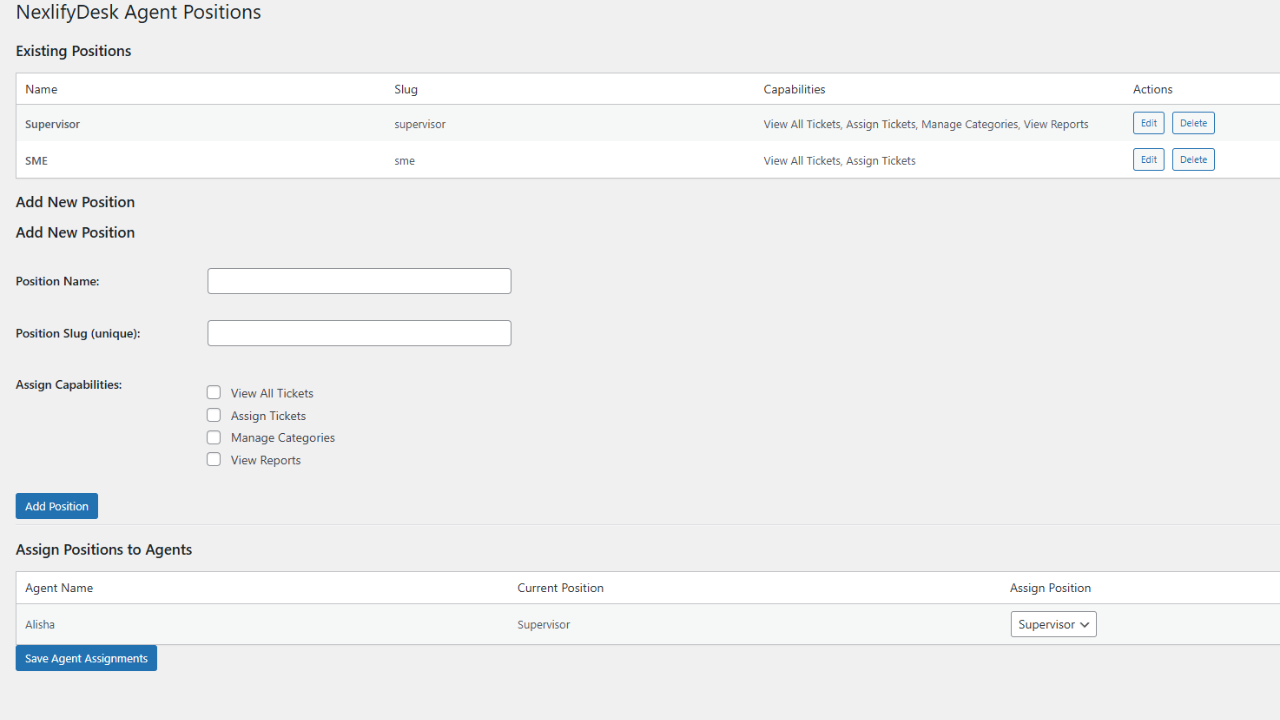
Agent Positions & Permissions – Granular role control and capability management system 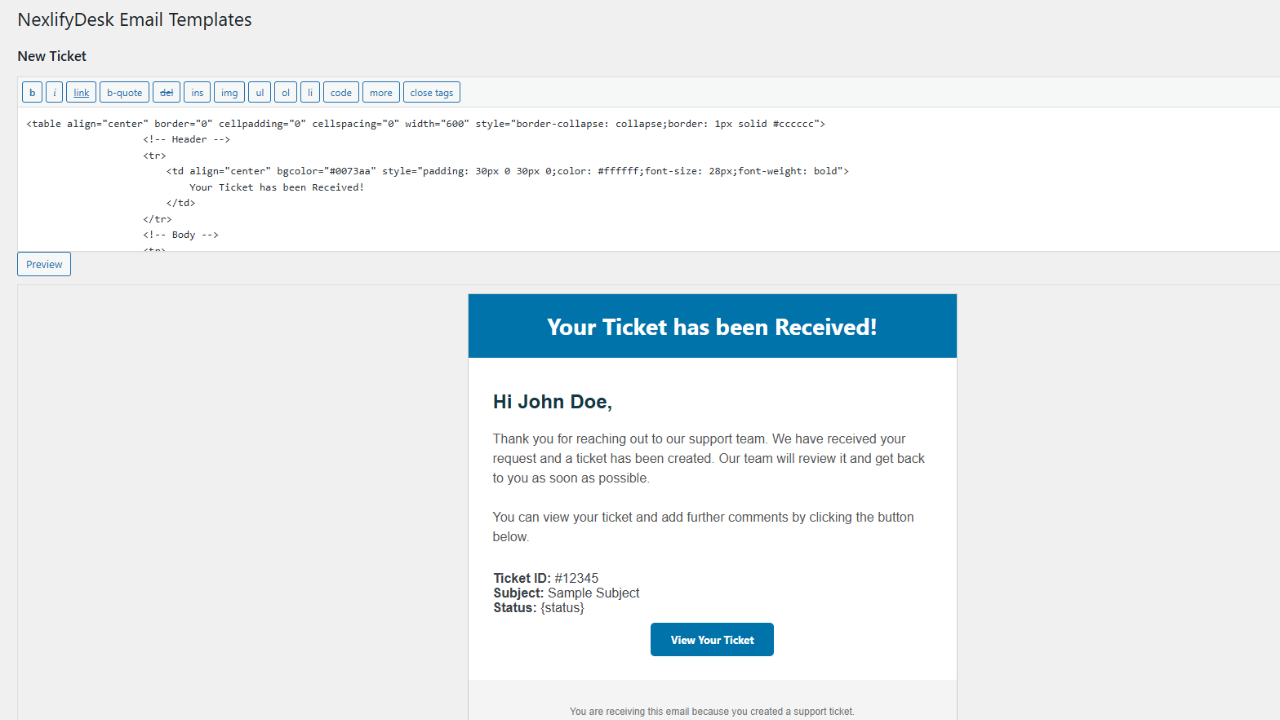
Email Template Editor – Customize all notification emails with dynamic placeholders 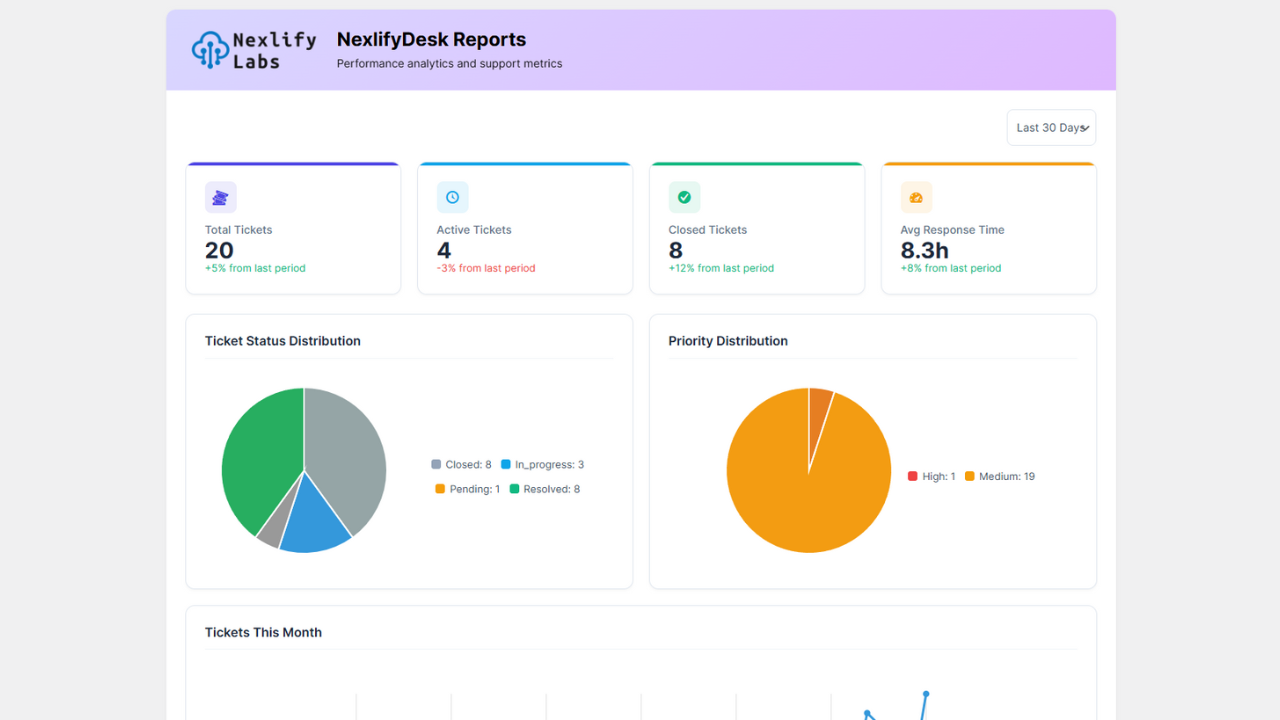
Reports & Analytics Dashboard – Visual charts and comprehensive metrics for performance analysis 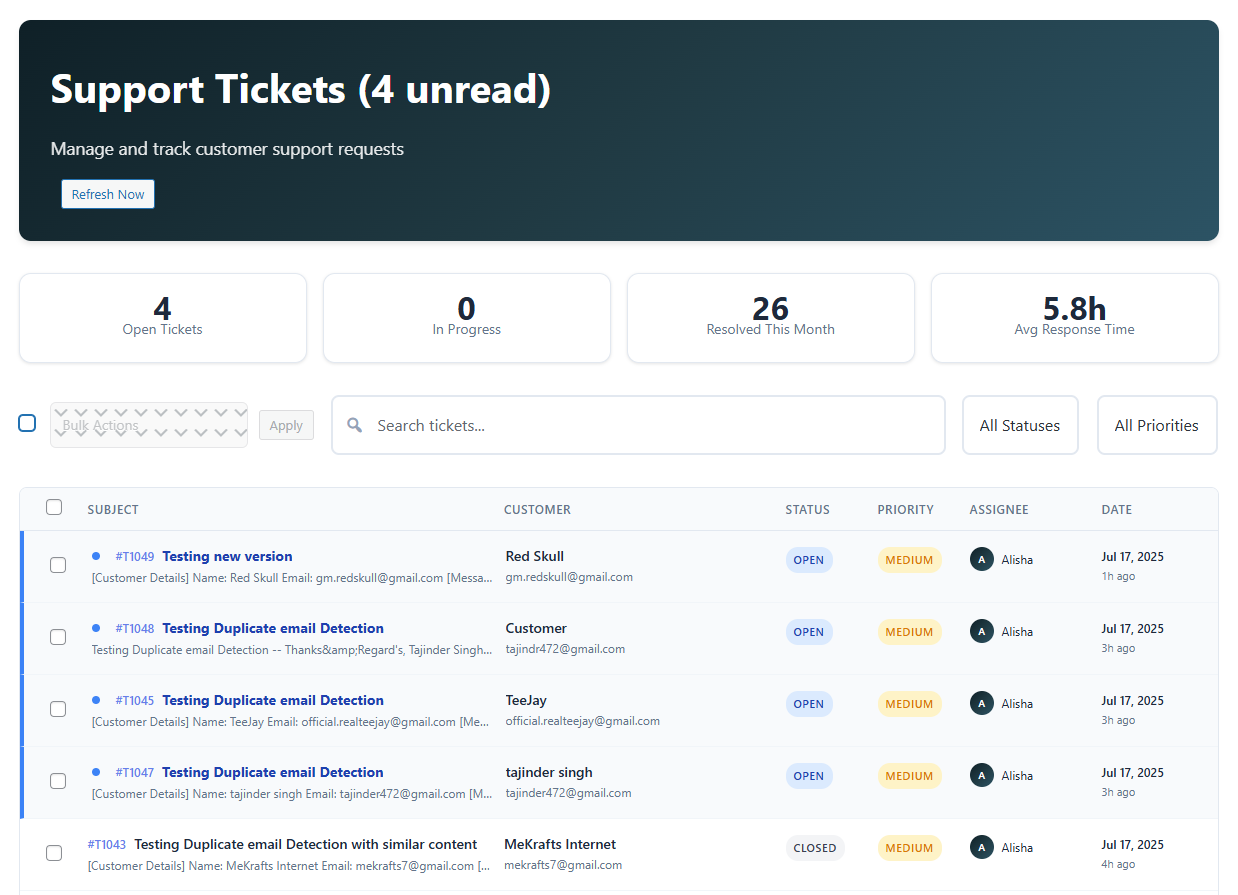
설치
Quick Setup Process:
- Plugin Installation: Upload the
nexlifydeskfolder to/wp-content/plugins/via FTP, or upload the ZIP file directly through WordPress admin dashboard - Activation: Activate the plugin through the ‘Plugins’ menu in WordPress administration
- Initial Configuration: Navigate to NexlifyDesk > Settings to configure:
- Email notification preferences and delivery settings
- File upload limits, allowed types, and security validation
- Default ticket priority and category assignments
- SLA response time targets and breach notifications
- Auto-assignment rules and agent load balancing
- Frontend Page Setup: Create user-facing pages for ticket management:
- Ticket Submission Page: Create a new page and add the shortcode
[nexlifydesk_ticket_form] - Ticket History Page: Create another page and add the shortcode
[nexlifydesk_ticket_list] - Configure page links in NexlifyDesk > Settings for seamless navigation
- Ticket Submission Page: Create a new page and add the shortcode
- Email Piping Setup (Optional): Configure email-to-ticket conversion:
- Select your email provider (Custom IMAP/POP3, AWS WorkMail, or Google Workspace)
- Enter connection details and authentication credentials
- Configure spam protection rules and filtering criteria
- Set email retention preferences (keep or delete after processing)
- Agent Team Setup (Optional): Prepare your support team:
- Create WordPress user accounts for support agents
- Assign the “NexlifyDesk Agent” role to team members
- Define custom agent positions with specific capabilities
- Configure automatic assignment rules for optimal workload distribution
FAQ
-
How do I create a support ticket submission form?
-
Create a new WordPress page and add the shortcode
[nexlifydesk_ticket_form]. You can customize the form with additional attributes:
–show_title="no"to hide the page title
– The form includes fields for subject, message, category selection, priority level, and file attachments -
How can customers view their submitted tickets?
-
Create a page with the shortcode
[nexlifydesk_ticket_list]. Logged-in customers will see their own tickets, while agents will see their assigned tickets. Customization options include:
–show_title="no"to hide the page title
–status="open"to filter tickets by specific status -
Can I customize the email notifications?
-
Yes! Navigate to NexlifyDesk > Email Templates to customize all notification emails:
– New Ticket notifications, New Reply alerts, Status Change notifications, and SLA Breach warnings
– Use dynamic placeholders like{ticket_id},{user_name},{subject},{ticket_content}, and many more for personalized communications -
How do I set up support agents?
-
Basic Agent Setup:
1. Go to Users > Add New to create agent accounts
2. Assign the “NexlifyDesk Agent” role to new usersAdvanced Agent Configuration:
1. Visit NexlifyDesk > Agent Positions to create custom roles
2. Define specific capabilities (e.g., “Level 1 Support”, “Senior Agent”)
3. Assign agents to positions through their user profiles
4. Configure automatic assignment rules in Settings -
What file types can be attached to tickets?
-
Default supported formats include JPG, PNG, PDF, and common document types. You can customize file handling in NexlifyDesk > Settings:
– Configure allowed file extensions
– Set maximum file size limits
– Enable security validation and virus scanning integration -
How does the SLA monitoring work?
-
Configure response time targets in NexlifyDesk > Settings (specified in hours). The system will:
– Track response times against SLA targets
– Send breach notification alerts to administrators and assigned agents
– Display SLA status indicators in the dashboard interface
– Include SLA performance metrics in comprehensive reports -
Can I integrate with WooCommerce?
-
Absolutely! NexlifyDesk includes native WooCommerce integration features:
– Built-in Order History lookup page for comprehensive order details
– Automatic order-based duplicate detection for context preservation
– Direct customer context access within tickets for enhanced support quality -
How do I set up email piping?
-
Email piping converts incoming emails into support tickets. Setup varies by provider:
Custom IMAP/POP3 Configuration:
1. Navigate to NexlifyDesk > Settings > Email Piping
2. Select “Custom IMAP/POP3” as your provider
3. Enter mail server details (host, port, username, password, encryption)
4. Configure spam filtering and processing rules
5. Choose email retention preferences (delete or keep emails after processing)AWS WorkMail Integration:
1. Ensure SSL is enabled on your WordPress site
2. Select “AWS WorkMail” as your provider
3. Enter AWS region, organization ID, and authentication credentials
4. Optionally configure SES for enhanced email deliveryGoogle Workspace/Gmail Setup:
1. Create OAuth credentials in Google Cloud Console
2. Select “Google Workspace” as your provider
3. Complete OAuth authentication flow
4. Configure email processing preferences and filters -
How does automatic ticket assignment work?
-
The intelligent assignment system operates through multiple algorithms:
1. Identifies available agents based on online status and workload
2. Balances ticket distribution by assigning to agents with fewest open tickets
3. Falls back to administrator assignment if no agents are available
4. Automatically reassigns orphaned tickets when agents are deactivated -
What happens to closed tickets?
-
Ticket closure follows a structured workflow:
– Agents can manually close tickets at any time
– Resolved tickets automatically close after 48 hours of customer inactivity
– Administrators can reopen closed tickets when necessary
– Customers cannot reply to closed tickets and are prompted to create new ones -
Is my data safe when uninstalling the plugin?
-
By default, YES! All plugin data (tickets, attachments, categories, etc.) is preserved during uninstallation for data safety. You can modify this behavior in Settings to enable complete data removal. Always create a backup before uninstalling any plugin.
-
How do internal notes work?
-
Internal notes provide private agent-to-agent communication:
– Notes are completely invisible to customers
– Ideal for sharing context, escalation information, or troubleshooting details
– Add notes through the “Add Internal Note” tab in the admin ticket interface
– All internal notes are logged with timestamps and agent attribution -
Can I customize the plugin’s appearance?
-
Multiple customization options are available:
– Add custom CSS styling through your theme’s stylesheet
– Override plugin templates by copying them to your active theme directory
– Customize colors, labels, and visual elements through Settings
– Full control over email template design and content
– Responsive design elements for mobile optimization
후기

기여자 & 개발자


변경이력
1.0.5
- SECURITY FIX: Resolved critical agent permission vulnerability where agents could view and reply to tickets not assigned to them
- NEW: Implemented smart role-based read status system – when agents handle tickets, they’re automatically marked as read for supervisors/admins to eliminate review backlog
- NEW: Added professional dual-date columns (Created + Last Updated) to ticket list with accurate timestamp display based on actual reply activity, not system background processes
- Enhanced agent role-based access control to properly restrict agents to only their assigned tickets
- Fixed agent position capabilities to correctly respect “View All Tickets” permission for supervisor roles
- Improved ticket filtering in admin dashboard to enforce proper agent-specific ticket visibility
- Enhanced frontend ticket access control with better customer email verification for unregistered users
- Fixed agent reply permissions to prevent unauthorized responses to unassigned tickets
- Improved agent dashboard statistics to show only relevant metrics for assigned tickets
- Enhanced bulk action permissions to restrict agents from performing actions on unassigned tickets
- Fixed ticket form redirect issues that caused incorrect URL redirection after submission
- Improved frontend shortcode logic to properly handle customer vs agent access permissions
- Enhanced duplicate detection with better customer detail extraction for unregistered users
- Fixed JavaScript form submission to use proper server-provided redirect URLs
- Improved success message handling with proper ticket number display and view links
- Fixed category deletion and reactivation bug that caused misleading error messages
- Resolved AJAX response issues where HTML was returned instead of JSON during category operations
- Enhanced category management with comprehensive output buffering and proper exit handling
- Improved JavaScript error handling with automatic page reload for better user experience
- Enhanced database query optimization with proper phpcs ignore comments for intentional non-caching
- Fixed category existence checks to prevent race conditions and stale cache data issues
- Enhanced admin category form processing with consistent non-caching approach for real-time accuracy
- Optimized category cache management to prevent deletion/recreation conflicts
- Implemented comprehensive cache clearing system for consistent ticket list updates across all user roles
1.0.4
- Enhanced email provider validation to prevent false success messages when credentials are not configured
- Fixed “Test Email Fetch” buttons now properly validate credentials before showing success/error status
- Improved AWS WorkMail connectivity across multiple server configurations and hosting environments
- Enhanced Google Workspace email integration with better error handling and credential validation
- Strengthened custom IMAP/POP3 email processing with comprehensive credential validation
- Improved JavaScript coding standards compliance by moving inline code to external files
- Enhanced AJAX handlers to check actual email fetch results instead of returning false positives
- Added proper return value validation for all email provider test functions
- Improved email piping reliability across different server setups and hosting providers
- Enhanced error messaging for better troubleshooting and configuration guidance
1.0.3
- Fixed AWS Test Connection functionality for WorkMail and SES integration
- Added comprehensive AWS System Diagnostic tools for enhanced troubleshooting capabilities
- Improved frontend ticket page UI with mobile-friendly design and cleaner interface elements
- Enhanced duplicate detection with advanced semantic text analysis using cosine similarity algorithms
- Implemented intelligent keyword mapping and stopword filtering for more accurate duplicate ticket identification
- Optimized TextAnalysis library for improved performance and security compliance
- Added comprehensive caching system for duplicate detection queries to improve response times
- Enhanced uninstall function to properly remove email credentials and IMAP settings
- Added comprehensive cleanup of email provider settings, OAuth data, and cached entries on uninstall
- Improved data security by ensuring complete removal of sensitive credentials when “keep data on uninstall” is unchecked
- Added donation button with heart emoji on WordPress plugins page
- Minor improvements in core ticketing functionality and email piping reliability
1.0.2
- Fixed critical email delivery issues with SMTP plugins (RFC 5322 compliance)
- Improved compatibility with popular SMTP plugins and mail delivery services
- Enhanced email header formatting for better deliverability and spam prevention
1.0.1
- Added comprehensive email piping support (IMAP/POP3, AWS WorkMail, Google Workspace)
- Enhanced duplicate detection algorithms with improved accuracy and performance
- Implemented real-time ticket list updates with live status indicators
- Added advanced spam protection and rate limiting for email processing
- Improved admin interface with better filtering and search capabilities
1.0.0
- Initial release with complete ticketing system functionality
- Full agent management with roles and permissions
- Internal notes system for private agent communication
- Native WooCommerce integration with order lookup
- SLA monitoring and breach notifications
- Advanced duplicate detection algorithms
- Customizable email templates and notifications
- Granular user roles and capability management
- Custom categories and priority levels
- File attachment support with security validation
- Comprehensive shortcode system for frontend integration