
설명
NicheTable is a lightweight block-based table builder plugin for the WordPress block editor.
You can easily create and edit comparison tables directly inside the editor.
This plugin helps you to display similarities and differences between products, useful for product reviews and comparisons.
Demo
View a live demo here: Demo Link
Features
- Mobile-friendly and responsive
- SEO friendly with nofollow support
- Create tables quickly within the block editor (no shortcode required)
- Customizable table header colors
- Image upload support
- Flexible column and row alignment
Video Tutorials
Step-by-step tutorials are available on YouTube:
https://youtu.be/p1WW-auijOA
https://youtu.be/vL9BtK2wxoY
How to use
After installing the plugin, you can create and manage tables with different options:
- Table: Configure main settings like header on mobile, alignment, hover effect, shadow effect etc.
- Table Head (th) / Table Row (tr): Adjust colors and set the number of columns.
- Table Data (td): Add product images, descriptions, and buttons.
Tips: Create a base row with all settings, then duplicate rows (Ctrl + Shift + D) and update the content.
스크린샷
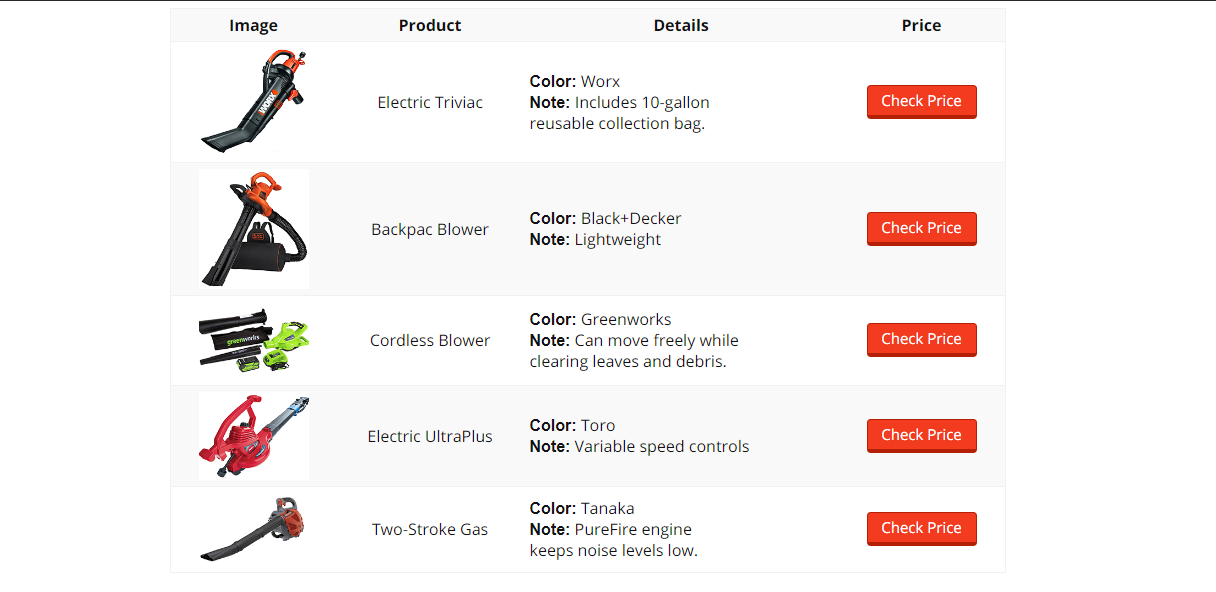
Table Demo 1 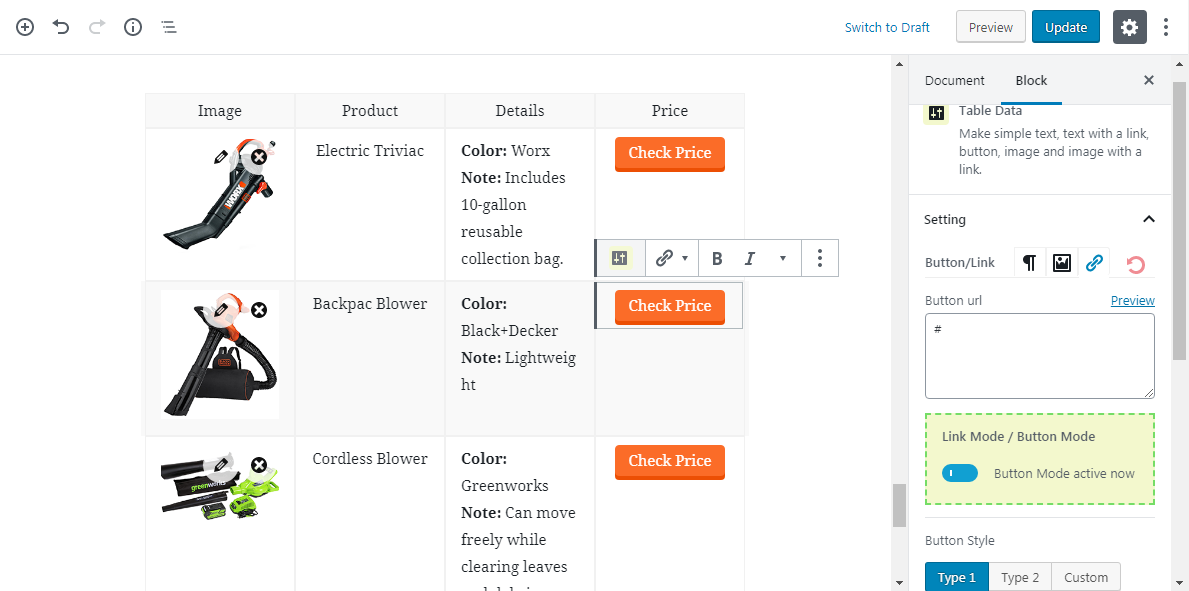
Table Demo Dashboard 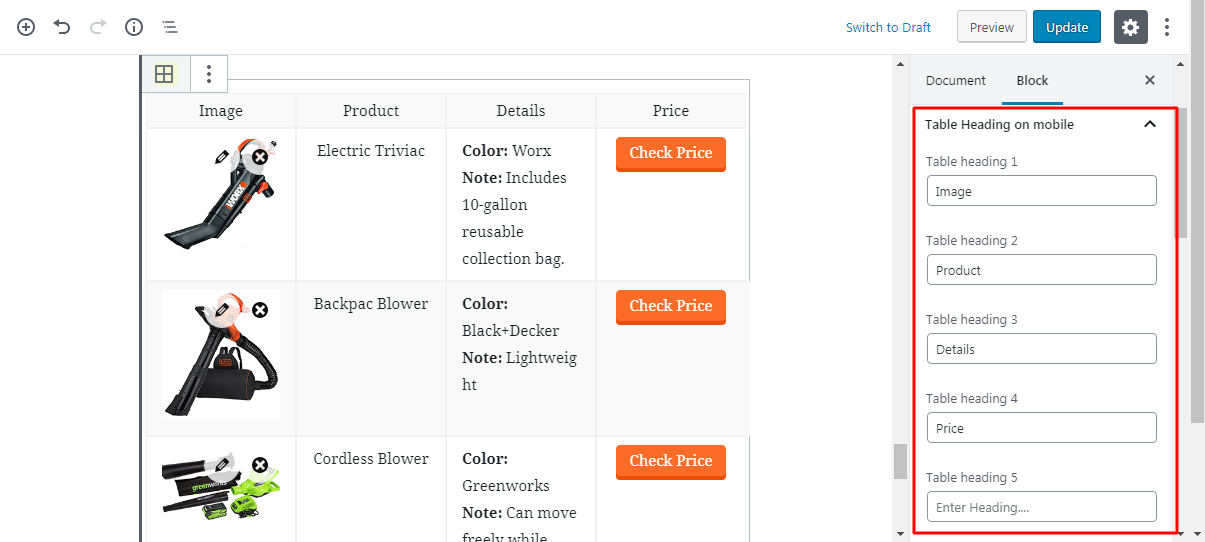
Mobile friendly header Setting
블록
이 플러그인은 5개의 블록을 제공합니다.
- Table Importer
- Niche Table
- Table Data
- Table Head Row
- Table row
설치
Automatic Installation
- Requires WordPress 5.0 or higher
- Go to WordPress admin Plugins Add New
- Search for “NicheTable”
- Click install, then activate
- Add the “NicheTable” block inside the editor
FAQ
-
Is NicheTable free?
-
Yes, it is completely free.
-
Does NicheTable slow down websites?
-
No. The plugin only loads inside the editor, not on the front-end.
후기


기여자 & 개발자
“NicheTable – Responsive Comparison Table Block”(은)는 오픈 소스 소프트웨어입니다. 다음의 사람들이 이 플러그인에 기여하였습니다.
기여자


변경이력
1.0.0
- Initial Release.
1.1.3
- Fixed extra space (Reload your editor using Ctrl + Shift + R).
- Fixed extra border (Reload your editor using Ctrl + Shift + R).
1.1.5
- Enhanced row edit options (Reload your editor using Ctrl + Shift + R).
1.2.0
- Import pre-built table demo with one click.
1.5.2
- Compatible with WP version 5.4.
- Highlight table row select area.
- Fixed deprecated warning in editor.
- Fixed editor default table data spacing.
- Note: Reload your editor using Ctrl + Shift + R to enjoy new changes.
1.5.3
- Fixed mobile scrolling (WP 5.4 version).
- Fixed “Cannot modify header information – headers already sent” warning in editor.
- Added table data Before/After spacing in editor.
1.5.5
- Improved circle in rating area.
- Mobile version progress. Improved both free and pro versions.
1.5.6
- Improved image alt attributes.
1.5.8
- Fixed background select visibility problem in Firefox.
1.6.0
- WordPress PHP 5.4 compatibility.
- Fixed admin menu redirect issue.
1.6.1
- Table header background color option.
1.6.2
- Enabled HTML code feature.
1.6.3
- New “Top Pick” style.
1.6.5
- Fixed Before/After link issue.
- Added a new Pro demo.
1.6.6
- Added row hide option.
- Added step-by-step video tutorials to show how to import a table and change the information.
1.6.7
- Added header hide option.
1.6.8
- Added border-around style in editor view.
- Fixed bottom border of each row in editor view.
- Improved table border display in editor view.
1.6.9
- Fixed button issue.
1.7.1
- Added new mobile style.
1.7.3
- Fixed CSS issue in new mobile style.
1.7.4
- Fixed list style issue.
1.7.5
- Fixed several issues for WP 5.5 version.
1.7.6
- Fixed column count visibility.
- WP 5.5 compatibility.
1.8.0
- Fixed automatic column count changes.
1.8.1
- Made plugin more lightweight.
- Improved table image top spacing.
1.8.2
- Fixed number of columns.
- Fixed mobile top spacing.
1.8.3
- Moved image to wpdab.com.
- Adjusted top and bottom spacing.
1.8.4
- Changed product image URLs.
- Fixed mobile table small issue.
1.8.5
- Fixed template inserter.
2.0.1
- Fixed block_categories issue.
2.0.3
- Added list bottom spacing.
2.2.1
- Fixed item load problem.
2.2.2
- Fixed table heading breaking issue on mobile.
2.5.0
- Fixed table heading breaking issue on mobile.
- Fixed text color and gradient color options not working.
2.6.0
- Fixed Astra theme editor extra padding.
- Fixed Astra theme hover border.
- Fixed box sizing.
2.6.1
- Fixed color options.
2.6.2
- Fixed before content options.
2.6.3
- Toolbar without label prop is deprecated since version 5.6. Now using ToolbarGroup.
2.6.4
- Fixed table margin bottom issue.
2.6.5
- Fixed before content icon alignment issue.
2.8.0
- Fixed color palette issue.
2.8.1
- Solved option conflicts with Rehub theme.
2.8.4
- Changed Append class of the Table Importer button.
2.9.1
- Improved plugin performance.