
설명
Seeb Abilities teaches your AI assistant 100 new things it can do on your WordPress site.
Ask Claude, ChatGPT or Cursor to “write a draft post about our summer sale”, “add a Contact page to the main menu”, “find images without alt text” or “approve all pending comments”, and it does it for you, in your own WordPress, with your own permissions.
Seeb Abilities works best with the official MCP Adapter plugin.
How it works
Seeb Abilities gives your site the capabilities to work on your site. It is not the connection to the AI assistant itself. For that, you need one more free plugin:
- Install Seeb Abilities (this plugin). It adds 100 actions an AI assistant can take, such as creating posts, editing blocks, updating menus or uploading images.
- Install the official MCP Adapter plugin. It connects your site to AI assistants like Claude, ChatGPT, Cursor and VS Code, and shows them everything Seeb Abilities can do.
- Connect your AI assistant to your site and ask it to do something.
That’s all. You don’t need any other MCP plugin or a paid service. If you still want to use a full-blown MCP plugin for WordPress anyway, here’s which MCP plugin to choose.
The missing half of the Abilities API
WordPress 6.9 added the Abilities API, a standard way to tell AI assistants what they’re allowed to do on a site. But WordPress itself only includes a few read-only abilities, so out of the box an AI assistant can look at your site but not change much. Seeb Abilities fills that gap with the everyday tasks you do in the admin.
Safe and in your control
- The AI assistant can only do what the connected user’s role allows. Connect it as an Author, and it can edit that author’s posts, but not anyone else’s and not your settings.
- Deleted content goes to the trash first, and edits are saved as revisions you can undo.
- It can’t run code, edit files, or install plugins.
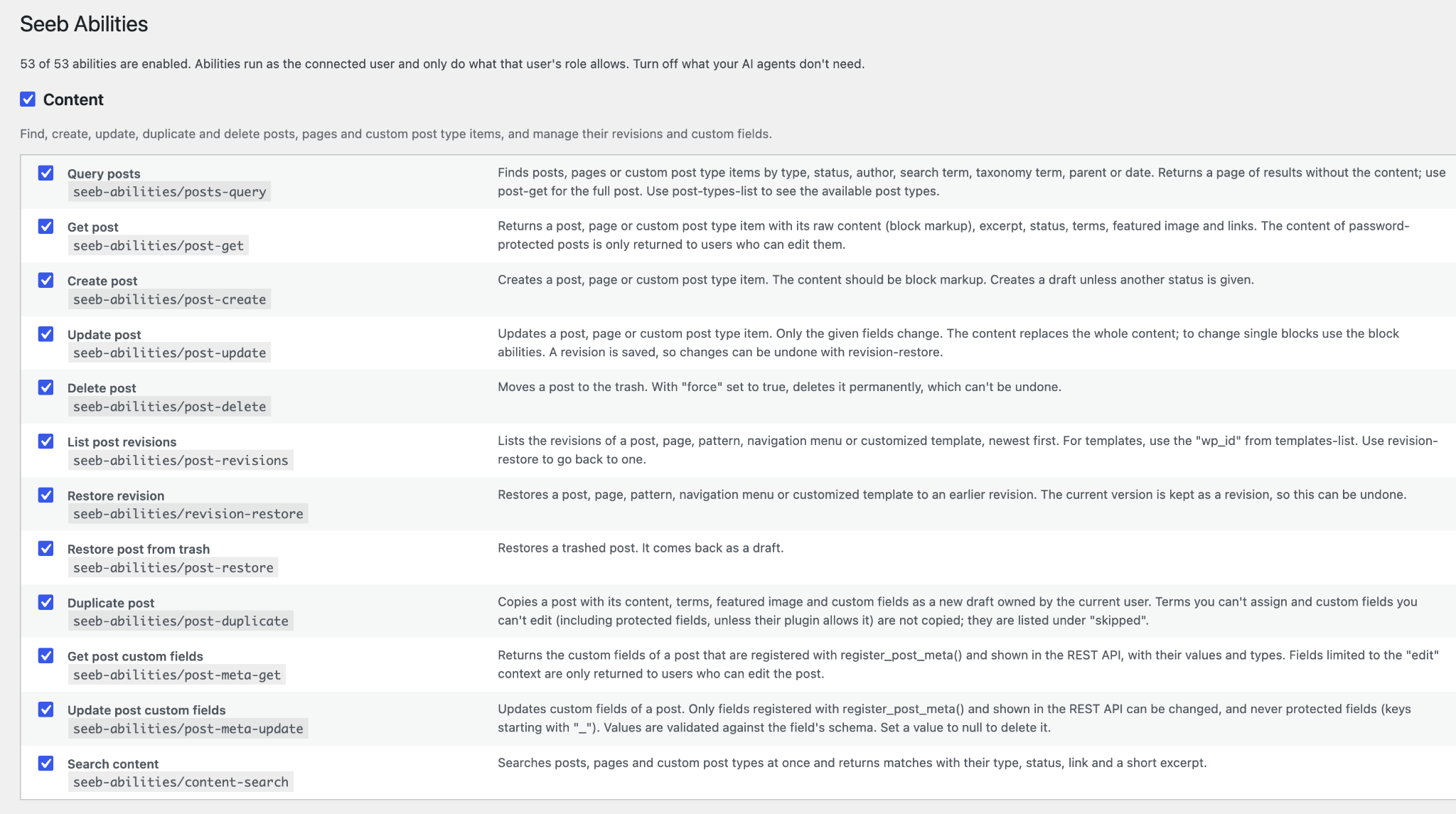
- You can turn off any ability, or a whole group, under Settings Seeb Abilities.
Technical details
Every ability:
- Uses WordPress’s own functions (
wp_insert_post(),wp_update_post(),wp_set_object_terms()and so on), so hooks, caches, revisions and other plugins behave exactly as they do in the admin. - Checks the current user’s capabilities for that specific object. An agent connected as an Author can edit their own posts, but not someone else’s and not the site settings.
- Declares input and output schemas, and annotations (read-only, destructive, idempotent) that clients use to decide when to ask before acting.
- Is available through the WordPress REST API (
/wp-json/wp-abilities/v1/) and, when the MCP Adapter plugin is active, as MCP tools.
100 new abilities
All abilities use the seeb-abilities/ namespace and are grouped into categories.
Content (posts, pages and public custom post types)
posts-query: find posts by type, status, author, search term, taxonomy term or datepost-get: get a post with its content, terms and featured imagepost-create: create a post, page or custom post type itempost-update: update title, content, excerpt, status, slug, author, date or featured imagepost-delete: move a post to the trash, or delete it permanently withforcepost-revisions: list the revisions of a post, pattern, navigation menu or customized templaterevision-restore: restore any of these to an earlier revisionpost-restore: restore a post from the trashpost-duplicate: copy a post, with its terms, featured image and the custom fields you’re allowed to edit, as a new draftpost-meta-get: read a post’s custom fields registered withregister_post_meta()post-meta-update: update a post’s registered custom fieldscontent-search: search across all public post types at onceposts-bulk-update: change the status, author, comments, stickiness or terms of up to 100 posts at oncecontent-replace: find and replace text across the site (for example an old phone number or domain), as a dry run firstrevision-diff: see what changed between two revisionspage-tree-get: get all pages as a nested tree of parents and childrenpost-lock-check: check whether someone else is editing a post right nowtrash-empty: permanently delete trashed items, optionally only those trashed a while ago
Taxonomies
terms-query: find categories, tags or custom taxonomy termsterm-create: create a termterm-update: rename a term or change its slug, description or parentpost-set-terms: set or append a post’s termsterm-delete: delete a termterms-merge: merge duplicate terms into one, moving their posts
Blocks and patterns (block editor)
block-types-list: list the registered blocks, with their category, title and descriptionblock-type-get: get one block’s attributes, supports, styles and variations, so an agent can write valid block markuppost-blocks-get: get a post’s content as a tree of blocks, each with its path (for example2.0for the first block inside the third)block-insert: insert one or more blocks at a path, or before or after a blockblock-update: change a block’s attributes or inner content without touching the rest of the postblock-move: move a block to another positionblock-duplicate: copy a block, with its inner blocks, right after itembed-check: check whether a YouTube, Vimeo, Spotify or other URL can be embedded, and get the embed block markupblock-remove: remove a block and its inner blocksblocks-replace: replace every block of one type, or with a given attribute value, across a post (for example turn allcore/quoteblocks intocore/pullquote)blocks-validate: check block markup before saving and report unknown blocks, invalid attributes and broken nestingblock-usage-find: find the posts, pages, templates and patterns that use a block typepatterns-list: list registered and synced patterns, with their categoriespattern-insert: insert a pattern into a post, either as a synced reference or as a copy of its blockspattern-create: save blocks as a new synced or unsynced patternpattern-update: update a synced pattern, which changes it everywhere it is usedpattern-delete: move a pattern to the trash, or delete it permanently
All block edits are saved as revisions, so any change can be undone with revision-restore. The first change to a theme template creates a customized copy, which template-reset removes again.
Site editor (block themes)
templates-list: list templates and template parts, and whether they are customizedtemplate-get: get a template or template part as blockstemplate-update: edit a template or template part with the same block abilities as poststemplate-reset: remove customizations and go back to the theme’s versionglobal-styles-get: read the site’s global styles: colors, typography and spacing presets, so new blocks match the themeglobal-styles-update: change the palette, fonts, link colors or block styles, with a revision to undo itcustom-css-get: read the Additional CSS (block and classic themes)custom-css-update: replace or add to the Additional CSS, with a revision to undo it
Navigation
menus-list: list menus and their locationsmenu-items-query: list the items of a menumenu-item-add: add a page, post, term or custom link to a menumenu-item-update: change a menu item’s label, URL, parent, position or link targetmenu-item-delete: remove a menu itemmenu-create: create a menumenu-delete: delete a menumenu-location-assign: show a menu in a theme location, such as the header or footer
Media
media-query: find media library itemsmedia-sideload: import an image or file from a URL into the media librarymedia-update: update alt text, caption, title or descriptionmedia-get: get a media item with its file size and image sizesmedia-delete: delete a media itemmedia-thumbnails-regenerate: generate the image sizes again, e.g. after switching themes
Comments
comments-query: find comments by post, status or authorcomment-moderate: approve, unapprove, mark as spam or trash a commentcomment-reply: reply to a comment as the current usercomment-create: add a new comment to a post as the current usercomment-update: edit a comment’s text or author detailscomments-bulk-moderate: approve, spam or trash up to 100 comments at oncecomments-empty: empty the spam folder or the comment trashcomment-blocklist-update: add or remove words, emails and IP addresses on the disallowed and moderation lists
Users
users-query: list users with their roles (read-only, requires thelist_userscapability, never returns passwords)current-user-get: get the connected user’s role and capabilities, so an agent knows what it is allowed to douser-get: get a user’s profileuser-create: create a user, who gets an email to set their own password (passwords are never returned)user-update: change a user’s name, email, bio or role (only roles you are allowed to assign, and never your own)user-password-reset-send: email a user a password reset linkuser-delete: delete a user and give their content to another user (refuses to delete content unless asked to)user-sessions-destroy: log a user out of all browsers and devicesroles-list: list roles with their number of users and capabilitiesprivacy-requests-list: list personal data export and erasure requestsprivacy-request-create: add a personal data export or erasure request
Site
settings-get: read general and reading settingssettings-update: change site title, tagline, timezone, date format and other allowlisted settingsplugins-list: list installed plugins and whether they are activepost-types-list: list registered post types and taxonomiessite-health-get: get the Site Health status and the tests that need attentioncron-events-list: list scheduled (cron) events and when they run nextthemes-list: list installed themes and which one is activeupdates-get: list available WordPress, plugin, theme and translation updates (nothing is installed)permalinks-flush: regenerate the permalinks to fix “page not found” errorscache-flush: clear the object cache and the page cache of WP Rocket, LiteSpeed Cache, W3 Total Cache, WP Super Cache, WP Fastest Cache or SiteGround Speed Optimizerdebug-log-get: read the last lines of the PHP error logsite-identity-update: set the site logo and site icon
Audit
content-analyze: word count, reading time, heading outline and problems, links and images without alt text of a postinternal-links-check: find links to drafts, trashed posts, missing uploads and pages that return “not found”images-missing-alt-find: find media library images without alt textcontent-counts-get: overview of posts, comments, media and users by status, type and rolestale-content-find: find published content that hasn’t been updated for a long timeunused-terms-find: find categories and tags that aren’t assigned to any post
Safe by default
- Deleting moves to the trash. Permanent deletion needs
force: trueand is marked as destructive. - Settings can only be read and changed from a fixed allowlist. Arbitrary options are never touched.
- Protected post meta (keys starting with
_) cannot be written. - Password-protected content is only returned to users who can edit it.
- No ability runs PHP or SQL, edits files, or installs, updates or activates plugins.
- Users are created with a random password that is never returned; they set their own via email. Roles can only be given if the connected user may assign them, and nobody can change their own role.
- Find and replace runs as a dry run unless told otherwise, saves a revision of each changed post, and skips posts whose block structure would break.
- Query results are paginated with a maximum page size.
- Site owners can turn off any ability, or a whole category, under Settings Seeb Abilities.
스크린샷
설치
- Install and activate the plugin from Plugins Add New, or upload the
seeb-abilitiesfolder to/wp-content/plugins/. - Install and activate the free MCP Adapter plugin. It connects your site to AI assistants like Claude, ChatGPT, Cursor or VS Code. You don’t need any other MCP plugin.
- Connect your AI assistant to your site by following the MCP Adapter’s setup instructions.
- Optional: go to Settings Seeb Abilities to turn off abilities you don’t want to expose.
Abilities run as the user who is authenticated, for example with an application password. Use an account that only has the role the agent actually needs.
FAQ
-
Do I need the MCP Adapter plugin?
-
Yes, to use Seeb Abilities with an AI assistant like Claude, ChatGPT or Cursor. Seeb Abilities adds the abilities, and the free MCP Adapter plugin connects them to your AI assistant.
Developers can also use the abilities without it, through the Abilities API’s REST endpoints or from PHP.
-
Do I need any other MCP plugin?
-
No. Seeb Abilities and the official MCP Adapter are all you need. You don’t need a separate MCP plugin or a paid connector service.
-
Is Seeb Abilities an AI assistant?
-
No. It doesn’t include or pay for any AI. You bring your own assistant (for example Claude, ChatGPT or Cursor), and Seeb Abilities gives it the tools to work on your site.
-
Can an AI agent break my site with this?
-
An agent can do only what the connected user’s role allows, and only through the listed abilities. It cannot run code, change arbitrary options or manage plugins. Deleting content moves it to the trash by default. For extra safety, connect with an Editor or Author account and turn off the categories you don’t need.
-
Does the plugin send data to any external service?
-
The plugin makes no external requests of its own, with these exceptions:
media-sideloaddownloads the file from the URL given in the request,embed-checkasks the provider of the URL (for example YouTube) for its embed details, as the block editor does,updates-getwithrefreshchecks WordPress.org for updates as the Updates screen does, andinternal-links-checkrequests pages of your own site to find the ones that return “not found”.user-create,user-password-reset-sendandprivacy-request-createsend emails through your site, as the admin screens do.When the plugin is activated, it asks whether you want to opt in to email notifications about security and feature updates, educational content and occasional offers, through Freemius. Only if you click “Allow & Continue”, your name, email address, site URL, WordPress and PHP versions and the list of plugins and themes are sent to Freemius. If you click “Skip”, nothing is sent and the plugin works the same. When you deactivate the plugin, you can optionally tell us why; that answer is only sent if you submit it. See the Freemius privacy policy and terms of service.
-
Does it work with custom post types and taxonomies?
-
Yes, if they are registered with
show_in_restset to true. Custom post types are subject to their own capabilities. -
Why does it require WordPress 6.9?
-
The Abilities API was added to core in WordPress 6.9 (see the Abilities API announcement). On older versions the plugin does nothing.

기여자 & 개발자
“Seeb Abilities – 100 New Abilities, Infinite Possibilities for AI Agents”(은)는 오픈 소스 소프트웨어입니다. 다음의 사람들이 이 플러그인에 기여하였습니다.
기여자
변경이력
1.1.0
- New: 47 new abilities, for 100 in total.
- New: Audit category, to find broken internal links, images without alt text, heading problems, outdated content and unused terms, and to get content counts.
- New: Bulk edit posts, find and replace text across the site, compare revisions, see the page tree, check post locks and empty the trash.
- New: Create, update, delete and log out users, send password reset emails, list roles and handle personal data requests.
- New: Create and delete menus, assign menu locations, and update and remove menu items.
- New: Change global styles and Additional CSS, with revisions to undo the changes.
- New: Write, edit, bulk moderate and empty comments, and update the comment blocklist.
- New: Merge and delete terms, duplicate blocks, delete patterns and check embed URLs.
- New: Get, delete and regenerate media; set the site logo and icon; list available updates; flush permalinks; clear caches; read the debug log.
- New: Header with links on the settings page.
- New: Optional opt-in for update notifications through Freemius. Nothing is sent unless you opt in.
1.0.0
- Initial release with 53 abilities.