

설명
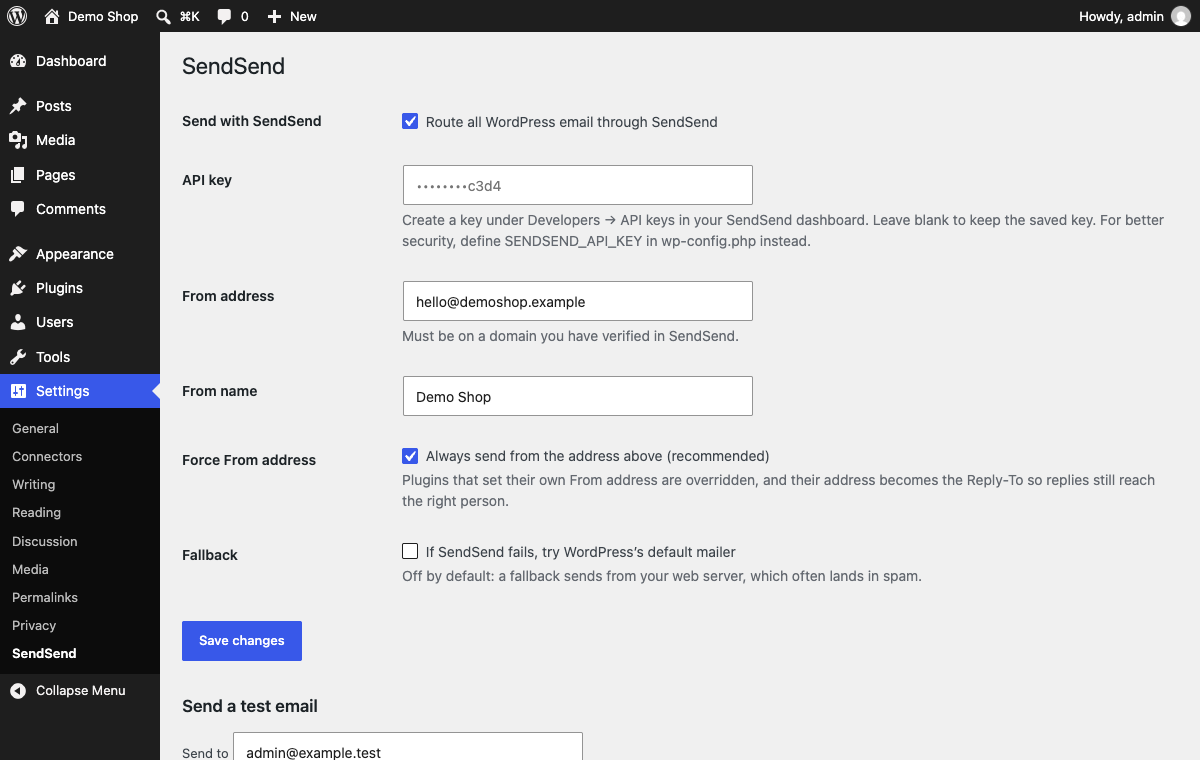
By default WordPress sends email from your web server. Those messages carry no signature of your own, so they often land in spam or never arrive. SendSend Mailer sends them through the SendSend email API instead, from your own verified domain.
Anything that calls wp_mail() is covered: WordPress itself, WooCommerce, Contact Form 7, Gravity Forms, WPForms and most other plugins.
- Works with any plugin that uses
wp_mail() - From address and name set once, with the option to force them
- Reply-To is kept when a form plugin sets the visitor as the sender
- Safe retries: a retried send can never deliver twice
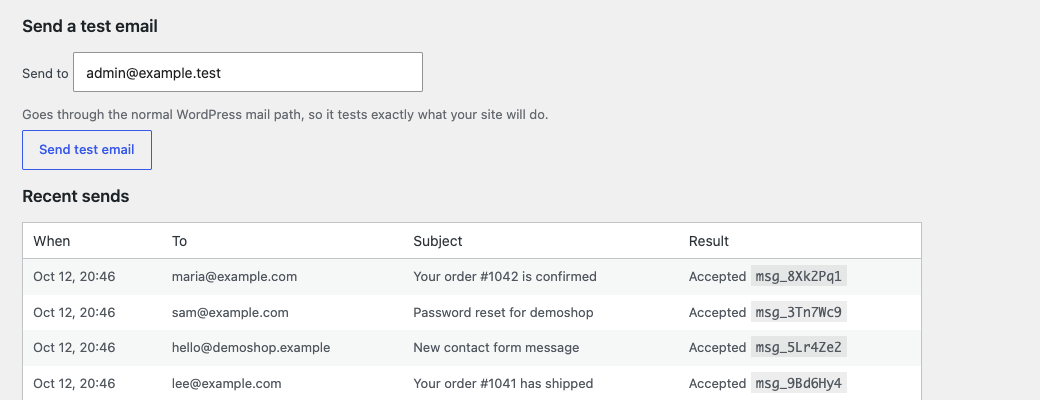
- Test email button and a log of recent sends
- API key can live in
wp-config.phpinstead of the database - Attachments: up to 10 files and 10 MB in total. Executables and scripts (.exe, .js and similar) are refused by SendSend.
You need a free SendSend account at sendsend.email, a verified sending domain, and an API key. SendSend also has a free tool to check your SPF, DKIM and DMARC records: sendsend.email/tools/domain-check.
External services
This plugin sends your site’s email through the SendSend API, a third-party service. It is the purpose of the plugin and it does nothing until you add an API key.
When WordPress sends an email, the plugin sends this to https://api.sendsend.email/v1/emails: the recipients, sender, subject, message body (text and HTML), reply-to address and any attachments, plus a tag saying the message came from WordPress, and your API key for authentication. The request is sent each time your site sends an email.
The service is provided by SendSend. Terms of service and privacy policy.
Developer hooks
sendsend_mailer_payload(filter): change the request body before it is sent. Receives the body and the originalwp_mail()arguments.
스크린샷
설치
- Upload the
sendsend-mailerfolder to/wp-content/plugins/, or install it from Plugins Add New. - Activate it.
- Go to Settings SendSend, paste your API key, and enter a From address on a domain you have verified in SendSend.
- Press “Send test email”.
Optional, in wp-config.php:
define( 'SENDSEND_API_KEY', 'ss_live_...' );
The API address is built in and not shown in settings. Developers can override it (https only) with define( 'SENDSEND_API_BASE', 'https://...' );.
FAQ
-
Do I need a SendSend account?
-
Yes. Create one at sendsend.email, verify the domain you send from, and create an API key. The plugin has no mail server of its own.
-
What does a test key do?
-
A key that starts with
ss_test_accepts messages but never delivers them, which is useful for trying the plugin. Use ass_live_key to send real email. -
Which plugins does this work with?
-
Any plugin that sends through
wp_mail(), which is nearly all of them, including WooCommerce and the common form plugins. -
What happens if SendSend is unreachable?
-
By default the message is reported as failed, so you see the problem in the log. You can turn on a fallback to WordPress’s default mailer, but that sends from your web server and may land in spam.
-
Where do I see whether an email was delivered?
-
The plugin log shows whether SendSend accepted the message. Delivery, bounces and complaints appear in your SendSend dashboard.
-
Does it store my API key safely?
-
The key is saved in your site’s database like other plugin settings and is never shown again in the settings page. For better security, define
SENDSEND_API_KEYinwp-config.php.
후기
이 플러그인에 대한 평가가 없습니다.
기여자 & 개발자

변경이력
1.0.0
- First release.