

설명
아름답고 매력적인 온라인 코스, 강의 및 퀴즈를 만드세요.
센세이 LMS는 워드프레스닷컴, 우커머스, 젯팩의 개발사인 Automattic의 강력한 학습 관리 플러그인입니다. Automattic에서는 모든 직원 교육 과정에 센세이 LMS를 사용합니다.
센세이 LMS로 지식을 공유하고 자유롭게 가르치세요!
강력한 LMS 기능
- 센세이 LMS를 워드프레스 사이트에 원활하게 통합하세요. 센세이 LMS는 어떤 테마와도 잘 어울리며 브랜딩과 스타일에 맞게 사용자 지정할 수 있습니다.
- 센세이의 무료 코스 테마가 완벽하게 활용되는 WordPress 블록 편집기로 매력적인 코스를 만드세요.
- 학습 모드를 활성화하면 방해받지 않고 몰입도 높은 학습 환경을 경험할 수 있습니다.
- 자세한 보고서로 학생의 진도와 성과를 추적하세요.
- 예. 비디오 기반 코스를 위해 YouTube, Vimeo 및 VideoPress의 비디오를 임베드할 수 있습니다.
- 페이지 또는 글에 코스 목록 블록을 추가하여 사용 가능한 코스를 표시합니다.
효과적인 퀴즈 만들기
퀴즈는 학생의 주요 개념에 대한 이해를 높이고 진도를 추적할 수 있는 강력한 방법입니다. 객관식, 빈칸 채우기, 참/거짓, 자유 응답, 파일 업로드 등 다양한 퀴즈 문제 유형 및 설정 중에서 선택하세요.
코스 소개
https://senseilms.com/showcase/에서 센세이 LMS의 공개 코스 쇼케이스에 코스를 제출하세요. 센세이 LMS의 코스 쇼케이스를 통해 새로운 대상에게 도달하여 코스의 가시성을 확장할 수 있습니다.
센세이 프로의 강력한 기능 알아보기
센세이 프로로 강의의 잠재력을 최대한 활용하세요.
WooCommerce 통합: 몇 번의 클릭만으로 손쉽게 가격을 설정하고 강좌를 판매할 수 있습니다. 센세이 프로는 우커머스 구독, 결제, 멤버십, 제휴사 확장 기능과 원활하게 통합됩니다.
예약된 콘텐츠 드립: 학생이 코스 시작 후 또는 특정 날짜에 정해진 간격으로 강의 콘텐츠에 접근할 수 있는 시기를 지정하여 코스에서 강의의 속도를 제어할 수 있습니다.
몰입형 대화형 블록: 매력적인 비디오, 플래시카드, 이미지 핫스팟 및 작업 목록으로 수업, 페이지 또는 게시글을 풍부하게 만드세요.
향상된 퀴즈 기능: 퀴즈 타이머를 설정하고 주문형 퀴즈 문제 유형을 통합하세요. 센세이 LMS 프로를 사용하면 퀴즈뿐만 아니라 모든 워드프레스 콘텐츠에 개별 퀴즈 문제를 포함할 수 있습니다.
쉬운 그룹 및 코호트: 학생을 그룹 및 코호트로 구성하여 접근 권한을 관리하고 학습 환경을 맞춤화할 수 있습니다.
코스 접근 기간: 시작 날짜, 종료 날짜 또는 학생이 코스에 접근할 수 있는 기간을 정의합니다.
조건부 콘텐츠: 그룹, 등록 상태 및 날짜에 따라 강의 및 콘텐츠를 숨기거나 표시하여 학습 여정을 개인화할 수 있습니다.
전담 우선 지원: 전문적이고 친절한 엔지니어 팀이 항상 도움을 드리고 성공을 보장해 드립니다!
플래시카드: 플래시카드 블록 유형의 양면에 텍스트, 동영상, 이미지, 임베드 등을 추가할 수 있습니다.
공동 교사: 코스 설정, 수업 및 퀴즈를 수정할 수 있는 공동 교사와 코스 소유권을 공유할 수 있습니다.
무료 확장 프로그램
인증서: 학생이 코스를 완료하면 다운로드 가능한 멋진 PDF 인증서를 자동으로 생성합니다.
코스 생성자에게 게시하기: 몇 번의 클릭만으로 기존 블로그 게시물을 코스 강의로 변환하여 빠르게 코스를 생성할 수 있습니다.
스크린샷
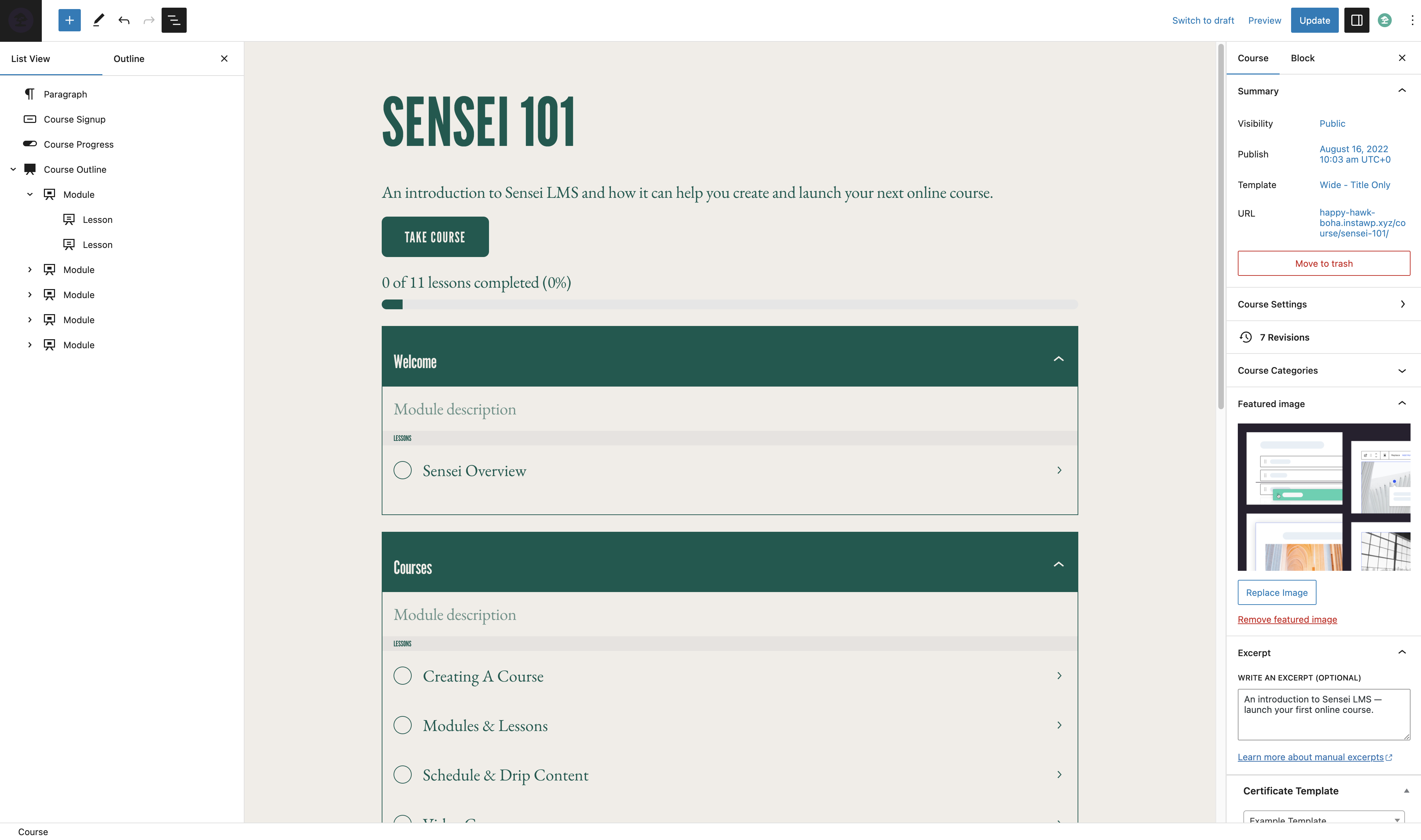
코스 편집기 
레슨 편집기 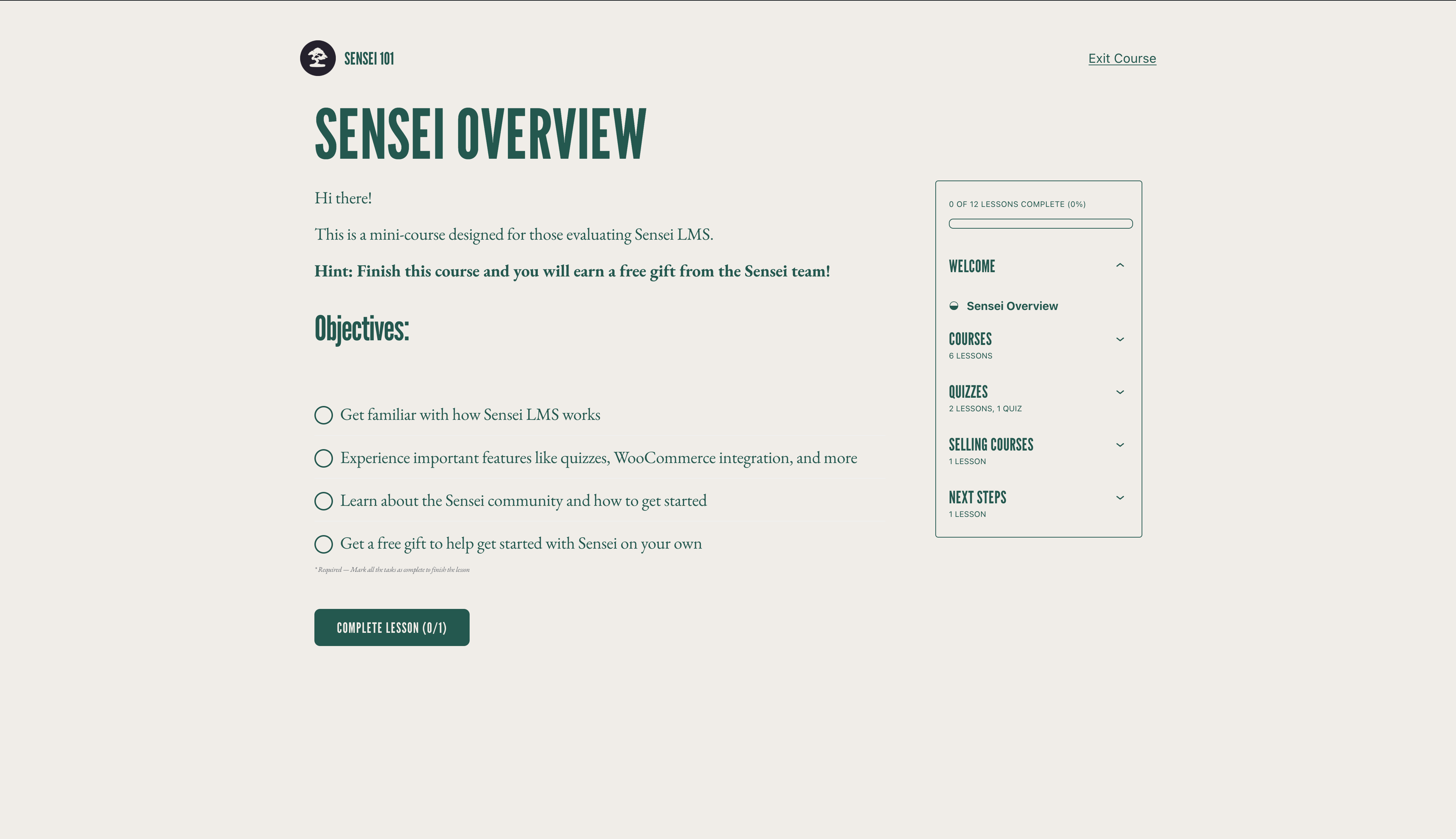
학습 모드 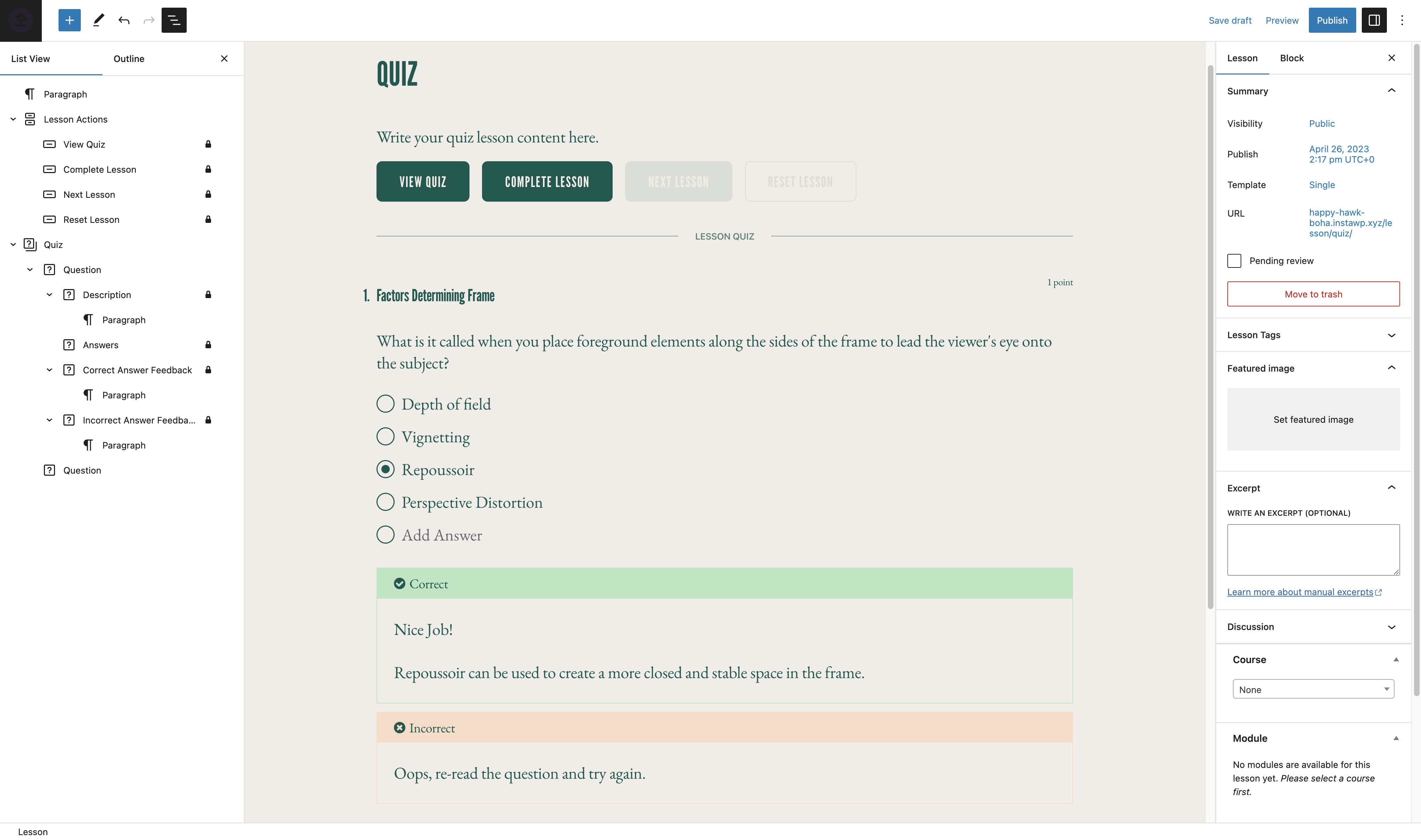
퀴즈 편집기
블록
이 플러그인은 14개의 블록을 제공합니다.
- Student Courses Manage what students see on their dashboard. This block is only displayed to logged in students.
- Course Results Show course results to students on the course completion page.
- Course Outline Manage your Sensei LMS course outline.
- Featured Video Add a featured video to your lesson to highlight the video and make use of our video templates.
- Course Actions Enable a student to perform specific actions for a course.
- Conditional Content Content inside this block will be shown to the selected subgroup of users.
- Lesson Properties Add lesson properties such as length and difficulty.
- Lesson Actions Enable a student to perform specific actions for a lesson.
- Course Title
- Course Theme Lesson Module
- Exit Course
- Module Group related lessons together.
- Lesson Where your course content lives.
- Category Question Pull questions from a question category.
설치
자동 설치
- 워드프레스 관리자 패널에 로그인하고 플러그인 > 새로 추가로 이동합니다.
- 검색 필드에 “센세이 LMS”를 입력합니다.
- 플러그인을 찾았으면 지금 설치하기를 클릭합니다.
- 활성화를 클릭합니다.
- 센세이 LMS > 설정으로 이동하여 설정을 구성합니다.
수동 설치
- 플러그인 파일을 컴퓨터에 다운로드하고 압축을 풉니다.
- FTP 프로그램 또는 호스팅 제어판을 사용하여 압축을 푼 플러그인 폴더를 서버의 워드프레스 설치
wp-content/plugins/디렉터리에 업로드합니다. - 워드프레스 관리자 패널에 로그인하고 플러그인 메뉴에서 플러그인을 활성화합니다.
- 센세이 LMS > 설정으로 이동하여 설정을 구성합니다.
FAQ
-
센세이 LMS에 대한 지원은 어디에서 받을 수 있나요?
-
무료 플러그인의 경우 궁금한 점이 있으면 지원 포럼을 이용해 주세요. 저희는 포럼을 정기적으로 모니터링하며 가능한 한 빨리 답변해드리겠습니다.
또한 웹사이트의 문서에서 가이드, 튜토리얼 및 기타 유용한 정보를 확인할 수 있습니다.
-
버그를 신고하거나 플러그인 개선에 기여하려면 어디에서 지원받을 수 있나요?
-
센세이는 Github에서 공개적으로 개발되고 있습니다. 누구나 버그를 보고하고, 풀 리퀘스트를 제출하고, 진행 상황을 따라갈 수 있습니다.
-
센세이는 멤버십 플러그인과 함께 작동하나요?
-
센세이 LMS를 센세이 Pro 및 우커머스 멤버십과 함께 사용하면 멤버십 플랜의 일부로 강좌를 판매할 수 있습니다. 자세한 내용은 멤버십으로 강좌 판매하기를 참조하세요.
-
센세이 LMS의 새 릴리즈 및 공지 사항을 최신 상태로 유지하려면 어떻게 해야 하나요?
-
센세이 LMS 쇼케이스에 내 강좌를 포함하려면 어떻게 해야 하나요?
-
센세이 LMS 쇼케이스에 코스를 제출하는 방법 및 요구 사항을 알아보려면 코스 쇼케이스에 대한 설명서를 참조하세요.
-
센세이는 라이브 코스, Zoom 통합 또는 웨비나를 지원하나요?
-
예! 코스 레슨에서 Zoom, Google Meet 또는 원하는 플랫폼에 대한 링크를 추가할 수 있습니다. 또한, 새 레슨을 만들 때 선택할 수 있는 모임 레슨 레이아웃이 포함되어 있어 이 작업을 더욱 쉽게 할 수 있습니다.
-
센세이는 워드프레스 멀티사이트에서 작동하나요?
-
센세이 LMS는 워드프레스 멀티사이트에서 잘 작동합니다. 센세이 프로 라이선스는 하나의 사이트에만 적용되지만, 센세이 에이전시 요금제는 최대 20개의 사이트에서 센세이 프로를 활성화할 수 있습니다. 20개 이상의 사이트가 있는 멀티사이트에서 센세이 프로를 사용 중이거나 사용할 계획이라면 문의 주세요로 연락하여 맞춤 가격을 문의하세요.
-
멤버십의 일부로 코스를 판매하려면 어떻게 해야 하나요?
-
센세이 LMS는 센세이 프로 및 우커머스 멤버십과 호환되므로 멤버십 플랜의 일부로 강좌를 판매할 수 있습니다.
자세한 내용은 멤버십으로 코스 판매하기를 참조하세요.
-
센세이는 내 언어로 작동하나요?
-
커뮤니티 회원들이 무료 센세이 LMS 플러그인을 18개 언어로 번역했으며, 센세이 프로는 16개 언어로 전문적으로 번역되었습니다. 더 많은 개선을 위한 여러분의 기여를 환영합니다.
후기


기여자 & 개발자
“센세이 LMS – 온라인 코스, 퀴즈 및 학습”(은)는 오픈 소스 소프트웨어입니다. 다음의 사람들이 이 플러그인에 기여하였습니다.
기여자


변경이력
4.25.2 – 2025-12-16
Security
- Fix XSS vulnerability in the Contact Teacher block
Removed
- Remove “new” badge from Appearance settings tab #7874
Fixed
- Allow multiple choice quiz questions with no wrong answers #7872
- Fix Course List pattern not working with newest Gutenberg #7876
- Fix error when activating MailPoet #7864
- Fix lesson comments being visible to unregistered users in some cases #7848
- Fix reports screen times out on larger sites #7859
- Fix the course structure API exposing the lesson AI generated bootstrap text #7869
- Prevent duplicate queries from happening on every block render #7860
Development
- Add CLI command for recalculating course enrolment #7877
4.25.1 – 2025-09-18
Security
- 강의 코스 관계를 업데이트할 때 권한 확인 추가하기
- 코스 구조에서 강의를 업데이트할 때 권한 확인 추가하기
Added
- 코스 개요 블록의 텍스트 색상 변경 지원 추가 #7826
Changed
Fixed
- “인자 없이 get_class() 호출은 더 이상 사용되지 않습니다” PHP 공지사항 수정 #7815
- 메시지에 대한 잘못된 속성 알림 #7814
- 코스 목록 블록의 패턴 선택기에 표시되는 코스 목록이 아닌 패턴 #7797
- 빈 배열에서 array_rand를 호출할 때 PHP 치명적 #7828
- 여러 줄 퀴즈 정답을 위한 쪼개진 라디오 버튼/체크박스 #7820
- 접근성 향상을 위해 커서를 가리키면 버튼 커서가 업데이트됩니다. #7843
4.25.0 – 2025-04-15
Added
- 블록 편집기에서 코스 아카이브 페이지 제목 편집 허용 #7786
- 양식 렌더링 시 제목 입력에 자동으로 포커스 #7802
- 이메일의 비활성화 상태를 나타내는 명확한 텍스트 표시기 #7752
Changed
- 활성화 로직을 업데이트하여 첫 설치 시 항상 설정 마법사를 활성화합니다 #7800
- WordPress.com 호스팅 사이트를 올바르게 처리하기 위해 Sensei Pro 업그레이드 URL을 업데이트 #7790
Deprecated
- 학생 코스 블록을 코스 목록 블록으로 대체 #7764
Fixed
- 설정 마법사 알림의 버튼 정렬 #7779
- 강의 개요: 레슨/모듈을 내부 블록에 추가할 때 발생하는 포커스 문제 수정 #7783
- 코스 패턴 레이아웃: Safari 렌더링 문제 수정 #7789
- WordPress.com에서 코스 순서 수정 #7799
- 일부 번역이 너무 일찍 로드되는 문제 수정 #7780
- 플러그인 구성 링크가 잘못된 설정 URL을 가리키는 문제 수정 #7781
- 필수 퀴즈 점수 텍스트 수정 #7793
- WP 6.8에서 정의되지 않은 속성 알림 수정 #7773
- 퀴즈 제출 시 발생하는 간헐적인 오류 #7755
- 패턴 미리보기: 테마 색상 변수를 사용하고 iframe 크기 조정 문제를 수정하여 패턴 미리보기에서 일관된 배경 색상을 보장합니다 #7796
- 학생 화면에서 메모리에 등록 데이터를 저장하지 않도록 방지 #7772
- 관리자 패널에서 학생 드롭다운 메뉴가 오프셋됨 #7695
- 워크플로: PR 마일스톤 유효성 검사 업데이트 지원 작업 재실행 #7787
- 뉴스레터 마법사 양식: 서버 오류 처리 #7801
Development
- NodeJS 및 NPM 버전 업데이트