

설명
🚀 The Ultimate Image Optimization Plugin for WordPress
⚡ Speed up your website with automatic image compression, WebP and AVIF conversion, and bulk optimization. Optimize images and PDFs, resize large uploads, and reduce file sizes with minimal setup.
Smaller images help your pages load faster, giving visitors a smoother experience, supporting your website’s SEO, and helping turn more visits into conversions.
🆕 New! AI image renaming and assistant support
- AI-generated, SEO-friendly filenames – Say goodbye to generic filenames like “IMG00931.JPG”. Automatically generate descriptive, SEO-friendly filenames for new uploads or existing images not yet used in published content.
- Manual file renaming – Rename images directly from the Media Library, including their thumbnails, WebP/AVIF versions, and backups.
- Multisite network settings – Manage ShortPixel settings across your network from one place.
- WPML and WP Offload Media compatibility – File renaming supports WPML Media Translation and WP Offload Media, including images stored only in the cloud.
- AI assistants and MCP support – Connected AI assistants can optimize and restore images, run bulk jobs, generate or undo AI Image SEO data, check statistics and credits, and adjust settings through the WordPress Abilities API and WordPress MCP Adapter. Actions follow your WordPress user’s permissions. Read more.
The ShortPixel plugin is a lightweight, user-friendly, install-and-forget solution for image optimization.
It is designed to work with any website type, whether it’s a small blog or a large WooCommerce-powered online store with tens of thousands of products.
🎬 Ready for a Quick DEMO of our Top Image Optimization Tool?
Test our plugin here.
Run an instant image compression test on your site, or try out our image compressor and compress some images to test our optimization algorithms.
💡 왜 ShortPixel이 이미지 최적화나 PDF 압축에 가장 적합한 선택인가요?
🤖 AI image features
- AI 이미지 업스케일 (2배, 3배, 4배) – 고품질 AI 업스케일링으로 작은 이미지를 확대하여 레티나 디스플레이와 선명한 시각 효과에 완벽합니다.
- AI Background Removal – Instantly remove background from your images with one click, ideal for creating clean product photos. After the background is removed, your image can have a transparent background or be filled with a single solid color.
- AI Image Titles – In addition to ALT text, captions, and descriptions, generate smart image titles using AI for better SEO.
- AI 데이터 일괄 삭제 – AI 생성 이미지 SEO 데이터를 한 번에 간편하게 모두 삭제할 수 있습니다.
- Prefix/suffix for AI SEO data – Add custom text before or after AI-generated image SEO data to keep it consistent across your site
🔎 AI Image SEO features
- AI-powered image SEO – Automatically generate ALT text, captions, and image descriptions for all your images.
- SEO-friendly filenames – Let AI generate descriptive filenames for new uploads or images not yet used in published content, without breaking existing links.
- Bulk mode – Mass-generate and update details for all your images.
- Preview mode – Test and fine-tune AI results before applying new ALT texts and descriptions in bulk.
- Multilingual – Support for 100+ languages.
- WooCommerce – Seamless support for WooCommerce product images.
- Unlimited credits – AI-generate image titles, captions, and more with our Unlimited AI plan.
- Accessibility – Improve website accessibility by generating all the necessary metadata for each image.
🌍 Faster Websites for Global Audiences
Improve your website’s loading speed with ShortPixel’s built-in global Content Delivery Network (CDN). Deliver optimized WebP and AVIF images, along with CSS, JavaScript, and font files, from locations closer to your visitors. The result? Faster loading times, better website performance, and less strain on your server.
📸 품질 손실 없이 이미지 크기 조정 및 압축
Automatically resize large images and compress image files, saving you the work of editing each upload manually.
- Popular plugin with over 300,000 active installations – according to WordPress
- Compress JPG (and its variations: JPEG, JPEG 2000, JPEG XR), PNG, GIF (still or animated) images, and also PDF documents.
- 더 작은 이미지 파일을 만들 수 있다면 PNG를 JPG로 자동 변환하는 옵션(대형 PNG 사진에 이상적).
- CMYK to RGB conversion.
- 더 작은 이미지 파일을 제공할 수 있을 때는 프로그레시브 JPEG를 사용합니다.
🌟 유손 및 무손실 이미지 압축
Both Lossy and Lossless image compression are available for the most common image types (JPG, PNG, GIF, WebP, and AVIF) plus PDF files.
We also offer Glossy JPEG compression, a high-quality lossy optimization algorithm designed especially for photographers and websites featuring high-quality product pictures.
Optimized images improve website performance and user experience, help achieve better PageSpeed Insights and GTmetrix scores, and may even increase conversions. Choose Lossless for pixel-perfect image quality, Glossy for an excellent balance between quality and compression, or Lossy for maximum file size reductions.
🔄 Convert Images to WebP and AVIF
ShortPixel includes both a WebP converter and an AVIF converter, with options for generating and delivering the converted files.
- 더 나은 성능과 향상된 구글 순위를 위해 JPEG, PNG 또는 GIF를 자동으로 WebP 및 AVIF로 변환하는 옵션.
- Automatically optimize your existing WebP files with ShortPixel’s SmartCompress algorithm.
- 애니메이션 GIF가 훨씬 작은 애니메이션 WebP 또는 AVIF 파일로 자동 변환될 수 있습니다.
- 태그를 사용하여 한 번의 클릭으로 프론트엔드 페이지에 최신 이미지(WebP 및 AVIF)를 포함할 수 있는 옵션.
📦 일괄 이미지 최적화 및 백그라운드 이미지 처리
Use the bulk image optimizer for bulk image compression and bulk image optimization. You can bulk compress images in a single workflow.
- With ‘Background mode,’ images can be optimized without needing to keep a browser tab open.
- 프론트엔드를 통해 사용자가 이미지를 업로드하는 사이트에 이상적인 백그라운드 최적화를 위한 반복 크론 작업을 쉽게 추가할 수 있습니다.
- Bulk-optimize all images in the Media Library or any gallery with a single click. Use this media optimizer to optimize Media Library images without processing each file manually.
- 날짜 기반 기준으로 대량 이미지 필터링 및 선택을 통해 최적화 대상과 시점을 정밀하게 제어하세요.
- 백그라운드 처리용 WP-CLI 전면 지원, 특히 대형 미디어 라이브러리에 유용합니다.
🔥 성능 및 자동 이미지 최적화
ShortPixel uses minimal resources and works well with any shared, cloud, VPS, or dedicated web hosting. It can optimize any image on your website, including those not listed in the Media Library, such as images in galleries or those added directly via FTP.
All optimization is performed using ShortPixel’s Image Optimization Cloud, so your hosting resources remain unaffected. Automatic image optimization lets you optimize images on upload.
- Automatic scan of Custom media folders for new images using cron jobs.
- Skip already optimized images to avoid redundant processing.
🎨 인기 테마, 페이지 빌더 및 미디어 라이브러리 플러그인과의 호환성
- Works great for eCommerce websites using WooCommerce and other plugins. WooCommerce image optimization helps reduce the file sizes of your product photos.
- Compatible with NextGEN Gallery, Modula, Foo Gallery, and other galleries or sliders.
- Fully compatible with WP Retina 2x, including automatic compression of retina images.
- Works seamlessly with WordPress multisite installs (sub-folders or sub-domains) using a single API key, with settings that can be managed at network level.
- Fully compatible with WPML and WPML Media Translation, including file renaming.
- Fully compatible with WP Offload Media plugin, including file renaming.
- Supports both HTTPS and HTTP websites.
- Compatible with virtually all hosting providers.
- Integrates with Gravity Forms’ post_image field type to optimize images upon upload.
- Works with watermarking plugins.
- Integrates directly with Cloudflare via a Cloudflare Token, automatically synchronizing updates with Cloudflare cache.
- HEIC file support
With ShortPixel, you can add images in Apple’s HEIC format directly from your iPhone. They will be automatically converted to JPG and optimized according to your settings. Easy!
Read more.
🔧 고급 이미지 최적화 기능
- Smart Cropping: Generate subject-centered thumbnails using AI, ideal for eCommerce websites.
- Optimize thumbnails and featured images, with options to exclude individual thumbnails from optimization.
- Advanced exclusion options (exclude images based on filename, path, size, or complex regex).
- Exclude images from optimization based on their file size, perfect for skipping very small images or large images that photographers need to keep in their original, full format.
- Ability to optimize any image, including those in NextGEN Gallery and other image galleries or sliders.
- Option to scale images down, with two automatic resizing options for large images (applicable to featured images). Optimize image dimensions before serving large uploads.
- Option to deactivate auto-optimization of images on upload.
- Keep or remove EXIF data from images, which is especially useful for photographers or for enhanced privacy. Combine photo optimization with the metadata settings that suit your photography workflow.
- Easily test lossy, glossy, or lossless versions of images with a single click in the Media Library.
- 100MB file size limit
🛡️ 백업 및 보안
- Safe to test and use: original images are backed up locally and can be restored with a single click (either individually or in bulk).
- Smart Backups: Save disk space by backing up only the main image. When restoring, thumbnails are automatically regenerated based on current settings.
- Automatic Backup Cleanup: Set rules to automatically delete old backups after a chosen period.
- No credits are used for images optimized by less than 5%
- Save & Restore option for all settings – ideal for agencies and users managing multiple websites.
- Decide whether AI bots can use your images for machine learning (ML) training, or block them entirely.
📊 보고, 분석, 컴플라이언스 및 고객 지원
- 30-day optimization report with detailed image statistics and overall site performance improvements.
- 24/7 stellar support.
- We are fully GDPR compliant.
🚀 ShortPixel Unlimited Plan
This is the ideal monthly plan for web agencies or website owners with multiple sites and frequent image uploads.
It allows you to optimize an unlimited number of images with ShortPixel Image Optimizer or use ShortPixel Adaptive Images without worrying about CDN traffic limits.
Read more details on our dedicated page.
- free optimization credits for non-profits, contact us for details
💸 How much does it cost?
ShortPixel comes with 100 free credits per month, and additional unlimited monthly credits can be purchased for $9.99.
One-time credit packages that never expire are available starting at $19.99.
Check out our prices.
🌟 추천사:
★★★★★ 슈퍼 플러그인, 전체적으로 62% 감소 효과가 있습니다. robertvarns
★★★★★ WordPress 웹사이트의 비밀 소스입니다. mark1mark
★★★★★ 꼭 필요한 플러그인, 훌륭한 지원! ElColo13
★★★★★ 훌륭한 플러그인! 더욱 뛰어난 고객 서비스! scaliendo
★★★★★ 훌륭한 이미지 압축, 견고한 플러그인, 동등하게 훌륭한 지원. matters1959
더 많은 추천사 보기
Help us spread the word by recommending ShortPixel to your friends and collect 100 lifetime monthly additional image credits for each referred active user. Make money by promoting a great plugin with our 30% commission affiliate program.
🛠️ Other plugins by ShortPixel
- FastPixel Caching – WP Optimization made easy
- ShortPixel Adaptive Images – On-the-fly image optimization & CDN delivery
- Enable Media Replace – Easily replace images or files in Media Library
- reGenerate Thumbnails Advanced – Easily regenerate thumbnails
- Resize Image After Upload – Automatically resize each uploaded image
- WP SVG Images – Secure upload of SVG files to Media Library
- ShortPixel Critical CSS – Automatically generate above-the-fold CSS for faster loading times and better SEO scores
📩 Get in touch!
- Email https://shortpixel.com/contact
- Twitter https://twitter.com/shortpixel
- Facebook https://www.facebook.com/ShortPixel
- LinkedIn https://www.linkedin.com/company/shortpixel
Actions and Filters for Developers
The ShortPixel Image Optimizer plugin calls the following actions and filters:
do_action( 'shortpixel_image_optimised', $post_id );
upon successful optimization;
do_action("shortpixel_before_restore_image", $post_id);
before restoring an image from backup;
do_action("shortpixel_after_restore_image", $post_id);
after successful restore;
apply_filters('shortpixel_image_urls', $URLs, $post_id);
filters the URLs that will be sent to optimisation, $URLs is a plain array;
do_action('shortpixel/image/after_restore', $this, $this->id, $cleanRestore);
This action can be used to cleanup the meta data from the database, regenerate thumbnails after restoring the main file, writing the updated meta data, etc.
apply_filters('shortpixel/settings/image_sizes', $sizes);
filters the array ($sizes) of image sizes that can be excluded from processing (displayed in the plugin Advanced settings);
apply_filters('shortpixel/image/imageparamlist', $result, $this->id, $this);
filters the list of parameters sent to the API so that resizing can be performed more granularly;
apply_filters('shortpixel/api/request', $requestParameters, $item_id);
filters the parameters sent to the optimization API (through $requestParameters), described in detail here: ShortPixel Reducer API; $item_id contains the ID of the Media Library item, or the ID of the Custom Media item (when used). In short, this filter can be used to alter any parameters sent to the API, depending on the needs. For example, you can set different resize parameters for different post types, different compression levels, remove EXIF or not, convert WebP/AVIF, and basically any other parameter that is sent to the API for a specific image (together with all its thumbnails).
This filter enables the background ShortPixel processing in additional pages (see here the original list). Here’s an example of this filter that enables the processing on the Comments screen (to be placed in your functions.php file):
add_filter('shortpixel/init/optimize_on_screens', function ($screens) {
    $screens[] = 'edit-comments';
    return $screens;
});
The edit-comments is the ID of the screen where you want to enable the processing.
If you want to add multiple pages, here’s what the snippet looks like:
add_filter('shortpixel/init/optimize_on_screens', function ($screens) {
    $screens = array('edit-comments', 'plugins', 'another-custom-post-type-page');
    return $screens;
    });


add_filter('shortpixel/image/filecheck', function () { return true; });
This filter forces a file check for WebP/AVIF in case they were manually removed from disk.
If you want to disable the automatic cache flush that is triggered after image optimization, you can use this filter:
add_filter( 'shortpixel/external/flush_cache', function() { return false; } );
In order to define custom thumbnails to be picked up by the optimization you have two options, both comma separated defines:
define('SHORTPIXEL_CUSTOM_THUMB_SUFFIXES', '_tl,_tr');
will handle custom thumbnails like image-100x100_tl.jpg;
define('SHORTPIXEL_CUSTOM_THUMB_INFIXES', '-uae');
will handle custom thumbnails like image-uae-100×100.jpg;
define('SHORTPIXEL_USE_DOUBLE_WEBP_EXTENSION', true);
define('SHORTPIXEL_USE_DOUBLE_AVIF_EXTENSION', true);
will tell the plugin to create double extensions for the WebP/AVIF image counterparts, for example, image.jpg.webp/image.jpg.avif for image.jpg;
Enable the “Trusted mode” in case the file system has limitations and is very slow in responding to direct file operations by adding this constant:
define('SHORTPIXEL_TRUSTED_MODE', true);
This will simply skip file check operations and if the Media Library loads very slowly or freezes, you might want to try adding the constant above to your wp-config.php file.
Disable the feedback survey when the plugin is deactivated:
define('SHORTPIXEL_SKIP_FEEDBACK', true);
스크린샷
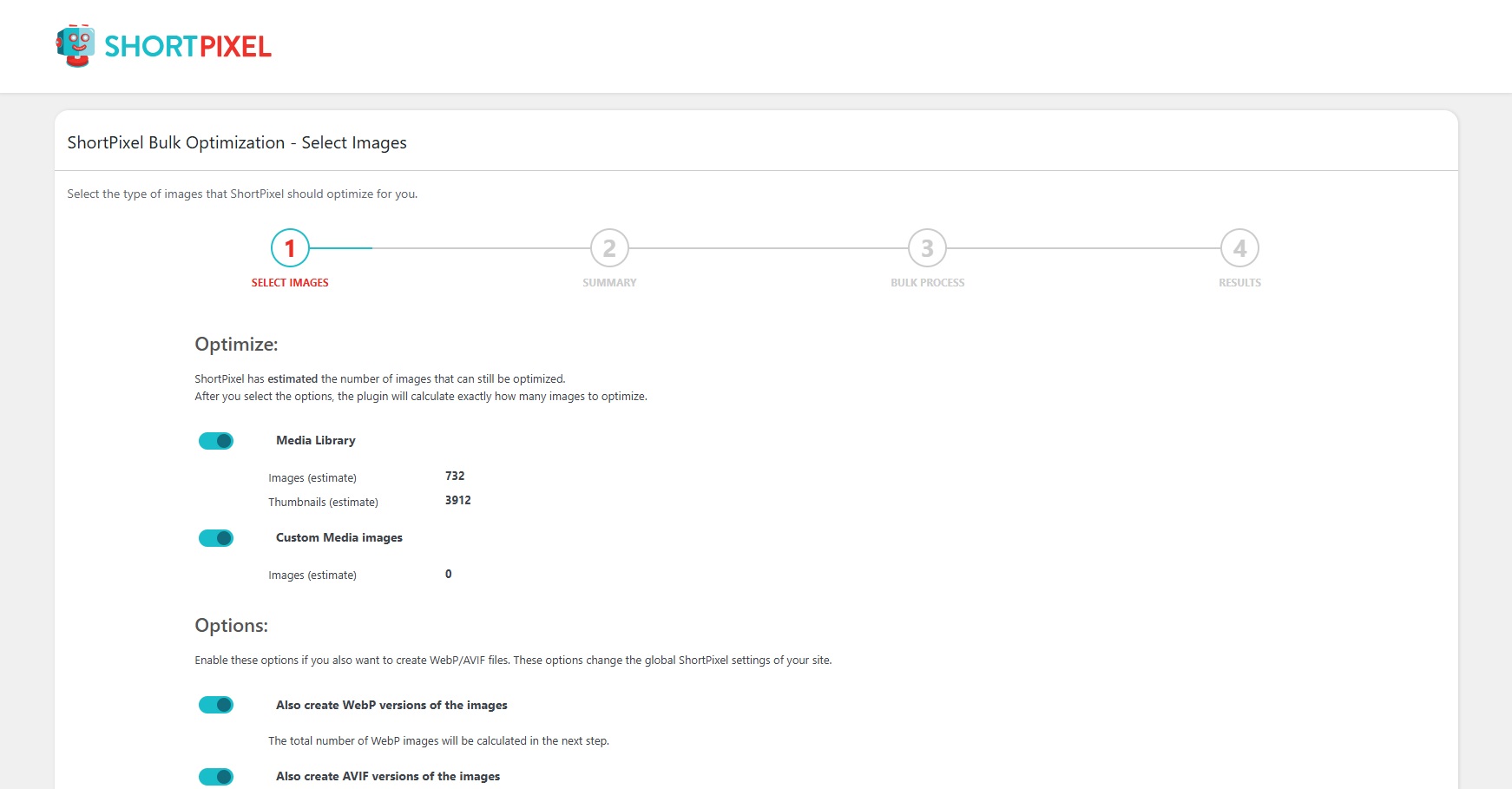
Select bulk optimization options. (Media -> Bulk ShortPixel)
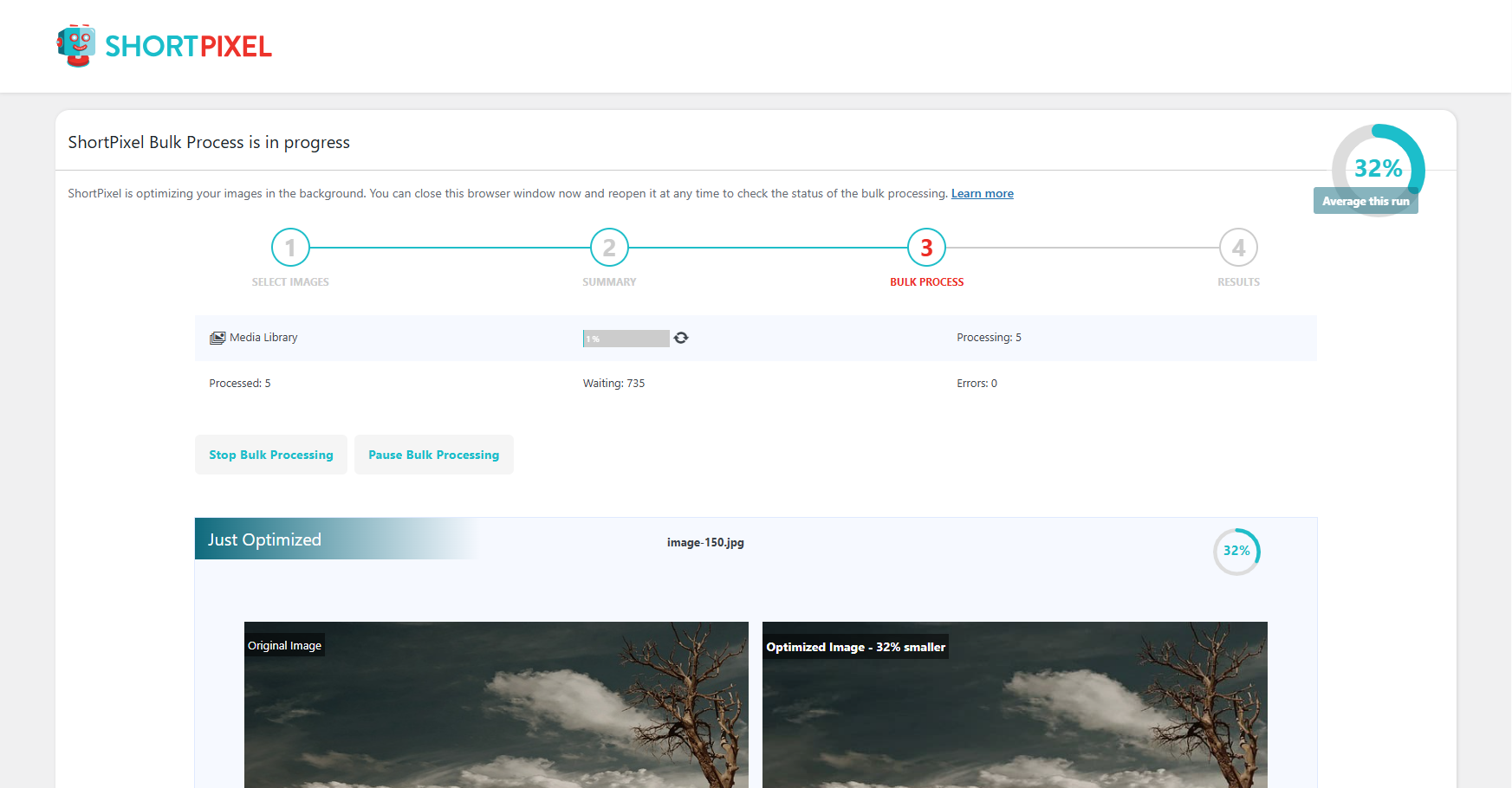
Bulk optimization running. (Media -> Bulk ShortPixel)
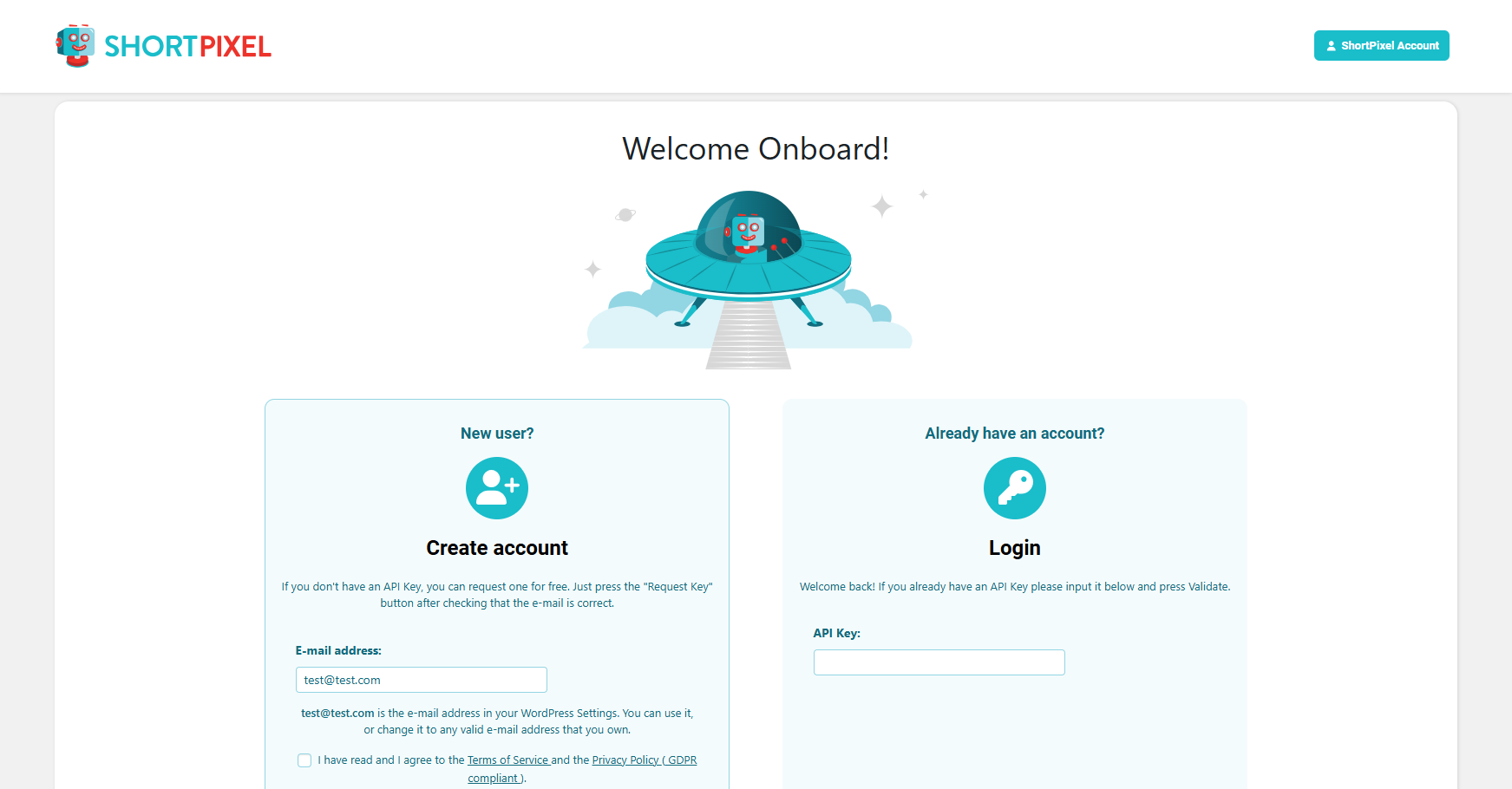
Activate your API key in the plugin Settings. (Settings -> ShortPixel)
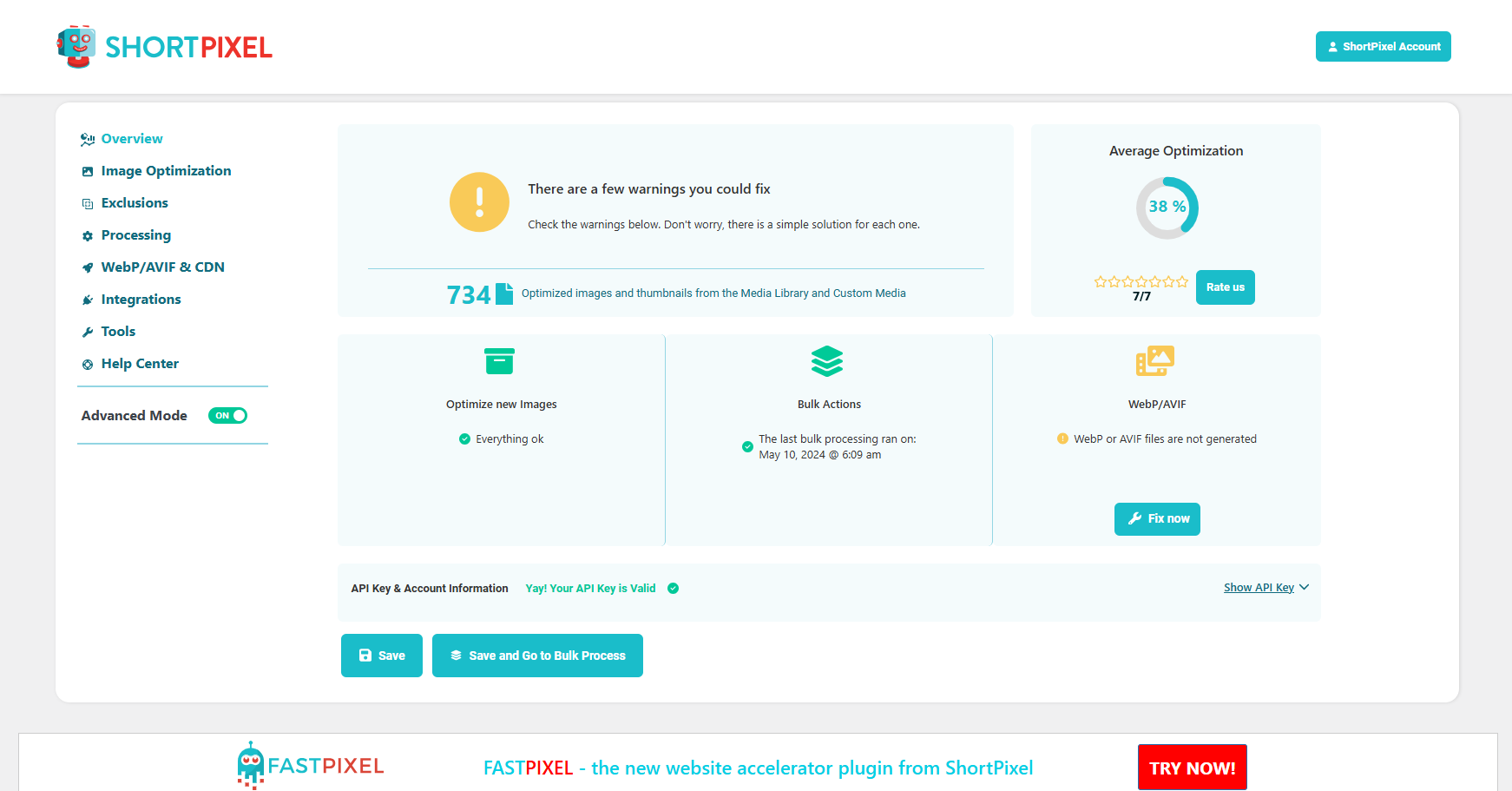
Plugin dashboard after entering the API key. (Settings -> ShortPixel)
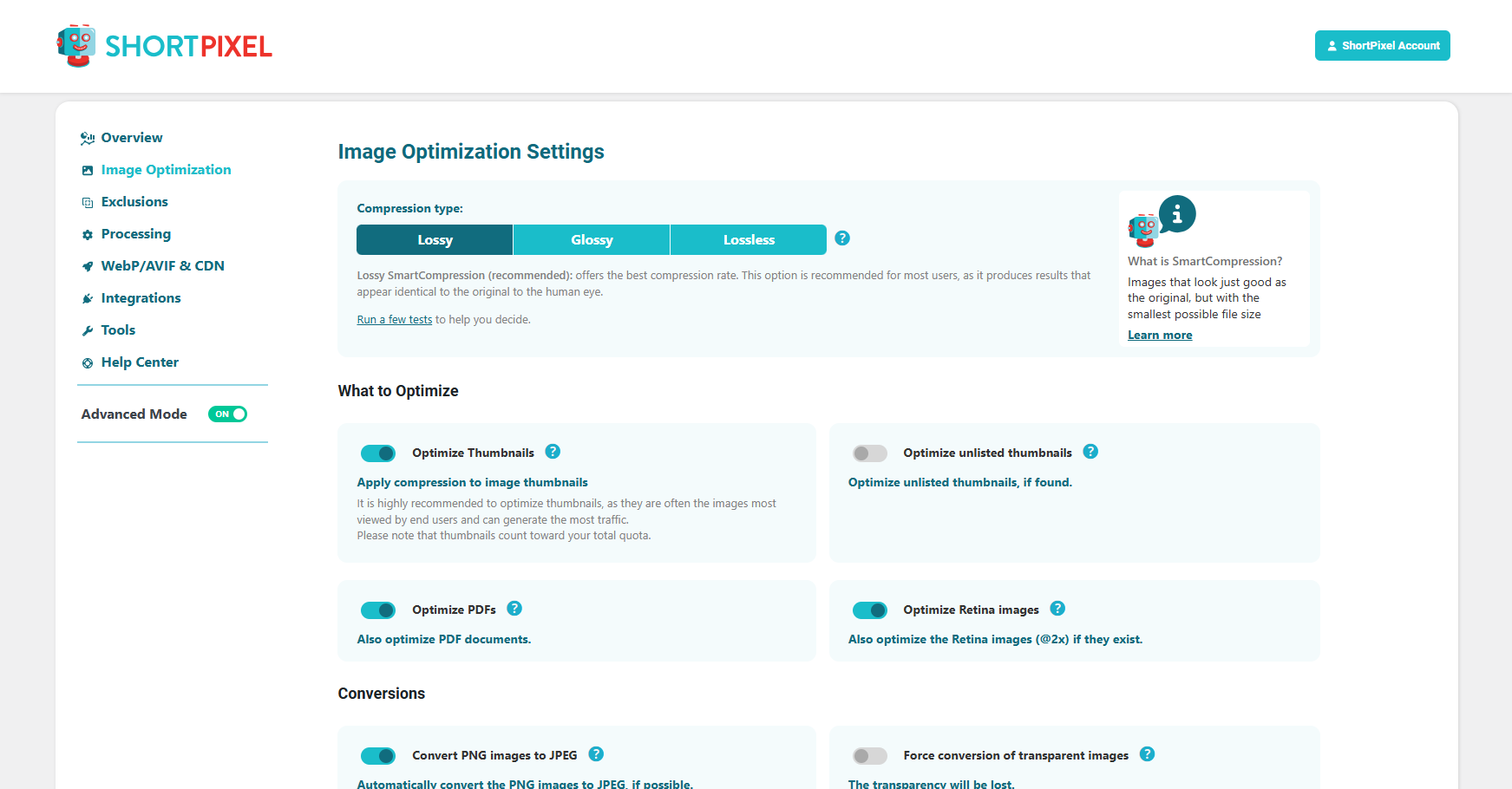
Image Optimization settings. (Settings -> ShortPixel -> Image Optimization)
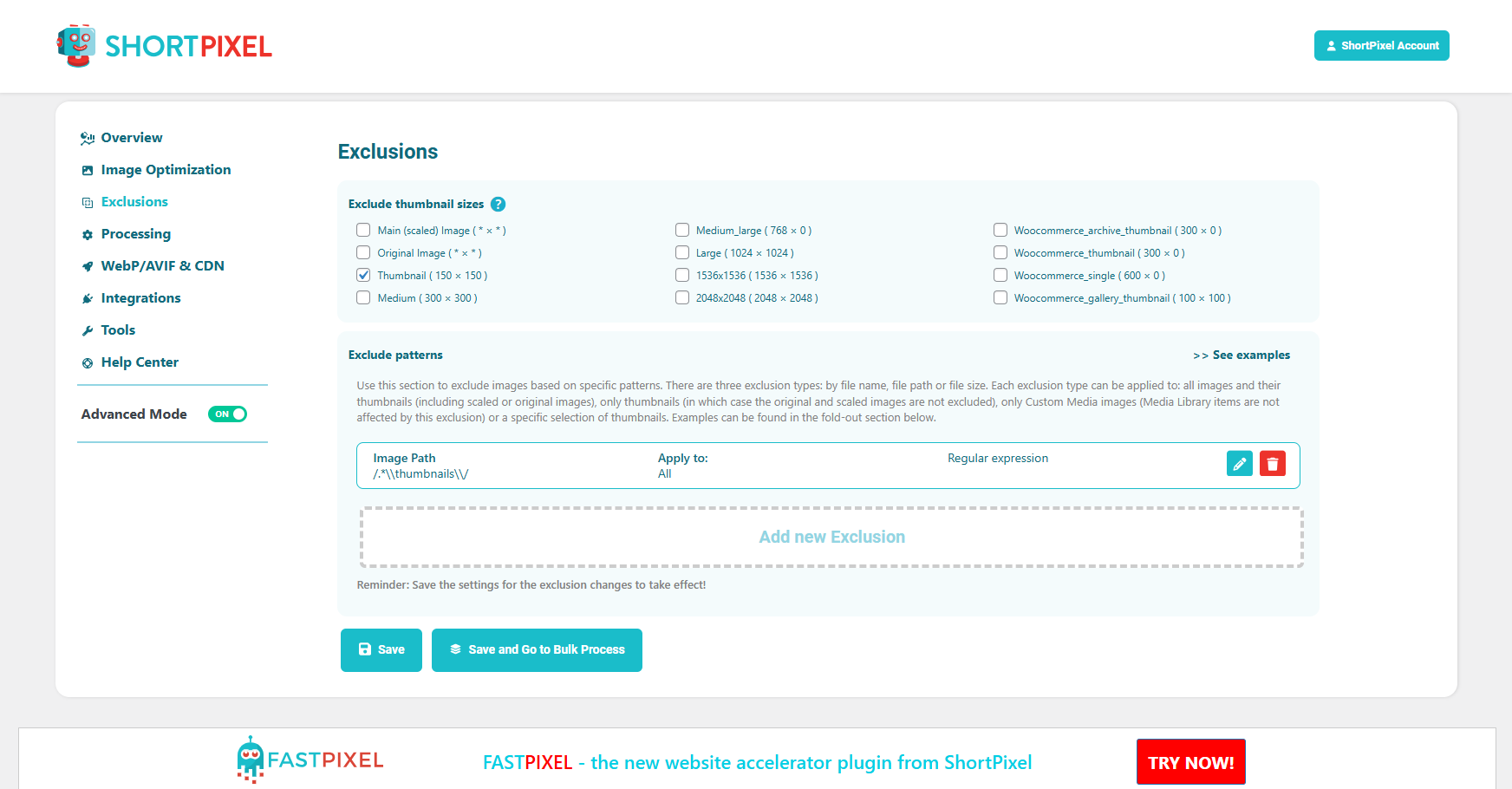
Exclusion settings. (Settings -> ShortPixel -> Exclusions)
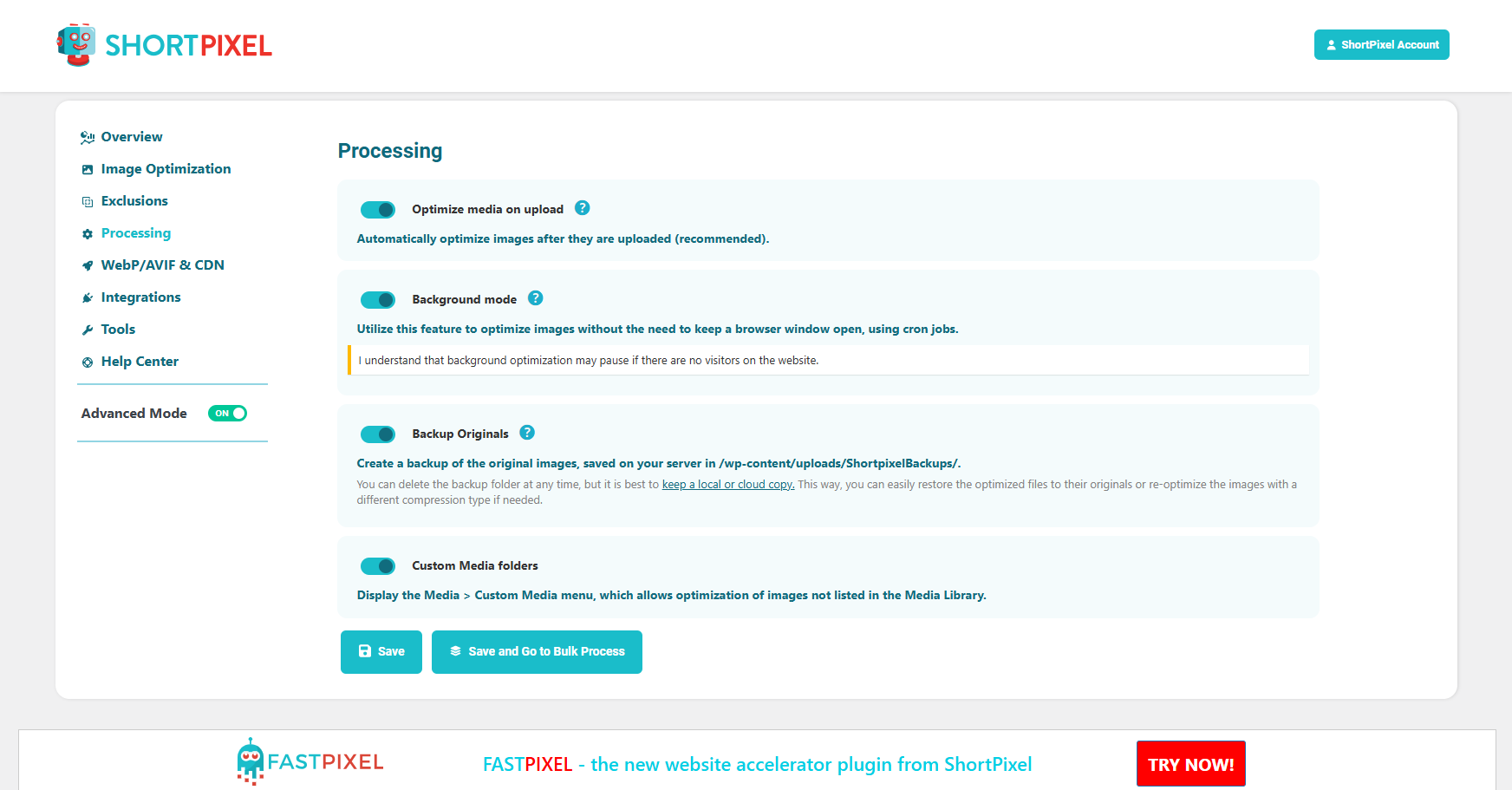
Processing settings. (Settings -> ShortPixel -> Processing)
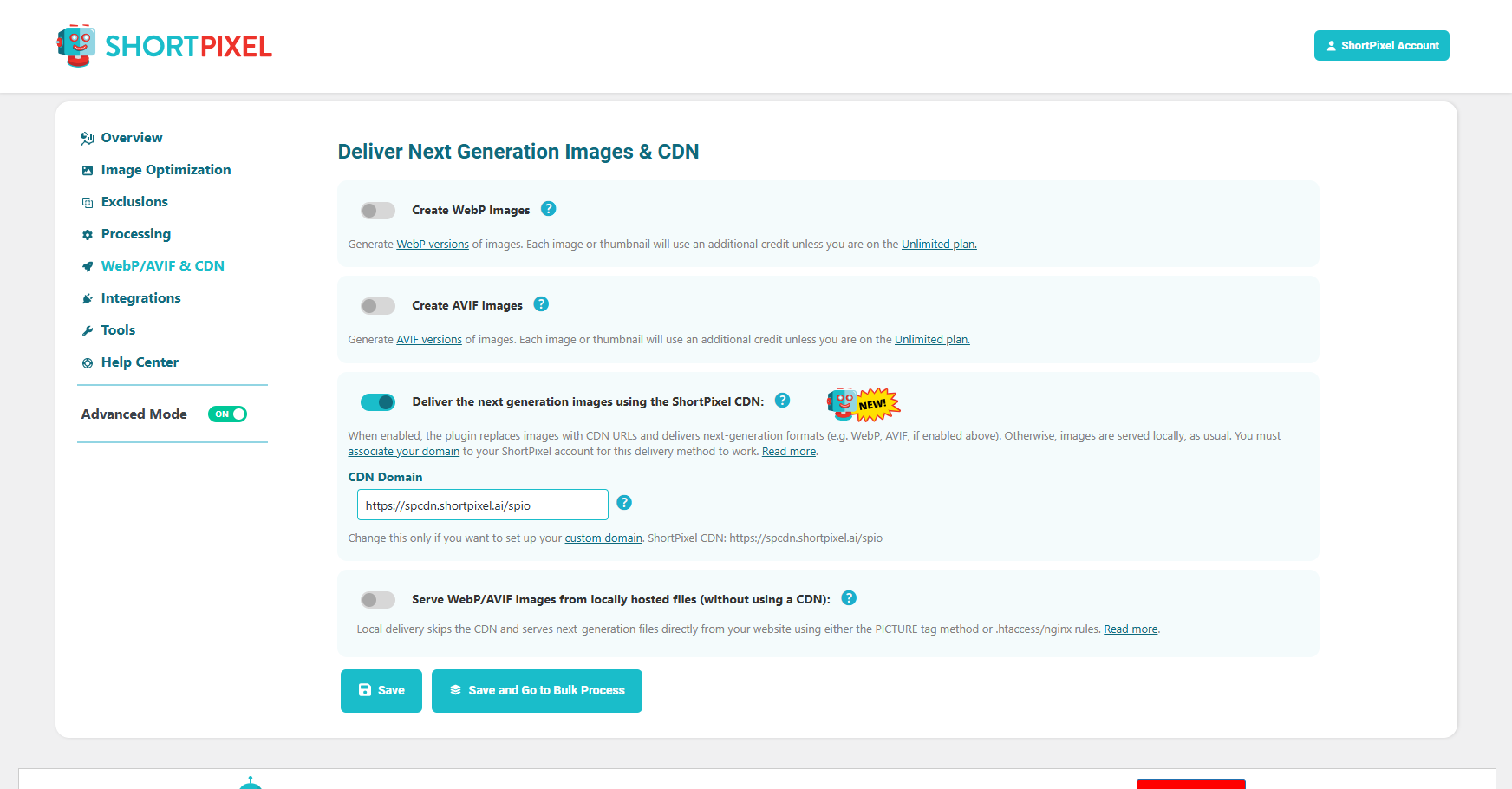
Next generation and delivery settings. (Settings -> ShortPixel -> WebP/AVIF and CDN)
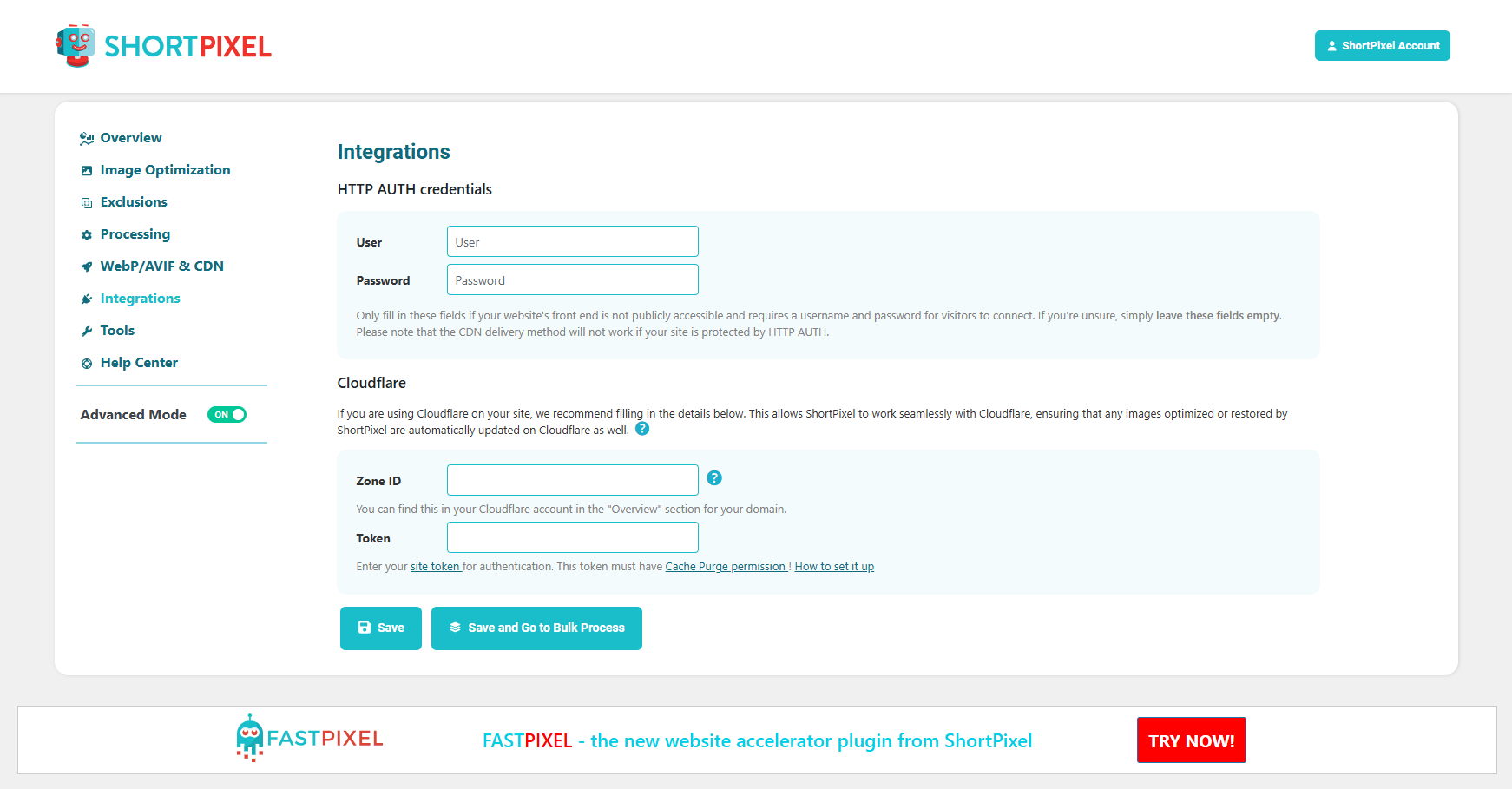
Integrations. (Settings -> ShortPixel -> Integrations)
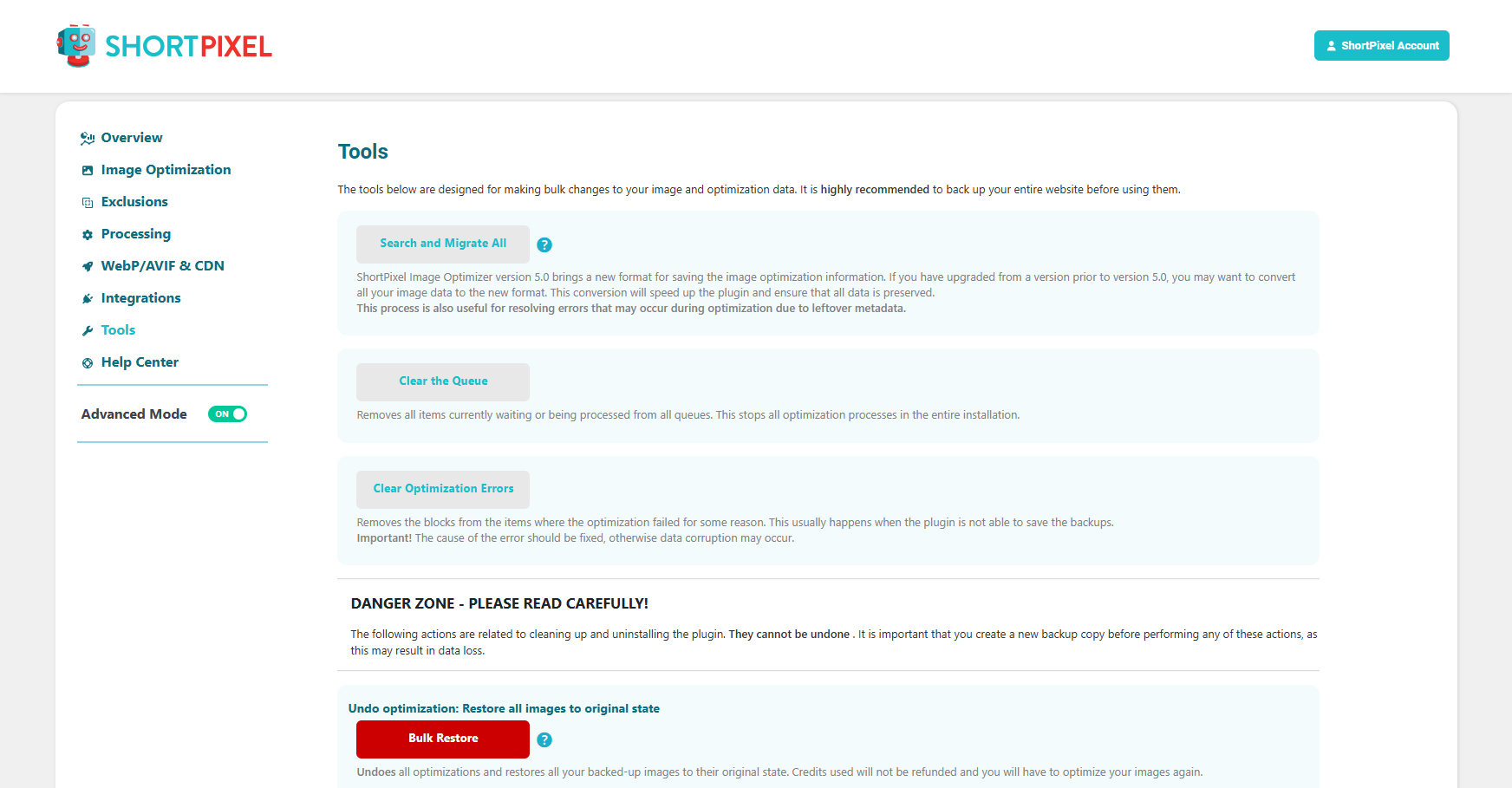
Tools. (Settings -> ShortPixel -> Tools)
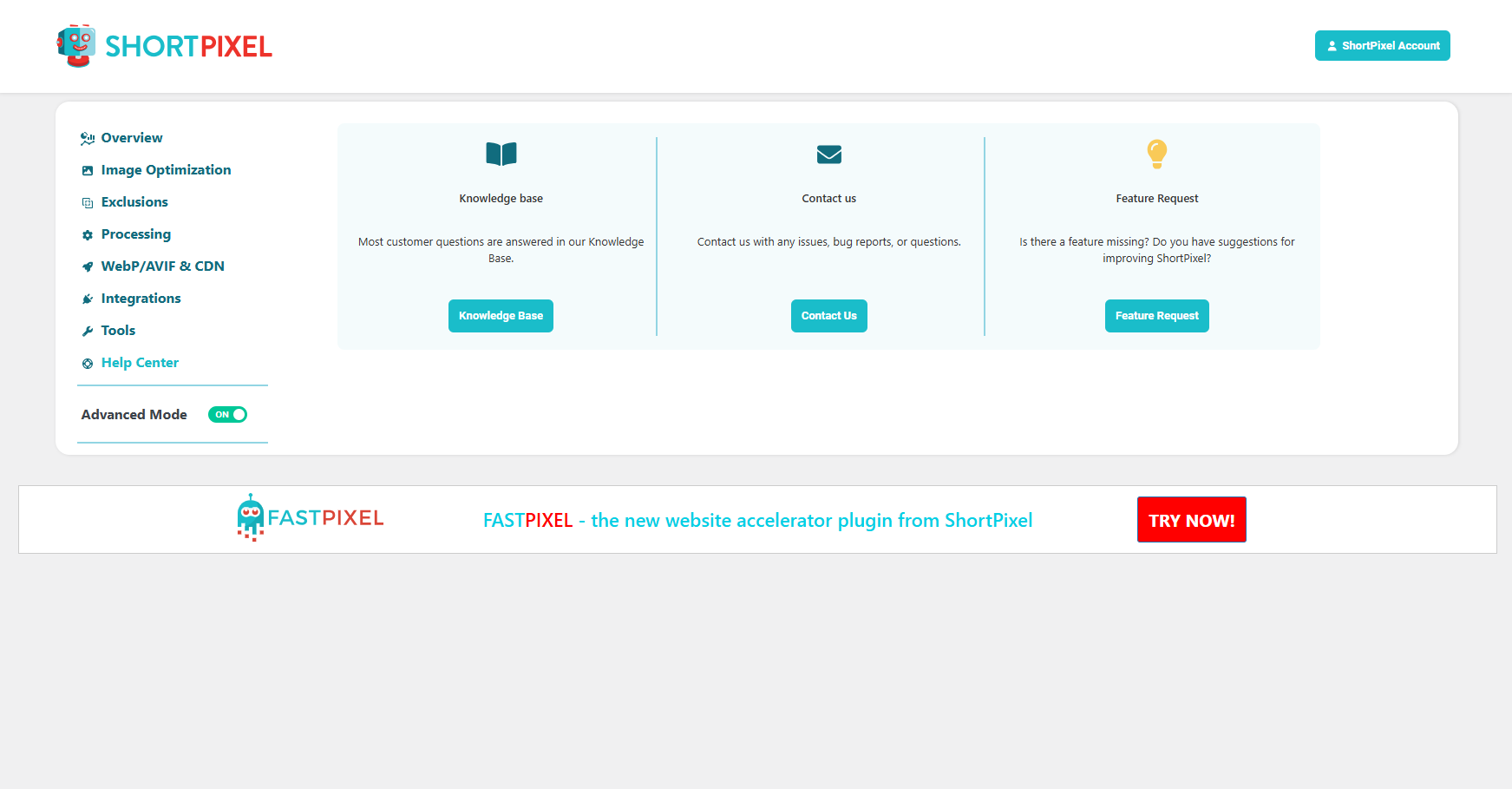
Help Center. (Settings -> ShortPixel -> Help Center)
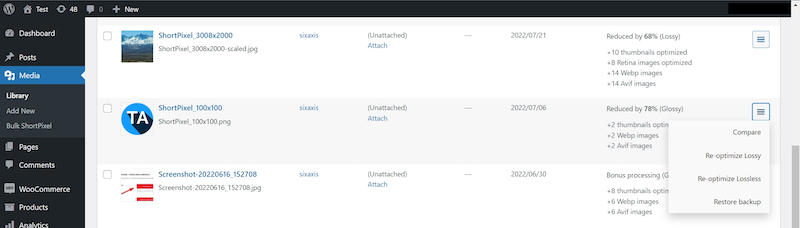
Check image optimization status, and restore or reoptimize the image. (Media -> Library)
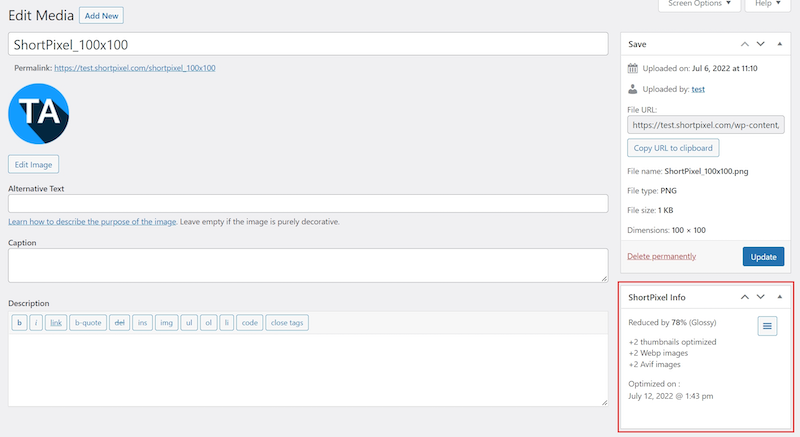
Check image optimisation details. (Media -> Library -> Edit)
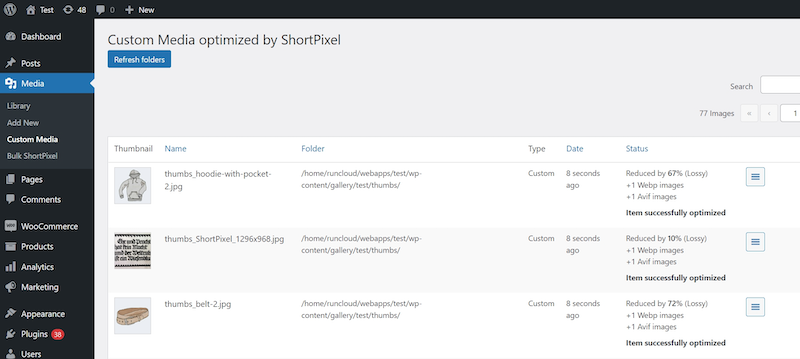
Check other optimized images’ status – themes or other plugins’ images. (Media>Other Media)
설치
Let’s get the ShortPixel plugin running on your WordPress website:
- Sign up using your email at https://shortpixel.com/wp-apikey.
- You will receive your personal API key in a confirmation email, to the address you provided.
- Upload the ShortPixel plugin to the /wp-content/plugins/ directory
- Use your unique API key to activate the ShortPixel plugin in the ‘Plugins’ menu in WordPress.
- Uploaded images can be automatically optimized in the Media Library.
- Done!
FAQ
-
How does ShortPixel compare to other image optimisation plugins (e.g Smush, Imagify, TinyPNG, Kraken, EWWW, Optimole)?
-
ShortPixel consistently has better compression rates along with more features, backup support and has very affordable one-time or monthly plans.
Here are a couple of independent reviews:
AuthorityHacker – “ShortPixel is our tool of choice, simply because it’s pretty much automated – we just let it do its thing.” (read full review)
WP Modula – “One of the reasons I’m personally a huge fan of ShortPixel is the built-in support for next-gen image formats like WebP.” (read full review) -
Can I use the same API Key on multiple web sites?
-
네, 가능합니다. 사용 가능한 크레딧이 있는 한, 단일 API 키를 원하는 만큼 많은 웹사이트에서 사용할 수 있습니다!
-
What plan is better for me? What do you recommend?
-
Everyone has different needs, but generally, we recommend getting a One-Time plan to optimize your whole Media Library and then get a Monthly plan to optimize your future uploads. To learn more, have a look at this comparison
-
How many thumbnails do I have, and which plan should I choose?
-
To know how many thumbnails you have, just install the plugin and go to Media > Bulk ShortPixel. The plugin will tell you how many thumbnails you’ve got. Based on this, have a look at our plans
-
Can I upgrade/downgrade easily my plan?
-
Of course. You can upgrade or downgrade your plans in a couple of clicks from your account on shortpixel.com.
-
Can I test/use the plugin for free?
-
네, 가능합니다.
저희는 매월 100개의 무료 이미지 최적화 크레딧을 제공합니다. 월간 무료 할당량을 초과하면 최적화 프로세스가 일시 중지되며, 할당량이 초기화되거나 요금제 중 하나를 구매하여 연장할 수 있습니다. -
Can I optimize images that aren’t in Media Library?
-
물론입니다.
사이트에 있는 이미지의 위치와 상관없이 최적화할 수 있습니다. ShortPixel 설정의 고급 섹션에서 최적화하려는 이미지가 있는 폴더를 추가하기만 하면 ShortPixel이 마법을 부려 나머지를 처리해 줍니다. -
Can I optimize images that are both past and new?
-
물론입니다!
미디어의 “Bulk ShortPixel” 페이지를 사용하여 모든 과거/현재 이미지와 사진을 단일 클릭으로 최적화할 수 있습니다. -
A credit = an optimized image?
-
네, 맞습니다. 하지만 보통 미디어 라이브러리의 이미지에는 5개 이상의 관련 썸네일이 있다는 점을 유의해 주세요. 각 최적화된 썸네일은 크레딧이 필요합니다. 드물게 ShortPixel이 이미지를 최소 5% 이상 최적화하지 못하는 경우에는 크레딧이 소모되지 않습니다.
-
Can I restore my images? What happens with the originals?
-
Settings/ShortPixel에서 ‘이미지 백업’ 옵션을 선택하면 최적화된 이미지나 PDF의 원본 버전이 백업 폴더에 저장됩니다. 이미지를 복원하거나 이미지를 손실/광택에서 무손실로 또는 그 반대로 변환하려면 원본 이미지가 필요합니다.
-
What types of formats can be optimized?
-
ShortPixel optimises JPEG (JPG, JPEG, JPEG 2000, JPEG XR), PNG, GIF (animated and still), and PDF type of files.
-
Do you have one-time plans?
-
Yes we do.
The credits that come with our one-time plans never expire. Yummy! 🙂 -
What happens to my existing images?
-
기존 이미지는 최적화된 이미지로 대체됩니다. 백업 옵션을 선택하면 원본이 별도의 폴더에 저장되어 필요하거나 원할 때 복원할 수 있습니다.
-
How does the plugin work?
-
Our lightweight plugin sends the original images to our Image Optimization Cloud where they are compressed. ShortPixel then downloads the optimized images and the unoptimized originals are replaced with the optimised versions.
-
Do you optimize images in the cloud?
-
Yes, all the images processed by ShortPixel are optimized in the Cloud. This takes the load off of your server and allows us to produce the best results.
-
What payment methods are accepted?
-
We accept payments via card (Mastercard, Visa, Maestro, American Express, Discover, Diners Club, JCB, UnionPay), PayPal, and Apple Pay.
-
How do I activate the API key on a multisite?
-
네트워크 관리자에서 플러그인을 활성화한 후, 멀티사이트의 각 개별 사이트에서 수동으로 활성화해야 합니다. 그렇게 하면 설정 메뉴가 나타나고 각 개별 사이트에 대한 API 키를 추가할 수 있습니다.
대안으로, wp-config.php 파일을 편집하고 다음 줄을 추가할 수 있습니다:define('SHORTPIXEL_API_KEY', 'APIKEY');APIKEY는 가입 시 받은 API 키입니다. 그렇게 설정된 경우, API 키는 멀티사이트의 모든 사이트에 사용되지만, 메인 사이트의 설정 페이지에서만 보이고 나머지 사이트에서는 숨겨집니다. -
I am not the only one working on the WordPress Dashboard. How can I hide my API key?
-
There is a simple way to hide the API key, all you need to do is to add these two lines in your wp-config.php:
define('SHORTPIXEL_API_KEY', '<<your api key here>>'); define('SHORTPIXEL_HIDE_API_KEY', true); -
How much is a credit?
-
ShortPixel이 이미지나 썸네일을 최소 5% 이상 최적화할 때마다 크레딧이 사용됩니다. 만약 이미지나 썸네일을 최소 5% 이상 최적화할 수 없다면 크레딧은 사용되지 않습니다 🙂
또한, 일반적으로 미디어 라이브러리의 이미지에는 3-5개의 썸네일이 연결되어 있으며, 최적화된 각 대표 이미지나 연결된 썸네일마다 크레딧이 사용된다는 점을 유의해 주세요.
-
Why shall I use a WordPress plugin and not an offline tool?
-
ShortPixel 알고리즘은 35억 개 이상의 실제 이미지를 최적화하면서 완성되었습니다. ShortPixel은 JPEG, PNG, GIF, PDF 파일에 대해 최고의 압축을 제공할 뿐만 아니라 많은 시간을 절약해 줍니다. 사이트에 설치하기만 하면 ShortPixel이 사이트의 모든 이미지를 업로드 후 즉시 최적화해 줍니다.
-
Image compression does not change your ALT text. If you enable AI Image SEO, ShortPixel can also generate image metadata according to your selected settings.
-
If I stop using ShortPixel will my images remain optimized?
-
물론이죠!
이미지를 최적화하면, 명시적으로 복원하기로 선택하지 않는 한 최적화된 상태로 유지됩니다. 하지만 왜 그렇게 하시겠어요? 🙂 -
Do I have to pay monthly or one time?
-
We have both options available.
One-time credits never expire and are a bit more expensive. Check out our prices here -
When can I cancel a monthly plan?
-
언제든지 원하실 때 가능합니다.
현재 청구 기간 동안 남아 있는 크레딧은 청구 기간이 끝날 때까지 계속 사용할 수 있습니다. 청구 기간이 끝나면 다시 청구되지 않으며 요금제가 무료 요금제로 재설정됩니다. -
When do credits expire?
-
Monthly credits expire after 30 days while one-time credits never expire.
-
Do you have an API?
-
Yes, we have several APIs and tools.
You can learn more about it here:
https://shortpixel.com/api-tools -
Can I use the ShortPixel WP plugin on a localhost installation?
-
Unfortunately not 🙁
But you can use either our command line tool or our web tool
https://shortpixel.com/web-tool-docs
https://shortpixel.com/cli-docs -
How does resizing work?
-
사이트에서 이미지를 크기 조정하는 옵션을 선택하면, 대표 이미지는 비율과 비례를 유지하면서 미리 정의된 크기로 조정될 수 있습니다. 관련된 썸네일은 크기 조정되지 않습니다. 이 옵션을 사용하면 원본 이미지를 안전하게 업로드할 수 있으며, 크기를 줄이기 위한 사전 처리가 필요하지 않습니다.
-
Will ShortPixel work if my website is using CloudFlare?
-
Absolutely! Sometimes you’ll need to make sure you whitelist some IPs, just contact us and we’ll assist you with that.
-
Where do I report security bugs found in this plugin?
-
Please report security bugs found in the source code of the ShortPixel Image Optimizer plugin through the Patchstack Vulnerability Disclosure Program. The Patchstack team will assist you with verification, CVE assignment, and notify the developers of this plugin.
-
Does the plugin use any external services
-
This plugin integrates with Chatbase (https://www.chatbase.co) to provide AI-powered chat support directly within the plugin interface. This integration allows plugin users to ask questions and receive automated assistance. The only data collected is the Country(no city and no exact location) and the message itself.
Chatbase ToS.
-
I’m stuck. What do I do?
-
The ShortPixel team is here to help. Contact us!
-
How do I compress images without losing quality in WordPress?
-
Select Lossless compression in ShortPixel’s settings to reduce file sizes without changing image quality. You can apply it to existing images in bulk and automatically compress new uploads. The reduction in file size depends on the original image.
-
What is image optimization?
-
이미지 최적화는 이미지의 품질을 손상시키지 않으면서 파일 크기를 줄여 웹사이트 성능을 향상시키는 작업입니다. 이는 ShortPixel과 같은 도구를 사용하여 이미지 압축, WebP와 같은 효율적인 포맷으로 변환, 그리고 빠른 로딩을 위해 적절한 크기로 조정함으로써 가능해집니다. 최적화된 이미지는 페이지 로딩 시간과 대역폭 사용량을 줄여 웹사이트 속도를 향상시키고, 사용자 경험을 개선하며, SEO 순위를 높이는 데 기여합니다.
-
How to optimize a WordPress image?
-
Install ShortPixel, connect your API key, and choose your compression settings. Run Bulk ShortPixel to optimize existing images, or enable automatic optimization for new uploads. You can also generate WebP and AVIF versions and resize large images.
-
How do I optimize images for SEO?
-
To SEO optimize images in wordpress, use the ShortPixel plugin to compress and convert them without losing quality, reducing load times—a key SEO factor. Add descriptive file names and alt text with relevant keywords to help search engines understand your images. Additionally, resize images to appropriate dimensions and consider converting them to WebP for faster performance. ShortPixel makes this entire process easy, helping improve both your SEO rankings and site speed.
-
성능을 위해 이미지를 어떻게 최적화합니까?
-
WordPress에서 성능을 위해 이미지를 최적화하려면 ShortPixel 플러그인을 사용하여 품질을 유지하면서 이미지 압축을 진행하고 파일 크기를 줄여 로딩 속도를 높이세요. 이미지를 WebP와 같은 효율적인 포맷으로 변환하고 사이트 디자인에 맞게 적절히 리사이즈되도록 합니다. ShortPixel은 이 과정을 한 번의 클릭으로 자동화하여 웹사이트 속도를 향상시키고 사용자 경험을 개선하며 SEO를 강화합니다—최적의 성능을 위한 핵심 요소들입니다.
후기


기여자 & 개발자
“ShortPixel Image Optimizer – Optimize Images, Convert WebP & AVIF”(은)는 오픈 소스 소프트웨어입니다. 다음의 사람들이 이 플러그인에 기여하였습니다.
기여자
변경이력
6.6.0
🏷️ The Smart Filenames & Multisite Update
Release Date: October 6, 2026
✨ 새로운 기능
- AI SEO-Friendly Filenames: ShortPixel can now rename your images using descriptive, SEO-friendly filenames generated by AI. To keep your site safe, renaming applies only to newly uploaded images or to images that are not yet used in any published content, so no existing links can break.
- Manual File Renaming: Rename any image directly from the Media Library edit screen. The main file, its thumbnails, the WebP/AVIF versions and the backups are all renamed together.
- Multisite Network Settings: On multisite installations, the plugin settings can now be managed at network level by the super admin and applied across all sites, with the site-wide tools restricted to super admins.
- Full WPML Compatibility: File renaming (AI and manual) works with WPML and its Media Translation add-on, keeping all language versions of an image in sync.
- Full Offload Media Compatibility: File renaming (AI and manual) works with WP Offload Media, including images that are offloaded to the cloud only, and keeps the access permissions (ACL) of your files.
- AI Assistants & MCP Support: ShortPixel now registers its actions as WordPress Abilities (WordPress 6.9+), so AI assistants connected to your site through the WordPress MCP Adapter can operate the plugin for you.
⚙️ 개선 사항
- AI Content Replacement Control: A new setting lets you choose whether AI-generated SEO data should be added to images in your posts and pages only when it’s missing, overwrite the existing data, or leave your content untouched.
- Better Front-End Delivery: The WebP/AVIF delivery via the tag now handles filenames with spaces, brackets or quotes, as well as background images, more reliably.
- Accurate AI Credits in Bulk Summary: The Bulk Summary now shows your AI credits, with a clear note for plans that include unlimited AI usage.
- Updated Interface & Texts: Many strings across the settings, bulk processing and media screens have been rewritten for clarity, and a number of texts that previously couldn’t be translated are now included in the translation files.
- Comprehensive Automated Testing: The plugin now runs a comprehensive suite of automated tests (unit, integration, compatibility, multisite and end-to-end browser tests) on every change, on all the supported PHP versions, complemented by the relevant manual tests done by our engineering and testing teams.
🔒 Security
- XSS Fix: Hardened the output escaping in the front-end WebP/AVIF delivery markup and in the Bulk Processing error log, preventing a potential cross-site scripting issue, safely disclosed by the PatchStack team.
- CSRF Fix: Strengthened the nonce verification for the actions on the Settings and Tools pages, preventing a potential cross-site request forgery issue, safely disclosed by the PatchStack team.
🛠️ Fixes
- Trusted Mode: Fixed fatal errors when optimizing, viewing or deleting images with Trusted Mode enabled.
- Repeated Re-Optimization: Fixed a case where some thumbnails were never marked as optimized, so the same image could be sent for optimization again on every run.
- WebP/AVIF Delivery via .htaccess: The rules now work correctly on LiteSpeed servers and behind caches/CDNs, with the right caching headers for each format.
- AI & Optimization Conflicts: AI tasks and optimization tasks for the same image no longer overwrite or block each other.
- PNG Conversion Order: PNG to JPG conversion on upload now happens before AI SEO data is generated.
- Backup Cleanup: The automatic backup removal now also removes folders that still contain files.
- Legacy Data Migration: Fixed incorrect original sizes, missing thumbnails and loading issues for images optimized with older versions of the plugin.
- Stats & Restore Accuracy: Fixed several edge cases with incorrect totals, stats and restore results.
- Bulk AI SEO from Media Library: The “Generate Image SEO” bulk action in the Media Library list view now also works for images that are not optimized yet.
- Gutenberg Image Blocks: Fixed image blocks that could become corrupted when applying AI SEO data.
- Undo AI SEO Data: Fixed undoing AI-generated SEO data, both for single images and in bulk.
- API Key Recovery: Fixed a fatal error caused by a corrupted or empty API key entry in the database.
- Multisite Debug Mode: Fixed a fatal error on multisite installations when debug mode was enabled.
- WPML Language Domains: Fixed file detection on WPML sites that use separate domains or directories per language.
- Safari Quick Tour: The onboarding quick tour now works correctly in Safari.
- PHP 8.5 Compatibility: Removed deprecated cURL calls and fixed a deprecation notice when reading image dimensions.
- Downloads Default to HTTPS: Optimized files are now always downloaded over HTTPS (the protocol can still be changed with a filter).
- Custom Media, WP-CLI & Settings: Fixed several smaller issues with Custom Media folders, WP-CLI commands, cron tasks, the Tools page and saving settings.
Update now to give your images SEO-friendly names, manage your network from one place and enjoy a more secure and reliable plugin! 🚀
6.5.6
🛡️ The Security & Fixes Update
Release Date: September 9, 2026
🔒 Security
- Hardened Content Replacement: The content replacer now blocks PHP object instantiation when processing serialized data, preventing potential object injection through crafted content, resposibly disclosed by the WordFence and PatchStack teams.
🛠️ Fixes
- Automatic Backup Removal: Fixed an issue that prevented the automatic removal of old backups from ever running, even when the option was enabled.
- CDN Links & Crawlers: Changed the parameter separator in CDN links from a comma to a plus sign, preventing some crawlers and SEO tools from misreading srcset URLs and reporting false 404 errors.
Update now for improved security and reliability! 🚀
6.5.5
🛡️ The Stability Update
Release Date: July 21, 2026
🛠️ Fixes
- Download Error Handling: Fixed a fatal error that could occur when ShortPixel was unable to download an optimized file from the API, with clearer error messages now shown instead. Thanks to Tremi Dkhar for the contribution!
- Queue Robustness: Fixed a PHP warning that could occur when processing queue items without a remote ID.
- AJAX Response Fix: Fixed a possible issue when sending array-based responses during optimization processing.
Update now for a more stable and reliable optimization experience! 🚀
6.5.4
⚡ The Optimization Flow Update
Release Date: July 6, 2026
🛠️ 수정 및 개선 사항
- Smarter Credit Handling: Automatic image optimization will now continue even if AI credits are exhausted, as long as image optimization credits are still available.
- AVIF Loop Prevention: Fixed a rare case where PHP limitations could not identify the MIME type correctly and could cause an infinite optimization loop for some AVIF files received from the optimization API.
- Cleaner Browser Console: Removed optimization-related console logs from production. They are now only shown when plugin debug mode is enabled, with an additional filter available to disable them completely if needed.
- Queue Stability: Fixed a rare error that could occur under specific conditions within the optimization queue.
- Better Bulk Error Help: Bulk processing errors now link directly to the ShortPixel Knowledge Base search, making it easier to find the most relevant solution.
- WordPress 7.0 UI Tweaks: Updated the Bulk Processing interface to better match the layout and styling changes introduced in WordPress 7.0.
Update now for a smoother optimization workflow, improved reliability, and a more polished experience! 🚀
6.5.3
🔧 The Reliability & Compatibility Update
Release Date: June 25, 2026
🛠️ Fixes
- Restore Metadata Fix: Restoring an image now correctly restores the original file size in the metadata instead of keeping the optimized size.
- Improved Host Compatibility: Removed the dependency on PHP’s getmypid() function, improving compatibility with hosting environments where it’s disabled.
- JSON Serialization Fix: Resolved a rare issue where JSON serialization could fail in specific edge cases.
🤝 Compatibility Updates
- Breakdance & Oxygen Ready: Added compatibility with upcoming versions of the Breakdance and Oxygen builders to ensure a smooth experience as these platforms evolve.
Update now for improved reliability, broader compatibility, and an even smoother optimization experience!
6.5.2
☁️ The Offload & Backup Reliability Update
Release Date: June 4, 2026
⚡ Performance Improvements
- Offload Media + AWS S3: Improved performance by reducing useless remote operations for websites using Offload Media with Amazon S3, resulting in a smoother and more efficient optimization workflow.
🛠️ 수정 및 개선 사항
- Optimization Data Migration: Fixed an error that could occur when migrating legacy image optimization data to the new format.
- Custom Media Search Stability: Resolved an issue caused by unusual search requests on Custom Media pages.
- Smart Backups Filename Conflict: Fixed a rare edge case where multiple files requiring conversion, uploaded with the exact same filename during the same month, could cause issues when Smart Backups were enabled.
- Backup System Enhancements: Various reliability improvements and small fixes across the backup system.
- Code documentation: Improved the overall code documentation of the plugin.
Update now for a faster, more reliable experience, especially if you’re using AWS S3 and Smart Backups! 🚀☁️
6.5.1
🛠️ The Hotfix Update
Release Date: May 5, 2026
🐛 Fixes
- Settings Page Fix: Resolved an issue affecting the Settings page in certain edge cases.
- Backups System Fix: Fixed an issue related to the new backups system that could appear in specific scenarios.
A small but important update to keep everything running smoothly! 🚀
6.5.0
🧠 The Smart Backups & AI Control Update
Release Date: May 5, 2026
✨ 새로운 기능
- Smart Backups: Save disk space by backing up only the main image. When restoring, thumbnails are automatically regenerated based on current settings.
- Automatic Backup Cleanup: Set rules to automatically delete old backups after a chosen period.
- Consistent prefix/suffix for AI SEO Data: You can now add fixed text before/after AI-generated image SEO data for full consistency across your site.
- Custom Media Re-Optimization: Re-optimize images directly from Custom Media bulk actions.
- Custom Media Pagination: Navigate large media sets more easily with new pagination controls.
⚙️ 개선 사항
- Smarter Title Replacement: Image titles are only replaced with AI-generated ones if they haven’t been manually edited (when overwrite protection is enabled).
- Better Error Messaging: Improved the “401 Unauthorized” message in the AI SEO Preview for clearer feedback.
- PNG Handling Improved: Improved the PNG to JPG conversion to better handle alpha channels.
- AI Context Limits: Added proper limits to AI context fields to prevent truncation issues.
- Bulk Stability: Introduced slight delays in Media Library bulk actions to avoid server overload.
- Paused Processing Logic: Restoring an item now cancels any paused processing to avoid unnecessary actions.
- UI Enhancements: Improved text clarity and layout across settings, bulk processing, and the ShortPixel panel in wp-admin.
🔄 호환성 업데이트
- NextGen Gallery (Imagely): Integration restored using updated hooks and filters.
- AI with EXIF Restrictions: AI generation now works even if EXIF blocks training (alternative data retrieval is used).
- Offload Media Support: Improved compatibility with offloading plugins, including full support for the new Smart Backups.
- Enable Media Replace: Image SEO data is now cleared when an image is replaced.
- WPML Support: Manually generate AI SEO data in different languages for multilingual sites.
🛠️ Fixes
- Backup System Refactor: Fixed multiple edge cases and improved reliability across all backup scenarios.
- Long Processing Safeguards: Added checks for images that take too long to process or become unavailable.
- Alias API Key Handling: Prevent unnecessary re-queuing for domains not allowed by Alias API keys.
- AI Disabled Message Cleanup: Removed misleading “AI Generation Disabled” responses to avoid conflicts with editors/builders.
- Database Optimization: Added indexes for the aipostmeta table for better performance.
- Queue Stability: Ensure blocked items are released properly on shutdown to avoid stuck processes.
- JS & jQuery Fixes: Resolved deprecation warnings and improved frontend stability.
- Filesize Exclusion Fix: Fixed a JavaScript issue that prevented filesize-based exclusions from working correctly.
Update now to unlock smarter backups, better AI control, and improved compatibility across your entire workflow! 🚀
6.4.4
🌿 The Spring Update
Release Date: March 24, 2026
✨ New Feature
- Exclusions by Filesize: You can now exclude images from optimization based on their file size, giving you even more precise control over what gets processed.
🛠️ Fixes
- Bulk Operation Messaging: When running bulk actions other than optimization, the correct descriptive text is now displayed.
- PICTURE Tag Fixes:
- Fixed issues with certain background images not being handled correctly.
- Multiple improvements to ensure correct paths and compatibility with Bedrock setups.
- Long Domain Handling: Fixed cases where very long domains caused CDN URL replacement to fail.
- Invalid API Key Feedback: A proper message is now shown in the AI settings preview when an invalid API key is used.
- AI Disabled Notice Scope: “AI generation disabled” message now appears only in the settings preview to avoid conflicts (especially with the Classic Editor).
- Async Chatbot Loading: The chatbot now loads asynchronously in settings to prevent slowdowns when CDN responses are delayed.
- JS Worker Stability: The JavaScript worker no longer stops if invalid JSON is received from the backend.
- LS Cache Compatibility: Fixed incompatibilities with LiteSpeed Cache and certain custom media folder setups.
- Custom Media Errors: Resolved errors occurring during optimization of specific custom media folders.
- open_basedir Improvements: Additional safeguards to prevent warnings with strict open_basedir configurations.
- PHP 8.4 Deprecation Fix: Fixed a rare deprecation warning on PHP 8.4.
🛡️ Security Fixes
- PHP Object Injection: Patched a potential vulnerability related to AI-generated SEO data (reported by PatchStack).
- Stored XSS (Author+): Fixed an authenticated stored XSS vulnerability when using AI features (reported by WordFence).
✨ Tweaks & Improvements
- Wording & Layout Updates: Small improvements to texts and settings layout for a cleaner and clearer experience.
Update now for stronger security, improved compatibility, and smarter control over your optimization workflows! 🚀
6.4.3
❄️ The Snowy Update
Release Date: January 29, 2026
🛡️ Security Fix
- Editor-Level Access Patch: Fixed a potential vulnerability (responsibly reported by the WordFence team) where an authenticated Editor user could access arbitrary files.
🛠️ 수정 및 개선 사항
- Bulk Restore Display Fix: Resolved an issue where the final step of the bulk restore process wasn’t being shown.
- Bulk Labels Added: Each bulk action (restore, legacy migration, etc.) now shows a clear label for better tracking and transparency.
- Custom Media Queue Info: Added more detailed status info for Custom Media items in the queue, now similar to what’s shown in the Media Library.
- Respect Image Title Overrides: The AI will no longer overwrite image titles if the “Preserve existing data” option is enabled.
- No Period on AI Titles: Removed the automatic period added at the end of AI-generated image titles.
- New Picture Tag Filter: Developers can now hook into a new filter for customizing how next-gen images are delivered via the tag.
- Improved CDN Detection: Enhanced logic to detect images declared across multiple lines when replacing with CDN links.
- Disabled AI Fields Visibility: AI fields that are disabled in settings are now clearly marked in both the Settings preview and the Bulk Processing preview.
- Bulk Logs Preserved: Logs from bulk processing are now retained even when backups are cleared via the Tools menu.
- Multisite Settings Hidden: Temporarily hid the multisite settings menu due to related errors – it will return in a future release.
- Correct Parent Page Context: Ensured that the parent post/page context of an image is properly sent to the AI API for better SEO relevance.
Update now for a more secure, transparent, and intelligent optimization experience! 🚀
6.4.2
📊 The Optimization Update
Release Date: January 15, 2026
🛠️ 수정 및 개선 사항
- Media Library Optimization Display: Fixed an issue where optimized images were always shown as “bonus optimization” — the stats now reflect actual results.
- Bulk UI Improvements: Cleaned up the layout of the bulk processing screen when only a few options are selected, for a more focused experience.
- Percentage Hidden for Non-Optimization Actions: Removed the optimization percentage display when running bulk operations like restore or data migration (that don’t involve actual image optimization).
- AVIF via .htaccess for WebPs: Added support for AVIF delivery using the .htaccess method for images added directly in the WebP format.
- AI SEO Preview Fix: Prevented display of incorrect data in the AI SEO Preview section within plugin settings.
- SmartCrop Percentage Display: Fixed the issue where SmartCrop could show a negative improvement percentage if the cropped image ended up larger in size.
- JPG to PNG Conversion Fix: Resolved a rare error when JPG files saved as PNG conflicted with the PNG-to-JPG conversion setting.
- PHP 8.5 Deprecation Fix: Fixed a deprecation warning added in PHP 8.5, thanks to @mondalaci.
- Text & Typo Corrections: Polished various texts and corrected typos on the Bulk and Settings pages.
Update now for clearer stats, smarter previews, and a smoother optimization experience across the board! 🚀
6.4.1
🎄 The Christmas Update
Release Date: December 18, 2025
🎁 Fixes & Improvements
- Temporary File Cleanup: Introduced a mechanism to automatically clean up temporary files after optimization, keeping your server tidy.
- Zero-Byte File Protection: Prevents copying of 0-byte files from the /tmp/ folder in cases of permission errors or low tmp disk space.
- IIS Compatibility Fix: Resolved a timestamp-related warning on IIS servers using 32-bit PHP environments.
- Download Timeout Limit: Added a 25-second cap on item downloads to prevent conflicts with PHP’s 30-second timeout.
- Manual Mode Debug Fix: Fixed an issue in the debug menu from the plugin settings when using manual debug mode.
- Custom CDN Field Fix: Corrected a conflict where the custom CDN field was hidden if the “Premium Add-ons for Elementor” plugin was active.
- Wording Improvements: Made several small text updates for better clarity throughout the plugin.
Update now and enjoy a smoother, more festive ShortPixel experience! 🎅🚀
6.4.0
🧠 궁극의 AI 업데이트
출시일: 2025년 11월 20일
✨ 새로운 기능
- AI 이미지 업스케일 (2배, 3배, 4배): 고품질 AI 업스케일링으로 작은 이미지를 확대하여 레티나 디스플레이와 선명한 시각 효과에 최적화됩니다.
- AI 배경 제거: 한 번의 클릭으로 이미지 배경을 즉시 제거하여 깔끔한 제품 사진이나 투명 자산을 만들 수 있습니다.
- AI 이미지 제목: ALT 텍스트, 캡션, 설명 외에도 이제 AI를 활용해 스마트한 이미지 제목을 생성하여 SEO를 개선할 수 있습니다.
- 날짜 기반 제외: 업로드 날짜를 기준으로 이미지를 처리에서 쉽게 제외할 수 있습니다.
- 날짜 범위별 일괄 최적화: 선택한 날짜 범위에 대해 일괄 최적화를 실행하여 최적화 대상과 시점을 정밀하게 제어할 수 있습니다.
🔄 호환성 업데이트
- Infinite Uploads 통합: ShortPixel이 Infinite Uploads 플러그인과 원활하게 연동됩니다.
- SliceWP 수정: SliceWP의 REST API가 활성화되었을 때 발생하는 오류 수정.
🛠️ 수정 및 개선 사항
- 대량 UI 재설계: 대량 처리 인터페이스를 재구성하여 더 부드럽고 직관적인 경험을 제공합니다.
- 도움말 링크 수정: 설정 내 도움말 팝업의 깨진 링크를 해결했습니다.
- 스마트 크롭 로직 개선: 스마트 크롭으로 자른 썸네일이 불필요한 크기 검사를 더 이상 유발하지 않습니다.
- 알림 범위 제한: 오퍼 관련 알림은 이제 설정 및 대량 작업과 같은 ShortPixel 전용 페이지만에 표시됩니다.
- 배너 표시 제어: 설정 내 모든 배너를 간단한 필터로 숨길 수 있어 고급 사용자를 위한 깔끔한 UI를 제공합니다.
- 파일 변환 안정성: HEIC, TIFF 또는 BMP 파일 업로드 시 발생할 수 있는 무한 변환 루프 문제를 수정했습니다.
- WP-CLI AI 데이터 수정: 기존 AI 이미지 데이터가 존재할 때 WP-CLI를 통한 재생성을 방지하는 검사를 추가하여 시간과 리소스를 절약합니다.
지금 업데이트하여 강력한 새로운 AI 기능, 개선된 일괄 제어 기능, 더 깔끔하고 스마트한 인터페이스를 경험하세요! 🚀
6.3.5
🔐 스마트 자르기 및 보안 수정 업데이트
릴리스 날짜: 2025년 10월 16일
🛠️ 수정 및 개선 사항
- 스마트크롭 재최적화 수정: 이제 “스마트크롭 사용/미사용으로 재최적화” 기능이 항상 저장된 설정을 적용하는 대신 선택한 동작을 올바르게 따릅니다.
- AI SEO 미리보기 크레딧 메시지: 크레딧이 소진되었을 때 AI SEO 미리보기(설정에서)에 명확한 메시지가 이제 표시됩니다.
- 프랑스어 로케일 호환성: 언어 관련 오류로 인해 워드프레스가 프랑스어로 설정되었을 때 플러그인 비활성화가 되지 않는 문제를 수정했습니다.
- AI SEO 제한 저장 수정: AI 생성 SEO 입력란의 제한이 이제 설정에 제대로 저장됩니다.
- 대량 배경 모드 안정성: 특정 크론 구성에서 발생하는 간헐적인 배경 처리 실패를 해결했습니다.
- Security Fix – Settings Import/Export: Patched a vulnerability that could allow contributor-level users to import/export plugin settings. Thanks to the WordFence team for the responsible disclosure!
- 인라인 배경을 위한 CDN 링크 수정: 단일 인용부호를 사용하는 인라인 배경 이미지가 이제 올바르게 CDN 링크로 대체됩니다.
- Nonce 유효성 개선: 다른 플러그인이 폼 데이터를 수정할 때 발생하는 “nonce 실패” 오류를 방지하기 위해 주요 입력란에 대한 검사를 추가했습니다.
- 인라인 배경 이미지 수정: 차세대 이미지를 제공하기 위해 PICTURE 태그를 사용할 때 모든 인라인 배경 이미지 스타일이 세미콜론(;)으로 끝나도록 보장했습니다.
지금 업데이트하여 더 강력한 보안, 개선된 SmartCrop 동작, 그리고 더 원활한 이미지 SEO 경험을 누리세요! 🚀
6.3.4
🤖 더 스마트한 AI 제어 업데이트
릴리스 날짜: 2025년 9월 18일
✨ 새로운 기능 및 개선 사항
- 기존 SEO 데이터 보존: AI 생성 이미지 SEO를 사용할 때 기존 ALT, 캡션, 설명 입력란을 그대로 유지할 수 있는 옵션이 추가되었습니다. 수동 작업이 안전하게 보호됩니다!
- 더 나은 블록 편집기 통합: AI 생성 SEO 데이터와 이미지 최적화가 이제 블록 편집기에서 이미지를 직접 업로드할 때 완벽하게 작동합니다.
- AI 지원 채팅봇: 새로운 AI 기반 지원 도우미를 만나보세요 — 24/7 언제든지 더 빠르게 도움을 드립니다.
🛠️ 수정 및 동작 개선
- 전체 AI 비활성화: 이제 AI 이미지 SEO를 비활성화하면 자동 생성이 비활성화되고, WP 관리자에서 일괄 처리 섹션을 포함한 모든 관련 옵션이 숨겨집니다.
- EXIF 기반 AI 학습 차단: EXIF 데이터를 통해 AI 학습이 차단된 경우, 플러그인은 이제 명확한 메시지를 표시하고 이미지를 처리로 보내는 것을 방지합니다.
- 재최적화 로직 수정: 이제 ‘스마트크롭과 함께/없이 재최적화’ 버튼이 항상 저장된 설정을 사용하는 대신 선택한 옵션을 따릅니다.
- 인라인 글꼴 처리: CSS 옵션이 비활성화된 경우 인라인 글꼴은 더 이상 콘텐츠 전송 네트워크(CDN) 링크로 대체되지 않습니다.
- 제외된 항목에 대한 AI SEO: 대량 AI SEO 생성이 이제 예상대로 제외된 항목을 건너뜁니다.
지금 업데이트하여 더 똑똑한 AI 동작, 데이터에 대한 더 많은 제어, 그리고 개선된 지원 경험을 누리세요! 🚀
6.3.3
🧠 더 스마트한 ALT 태그 업데이트
릴리스 날짜: 2025년 8월 21일
🛠️ 수정 및 개선 사항
- 신뢰할 수 있는 ALT 태그 교체: 교체 모듈은 이제 모든 시나리오에서 AI로 생성된 ALT 태그가 올바르게 업데이트되도록 보장합니다.
- 가시성을 위한 캐시 삭제: ALT 태그 교체 후 자동으로 캐시를 삭제하여 객체 캐싱이 활성화된 경우에도 변경 사항이 표시되도록 합니다.
- AI 설정 제한: 과도한 입력을 방지하고 일관된 결과를 보장하기 위해 AI 컨텍스트 및 출력 입력란에 최대 값을 추가했습니다.
- UI 및 문구 조정: 설정 및 대량 처리 페이지에서 더 깔끔한 경험을 위한 사소한 텍스트 및 레이아웃 개선.
더 원활한 AI 통합과 더 정확한 이미지 SEO 처리를 위해 지금 업데이트하세요! 🚀
6.3.2
🧠 AI SEO 호환성 업데이트
릴리스 날짜: 2025년 8월 20일
🛠️ 수정 및 개선 사항
- Yoast SEO + 클래식 편집기 수정: Yoast SEO를 클래식 편집기와 함께 사용할 때 발생하던 JavaScript 오류를 해결했습니다.
- 향상된 AI 데이터 레이아웃: 미디어 라이브러리에서 AI 생성 이미지 SEO 데이터의 표시가 더 명확하고 사용하기 쉽게 개선되었습니다.
- 정확한 실행 취소 기능: 미디어 라이브러리 팝업에서 AI 생성 데이터를 실행 취소하면 이제 모든 관련 입력란이 올바르게 되돌려집니다.
더 원활하고 신뢰할 수 있는 SEO 및 편집 경험을 위해 지금 업데이트하세요! 🚀
6.3.1
🔥 빠른 수정 업데이트
릴리스 날짜: 2025년 8월 19일
🛠️ 수정 및 개선 사항
- 임시글 콘텐츠 보존: AI 이미지 SEO 데이터 생성은 이제 임시글의 콘텐츠를 존중하고 보존합니다.
- 더 깔끔한 미디어 라이브러리 표시: ShortPixel 정보가 이제 지정된 열에만 표시되어 더 이상 예기치 않은 위치에 나타나지 않습니다.
- 클래식 편집기 호환성: 클래식 편집기를 사용할 때 글 편집기에서 발생하는 JavaScript 오류가 해결되었습니다.
최신 주요 릴리스 후 더 원활한 경험을 보장하기 위한 집중 핫픽스입니다. 지금 업데이트하세요! 🚀
6.3.0
✨ AI 이미지 SEO 업데이트
릴리스 날짜: 2025년 8월 18일
🌟 새로운 기능
- 더 빠른 AI 모델: 이미지 SEO 데이터를 더 정확하고 효율적으로 생성하기 위해 더 나은, 더 빠른 AI 모델로 업그레이드했습니다.
- 확장된 SEO 태그: ALT 태그 외에도 이제 이미지 캡션과 설명을 자동으로 생성하여 SEO와 접근성을 향상시킬 수 있습니다.
- 업로드 시 자동 생성: 이제 새로 업로드된 이미지에 대해 이미지 SEO 데이터를 자동으로 생성할 수 있습니다.
- 대량 SEO 생성: 기존 미디어 라이브러리를 최적화하기에 적합한 이미지 SEO 데이터를 손쉽게 대량으로 생성하세요.
- 언어 선택: 플러그인 설정에서 이미지 SEO 생성을 위한 언어를 직접 선택하세요.
🛠️ 수정 및 개선 사항
- 캐시 제어 헤더: WebP 및 AVIF 이미지가 이제 .htaccess를 통해 제공될 때 캐시 제어 헤더를 포함하여 캐시 동작이 개선됩니다.
- 썸네일 처리: 특수 형식(BMP/TIFF)의 메인 이미지가 최적화에서 제외될 경우, 해당 이미지의 JPG 썸네일이 더 이상 잘못 제외되지 않습니다.
- 우커머스 SVG 수정: 우커머스 장바구니에서 특정 결제 수단의 SVG 아이콘이 콘텐츠 전송 네트워크(CDN) 링크로 올바르게 대체되지 않는 문제를 수정했습니다.
지금 업데이트하여 AI를 활용한 더 똑똑한 이미지 SEO와 사이트 전반에 걸친 더 나은 호환성을 최대한 활용하세요! 🚀
6.2.2
🧠 스마트 미디어 업데이트
릴리스 날짜: 2025년 7월 29일
⚙️ 개선 사항
- 향상된 REST API 지원: 미디어 항목에 대한 워드프레스 REST API에 두 개의 새로운 파라미터인 source_url_webp와 source_url_avif가 추가되어 차세대 이미지 형식을 프로그래밍 방식으로 더 쉽게 접근할 수 있습니다.
- 미디어 라이브러리 필터: 미디어 라이브러리의 특정 영역에서 ShortPixel 상자를 숨기기 위한 새로운 필터가 도입되었습니다 — 필요할 때 더 깔끔한 UI를 위해 적합합니다.
🛠️ Fixes
- 404 페이지 스타일링: 콘텐츠 전송 네트워크(CDN) 전송이 활성화되었을 때 404 페이지에서 CSS가 깨지는 문제를 수정했습니다.
- 대형 PNG 복원 수정: 워드프레스에서 생성된 스케일 버전이 있는 대형 PNG 백업을 복원할 때 발생하던 오류를 해결했습니다.
- 개선된 콘텐츠 전송 네트워크(CDN) 교체: 데이터-srcset을 사용하는 이미지가 이제 전송이 활성화되었을 때 CDN 링크로 올바르게 교체됩니다.
- 스마트 자르기 업로드 문제: 업로드 시 자동 최적화가 꺼져 있을 때 스마트 자르기가 올바르게 작동하지 않던 버그를 수정했습니다.
- 대기열 안정성: 처리 대기열에서 오래된 항목과 관련된 드문 경우에 오류를 유발할 수 있는 상황을 방지하기 위한 안전장치를 추가했습니다.
지금 업데이트하여 더 나은 REST API 지원, 개선된 콘텐츠 전송 네트워크(CDN) 처리, 그리고 더욱 원활한 미디어 최적화 경험을 누리세요! 🚀
6.2.1
🚀 The CDN & AI Control Update
Release Date: May 27, 2025
⚙️ 개선 사항
- AI 기능 제어: 필요 시 AI 기반 기능을 쉽게 비활성화할 수 있도록 필터가 추가되었습니다.
CDN 전송 개선 사항:
* 이제 인라인 스타일 블록 내의 배경 이미지를 지원합니다.
* 일관된 자산 성능을 위해 인라인 SVG를 CDN을 통해 전송합니다.
* WebP/AVIF 누락 시 대체: WebP 또는 AVIF 이미지가 로컬에서 생성되지 않은 경우, 이제 즉석에서 생성되어 CDN에서 직접 제공됩니다.
* 손상된 이미지 보호: CDN이 손상된 이미지를 저장하거나 전송하지 않도록 확인하는 검사를 추가했습니다.
- 타임스탬프 처리 개선: 이미지 최적화 시마다 타임스탬프가 추가되어 원치 않는 캐싱을 방지합니다.
- ImageMagick을 통한 PNG 변환: GD 확장이 없는 경우 ImageMagick을 사용하여 PNG 변환을 위한 대체 지원이 추가되었습니다.
- AI 텍스트의 구두점 조정: 가독성을 위해 AI가 생성한 대체 텍스트의 끝에 마침표가 추가되었습니다 (필터를 통해 비활성화할 수 있음).
🛠️ Fixes
CDN 전송:
* 이미지 URL에 단일/이중 따옴표가 포함된 경우 올바르게 구문 분석되지 않는 여러 엣지 케이스를 수정했습니다.
* 상대 경로가 올바른 CDN URL로 해결되지 않는 문제를 수정했습니다.
* 특정 상황에서 CDN 링크가 실수로 중복되는 문제를 해결했습니다.
- 설정 가져오기: 이전 버전의 PHP와의 호환성을 위한 가져오기 기능을 수정했습니다.
- WebP/AVIF 개수 수정: 대량 처리 시 이미지 개수가 다시 올바르게 표시됩니다.
- S3 업로드 호환성: S3 업로드 플러그인 사용 시 누락된 메서드로 인해 발생한 오류를 수정했습니다 (감사합니다 @matthewgrzegorczyk! 🙌).
- WP-CLI 메시지 버그: 메인 이미지는 최적화되었으나 썸네일이 쓸 수 없을 때 표시되던 오해의 소지가 있는 WP-CLI 메시지를 수정했습니다.
- Custom Media Folder Fix: Resolved errors in the folders list when performing specific actions.
🌍 Language Updates
- Added 2 new strings and updated 2, to enhance global translation support.
Update now to take full advantage of smarter CDN handling, more control over AI features, and improved compatibility across the board! 🚀
6.2.0
🚀 파워 툴 업데이트
Release Date: May 8, 2025
🌟 새로운 기능
- 스마트 WebP 압축: ShortPixel은 이제 품질 저하 없이 공간을 더 많이 절약할 수 있도록 기존 WebP 이미지를 압축합니다.
- AI 기반 이미지 캡션(BETA): AI 모델을 사용하여 이미지에 의미 있는 “대체 텍스트(ALT)”를 자동으로 생성합니다—SEO와 접근성에 탁월합니다!
- CSS 및 JS용 글로벌 CDN: 귀하의 CSS, JS, 심지어 배경 이미지도 이제 ShortPixel의 글로벌 CDN을 통해 제공되어 페이지 로드 속도가 빨라집니다.
- CDN 캐시 삭제 제어: 대시보드에서 한 번의 클릭으로 캐시된 CSS, JS 또는 전체 CDN 캐시를 삭제할 수 있는 새로운 버튼이 추가되었습니다.
- 설정 저장 및 복원: 모든 설정을 손쉽게 내보내고 가져올 수 있어, 여러 사이트를 관리하는 기관에 이상적입니다.
⚙️ 개선 사항
- 탭 간 동기화: 여러 브라우저 탭에서 수행한 최적화 작업이 브라우저 브로드캐스팅을 통해 동기화됩니다.
- ShortPixel 계정과 자동 연동: CDN 전송을 활성화하면 사이트 도메인이 자동으로 ShortPixel 계정과 연동됩니다.
- CDN 도메인 검증: 스마트한 CDN 도메인 형식 검증을 통해 잘못된 구성 설정을 방지합니다.
- 깔끔한 관리자 바: 아이템 복원 시 ShortPixel 아이콘이 숨겨져 관리자 인터페이스를 깔끔하게 유지합니다.
- CDN 우회 옵션: 디버깅 또는 테스트를 위해 CDN 교체를 비활성화하려면
?PageSpeed=off를 추가하세요. - WebP 제한 처리: WebP 변환 한도를 초과하는 파일들이 오류 없이 제대로 관리됩니다.
🛠️ Fixes
- Lossless Labeling Bug: Fixed an issue where images were incorrectly marked as “Lossless” if the main image …