
설명
Sends a detailed notification email when admins and other users log in to your site. Choose the user levels/roles for which you would like to receive login notifications. Optionally exclude users and/or IP addresses.
This plugin is useful for keeping an eye on any unauthorized administrator or user logins. Each email alert includes the user name, IP address, user agent, and other details. Very useful for forensic investigations.
👁️ Keep an eye on things..
Features
- Send email alerts for any user level/role
- Option to exclude alerts for any user ID
- Option to exclude alerts for any IP address
- Send alerts to additional email addresses
- Automatically send alerts to main Admin user
- Option to disable alerts for main Admin user
- Provides detailed information about each login
- Lightweight and fast: total plugin size < 100KB
- Simple to use: configure a few options and done
- No permanent changes are made to anything
- Easy peasy mac and cheesy
👇 Check out the screenshots
Why is this useful?
I use this plugin to keep an eye on any unauthorized login attempts. Probably a bit paranoid but I don’t care, paranoid works well for me.
How is this plugin different?
While researching for this plugin, I found four other “admin login notification” type plugins:
- Email Notification on Login
- Email notification on admin login
- Kaya Login Notification
- KolorWeb Access Admin Notification
Unfortunately none of these plugins suited my specific needs:
- Lightweight, clean and simple
- Current with latest WordPress
- No requirement for PHP sessions
So I decided to build my own. Let me emphasize the utter simplicity of this plugin. It does one thing and does it well: sends an email whenever an admin-level user logs in to WordPress. No bells and whistles, no bloat. If you need more functionality, check out the above plugins should get you there.
Privacy
This plugin does not collect or store any user data. It does not set any cookies, and it does not connect to any third-party locations. The only thing this plugin does is send an email for each admin-level login. Each email includes information about the user, such as username, IP address, user agent, and other details.
Simple Login Notification is developed and maintained by Jeff Starr, 15-year WordPress developer and book author.
스크린샷
설치
Installing the plugin
- Upload the plugin and activate
- Configure the plugin settings as desired
More info on installing WP plugins
Configuration
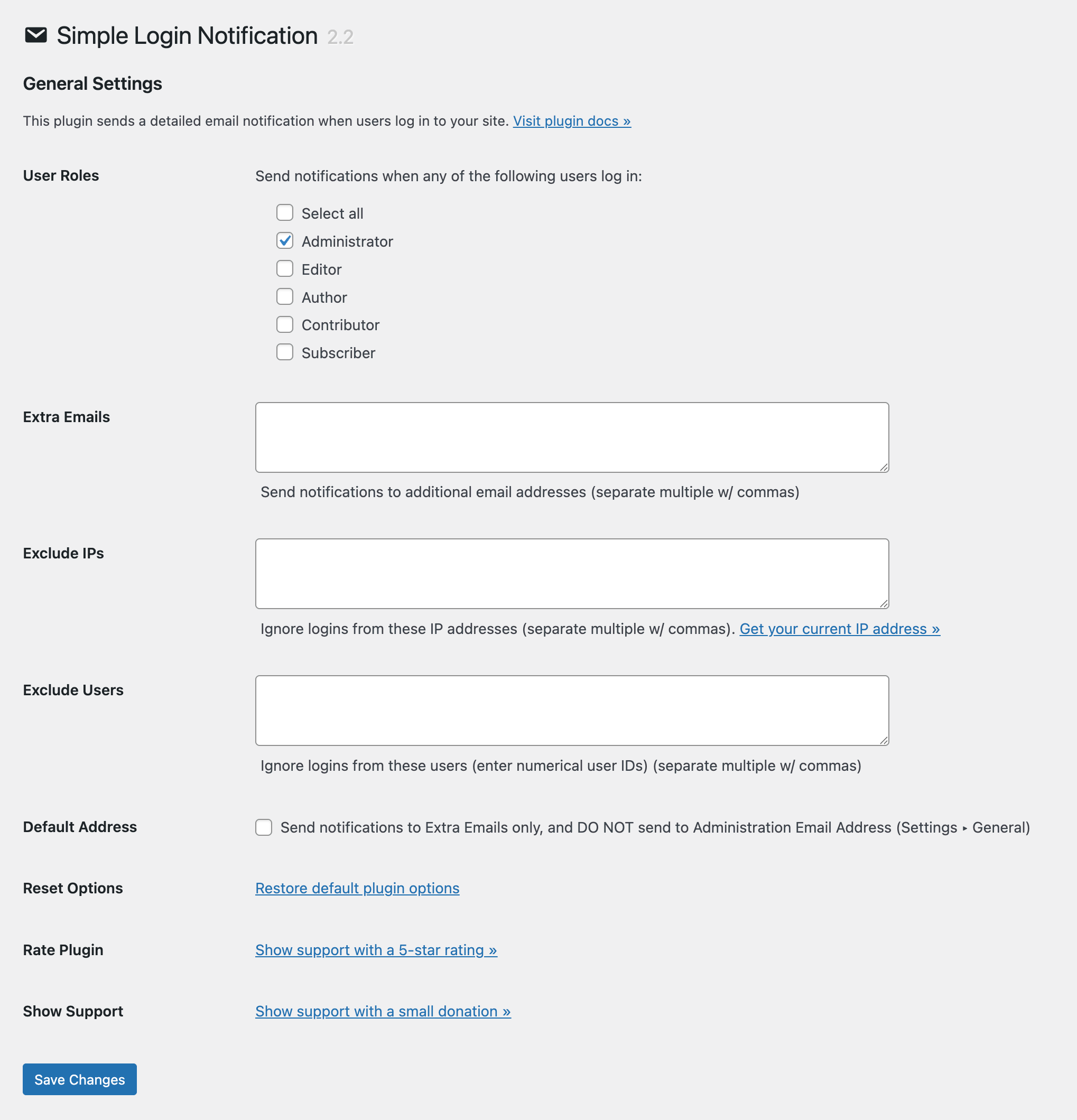
By default, email alerts are sent only when admin-level users log in to your site. To include additional user levels/roles, check out the plugin setting, “User Roles”.
By default, email alerts are sent only to the Administration Email Address (as specified in the WP General settings). To disable sending of alerts to this address, visit the plugin setting, “Default Address”. Important: if you disable sending to the default address, make sure that at least one email address is entered in the setting, “Extra Email”. Otherwise, no email alerts will be sent!
To disable alerts for any user, visit the plugin setting, “Exclude Users”. There you can enter any user IDs that should NOT receive email alerts. Separate multiple user IDs with commas.
To send email alerts to additional email addresses, visit the plugin setting, “Extra Emails”. Separate multiple email addresses with commas.
To disable email alerts for any specific IP address(es), visit the plugin setting, “Exclude IPs”. More information on this below.
Exclude IP address
If you want to exclude an IP address from email alerts, visit the plugin settings > “Exclude IPs”. So if you don’t want to get an email every time you log in, add your IP address to this setting. You can use a free online tool to get your current IP address. If you are unsure, leave this setting blank.
To add an IP address to the “Exclude IPs” setting, you can use any of the following notations:
- Individual IP address, like
93.184.216.34 - Sequential range of IP addresses, like
93.184. - CIDR range of IP addresses, like
93.184.216.34/24
Important: Separate multiple IP/strings with commas.
Email notifications
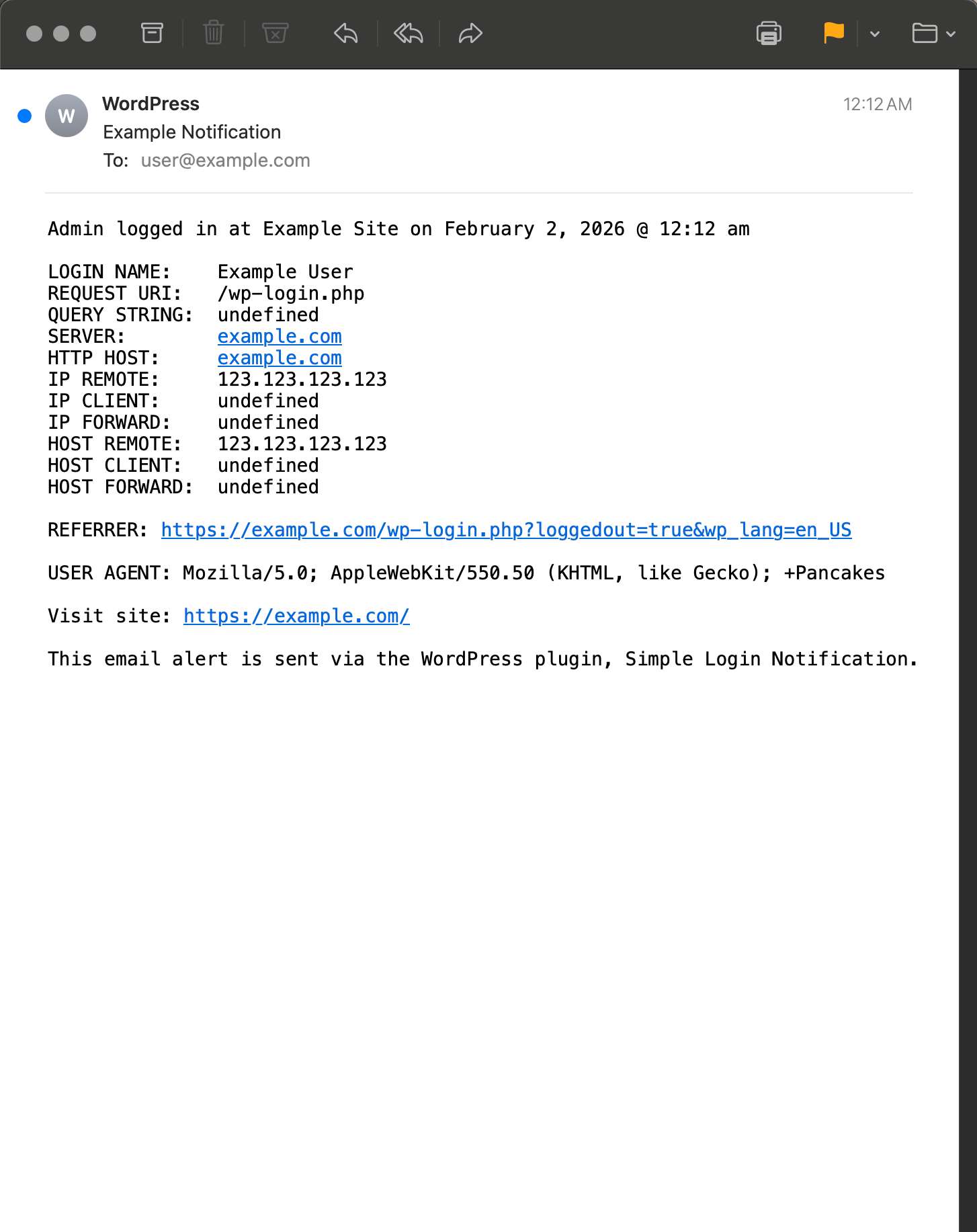
Here is an example of what the email notifications (alerts) look like:
Admin logged in at Example Site on February 1, 2026 @ 10:47 pm

LOGIN NAME:    Example User
REQUEST URI:   /wp-login.php
QUERY STRING:  undefined
SERVER:        example.com
HTTP HOST:     example.com
IP REMOTE:     123.123.123.123
IP CLIENT:     undefined
IP FORWARD:    undefined
HOST REMOTE:   123.123.123.123
HOST CLIENT:   undefined
HOST FORWARD:  undefined

REFERRER: https://example.com/wp-login.php

USER AGENT: Mozilla/5.0; Chrome/144.0.0.0 Safari/537.36

Visit site: https://example.com/

This email alert is sent via the WordPress plugin, Simple Login Notification.
Like the plugin?
If you like Simple Login Notification, please take a moment to give a 5-star rating. It helps to keep development and support going strong. Thank you!
Restore default options
To restore the default options at any time, visit the plugin settings and click the link that says, “Reset Options”.
Uninstalling
This plugin cleans up after itself. All plugin settings will be removed from the WordPress database when the plugin is deleted via the WP Plugins screen.
FAQ
-
Got a question?
-
Send any questions or feedback via my contact form
후기


기여자 & 개발자

자국어로 “Simple Login Notification”(을)를 번역하세요.
개발에 관심이 있으십니까?
변경이력
Thank you for using Simple Login Notification! If you like the plugin, please show support with a 5-star rating »
2.3 (2026/04/19)
- Fixes bug with reset options
- Updates plugin settings page
- Improves readme.txt documentation
- Tests on WordPress 7.0
Full changelog @ https://plugin-planet.com/wp/changelog/simple-login-notification.txt