콘텐츠로 바로가기
WordPress.org

한국어

  • 테마
  • 플러그인
  • 소식
    • 문서
    • 포럼
  • About
    • WordPress 6.9
    • 워드프레스 6.8
    • 워드프레스와 40% 웹을 위한 여정
    • 워드프레스 번역 핸드북
  • 워드프레스 한국팀
  • 워드프레스 받기
워드프레스 받기
WordPress.org

Plugin Directory

Webknit Site Toolkit

  • 플러그인 제출하기
  • 내 즐겨찾기
  • 로그인
  • 플러그인 제출하기
  • 내 즐겨찾기
  • 로그인

Webknit Site Toolkit

작성자: Webknit Digital
다운로드
  • 세부사항
  • 평가
  • 설치
  • 개발
지원

설명

Webknit Site Toolkit lets a site administrator:

  • Recolor the wp-admin sidebar, links, buttons, and form inputs, entered as hex codes or picked visually.
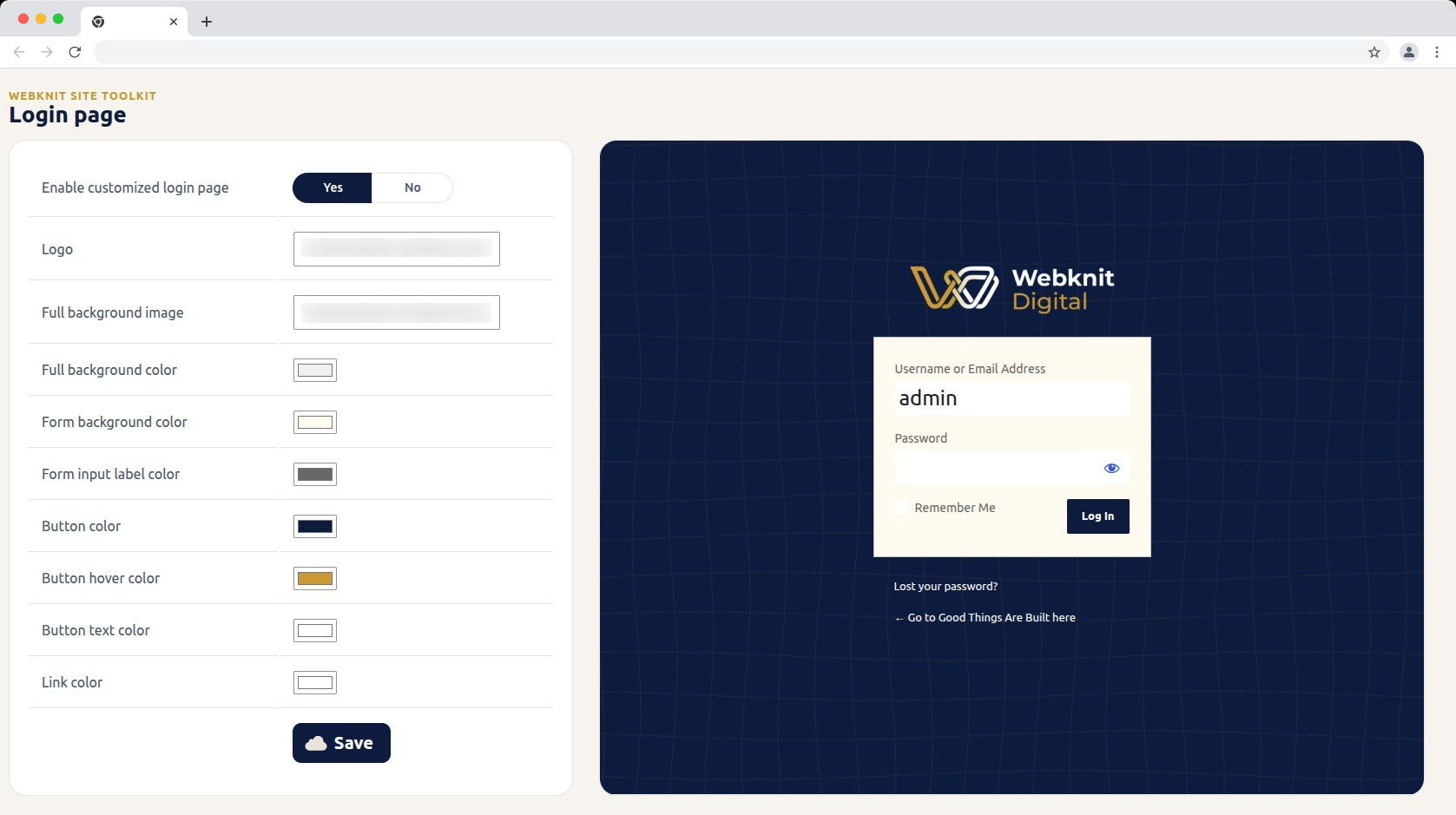
  • Customize the login screen: logo, full-page background image/color, form background/label colors, and button colors/text.
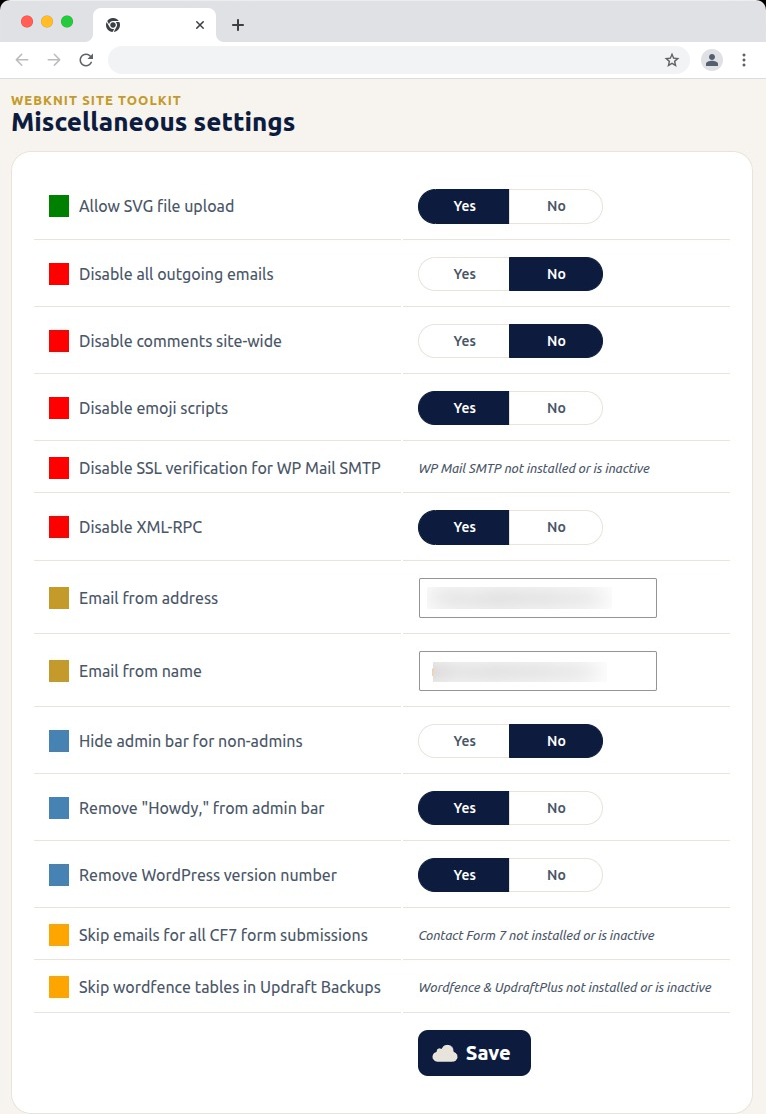
  • Toggle a set of miscellaneous settings: allow SVG uploads, disable SSL verification for WP Mail SMTP, disable outgoing emails, skip Wordfence tables during UpdraftPlus backups, skip Contact Form 7 submission emails, disable XML-RPC, remove the WordPress version number, disable emojis, hide the admin bar for non-admins, disable comments sitewide, remove “Howdy,” from the admin bar, and override the outgoing mail “from” name/address.

스크린샷
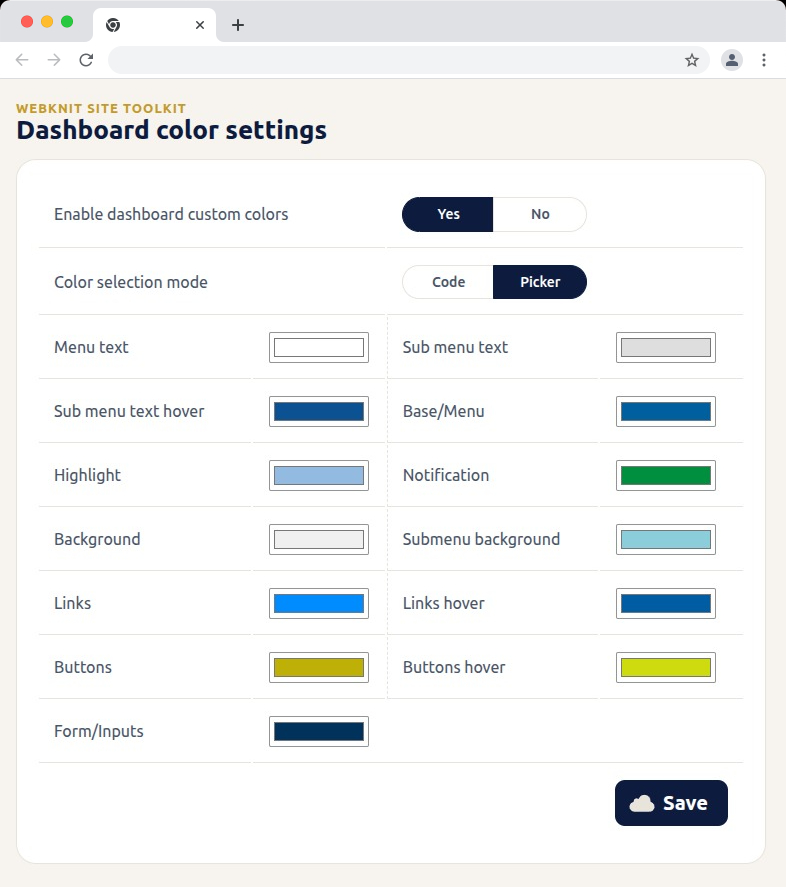
Dashboard color settings — recolor the wp-admin sidebar, links, buttons, and form inputs with hex codes or a visual picker.
Login page — customize the logo, background, form colors, and button styling, with a live preview alongside the settings.
Miscellaneous settings — toggle SVG uploads, outgoing email, comments, XML-RPC, and more; toggles for a plugin that isn't installed or active show a status message instead of a Yes/No choice.
Miscellaneous settings — toggle SVG uploads, outgoing email, comments, XML-RPC, and more; toggles for a plugin that isn’t installed or active show a status message instead of a Yes/No choice.

설치

  1. Upload the plugin files to /wp-content/plugins/webknit-site-toolkit, or install through the WordPress plugins screen directly.
  2. Activate the plugin through the “Plugins” screen in WordPress.
  3. Use the “Site Toolkit” menu in wp-admin to configure dashboard colors, the login page, and miscellaneous settings.

FAQ

Why does one of the Misc. settings toggles show a message instead of Yes/No?

That setting acts on another plugin (WP Mail SMTP, Contact Form 7, or Wordfence + UpdraftPlus) that isn’t currently installed or active, so the toggle would have no effect. The message replaces the toggle until that plugin is active; your previously saved choice is kept and reappears once it is.

I don’t see the “Site Toolkit” menu in wp-admin.

Access requires the manage_options capability, which by default only Administrators have.

I changed a color or setting and saved, but the site still looks the same.

Generated CSS is served with a cache-busting version, but browsers can still hold an old copy. Hard-refresh the page (Ctrl+Shift+R / Cmd+Shift+R) and confirm the save actually completed.

Where are the generated CSS files stored?

In wp-content/uploads/webknit-site-toolkit/. That directory must be writable by the web server, or dashboard/login color changes won’t apply.

후기

이 플러그인에 대한 평가가 없습니다.

기여자 & 개발자

“Webknit Site Toolkit”(은)는 오픈 소스 소프트웨어입니다. 다음의 사람들이 이 플러그인에 기여하였습니다.

기여자
  • Webknit Digital

자국어로 “Webknit Site Toolkit”(을)를 번역하세요.

개발에 관심이 있으십니까?

코드 탐색하기는, SVN 저장소를 확인하시거나, 개발 기록을 RSS로 구독하세요.

변경이력

1.0.0

  • Initial release.

기초

  • 버전 1.0.0
  • 최근 업데이트: 3주 전
  • 활성화된 설치 10보다 적음
  • 워드프레스 버전 6.0 또는 그 이상
  • 다음까지 시험됨: 7.1.2
  • PHP 버전 7.4 또는 그 이상
  • 언어
    English (US)
  • 태그:
    admincolorsdashboardloginsettings
  • 고급 보기

평점

아직 제출된 리뷰가 없습니다.

Your review

모든 리뷰 보기

기여자

  • Webknit Digital

지원

할 말 있으신가요? 도움이 필요하신가요?

지원 포럼 보기

  • 소개
  • 뉴스
  • 호스팅
  • 개인정보
  • 쇼케이스
  • 테마
  • 플러그인
  • 패턴
  • 배우기
  • 지원
  • 개발자 도구
  • WordPress.tv ↗
  • 참여하기
  • 이벤트
  • 기부하기 ↗
  • Swag ↗
  • WordPress.com ↗
  • Matt ↗
  • bbPress ↗
  • BuddyPress ↗
WordPress.org
WordPress.org

한국어

  • X(이전 트위터) 계정 방문하기
  • 블루스카이 계정 방문하기
  • 마스토돈 계정 방문하기
  • 스레드 계정 방문하기
  • 페이스북 페이지 방문하기
  • 인스타그램 계정 방문하기
  • LinkedIn 계정 방문하기
  • 틱톡 계정 방문하기
  • 유튜브 채널 방문하기
  • 텀블러 계정 방문하기
코드는 詩다
The WordPress® trademark is the intellectual property of the WordPress Foundation.