

설명
이 워드프레스 플러그인은 다른 웹사이트 작성자가 글 콘텐츠를 복사하지 못하도록 보호합니다. 콘텐츠가 본인의 허락 없이 유포되는 것을 원치 않으실 겁니다!
이 플러그인은 다양한 기술(자바스크립트 + CSS)을 통해 글과 홈페이지를 보호합니다. 이러한 기술은 다른 워드프레스 플러그인에서는 찾아볼 수 없으며, 이 플러그인을 사용하면 글과 홈페이지를 무료로 소유할 수 있습니다.
WP Content Copy Protection & No Right Click 기능으로 귀중한 콘텐츠를 보호하세요
원본 콘텐츠가 허락 없이 웹에 복사되어 유포되는 것을 보고 지치셨나요? WP 콘텐츠 복사 보호 & 오른쪽 클릭 방지 플러그인이 글과 홈페이지를 무단 복사로부터 보호해 드립니다.
주요 기능:
콘텐츠 보호:
노고를 인정받으세요. 이 플러그인은 고급 콘텐츠 보호 기술을 사용하여 다른 웹 작성자가 텍스트와 이미지를 복사하지 못하도록 안전하게 보호합니다.
복제 방지:
이 플러그인은 강력한 복제 방지 메커니즘을 통해 콘텐츠의 무단 복제를 방지합니다. 콘텐츠 도용에 사용되는 일반적인 방법을 효과적으로 차단하여 지적 재산권을 안전하게 보호합니다.
저작권 보호:
저작권이 있는 자료에 대한 통제권을 유지하세요. 이 플러그인은 저작권 규칙을 시행하고 잠재적 침해자를 방지하는 가상의 보호자 역할을 합니다.
오른쪽 클릭 비활성화:
사용자가 콘텐츠를 오른쪽 클릭하지 못하도록 차단합니다. 이 플러그인은 오른쪽 클릭 기능을 비활성화하여 보안을 강화하고 콘텐츠 복사에 사용되는 컨텍스트 메뉴에 쉽게 접근할 수 없도록 합니다.
복사 및 붙여넣기 거부:
콘텐츠 복사 및 붙여넣기 기능을 차단합니다. 이 플러그인은 JavaScript와 CSS 기술을 결합하여 사이트에서 복사 및 붙여넣기를 거의 불가능하게 만듭니다.
복사 권한 관리:
콘텐츠 배포를 관리하세요. 이 플러그인을 사용하면 콘텐츠를 복사할 수 있는 사람과 복사할 수 없는 사람을 제어할 수 있어 작업물이 보호된다는 확신을 가질 수 있습니다.
이미지에 워터마크 적용 (Pro 버전):
Pro 버전으로 업그레이드하여 이미지에 워터마크를 추가하세요. 이 기능을 사용하면 이미지가 복제되더라도 워터마크가 그대로 유지되어 브랜드 인지도를 유지하고 무단 사용을 방지할 수 있습니다.
독특한 장점:
탁월한 보호: 다른 워드프레스 플러그인과는 달리, 저희만의 JavaScript 및 CSS 기술을 결합하여 다른 곳에서는 찾아볼 수 없는 수준의 보호 기능을 제공합니다.
무료 사용: 이 모든 강력한 기능을 무료로 즐겨보세요. 무료 버전의 플러그인으로 콘텐츠를 보호하고, 이미지 워터마킹과 같은 추가 기능을 제공하는 Pro 버전으로 업그레이드하세요.
사용자 친화적: 설치 및 구성이 간편한 이 플러그인은 전문 기술 지식이 필요 없어 모든 워드프레스 사용자가 쉽게 사용할 수 있습니다.
WP Content Copy Protection & No Right Click 플러그인으로 콘텐츠를 안전하게 보호하세요. 작업물을 보호하고, 저작권을 보호하고, 콘텐츠 복사 권한을 제어하세요 — 이 모든 것이 무료로 제공됩니다.
간편한 설치:
설치 단계를 읽어보시면 이 플러그인은 코딩이나 테마 편집 없이 마우스만 사용하여 설치할 수 있다는 것을 알 수 있습니다.
기본 기능:
- 콘텐츠를 선택 및 복사로부터 보호하세요. 이 플러그인을 사용하면
방문자에게 불쾌감을 주지 않고 글을 매우 간편하게 보호할 수 있습니다. - 아무도 사이트에서 이미지를 저장할 수 없습니다.
- 컨테스트 메뉴에 대한 오른쪽 클릭 금지.
- 이미지를 저장하거나 오른쪽 클릭하면 경고 메시지, 이미지 광고 또는 HTML 광고를 표시하세요.
- 다음 키를 비활성화하세요 CTRL+A, CTRL+C, CTRL+X, CTRL+S 또는 CTRL+V.
- 고급 및 사용하기 쉬운 제어판.
- 원하는 경우 누구도 귀하의 사이트에서 이미지를 오른쪽 클릭할 수 없음
Pro 에디션 기능은 다음과 같습니다:
- PRO 버전 제품 페이지
- 워터마크 적용
- .htaccess 규칙 사용
- jQuery 오버레이 보호 지원
- 오른쪽 클릭이나 컨텍스트 메뉴에서 전체 제어하세요
- 사용자가 이미지, 텍스트 상자, 링크, 일반 텍스트 등을 오른쪽 클릭하면 경고 메시지를 표시하세요
- 관리자는 홈페이지 또는 단일 글을 복사 보호에서 제외할 수 있습니다.
- 관리자는 관리자 사용자의 복사 보호 기능을 비활성화할 수 있습니다.
- 3개의 보호 레이어 (JavaScript 보호, 오른쪽 클릭 보호, CSS 보호)
- 적극적인 이미지 보호 (전문 사용자가 이미지를 훔치는 것은 거의 불가능합니다!!)
- 모든 주요 테마 프레임워크와 호환 가능
- 모든 주요 브라우저들과 호환 가능
- IE9, IE10, Firefox, Google Chrome, Opera에서 테스트 완료
- 이미지 끌어다 놓기 기능 비활성화
- 스마트폰 및 iPhone에서 작동 – 2-10-2015 이후 해결 & 13-11-2015 업데이트
- 페이지나 글 별로 다양한 수준의 보호를 설정할 수 있는 기능.
스크린샷
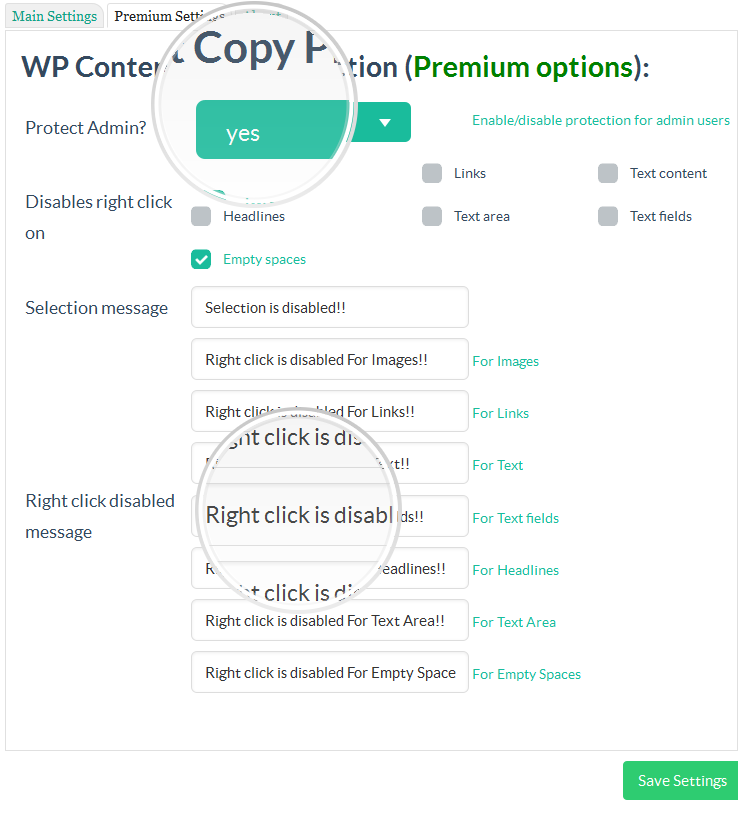
WP 컨텐츠 복사 보호 프리미엄 관리자 페이지 
컨텍스트 메뉴 전체 제어 
워터마크 적용 옵션 
워터마크 적용 샘플
설치
설치 단계
- 패키지를 다운로드하세요.
- WP-Content-Copy-Protection.zip의 내용을 wp-content/plugins/ 폴더로 추출하세요. WP-Content-Copy-Protection이라는 폴더가 생성되어야 합니다.
- WP-Admin에서 플러그인을 활성화하세요.
- 설정 > **WP-Content-Copy-Protection**으로 가서 옵션을 구성하세요.
- 콘텐츠, 이미지, 홈페이지 및 CSS 보호를 보호하기 위한 **4가지 옵션**이 있습니다. 종료하기 전에 변경 사항을 **저장**하는 것을 잊지 마세요.
후기


기여자 & 개발자
“WP Content Copy Protection & No Right Click”(은)는 오픈 소스 소프트웨어입니다. 다음의 사람들이 이 플러그인에 기여하였습니다.
기여자
변경이력
3.6.9
- Fix admin page tabs view error.
3.6.8
- Security: Escaped JavaScript output using esc_js() to prevent potential XSS vulnerabilities.
- Security: Added nonce verification for $_GET requests to improve protection against CSRF attacks.
- Fix plugin upgrade messages logic into wpccp_after_plugin_row() function.
- Load plugin textdomain function hass been removed because its deprecated.
- Remove wp_enqueue_style(‘font-awesome.min.css’) because including external css file is prevented.
3.6.7
- Checking with wordpress version 6.9.4
3.6.6
- Checking with wordpress version 6.9
3.6.5
- Checking with wordpress version 6.8.2
3.6.4
- Checking with wordpress version 6.8.1
3.6.3
- Checking with wordpress version 6.7.2
3.6.2
- Fix style error inside customizer.php theme options page
- Checking with wordpress version 6.7.1
3.6.1
- Fix security issue related to restore_defaults action inside admin panel
- Checking with wordpress version 6.6.2
3.5.9
- Checking with wordpress version 6.6.1
3.5.8
- Checking with wordpress version 6.4.3
3.5.7
- Checking with wordpress version 6.3
3.5.6
- Fix some sanitization errors
3.5.5
- Checking & some text changes
3.5.4
- Checking with wordpress version 6.2.2
3.5.3
- Checking with wordpress version 6.2
3.5.2
- Checking with wordpress version 6.1
3.5.1
- Fix ReferenceError: on is not defined, e.setAttribute(unselectable, on)
- Checking with wordpress version 6.0.1
3.4.9
- Return to the previous version (3.4.7)with some small fix and new version id (3.4.9) until do more fixes
3.4.8
- error fix for the main page
3.4.7
- Checking with wordpress version 6.0
3.4.6
- Checking with wordpress version 5.9.3
3.4.5
- security fix for the settings form
3.4.4
- Checking with wordpress version 5.9
3.4.3
- Checking with wordpress version 5.8.2
3.4.2
- Checking some code errors
3.4.1
- Checking with wordpress version 5.8.1
3.4.1
- Checking with wordpress version 5.7.2
3.4
- Important code fix
3.1.5
- Checking with wordpress version 5.7
- Important code fix
3.1.4
- Checking with wordpress version 5.6
3.1.3
- Fixed, PHP Notice: fread(): read of 8192 bytes failed with errno=21 Is a directory in /wp-includes/functions.php on line 6030
3.1.2
- Important fix for this error, PHP Warning: array_key_exists() expects parameter 2 to be array, preventer-index.php on line 691
- Top icon bar color converted to new very nice color – green
- Testing with wordpress 5.5.3 new version
3.1
- Now compatible with (elemenator page builder) plugin
- Now compatible with (siteorigin live editor page builder) plugin
- Now compatible with (WordPress Page Builder – Beaver Builder) plugin
- Now compatible with (WordPress internal preview mode)
- New control panel (restore defaults) button added
- New control panel (preview alert message) button added
- New name for the top bar icon to fix its default choice in the previous version
- Translation file updated
- Some fixes
2.9
- Important fix for content editable tags
- Now compatible with wpDiscuz plugin & some chat wordpress plugins
- Top bar icon has been returned, as it was inside previous version 2.6
- New option inside main settings to control the visibility of the top bar icon
- Stop the auto loading for the alert (warning.png) icon
- Some linguistic mistakes were corrected
2.8.1
- Important fix for 2.7 update
- Add links to dismiss the new start page links
2.7
- Disable (CTRL + Shift + I) developer tools shortcut key
- Remove recommended plugins section from admin page
- Add one starting page for all of our plugins
- Code fix
2.6
- Test all features with wordpress version 5.5
2.5
- Code fix
2.4
- Safari update and fix
- checking with new wordpress version
- Admin page Fix
2.3
- Copy paste password to log in fields and any other text field is now possible
- Some script fixes
- Admin page Fix (mailing list join message will show your email before submit)
- Admin page Fix (Our other products list is ready to go)
2.2
- Admin page Fix
2.1
- Fix iphone & ipad posts protection
- Premium feature unlocked!! the second option inside CSS protection tab
- “Review us” admin dismissable notice added
1.9
- Translation slug is now the same as the plugin slug
- Arabic translation file included inside the plugin language folder and its also included on wordpress translation plugin page
1.8
- Translation is now supported
- wp-content-copy-protector.pot Template translation file included
1.7.3
- Checking with the last update
- Unwanted ad removed
1.7.2
- Fix the error Undefined index: prnt_scr_msg in preventer-index.php on line 171
1.7.1
- Add dismiss button to the end of upgrade message
1.7
- New option to show Print preview message instead of showing page content when user try to print your page using CTRL+P key
- Fixes inside admin page layout
1.6.2
- Fix Fatal error: Cannot redeclare plugin_add_settings_link()
1.6
- JQuery important hotfix
- Sanetization for all input and output
1.5.0.5
- Internet Explorer important hotfix
- Testing on wordpress 4.4.2 new version
1.5.0.4
- Auto remove image url’s
- Fix javascript errors
1.5.0.3
- Adding adminbar link and icon redirecting you to the plugin settings page
- Adding settings link into the plugins list page
1.5.0.2
- Adding isset() function to all variables
- Improving alert message
- Fixing CTRL + U issue
- Fixing CSS tricks
1.5.0.1
- Fixing error (Warning: join(): Invalid arguments passed in /home/retailmakeover/public_html/wp-includes/post-template.php on line 478)
1.4.0.1
- Admin can disable copy protection for logged in/admin users
- disable the possible shortcut keys for copying the Text
- You can also choose where this Plugin should work like All Pages (including Home Page and all other Pages & Posts) or Home Page or Custom Pages/Posts using the Settings Page options.
- Multiple Text and Image Protection methods
- Advanced Image Protection using Responsive Lightbox
- Protect your Text and Images by Disabling the Mouse Right Click and Possible Shortcut Keys for Cut (CTRL+x), Copy (CTRL+c), Paste (CTRL+v), Select All(CTRL+a), View Source (CTRL+u) etc.
- control the protection to be on users only (if admin here dont protect)
- Option to Display Alert Message on Mouse Right Click.
- Enable Right Click on Hyperlink Option Added
- Right click problem fixed on static pages
- New flat interface
1.0
- initial version
- static pages bug fixed
- home page problem fixed
- Add new Style