
설명
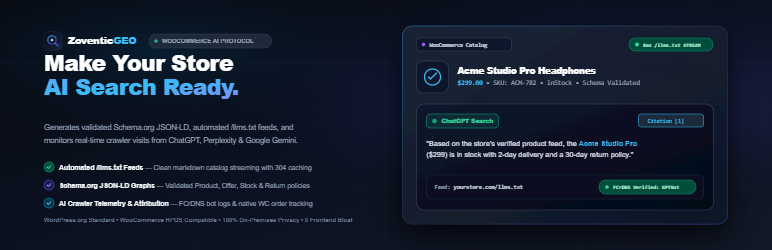
Zoventic GEO is a Generative Engine Optimization (GEO) and AI discoverability suite built for WooCommerce.
While traditional SEO plugins optimize for standard 10-blue-link search result pages, Zoventic GEO structures your store for AI Answer Engines, RAG (Retrieval-Augmented Generation) ingestion, and conversational shopping queries across ChatGPT Search, Perplexity AI, Google AI Overviews, Claude, and Copilot.
Why Does Your WooCommerce Store Need GEO?
Standard WooCommerce product pages carry 1.5MB to 4MB of heavy HTML, sliders, and JavaScript. When AI search crawlers (like GPTBot or PerplexityBot) crawl your site, their strict token budgets get exhausted before reading your actual pricing, product specs, and warranty policies.
Zoventic GEO solves this by providing:
1. Dynamic /llms.txt and /llms-full.txt Streaming: Standard-compliant, clean markdown product feeds that AI agents can ingest in fractions of a second with zero token bloat.
2. Enhanced JSON-LD Entity Graphs: Injects rich, structured semantic schema (Product, Offer, verified AggregateRating, Return Policy, and Availability) that conversational LLMs require to quote your products accurately.
3. AI Prompt Injection Shield (Prompt Guard): Protects your store catalog against indirect prompt injection, hidden zero-width unicode attacks, and malicious competitor redirection payloads.
4. AI Crawler Access Telemetry: Real-time logging of verified AI bots (GPTBot, PerplexityBot, ClaudeBot, Bytespider) with cached Reverse DNS (FCrDNS) anti-spoofing.
5. Native WooCommerce 8.5+ AI Order Attribution: Automatically queries WooCommerce’s built-in order attribution (_wc_order_attribution_*) to track orders and GMV generated directly from AI search citations.
6. HTTP ETag & 304 Caching: Saves up to 95% server bandwidth by sending instant HTTP 304 Not Modified responses when catalog data has not changed.
External Services
This plugin connects to external third-party services as detailed below:
- Microsoft IndexNow API
* Service: Microsoft IndexNow API
* Endpoint: https://api.indexnow.org/indexnow
* Purpose: When enabled in settings, automatically pings search engines (Microsoft Bing, Yandex, Naver, and participating AI search engines) upon product publication or update to accelerate discovery without manual sitemap submissions.
* Data Transmitted: Newly published or modified WooCommerce product URLs and the store’s unique IndexNow authentication key. No customer data, order details, or personal information is ever transmitted.
* Trigger: Dispatched non-blocking via wp_remote_post() only when the “Enable IndexNow” setting is active and a product status changes to published.
* Service Terms: Microsoft IndexNow FAQ & Terms
* Privacy Policy: Microsoft Privacy Statement
- Client-Configured AI Service Providers (BYOK – Bring Your Own Key)
The plugin allows site administrators to optionally connect their own third-party AI provider API credentials under Settings > AI Engine (BYOK). When configured, the plugin connects directly to the respective provider to validate credentials and conduct merchant-initiated actions:
-
OpenAI API
- Endpoint:
https://api.openai.com/v1/modelsandhttps://api.openai.com/v1/chat/completions - Purpose: Authenticating merchant-supplied API keys and tracking grounded search citations when an OpenAI key is configured.
- Data Transmitted: Admin-entered API key (in authorization header) and product/search query text. No customer, order, or PII data is transmitted.
- Trigger: Admin-initiated “Test Key” button click in Settings or scheduled Rank Radar audits.
- Terms: OpenAI Terms of Use
- Privacy: OpenAI Privacy Policy
- Endpoint:
-
Google Gemini API
- Endpoint:
https://generativelanguage.googleapis.com/v1beta/models/ - Purpose: Authenticating merchant-supplied API keys and Google Search grounded citation audits.
- Data Transmitted: Admin-entered API key and product/search query text. No customer, order, or PII data is transmitted.
- Trigger: Admin-initiated “Test Key” button click in Settings or scheduled Rank Radar audits.
- Terms: Google Terms of Service
- Privacy: Google Privacy Policy
- Endpoint:
-
Perplexity AI API
- Endpoint:
https://api.perplexity.ai/chat/completions - Purpose: Authenticating merchant-supplied API keys and live web-grounded Sonar citation audits.
- Data Transmitted: Admin-entered API key and product/search query text. No customer, order, or PII data is transmitted.
- Trigger: Admin-initiated “Test Key” button click in Settings or scheduled Rank Radar audits.
- Terms: Perplexity Terms of Service
- Privacy: Perplexity Privacy Policy
- Endpoint:
-
Anthropic Claude API
- Endpoint:
https://api.anthropic.com/v1/messages - Purpose: Authenticating merchant-supplied API keys.
- Data Transmitted: Admin-entered API key and lightweight ping message. No customer, order, or PII data is transmitted.
- Trigger: Admin-initiated “Test Key” button click in Settings.
- Terms: Anthropic Terms of Service
- Privacy: Anthropic Privacy Policy
- Endpoint:
스크린샷


![Rank Radar [Pro Edition] – Automated high-intent buyer query monitoring, multi-LLM citation forecasting, and 5-audit ranking trajectory.](https://ps.w.org/zoventic-geo/assets/screenshot-3.jpg?rev=3733245)


![AI Search Query Benchmark & Simulator [Pro Edition] – Test and preview how AI answer engines discover, cite, and recommend store products compared to standard listings.](https://ps.w.org/zoventic-geo/assets/screenshot-7.jpg?rev=3733245)


설치
- Upload the
zoventic-geofolder to your/wp-content/plugins/directory, or install directly through the WordPress Plugins dashboard. - Activate the plugin through the ‘Plugins’ screen in WordPress.
- Ensure WooCommerce 7.0+ is installed and active.
- Navigate to Zoventic GEO in your WordPress admin menu.
- Review your automatically generated
/llms.txtfeed and verify your catalog’s GEO Readiness Score.
FAQ
-
Does this plugin guarantee #1 ranking in ChatGPT?
-
No. LLMs are probabilistic, non-deterministic answer engines. Anyone claiming “guaranteed #1 AI ranking” is selling deceptive hype. Zoventic GEO maximizes your citability and readability so AI engines choose your store when answering relevant buyer queries.
-
Where can I view my store’s llms.txt file?
-
Once activated, your feed is accessible at
https://yourstore.com/llms.txtandhttps://yourstore.com/llms-full.txt. -
Will this slow down my store’s checkout?
-
Not at all. Zoventic GEO operates with zero frontend JavaScript or CSS on customer-facing pages. Crawler logging is deferred to the WordPress
shutdownhook via an asynchronous memory buffer, having 0.00ms impact on checkout latency. -
Is this compatible with Rank Math and Yoast SEO?
-
Yes. Zoventic GEO hooks cleanly into
woocommerce_structured_data_productand existing SEO schema filters, preventing duplicate schema declarations and ensuring seamless harmony.
후기
이 플러그인에 대한 평가가 없습니다.
기여자 & 개발자
“Zoventic GEO – Generative Engine Optimization (GEO) & AI Search for WooCommerce”(은)는 오픈 소스 소프트웨어입니다. 다음의 사람들이 이 플러그인에 기여하였습니다.
기여자
변경이력
1.0.1
- Enhanced AI verification safety & full third-party service transparency disclosures.
- Upgraded Rank Radar citation audit engine to prevent simulated fallbacks when live credentials fail.
- Added full database cleanup routines on plugin uninstallation.
- Added redirection limits and safe remote requests for store and competitor audits.
- Verified compatibility with WordPress 7.1 and WooCommerce 11.2.
1.0.0
- Initial official release.
- Dynamic
/llms.txtand/llms-full.txtstream with ETag 304 caching. - JSON-LD semantic entity graph enhancer.
- Real-time AI crawler access logging with cached FCrDNS anti-spoofing.
- AI Prompt Injection Shield (Prompt Guard).
- Native WooCommerce 8.5+ AI Order Attribution & Revenue tracking.
- React 19 + Ant Design v6 isolated admin dashboard.